DxO suggest rolling back NVidia drivers to resolve Internal Error issues. I’ve rolled back to 576.52 and whereas before I couldn’t use any AI local adjustments, now I can use them all. However whereas before I could at least export and print images, now I can’t export or print. I think I might be better off updating my driver to the latest again and just wait for DxO to find a fix. At least PL9 works if you don’t use AI features on updated drivers.
@happysnapp1ng I believe that the “recommended” (on the forum at least) drivers are 572.83 and a search for “NVidia 572.83” should help to locate the drivers but the NVidia app has already informed me that there are later drivers, which I ignored, for now, and changing the drivers might cause issues with other software.
You give no details of your GPU in particular e.g. from GPU-Z

Tests with AI on my other machine a Ryzen 5600G CPU with an RTX 2060(6GB) have been something of a mixed bag and my conclusion is that AI, exporting and a 6GB GPU don’t mix, at least at the moment and reported in Dell ulta core 7 265k, rtx 5070 12gb and 32Gb ram for pl9 and for additional details DXO Official info on Nvidia-driver problem that prevents both export and printing .
The RTX3600(12GB) GPU on my Ryzen 5600X seems to be O.K. (currently!??)
Hi and thanks. It’s Legion 5, 32gb, rtx 2060, ryzen 7. I’ve tried the drivers suggested by support and a couple of others but I get an incompatibility message. I rolled back to 576.52 with limited results. I’ve now installed the latest driver and can work in PL9 again as long as I don’t use AI local adjustments. I’m using control points, masking brush etc without any problem and can print and export again. I’m not particularly tech savvy so I think I’ll probanly just wait for a fix to be issued.
The RTX 2060 has always worked fine for me with exporting etc. and works fine with the new View options but it has “only” 6GB of memory and that has been fine for exporting etc. but the AI currently seems to take about 4GB, to that needs to be added running the monitor(s) and then exporting and that then seems to break the 6GB “ceiling”.
I am concerned that will be the norm going forward.
When AI is used the AI model is loaded into the GPU and never seems to leave. If the user has used AI then that module will be needed anyway for helping to render the image for export.
I have had one situation where the 3060 memory usage climbed to over 11GB but that was probably with the later NVidia drivers, reverting to the 572.83 driver has reduced that somewhat.
If it is important to me to be able to use AI with PL9 then I may have to move the 3060 to the 5600G and buy a new (probably second-hand) GPU with either 12GB or 16GB memory.
However, laptop users do not have that “luxury” and I am not sure I have the funds, actually I do but justifying it to my wife and even to myself may be “difficult”.
Lets see what the “fix” provides.
Take care
Bryan
RTX 2060(6GB) have been something of a mixed bag and my conclusion is that AI, exporting and a 6GB GPU don’t mix,
I think its in-line (6GB) what i guess (think) a few days back it this thread:
PL 9 not really ready for release!
I copy the relevant part (from my comment), and add highlight with BOLD:
- CPU only everything works fine, AI subject detection, etc. Off course performance as it is.
- PL use for AI masking modell about 3-4GB of GPU memory
- For DP3 the AI noise reduction model may use 1-3GB (seems like 2GB), seems XD2s may use less GPU memory.
- With GPU - IF - you have only 4GB or 6GB VRAM, seems problems started
- If you have even 1 (one) enabled AI mask, the ‘AI mask’ model loaded to GPU memory and STAY in GPU VRAM there. Seems AI model memory size is 4GB.
- I guess 4GB VRAM its enough for AI mask quality and performance. Photos has limited sizes (pixel count), so i guess, its not hundred billion parameter (at least not for now)
- In few photos i see whole AI model runs in the backgrund, as its just select ‘people head’, its some cases also select hands, etc. So its runs subject detection, everything.
- I guess 'Subject", ‘Sky’ and similar pre-sets takes more GPU VRAM memory then if you select the subject with selection - as its need to scan the whole image. May that’s the reason why with my 4GB VRAM its never find any subject, sky, with one exception: hair (may its easier to find, may works only in a partially bald people)
- AI models far-far-far faster if its runs in GPU VRAM (and NOT in computer main memory). So, i guess performance is the reason, why only GPU VRAM used (and not GPU shared memory, as it can be far-far slower, and may not all model engine / GPU driver support shared - at least in not encounter with this in my computer)
- If you last selected photo has AI mask, when PL starts (in this last photo), AI mask model automatically load to GPU VRAM, So automatically use 4GB GPU VRAM (as the photo has at least one enabled AI mask)
- If you last selected photo Dont has AI mask when PL starts (in this last photo), AI mask model NOT loaded to GPU VRAM
- If you has 4GB GPU memory, seems AI masks itself its on the limit on works.
- But if you want (with 4GB VRAM) AI mask AND also export the photos ->Export crash. I guess, its just simply runs out of GPU VRAM - AI mask (4GB) + Export (2GB) > 4GB.
- I guess, GPU with 6GB VRAM its a minimum for AI mask (4GB) + Export (2GB). I guess, even its on the edge.
Summary: seems the 4GB of GPU VRAM in the edge of AI mask model, and not enough for export if you has even 1 (one) AI mask - as AI mask modell loads up approx 4B of GPU VRAM, and stay in there, and don’t leave any free GPU VRAM. May, just may GPU with 6GB of VRAM is near to edge for AI mask + Export.
Add to that (in the meantime) a few guess/observation:
- Please write the GPU VRAM memory size for the issue. As “i have a XYZ GPU” may not enough to get this info. It’s can help the observations.
- As far as i see, issues not happen with GPU with 12GB. Also not with 8GB.
- Issues definitely raised with 4GB GPU
- Actually i guess its works fine with 6GB. May you need to ensure GPU VRAM free memory is maximized as possible. May not a bad idea if you close another applications as possible - eg. not run LR or similar in parallel, or don’t use like YouTube playback (where browsers usually use HW/GPU acceleration, etc.). So i guess 6GB is works, but its on the edge.
- I don’t think the GPU is ‘new’ or ‘old’, only VRAM amount is the important. If its older, the things performance is off course slower, but just works.
- Regarding Nvidia driver (you need to back older driver version) - I guess, AI model (used by PL9) don’t find entry point / fail on initialization in the Nvidia lastest GPU driver. I guess the reason not exactly in DxO testing method, personally i think they tested fine with new (latest as possible) drivers. But may (just may) the AI model engine has some last minute change in the Release (9.0) versus Beta versions (may not the same as in the Beta versions). Anyhow, it’s an issue but seems workaround (with driver versin downgrade)
- I guess re-validate the AI quality and stability can be time consuming.
Yes, the real problems start in there 
Example: I don’t have funds to get some actual / decent GPU.
Anyhow, i use CPU mode: AI Masking just works fine. During Export i do some homework: dishwashing and so on.
Actually Wife never was happier with PL version upgrade like this - all dishes is clean in time, dinner is served.
Best comment ever 
Since I own a Mac M3, which has no problems with PL 9, my wife is not so happy because I am now spending more time on photo editing than before.
The Geforce drivers - 581.29 - released yesterday have so far solved my issues with Internal error when using AI masking. This is across multiple restarts of the computer, starting/closing PL9 and doing all kind of stuff including AI masking. Fingers crossed the issue does not come back.
@andras.csore I had given up reading the topic you identified because I got behind with reading it and the number of new additions rose ever higher and so I just left it alone!
Your analysis coincides with mine but the problem is that not all CPUs have an IGPU.
So my 5900X will take about 1300 MB for driving 3 attached monitors, but has a 12GB 3060 so no problem there, but my 5600G has the 2060 with only 6GB and an IGPU but the IGPU has only two monitor connections so a third monitor will take space from the 2060 and push that machine close to or just over the limit!
Currently any 6GB GPU is arguably no use at all if exporting (& AI) is involved, and why else would you edit an image unless you intend to export in one way or another, other than me when just testing!
While the forum doesn’t need to be as precise as DxO support, any post should ideally identify the platform (Win or Mac) and the GPU and VRAM would also be useful (sadly the driver level might also be useful now!)
Maybe or maybe not! If I was looking to upgrade I would seriously look at greater than 8GB, but prices rise dramatically because the higher memory configurations seems to go with higher spec GPUs.
The 3060 is the exception to that and came out with 12GB.
No use at all with AI currently.
Not in all my tests, the fit is “too tight” and DxO leaving the export workers still running does not help one bit.
It means that the export workers hang on to the GPU VRAM they have used.
So
- Trim back the number of export workers, arguably should only be 2 or 3 anyway.
- Terminate the export workers when an export job has finished.
I would disagree, prior to this release I would suggest that the later GPUs would give faster (shorter) export times but now it is memory first (if you intend to do any AI) and processor second but as I just said the higher memories typically go with the more powerful and more expensive GPU chips anyway.
Looking at the dates of the recommended drivers I guess it would coincide with the release to Beta testers of the new AI features. In fact they may well have developed on a pre-release from NVidia!
But then “dropped” the ball by not testing or encouraging the Beta testers to test with the latest drivers, i.e. it might then have delayed the PL9 release (or not).
The reason for the release getting even earlier is unlikely to be explained by DxO to the users but it did coincide with one review being published in the press?
Life is way to short, not for helping with the housework but for waiting for an export to complete.
In the Summer it would be watering the plants rather than housework, while waiting for an export to complete.
My concern is that the calculations have been done with XD2s but what about any future upgrades for the denoising algorithms, what might that do to the calculations, if anything!?
@HenrikW Thank you for the update which I installed after searching for a 16GB card I can “afford”/“justify” to my wife, £400 seems to get me a 5060Ti with 16GB!
You didn’t state what card you are using, in particular the GPU memory available.
This is the 5900X(32GB) with the 3060(12GB) running a benchmark, first with XD2s.
PL9 went straight into the test directory so no editing was done and the export test started immediately with both viewer options pre-selected.
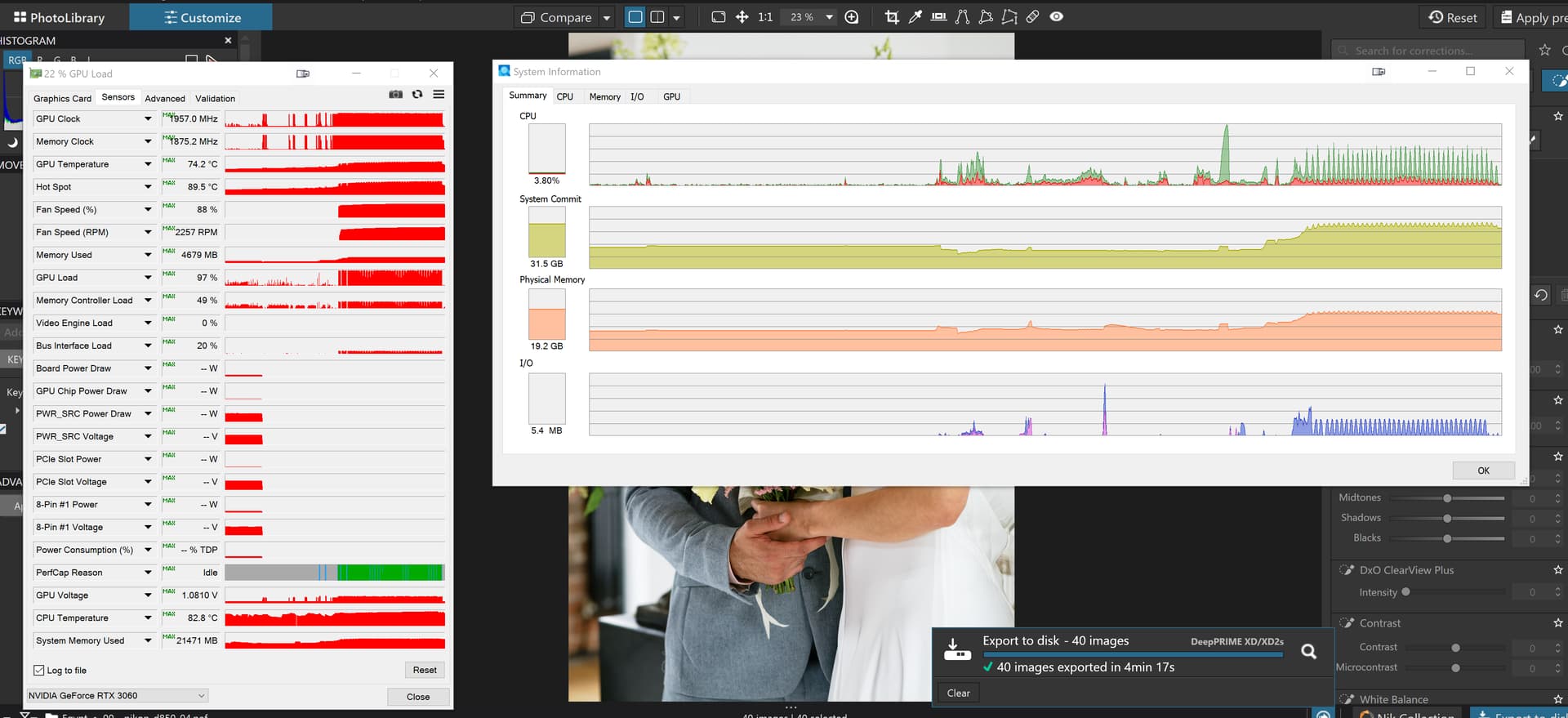
4769MB of GPU memory used for the XD2s test which was then followed by a DP3 test immediately after setting all the images to DP3.
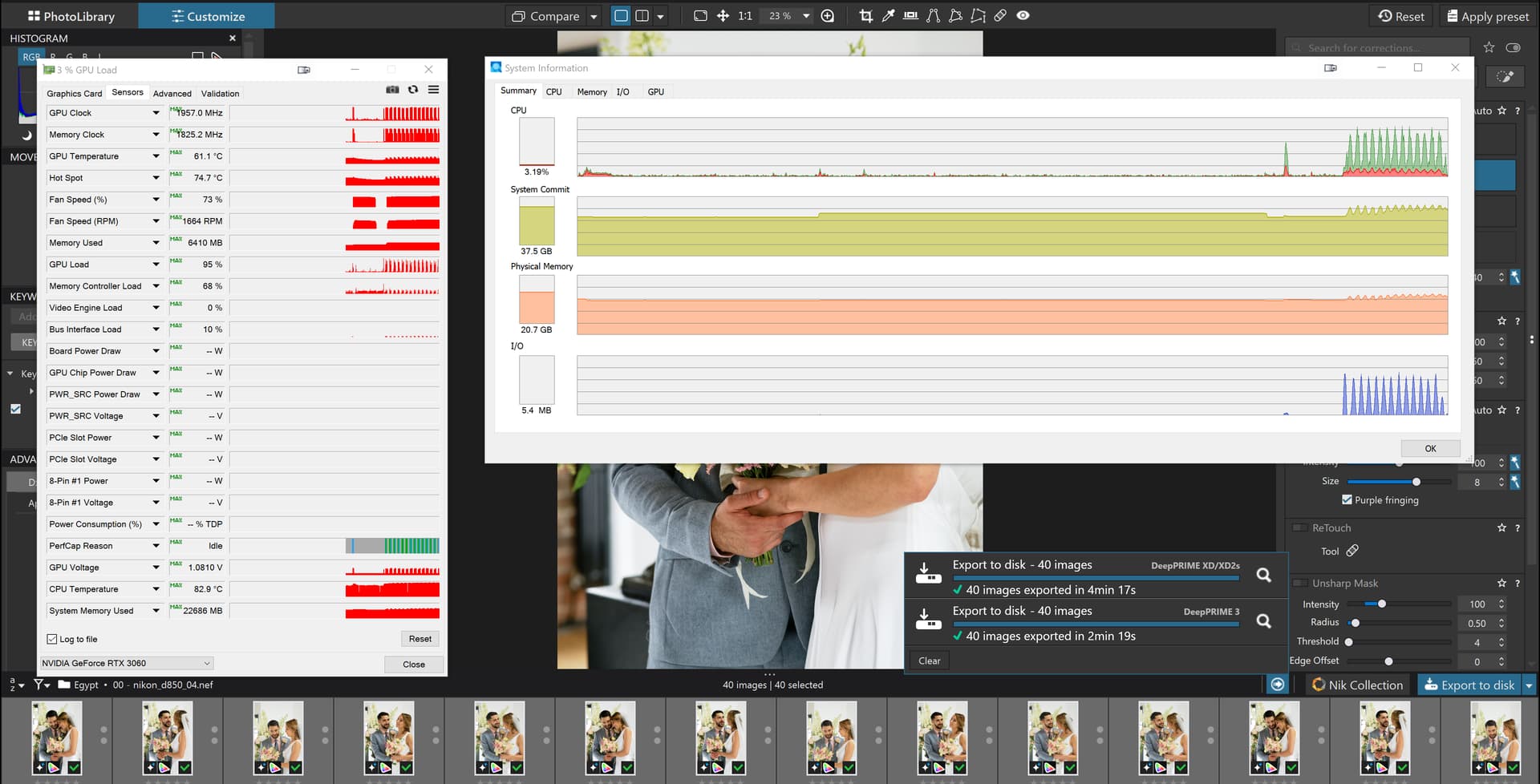
This used 6410MB and was then followed by changing the denoising back to XD2s, , and repeating the run, looking for any cumulative effects, which used 6430 MB this time.

I will run the test on the 5600G(32GB) with 2060(6GB) to see what happens and add the details here later.
So on the 5600G I installed the new NVidia drivers and ran an export run where I believe that the AI selectors were turned off. I didn’t check because it is too easy to activate them while looking!
This was the first export run
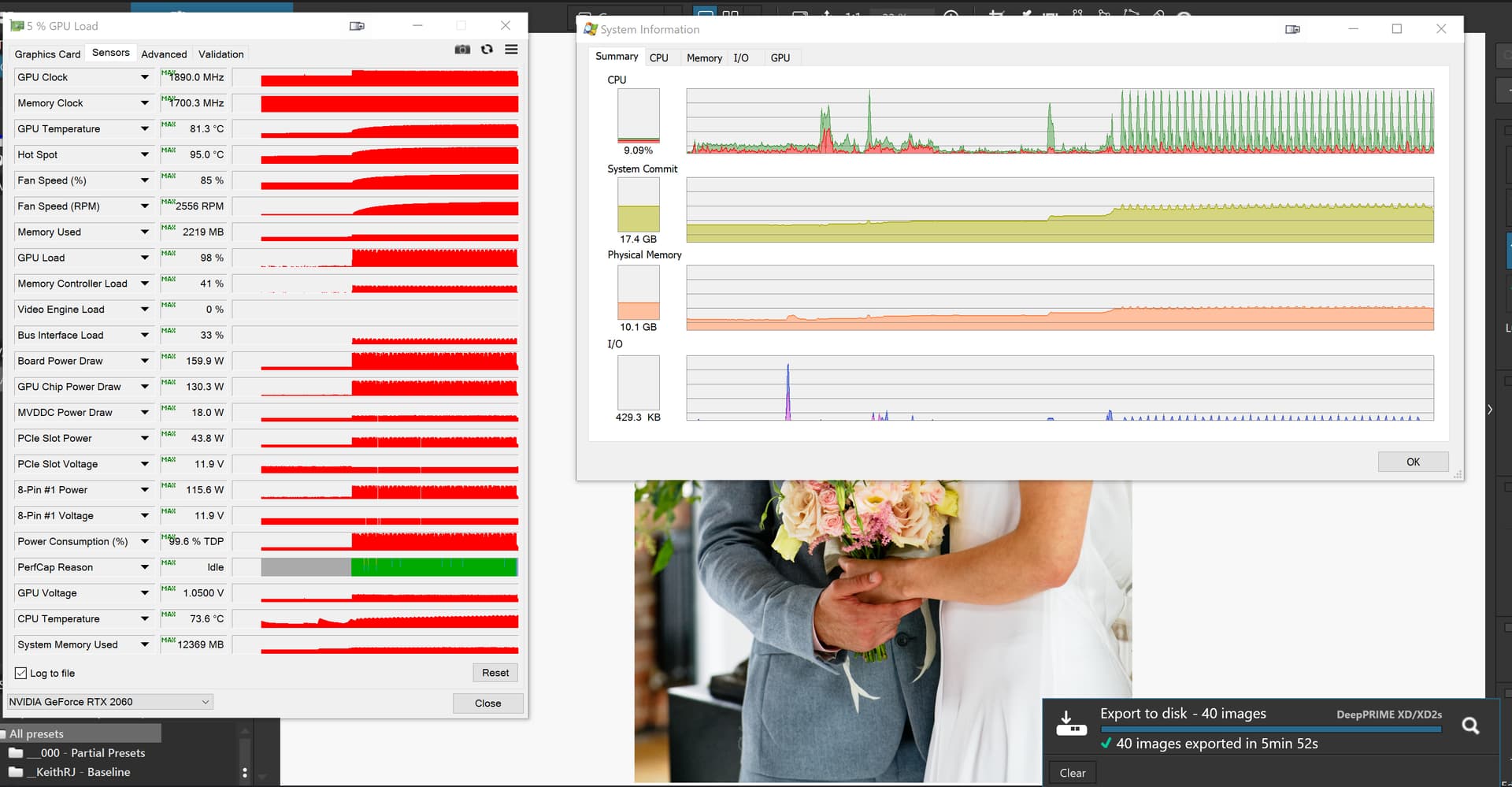
but the second where I had activated the AI masks went like this
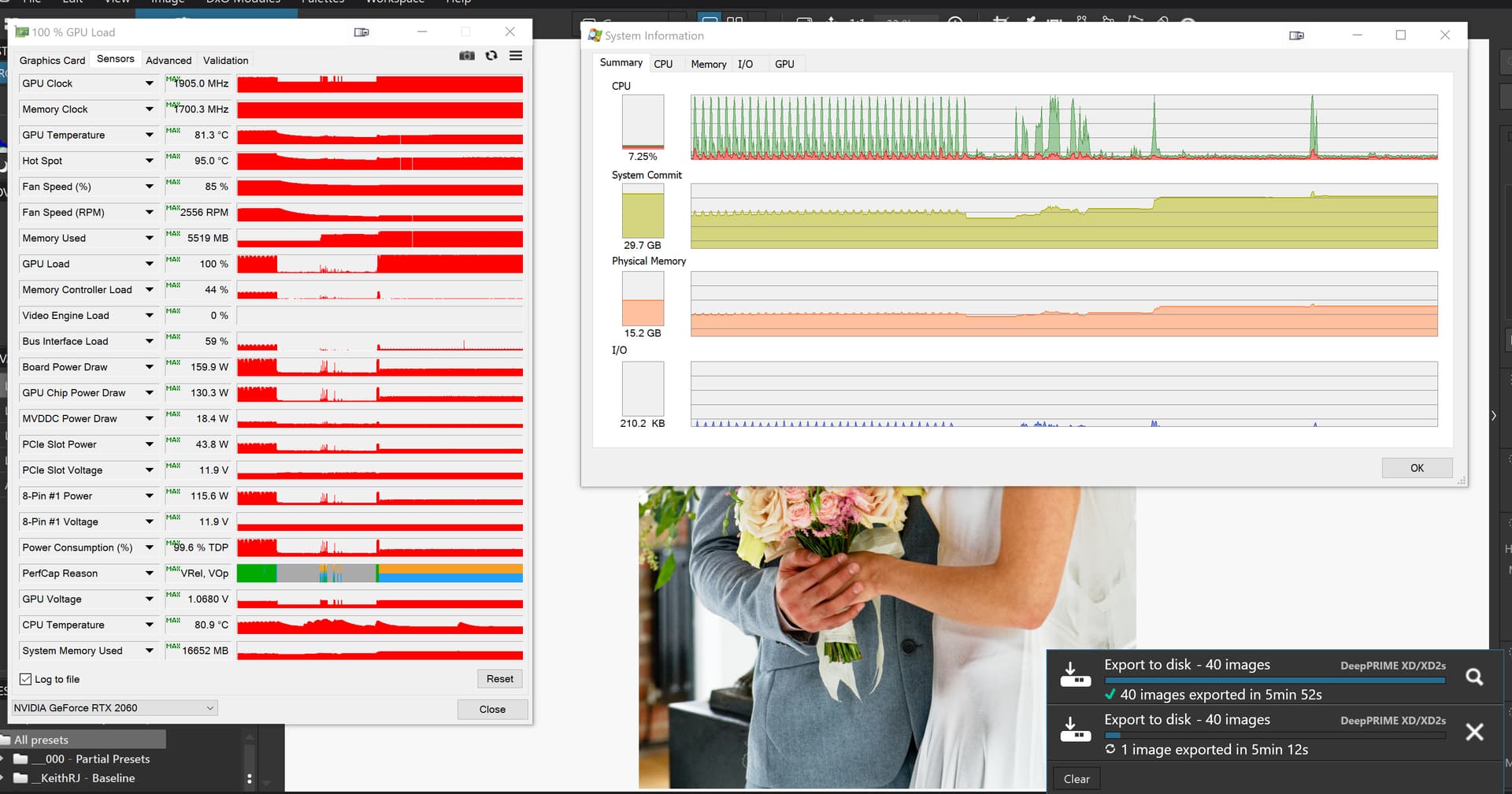
and after 12mins and 42 seconds it had managed 2 images!
Alas those same drivers fix nothing for me!
Yeah, I take it all back - broke again.
It does seem to break only when I go to the AI subject detection “presets” (background, sky, bird etc.) - if I don’t mess around with those buttons it seems fine.
@BHAYT - I have an RTX 4070, AMD Ryzen 5 7600, and I’m on Windows 11.
Same here. Leave the AI alone and it’s like a slightly quicker version of PL8
Conclusion:-
With enough GPU memory (in my 3060(12GB)) exporting and AI and the very latest Nvidia Drivers work in both my 5900X and 5600G. Why other users have problems getting anything but trouble out of PL9 I do not understand!?
But any attempt to export with a 2060(6GB) and AI set is doomed to failure, i.e. AI and XD2s (and running the monitors) requires too much memory and PL9 either takes forever to export a single image or takes forever to export a single image and does so disgracefully!
@HenrikW and others I was unsure about the reason for the failures on the 5600G with the 2060(6GB), e.g. lack of GPU memory or whether there was some other factor causing exports with AI and XD2s on the 5600G to fail.
So I swapped the 3060(12GB) to the 5600G (and the 2060(6GB) went into the 5900X until the new 5060Ti(16GB) card arrives, it actually cost about £30 more than I paid for the 3060(12GB) at the beginning of 2023!)
I believe that AI was on in all images and the run was successful but took longer than on the 5900X which is about twice as powerful as the 5600G
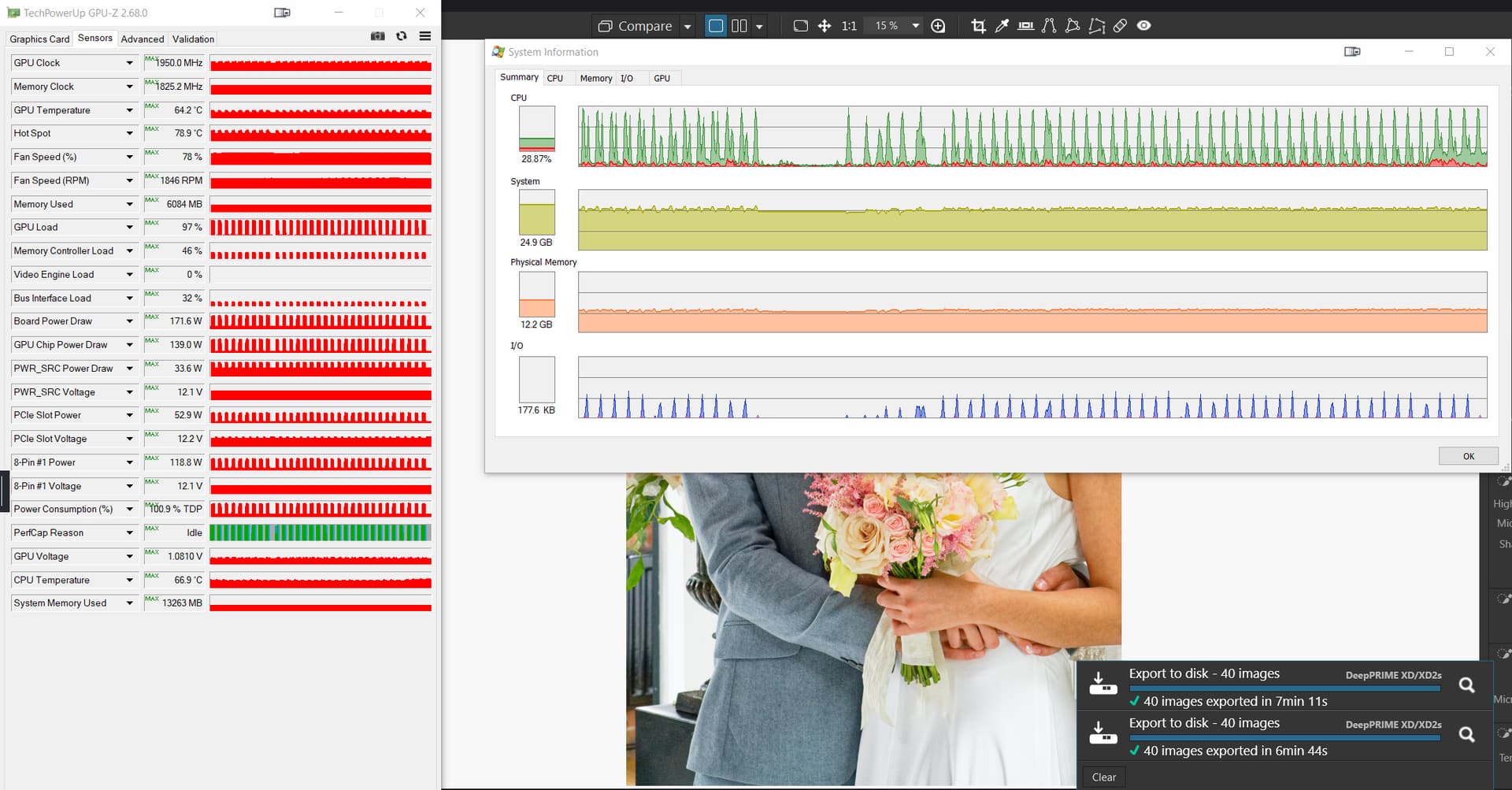
The snapshot shows two runs one with AI on and the other with it off (I think) the end of the run with AI enabled shows each processor spike has another just behind it the other graph shows only a single peak.
The 2060(6GB) in the 5900X worked fine exporting images with only XD2s but failed in style when an export with AI was attempted
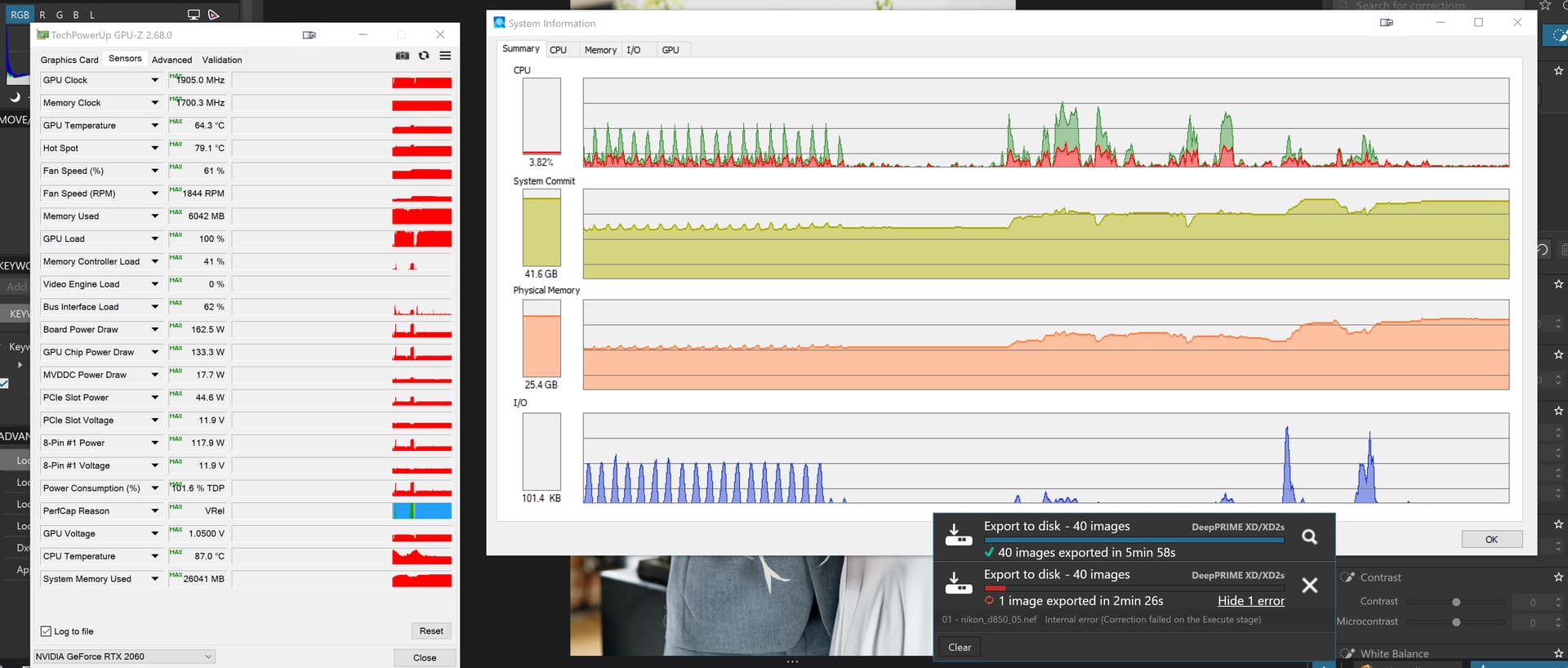
Yes I find that - leave the presets alone and the “click on an object to select it” tool often works - but it feels very flaky!
@BHAYT FWIW I have a 1080Ti - older model of GPU but still a workhorse with 11GB memory and I have the same problems that HenrikW describes above - subject/sky etc. selection cause problems.
If memory really is the problem and anyone with less than 12GB is going to struggle then that’s a big problem for working with PL9.
@Fineus Funny you should write that just as I am testing!
So once upon a time I had a 2060(6GB) and a 3060(12GB) and I experienced problems when exporting from the 2060(6GB) but no (or little problems) with the 3060(12GB).
So right or wrong it looked like the 2060’s days were numbered. With my wife’s agreement I purchased an Asus 5060Ti(16GB) which arrived yesterday afternoon and fitted it to the 5900X, the 3060(12GB) had already been moved to the 5600G.
Runs with the 5900X and 5060Ti(16GB) seemed to show massive memory consumption with the 5060Ti with the latest NVidia drivers so I went to the Asus site and downloaded all the drivers available for the 5060Ti and installed the oldest, NVidia release 560.02, and reran my tests.
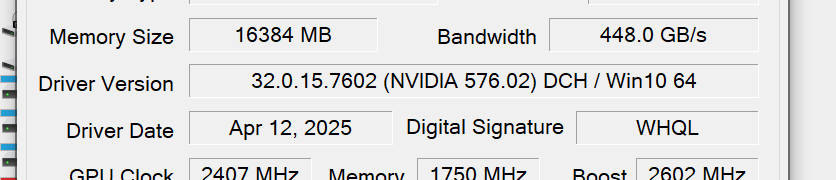
Before changing drivers a 40 image export with 3 workers took 10,842MB and 2mins 28 seconds, and I have had higher memory usage figures than that!
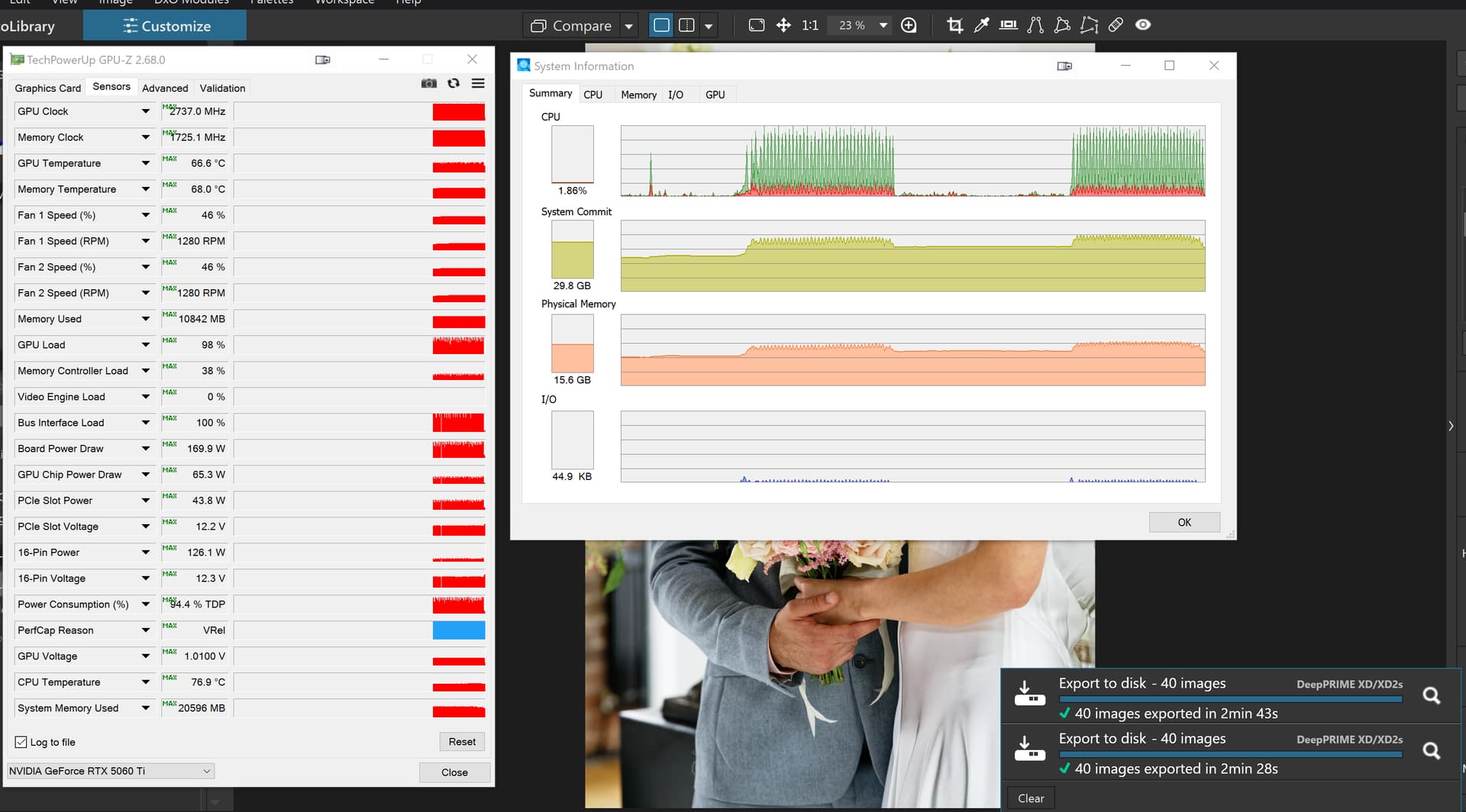
After changing to the earlier release the memory usage has dropped to 6,697MB and the time was 2mins 33 seconds.
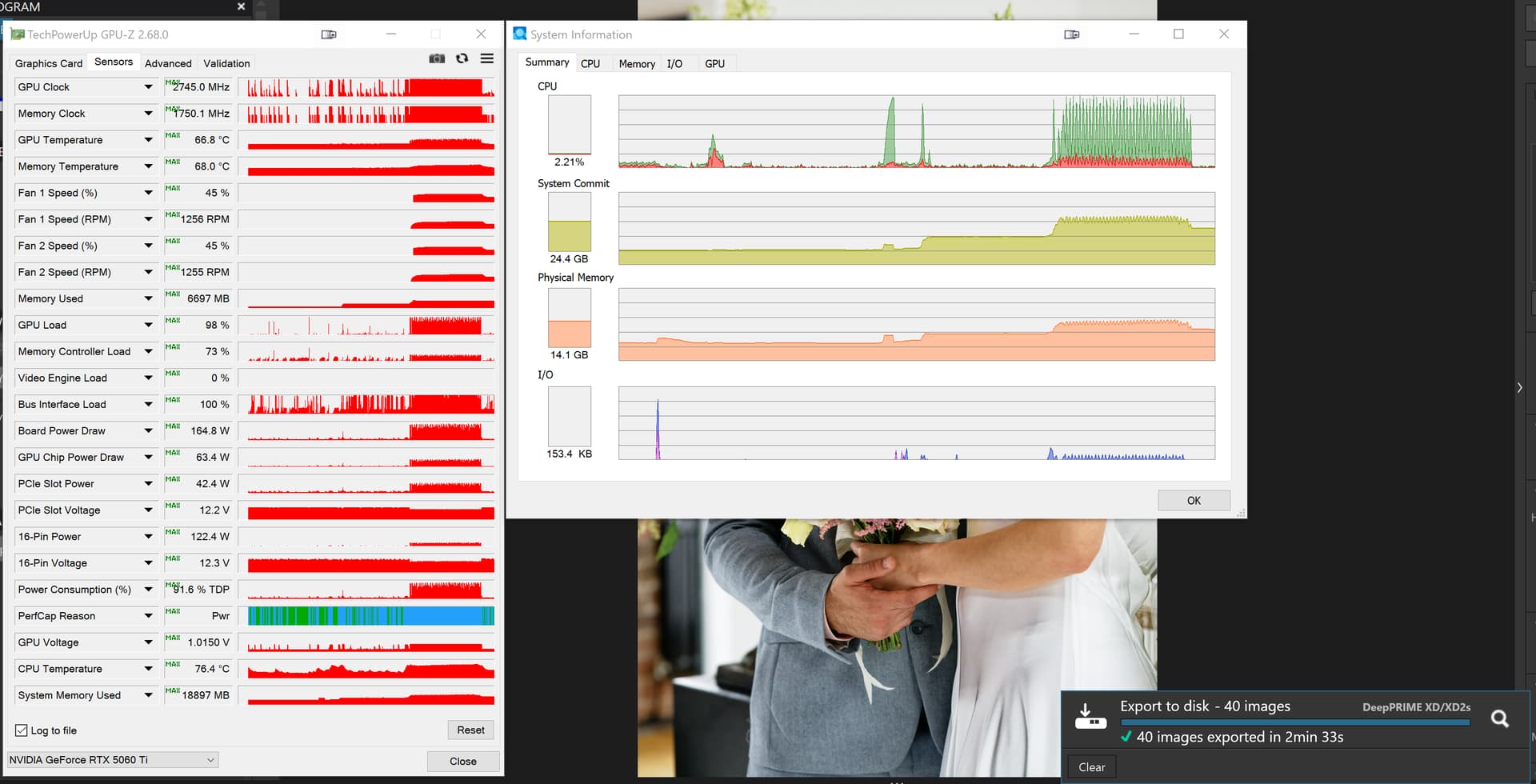
While I doubt it will still work with the 2060(6GB) I might swap back to that GPU later today and retest with the older drivers.
Take from that what you will! but also look at PL9 on older computers. The images in my test come from the Google GPU spreadsheet and are from a Nikon D850 and 25.56MP.
With the latest GPU driver release by Nvidia (Driver Version: 581.57 - Release Date: Tue Oct 14, 2025) the DxO PhotoLab 9 problem has been fixed. The driver release notes explicitly mention this and I have verified this on my Lenovo Slim Pro 9i 16IRP8 laptop (GeForce RTX 4050).
@joadrian101 Welcome to the forum and if 581.57 appears to fix any problem you have experienced that is good and thank you for reporting it.
Nvidia may well have fixed the driver issue, as stated in their release notes, but is that the whole story of the all the problems users have experienced?
Not according to my testing at New Nvidia driver 581.57 with PL9 AI Mask fix! - #23 by BHAYT.
Either my testing is wrong, which is certainly possible, or the driver fix is only one part of a more complex problem, i.e. DxO may have some more work to do.
If it fixes yours and other users problems, as others have reported, that is good, but it isn’t fixed as far as I am concerned until my efforts to break it are far more complicated than they currently appear to be, i.e. the test I used that caused export issues is really trivial.
So as far as I am concerned the fix will truly be in place when the tests cases I have currently got do not fail in any way, i.e. no problems during editing and no problems during export.
In the meantime happy editing and exporting, 581,57 is definitely better than what was on offer before.