In my case to free up every thing I had to reboot the laptop. Rebooting PL did nothing the error was there as soon as it opened it and it had been suggested a sleep clear it but not in my test.
I guess, that’s the problematic PC (notebook) from one of your previous comment:
and laptop with RTX 4050, 6 GB
May i not read thru all of your comments, but may few thing/step/tip/hint or whatever we call it may helps or worth to check thru and try. Note: all based on my observations, PC and my photos.
-
Close all other applications as much possible. Some of them use some VRAM. Even the little ChatGPT client use 0.1GB, web browsers usually use 0.2-0.5GB (even they just idle).
-
“Enable DeepPrime rendering” → turn off. (uncheck) (preferences → display). If its turned on, for preview its use the selected NR mode to display → but its come a cost of VRAm usage. If DP3 selected, the the preview is DP3, if DP XD2s selected, than that (and seems if ‘normal’ selected, then the standard HQ NR used). In the case of DP3 may takes around +1.5GB or more VRAM. So PL use something like: PL clients itself usually around 1GB VRAM + the DP3 model/render/preview (whatever we call it) in ‘fit zoom level’ view may 1.5GB VRAM → you’re already 2.5GB VRAM at least. If you zoom to 1:1 and scroll thru the photo, its may go up like 3+GB VRAM.
-
Seems DP XD2/XD2s use a bit more VRAM vs DP3. May +0.5-1GB VRAM. So, i suggest to try with DP3 to save some VRAM.
-
I think “Enable High quality preview” doesn’t matter (about VRAM usage), as its seems use the ‘Normal’ NR (previously called ‘HQ’)
-
In export, set-up: ‘maximum number of simultaneously process’ to 1 (one), to minimize DP export VRAM usage.
May its helps you out to ‘shave’ VRAM usage. I hope its helps.
2 Likes
Thanks all worth doing as with many people there is no way I can afford the replace an expensive laptop just over a year old
Luckily local AI isnt so effected and hopefully AI isn’t needed much as all the test ones were processed without it befor the tests
1 Like
Virtual memory has spoiled us all but it’s important to understand the VRAM pool behaves very differently. A system with 8GB of RAM and a 60GB pagefile will have roughly the same memory capacity as one with 64GB of RAM and a 4GB pagefile. It’s just that the latter will be significantly faster. And pagefiles can grow beyond their minimum sizes. Unless you run out of hard drive space, we all effectively have “unlimited” RAM.
VRAM on the other hand is very limited. To the point about PL “needing” 14-16GB of VRAM. Clearly, it does not as seen when running in CPU-Only mode. It doesn’t strictly “need” any. The problem seems to be the implementation PL is using is all-or-nothing. I.e. there seems to be no notion of “I’ve only got 6GB of VRAM so I’m going to have to split this 12GB worth of processing into 2 batches”. It either fits and works or doesn’t and fails. This type of brute force approach works somewhat ok with regular RAM thanks to the pagefile, but for VRAM it is going to be very fragile for all who don’t have huge capacities.
1 Like
You welcome. Can be nice of you let us to know some of it helps or not.
I’m also ‘cant afford’ case: GPU is expensive, wife definitely not happy even if i just mention the thing - no way to get new shiny GPU for this Christmas, may only in next summer.
This is all obfuscation. Do not waste time on trying to follow the ‘well intentioned’ advice. I have a RTX 3090 with 24GB VRAM (and 128GB system RAM) - the issues with PhotoLab 9 (current version) are not (!) related to a shortage of RAM/VRAM.
@mzbe I agree or at least in part. I have said in most if not all of my posts that the drivers are a factor but not the whole story.
However, what has puzzled me is that when running tests on my 3060(12GB) and on my 5060Ti(16GB), with GPU-Z monitoring GPU VRAM, the same test images occupy nearly all the VRAM available on both the GPUs, i.e. 12GB on one and 15+GB on the other
Is this also the case with your “monster” 3090(24GB), i.e. is all or nearly all of the 24GB being used?
So have the new drivers actually fixed or at least improved the situation?
In my experience an image that frequently failed on loading with the previous “latest” driver, no longer seems to be as prone to failure as it was. But as I explained in a rather long post New Nvidia driver 581.57 with PL9 AI Mask fix! - #23 by BHAYT it is still easy to cause export failures and once an error has occurred the product becomes very fragile @John7, as you have discovered. Exactly where the corruption lies after such a failure, I am not sure.
The sleep strategy may help reduce the long term VRAM usage, if executed at the right time (whenever that might be!?) and terminating the Export worker will restore the VRAM it has used and for those really tight on VRAM it might help (a bit) but the failures I have experienced are on the 12GB 3060, not exactly a “tiny” GPU, hence my doubts about any declaration that the latest drivers fix the problem.
The 5060Ti(16GB), on the other hand, seems to be immune!? Why!?
What is more likely is that there is a change in the architecture of the GPU that means that the 5060Ti(16GB) does not suffer from the same problems as the 3000 and 4000 series GPUs in particular.
What GPU and drivers did DxO use in their development and did they encourage Beta Test users of other GPUs to test specific images so they could assess the outcomes?
The new drivers may well help DxO subsequently fix the issues with their software but those issues do not appear to have miraculously disappeared with the installation of the new drivers, I am sorry to say.
1 Like
On my 12Gb desk top card no problems and free hand AI on the 6Gb laptop again OK. But as you say when it goes wrong it does big time. Totally locks up and doesn’t free up any thing when closed needing a full laptop reboot to close down the problems. As others have pointed out they use the VRAM like a sledge hammer rather than incrementally. I have tried using AI in Affinity 2 with no problem. As that didn’t crash I have no idea if it would free itself up if things went wrong but I suspect its better programed than PL. The email (for a support ticket nothing to do with AI?) from support saying the new driver claiming the probables was nothing to do with them as you say is total rubbish both outstanding issues, instability and how they got into the mess originally ignored.
@John7 It would be “plausible deniability” except it simply isn’t plausible so its a bit like a child who throws a stone and then denies it was them that broke the window, which is correct, it was the stone!
For “child” read DxO and for “stone” read Nvidia (drivers).
I am getting way to cynical in my old age.
2 Likes
Well speaking of well intentioned, what specific issues are you facing with that hardware config? Surely not an export failure? Obviously nobody suggests there is only a single bug lurking in PL. “An” issue faced by many - inability to export - IS mitigated by an increase in VRAM in many environments (having the wrong drivers or some other show stopper could still trip up the success of course).
1 Like
Support look to be thinking if they send out the same lalls well and wasn’t us email enough times it will be believed
Two more today fir the same non AI ticket today.
I made some random adjustments to a few images - GPU VRAM usage peaked around 10.3 GB (= 13.7 GB free). I don’t want to guess what DXO is doing on the development side. PL is quite unique having those kind of problems (and potentially excessive hardware requirements, which is not even officially confirmed).
My earlier advice is simply this: Don’t spend thousands on a new laptop because some speculation on this forum amounts to solving your problems that way.
Either buy a Mac or wait until DXO fixes their bugs. It’s not you (= your PC/laptop), it’s them (= current DXO 9.x versions).
1 Like
Apple is not perfect, but if you want the best integration of hardware, software, and device drivers, you’re going to have to get a Mac. 
Most of the problems with highly complex and visual apps like Adobe Lightroom and DxO PhotoLab occur on Windows PCs due to the enormous variety of manufacturers of the hardware and software! As well as inadequate resources: old and slow processors, and low amounts of memory and storage.
3 Likes
I could believe this more readily if there weren’t ample evidence of others succeeding to get their offerings working… and doing so years ago.
As much as PhotoLab can be a powerful tool, DxO aren’t building something here that is so advanced that they’re doing things nobody has done before. In fact, it’s the opposite.
3 Likes
And DxO will also succeed. Significant changes in technology do not roll out evenly across an industry.
Nobody else has the data on cameras and lenses that DxO does. Nor the software to make use of that data.
I can only think that you have not watched Adobe, just to name one other competitor, well enough or long enough to know the struggles that Adobe users have been though.
1 Like
Much as that’s true, the PhotoLab 9 launch had issues from day 1. There was even contradictory launch note advice, recommending users use the latest drivers and use outdated drivers to try and mitigate the problem.
There was also insufficient (almost no) communication with customers on progress in addressing the faults which - for some users - remain ongoing. Many of us are still experiencing performance issues too.
Nobody else has the data on cameras and lenses that DxO does. Nor the software to make use of that data.
And that’s one of the major reasons I’m not using Adobe software.
However, it’s not really the point when it comes to launching AI masking - which competitors have had for years where DxO has not.
Don’t get me wrong, it’s great to see it in the works, but this version felt rushed and customers not really valued.
Instead of communication about fixing PhotoLab, we’ve had forced adverts for the latest FilmPack and a monetised support programme roll-out (!) Defend that if you like, but I’m not impressed.
2 Likes
It is not just new Mac-computers with a lot of RAM and GPU-memory that works flawlessly with Photolab 9 if you haven´t understood that yet. Compare your Mac with a PC and a modern high end Nvidia GPU with an equal amount of VRAM and start there instead of comparing systems with old RTX-cards. Otherwise we´ll just get lost among apples and pears.
That said there are two main roads to handle AI-problems like the ones DXO have got themselves into:
The first is a “local” AI-solution like Photolab 9 has and that part of Topaz are using for for example sharpening. We can even find that in the models we can use with LM Studio or Ollama in for example iMatch DAM. A good example of that is the Google Gemma-series of models. If you look carefully, you can see that LM Studio already gives you more than 500 AI-models to choose between. The top three in this list is three Google Gemma-models WITH DIFFERENT SIZES MADE TO FIT DIFFERENT SIZES OF GPU VRAM:
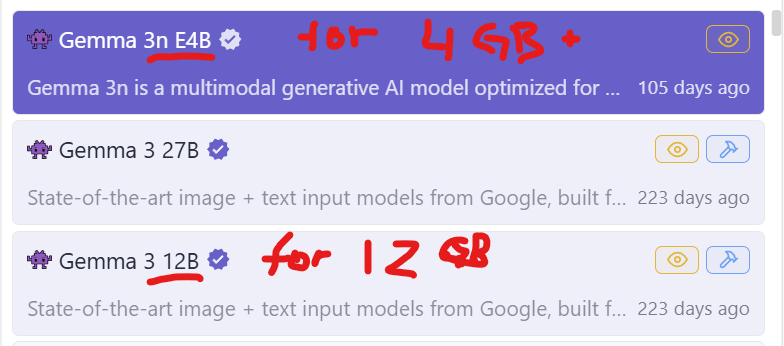
It is not more difficult than that to handle a problem like Photolab has but they chose ONE SIZE FITS ALL - 4GB cards as well as ones with 32 GB VRAM
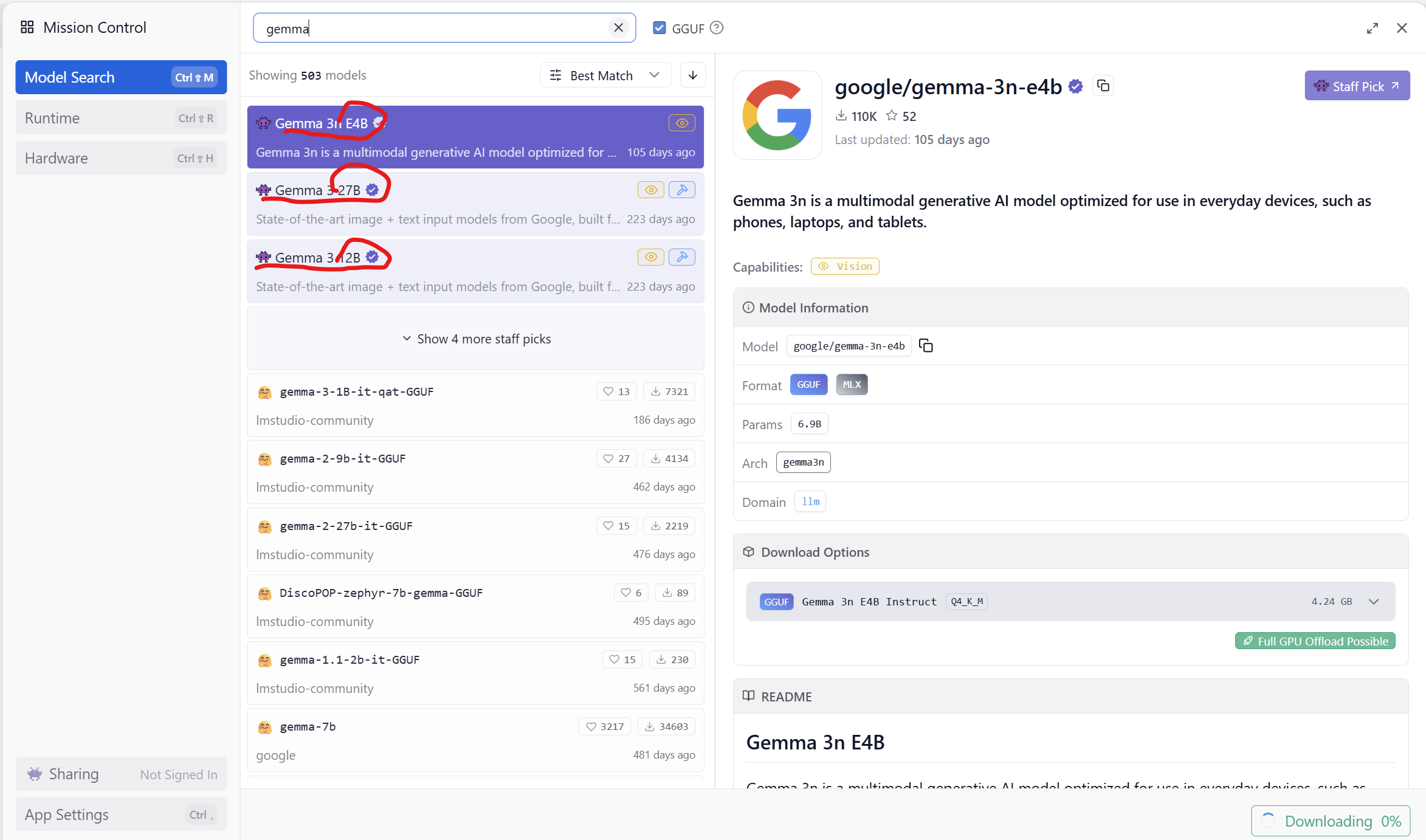
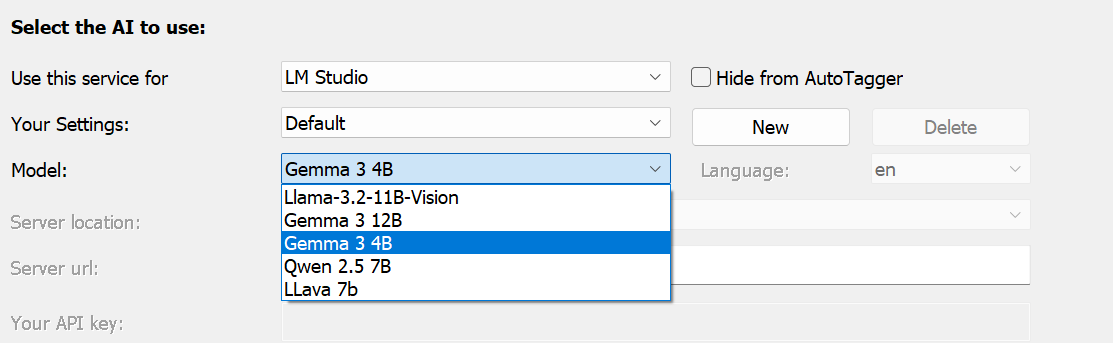
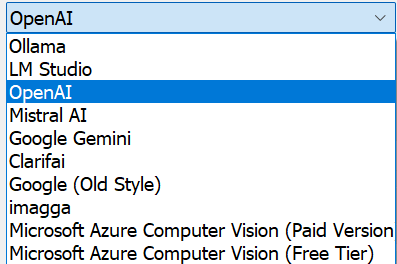
iMatch DAM is an example of software where the developer has offered a great variety of both free models like Gemma 3 and commercial ones like Google Gemini, Mistral or Open AI.
Even here you can see the Gemma 3 4 (GB version) and the 12 (GBversion)
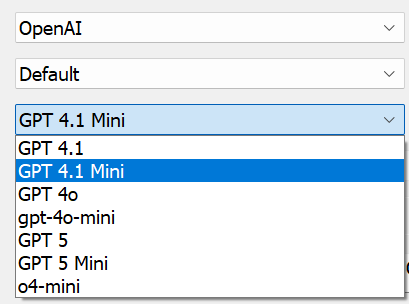
There will always be problems with systems that of different reasons over time will end up with to low performing GPU-units to handle the models available in a certain program - even in iMatch DAM and of that reason they offer a lot of different commercial API-variants and models too. I Use Open AI and GPT 4.1 and GPT 4.1-mini. The reason for that is that the mini is cheap and mostly fine BUT it is not always enough when I for example use it to analyse and write Descriptions for my safari pictures. The mini-model does not fix to define what animal species there are in the motifs but the bigger model does.
DXO could also offer us a broader choice than they do today and that goes even for Adobe and Capture One and not to talk about Topaz but a company like Topaz is not thinking about their users when offering a really expensive AI-cloud support - since that is purely proprietary.
AI is developing so fast that it is necessary to have more than one provider to chose between because some models get discontinued like the old ones from OpenAI did and the new GPT 5 doesn´t work as expected in iMatch either since it is optimized for reasoning by default using the wrong end point to suite image analyzes and description generating. So, I´m glad Open AI have not discontinued GPT 4.1 yet since version 5 isn´t really an option before the GPT 5 dialog gets adapted to the way iMatch really works.
Freedom of choice hasn´t been Apple’s hall mark over the years but that is truer for the Windows-platform for good and bad. The bad is that it comes with a cost - the cost of choice and it is up to ourselves to make the right one for us in order to get it working with the hardware we happen to have. Every software company has to consider the hardware level of the market too, otherwise they will end up losing a big part of their current users more or less overnight.
So, in short, DXO could have foreseen these problems and offered at least one smaller and one bigger AI-model instead of just offering a one size fits all solution that did not really work for many.
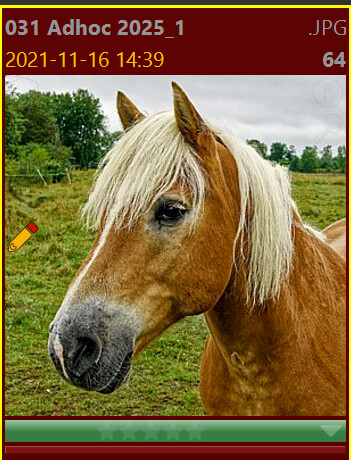
Description created with Open AI GPT 4.1 :
Baldersgården Rindö Vaxholm Sweden 2025 - Haflinger horse - A Haflinger horse with a light blond mane stands in a green field with grass and trees. The sky is cloudy. The setting is natural and outdoors. Common name: Haflinger horse Family: Equidae Scientific name: Equus ferus caballus
Description created with Open AI GPT 4.1 -mini (smaller cheaper model) :
Baldersgården Rindö Vaxholm Sweden 2025 - Haflinger horse - A Haflinger horse with light blond mane and brown fur stands in a green field. Behind the horse, there are trees and grassy land. The sky is cloudy. The horse is the main subject in the image.
(despite exactly the same prompting for the Descriptions the mini modell did not fix to write type of animal. Animal family or the scientific latin name.
Description created with LM Studio and Google Gemma 3 4GB (free model for GPU-cards with less than 12 GB):
Baldersgården Rindö Vaxholm Sweden 2025 - Haflinger horse - A Haflinger horse with a light blond mane stands in a green field with grass and trees. The sky is cloudy. The setting is natural and outdoors.
(Even here the prompting was exactly the same - a simpler text not far from OpenAI 4.1-mini. If I have had 12 GB on my card and used the Gemma 12 GB model the texts would probably been a bit more like OpenAI 4.1 (the bigger OpenAI-model))
1 Like
[/quote]
Nobody else has the data on cameras and lenses that DxO does. Nor the software to make use of that data.
I can only think that you have not watched Adobe, just to name one other competitor, well enough or long enough to know the struggles that Adobe users have been though.
[/quote]
-
Leica M lens support in DXO PL is more limited compared to Adobe and C1. Before you ask: C1 also includes distortion, sharpness falloff, and light falloff in their profiles; and of course, C1 and Adobe do full color profiles and color equalization (e.g. older Leica M lens “Italian flag” issue). Numbers (e.g., Leica M11 body): DXO=12, C1=29, ACR=73 [33 (Leica) + 12 (Zeiss) + 28 Voigtlander]
-
DXO camera body support equally is behind the ‘big 2’, e.g. only recent inclusion of modern iPhones, no support for monochrome cameras, … In part this is a hardcoded blocker to ‘encourage’ users to update to newer versions of DXO – replacing camera names in EXIF metadata is often a workaround to ‘trick’ DXO into opening such files (most DNG files should always work).
-
camera ‘support’ with the ‘big 2’ includes in many cases tethering (DXO = no show).
The two lists below appear to be more comprehensive compared to DXO’s database?
I just opened PL 9.1 on my RTX 3090 (24 GB VRAM) Threadripper (32 core) workstation. The AI error immediately appeared because the last image I worked on had an AI selection. Needless to say, VRAM was not exhausted. And this is an ‘above average’ PC. And users have reported here that the error occurs also with AMD and Intel GPUs.
So the horse doesn’t solve it?
Strange, my rather lowly PC with an RTX 2060 6GB and Ryzen 5700G 32GB RAM,PL 9.1 worked perfectly when I did work with all kinds of AI selections yesterday evening! Of course, if I use DeepPrime XD and any AI selection, I have to wait a very long time before it finishes. (I have the last studio driver for my card installed.)
1 Like