Same story with my 1080Ti (11GB), Xeon E3-1231v3 (old Intel server CPU @3.4ghz) and 32gb DDR3 RAM.
I don’t expect everything to fly on my system, but have to note that other applications simply work better.
Same story with my 1080Ti (11GB), Xeon E3-1231v3 (old Intel server CPU @3.4ghz) and 32gb DDR3 RAM.
I don’t expect everything to fly on my system, but have to note that other applications simply work better.
I started using PL9 on my 5 year old Thinkpad and after lots of communication with the support team about “Internal Errors” I decided to get a new Thinkpad. It has an Intel(R) Core™ Ultra 9 285H, 2900 CPU and the GPU is NVIDIA RTX PRO™ 2000 Blackwell Laptop GPU 8GB GDDR7. I am still getting an Internal Error if I use an AI mask when exporting to disk! I have raised another case.
I think DxO choose the ‘4GB’ alike AI model and not ‘12GB’ version - for the ‘AI Mask model’. I guess it’s just ‘4GB model’ enough for the ‘AI masking’. And of course, 4GB ‘AI Mask model’ works for 12GB cards also. I think ‘AI mask (manual)’ use like 2.5GB VRAM
But other things also use VRAM by PL: ‘Export AI model (DP)’, ‘Screen rendering AI model (DP)’. The latter basically looks similar some way than the the ‘Export AI model’
So, other VRAM usage other than PL: ‘AI Mask model’:
Example on VRAM usage - Please take the VRAM usage numbers a bit grain of salt, i try my best:
Sum: 0.5+1.0+1.5+2.5+1.5= 7 GB VRAM. Seems 6GB VRAM not enough…
If you not use Deeprime rendering (Screen), than its 5.5GB. Seems 6GB VRAM may fit.
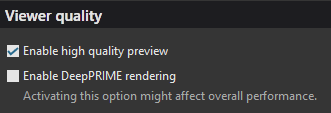
Note: VRAM usage for DP3 less then for DP XD2s. ‘Deepprime rendering’ need to be enabled in preferences. Export process VRAM usage looks depend on what is the ‘maximum number of simultaneously processed…’ number (may some change on that in PL9.1). Seems ‘AI mask model in keyword (like Sky)’ peaks a bit more more VRAM than manual ‘AI mask’ usage.
DxO describe in PL9.1 release notes:
Minimum system configuration … For DeepPRIME 3, DeepPRIME XD3 X-Trans, and AI Mask: NVIDIA RTX™ with 6GB of VRAM with latest drivers … etc…
See… First it’s say DP3 and not DP XD2s (as DP3 use less VRAM than DP XD2s). ‘AI mask’ and not ‘AI Keyword mask’. Not say ‘Deepprime rendering’ (preview) enabled, not say 4x paralel export process is possible and so on. Not say how other apps use VRAM and so on.
Example for some optimal case on VRAM:
Sum: 0.4+0.7+2.5+1.5 = 5.1GB VRAM
Looks okay (less than 6GB VRAM).
Unfortunately they (DxO) not break down the VRAM usage description 
Like: ‘And, ohhh, guys be aware! If you use DP XD2s you may run out of 6GB VRAM. Also if you turn on ‘Deepprime rendering’ you may also runs out of 6GB. And wait! Don’t forget multiple (more than 1) export threads may not of the friend of 6GB’ and so on…
I don’t want to defend DxO. I think ‘we’ (whatever the ‘we’ means) discover the ‘price’ of more AI (or may better to say: more features based on AI)
Anyhow, I guess may they (DxO) underestimate the ‘AI keyword mask model (like Sky)’ usage. 6GB looks very on the edge. And may better communication on VRAM usage and PL behaviours may ‘helps out of us’ from ‘heart attacks’…
Recommended system configuration: … For DeepPRIME 3, DeepPRIME XD3 X-Trans, and AI Mask: … NVIDIA RTX™ 3070 with latest drivers with 8GB of VRAM
Still the same description points, but with 8GB - what seems more on the safe side. But still with DP3 and so on…
Note: i leave out the nVidia driver issues or similars.
Note: i leave out some ‘Internal error’, what may some bugs DxO need iron out. I talk the VRAM usage at general.
Note: based on my observations (in my PC) and other forum colleagues observations/measurements.
May try to change the ‘Maximum number of simultaneously processed images’ to 1 (one).

If ‘Deepprime rendering’ enabled, may try to turn off
May also wort try with DP3 and not DP XD2s.
May let us to know it’s helps or not. Our shared experience can helps out of us how to deal the thing.
I guess there might be other bugs too that DXO are responsible for. Photolab should not crash just because VRAM is exhausted, the Photolab Cache is supposed to handle that together with Windows “Swap-file”. We shall loose speed but it doesn´t ought to crash.
There also is a substantial difference in how the premade AI-models for Subject, Sky, Background and whatever are working and the Freehand Select Area works. I have tested that quite a lot and when exporting I have earlier seen a difference in export time of around five times more for using the premade models. So even if I now can apply them with version 9.1 and the latest Nvidia driver for RTX 3060 Ti I never use them since they are consuming a lot more of the system resourses. I have no problems what so ever today using that method. I use both High Res-previews and Deep Prime 3 without any crash-problems what so ever and it is resonably fast too.
What I wrote above is just to add some perspectives here on how these AI-model issues are handles in other softwares. As you could see there are local AI-methods and cloud based ones. There are fre ones and commercial and there are in worst case proprietary models that have issues on top of that.
The problems we have here would probably not have been any problems if we would have a more open software with access to several different options to chose between.
We also have to be fair when looking at how Photolab is handling VRAM. We have a lot of examples here where the VRAM usage is not below 4 GB but exceeding both 12 and 16 GB. So, we don´t really know how efficient or inefficient Photolab really is.
It is even more complicated these days. Here an example from OpenAI API-usage:
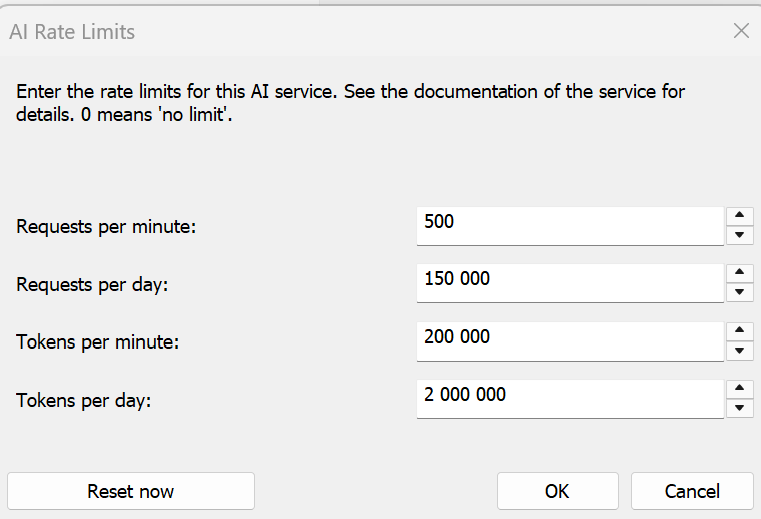
There is also a factor that gratly can affect AI-performance in an application like iMatch that uses external API-solutions too. There is something called Rate Limits which are set by the providers and can varies according to your customer status and licensing model.
This is an example of how it can look. Initially my performance was much lower because the defaults for the free users were much lower.
So there is a lot of parameters that affects. Another problem is that now models by default are set for dialog and “Response” while a software like iMatch is not bu default. So, it is necessary to turn off that condition otherwise the performance gets absolutely unusable. Using AI efficient takes som knowledge too.
Photolab should not crash just because VRAM is exhausted, the Photolab Cache is supposed to handle that together with Windows “Swap-file”. We shall loose speed but it doesn´t ought to crash.
I think not.
AFAIK/Test PL Cache does 2 thing:
PL not use this ‘cache’ folder for anything else in my opinion / tests.
‘Windows swap file’ - No, Windows can’t use for extend VRAM for dedicated GPU’s (or any GPU method i think).
I’ve had another thought (best read in Jeremy Clarkson’s voice)…
This one relates to hideous slowdown when implementing many masks and/or AI masks AND the rendering of a preview whenever the slightest thing is changed.
My not-scientific theory is that EVERY change, setting, and mask is being recalculated whenever a change is made.
It may even be that the areas the masks themselves impact in our images are being recalculated from scratch too, which would add considerable time, especially if the subject the mask should be applied to has not changed.
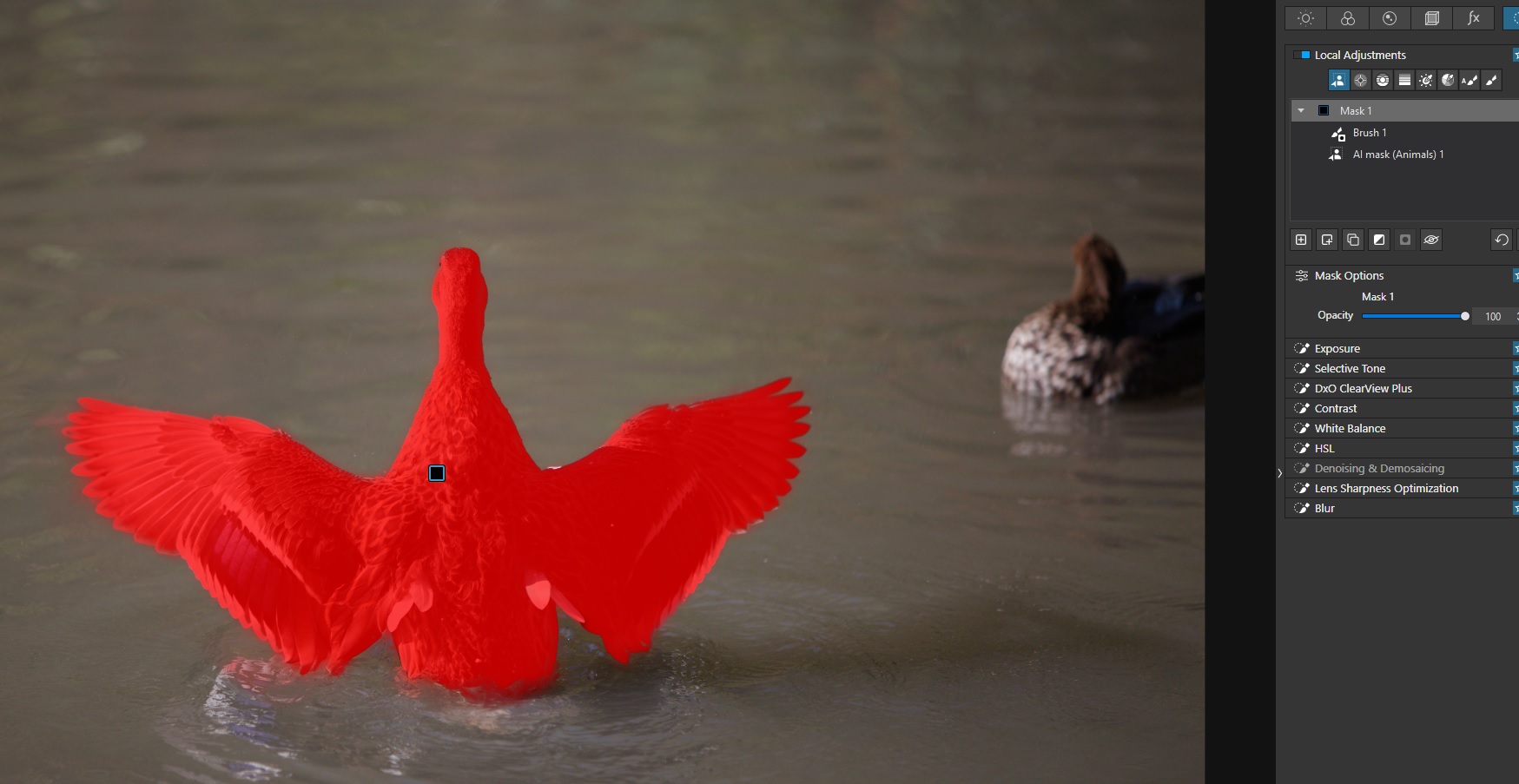
It would make sense to do this if I changed the crop of my image (changing the position of the masked duck within the photo) or if I actually adjusted the mask of the duck (or whatever other mask is active).
However, if I don’t do either of these things, the selected area should not need recalculation?
As I say, I’m not being hugely scientific about this, but looking for reasons that the action of masking slows PhotoLab to a crawl.
Presumably, now that we have the full image denoising and sharpening that many people used to scream for attention over in previous versions, this must, indeed, mean that the whole image gets recalculated at every change.
Although you can always lower the image rendering quality…
I wonder what sort of hardware the DxO developers use in the office? They can’t be using stuff that runs PL at a crawl, can they?
I never raised it from having both disabled  It still performs poorly.
I really wish I could heavily customise what PhotoLab renders and when. I know I shouldn’t have - other applications don’t require such fine tuning - but if it must be this way then let me tell PL not to render lens corrections, sharpness, or even masking at all unless I explicitly tell it to by pressing a button.
Then I can at least compartmentalise my editing, doing the quick stuff first and fine-tuning the rest once. Or let me finish the intensive fine tuning and turn off the rendering of it so that if I need to make quick tweaks elsewhere, I can do so quickly.
The importance of performance simply can’t be overlooked. If this means it takes longer to export the final images for some reason, so be it. I’d sooner go away for 30 minutes while an export happens once the work is done than have my workflow fragmented by constant “rendering preview” nonsense.
Would the rendering issues be resolved if PL used a true Layers system for adjustments ?
Because they display approximate output and 90% standard users won’t see the difference, except for 90% of photographers 
(I feel like I’m stalking you this morning, apologies for all the replies!)
But honestly… give me that approximate output? Let there be a toggle switch in PhotoLab that lets me switch between “lightning fast but not 100% accurate” previews and “pixel-peeping because you need to be accurate” previews?
I would be delighted.
Thanks Andras. I tried changing the maximum number of simultaneously processed images’ to 1 (one), but I still got the internal error.
I was not using Deep Prime.
Must admit I do find version 9 sluggish. I had reason to use LrC today. It was responsive and the Ai masking was far in advance of anything PL provides and with no fall off in performance. That combined with highlight and shadows sliders that perform as expected (by me anyway) is really making me rethink my editing needs.
Honestly I know where you’re coming from. My reasons for staying with DxO currently are:
Sunken cost. I’ve spent enough on PhotoLab and its add-ons that it would be a shame not to continue to use it, and money doesn’t grow on trees.
I really don’t like Adobe’s subscription model or way of working. As companies go, they’re hardly some paragon of virtue, but they do have a formidable product line.
End-quality. This one is the kicker. I feel I can get sharper, better images out of Photolab than other products on the market.
That last one is not without some sacrifices though. Like you say… it’s increasingly slow, it’s not good at bulk work, and products like Lightroom are much slicker to use (and) have some nice features PhotoLab should’ve had years ago (colour grading across shadows, highlights and mid-tones, for example).
What I don’t buy into is the significantly superior image quality claim. Personally I do not see any significant differences - some are slightly better some worse. That said I am by no means a pixel peeper and I suspect that is true of the majority. Enough top flight professionals use Lr to convince me there it’s no real issue.
Lightroom and Capture One are fine as long as there isn´t really hard light conditions. High ISO under poor lightning is where these differences use to manifest themselves most clearly.
Lightroom has improved. Earlier there was a big reason Lightroom users bougt PureRaw. Deep Prime is still the best and most efficient noise reduction you can buy. Topaz is better for non-RAW but it often is far less efficient and demands much more human interference. Deep Prime is a “black box” compared to that and Lightroom has nothing like DXO Lens Profiles. Lightroom has never been in par with Photolab when it comes to preview quality and with version 9 and Deep Prime rendering of previews that fact prevails. With version 9 we even can selectively add both state of the art Deep Prime and Lens Correction to a masked area. I haven´t seen that anywhere else.
From what I have seen in other converters I have never seen anything like submasks and the interaction we can get in Photolab with for example the older Local Adjustment-tools like the Control Points.
… and neither Capture One or Lightroom can scale so seamlessly with iMatch and PhotoMechanic like Photolab (that is the upside of NOT having an import-function like C1 and LR has). Photolab has a much more efficient integration through “External Searches” than other software which often use more clumsy administration heavy “Project”-type of solutions instead - or just open the import-function instead of a “Developer”-mode. So everything is certainly not bad with direct access to the file system even if it can even be better with a few small tweaks.
As I have written before - if you feel Photolab is sluggish you might not use the most effective workflows. One reason Lightroom has improved speed is by using previews of inferior quality. I still have it in writing by Scott Kelbys recommendations: Dont use 1:1 previews if you want speed was his recommendation. That was one of the reasons why I left Lightroom when I did - not the prescription model at all.
There are upsides of that as well. With Capture One I get new and improved features in service releases over the whole year. With Photolab we get one and only one main release per year. If that wasn´t what you had expected we have to wait another year - best case before our wishes are met. I have come to like what Capture One has delivered the last three years I have subscribed.
Im a mostly storm photographer my specific genre is lightning.
When I started way back when was it PL5 after a professional photographer who uses LR Topaz and PL suggested go no further than PL for what you do if it’s the main thing. Image quality number one for lightning images.
If you want all rounder go for LR both good both capable I followed his advice haven’t regretted it for a moment and yes compared with LR with this actual pro my images and slight edge.
And now with 9 im ever more happier but im just a hobbyist many on here who pick faults with PL may well be pros so im not qualified to argue
A lot of this is subjective and I use 1 to 1 previews without issue. Adobe’s AI masking is superior imo and Lr has had the ability to add.to / subtract from a mask for a while now. Lens profiles in DxO might be better but to be honest I do not notice it in real world use. I don’t spend my life comparing the output of one quality editor against another. I do notice performance issues like laggy sliders and the rendering of thumbnails.