Purely for technical specs you may like to have a look here or here.
Lightroom had masking since 2021 (?). The masking quality is not that substantially better that it justified such an increase in hardware requirements. They could have used much smaller models for similar results.
Also I don’t understand why the problems appear at export and why the addition of several masks increases the memory usage? They can just store each detected mask in the dop file and then release the memory. On export the AI masking should not run anymore, the work is already done.
I have a macbook M1 pro (2021) with 16gb of RAM. The silicon chip uses unified memory, where the RAM is shared between CPU and GPU, so I’ve had zero issues with AI masks, denoising or exporting. I just exported 34 full res images in 38 seconds!
I must say that while watching the activity monitor, DxO consistently used about 2 to 3gb of ram and at times more than 6gb. Working with AI masks did not increase ram or cpu/gpu usage in my case. Exporting did cause the RAM to go up to about 6GB too, and it never came back down after export finished. Switching to another folder forced it to go back down.
My fixes for the crashes:
- Change AI acceleration from neural engine to GPU M1 Pro
- Enable High quality previews (the performance hit was minimal)
- Disable Deep Prime rendering (I’ll have to live with the loupe, performance hit was larger)
It’s finally working like it should, just as good as PL8 was! I’m finally a happy PL9 user (but it shouldn’t take me 4 days of testing and tweaking to get here).
Thanks, great site for comparison of the hardware! I wish some of these guys would incorporate metrics relevant to photo or video work. Everything is so focused on game resolution and fps.
One really interesting thing is their “relative performance” chart shows my 7-year-old GTX 1080 Ti as 70% of the performance of the RTX 3070. This is actually pretty amazing to me that the very old card would even be in the realm (I would be totally fine having things run 30% slower than the recommended setup for PL9). But this also underscores my earlier point. If you don’t have enough memory to even “play” then speed is meaningless. I just worry that 8GB could be marginal in the near future…
I’m very disappointed with this version PL9. I bought the upgrade and AI masks simply won’t work, let alone export. I’ve never known DXO software to be so buggy. I hope that they fix it soon as there are obviously many others in the same boat.
Je viens juste d’acheter cette v9 et ne l’ai pas encore testée. J’étais juste un peu inquiet de lire toutes ces réactions concernant les lenteurs par comparaison avec la v8 et les accusations de lancement prématuré d’une v9 inaboutie. Entre les imperfections compréhensibles d’une nouvelle version et les injonctions à brûler DxO, il est parfois difficile de se faire une opinion !
No, it is the latest Nvidia-drivers that is the problem and DXO has recommended to go back to 573.24 but the problem with that is that even that crashes at installation (Nividia fault). So I´m still struggling.
This is not a Beta issue. Version 9 is out now isn´t it?
By the way I have 8GB on my card and 16 GB RAM.
No I have 8 Gb and that is the recommendation isn´t it?
The driver version 580xx is said to be the problem at that I have but are trying to downgrade from. So much for installing the “latest drivers”.
I found out there is no 573.24 to 3060 Ti but a 577.00. I will see if that works. At least it was possible to install. 
On my M4 air, 16gb PL 9 works flawlessly with no need to change AI acceleration or previews or anything really. The export with deep prime 3 works as expected and the quality of output is as before. Images with AI masks take slightly longer to export, but not a lot. I wonder why you had to do all that configuration to get it to work.
I am talking Windows 11.
Like many here, I’ve had various performance issues, primarily associated with application of the AI mask, failed and slow exports, and issues with the application of the local Lens sharpness optimization tool.
For users of Nvidia RTX cards, DxO has recommended installing an older driver, specifically 573.24. I was unable to find that specific studio driver for my RTX 4060 running on my Windows 10 machine, so instead I installed the closest previous driver to that one which I was able to find.
On my specific machine the improvement was immediate and profound. Admittedly my testing so far has been very limited but initially, I have been able to apply AI masks without getting an internal error, I have been able to apply the local Lens sharpness optimization without the editing window going blank, and exports with all versions of DeepPrime went down to seconds rather than more than a minute.
It is far too early for me to say these issues have been permanently resolved, but I am very pleased and hopeful based on the limited testing I have done so far. It suggests that optimization by DxO will likely be able to resolve many of the issues reported in this new version.
Keep in mind, that this is by far the single largest addition of new and updated features that DxO has ever released in an annual upgrade. Based on my 8 years of experience With PhotoLab, DXO has implemented around three times the average number of annual feature changes. in PL 9, which in itself is extremely unexpected. With so many changes implemented in this version, it is not surprising that a number of bugs will crop up despite DxO’s best intentions.
Mark
Hi mark!
My version was 580.xx for my 3060Ti.
Was recommended 573.24 which is a non-existing version for 3060 Ti in my Nvidia interface.
I tried a few others witch not solved the problem.
Finally i found a pretty old version from 2025 at least and close to the recommended in version code. In my case version 572.83 which seems to have solved my problem.
Below is a picture where I have used “Animal”, “Background” and a Control Point I have used to lighten the eye on this lovely Haflingerhorse that I happen to be a neighbor of and love because it is so friendly and beatiful.
With “Animal” I have lifted the shadows on the horse.
With “Background” I just added a little extra blur.
I have exported a full JPEG with all pixels and a smaller 4K without any problems.
If I normally export now in 3-5 seconds without AI-masks in the picture it seems to take 30-40 seconds with AI-masks.
So it is a pretty huge cost in performance when exporting those files.
Well, it is what it is and I´m happy it works.
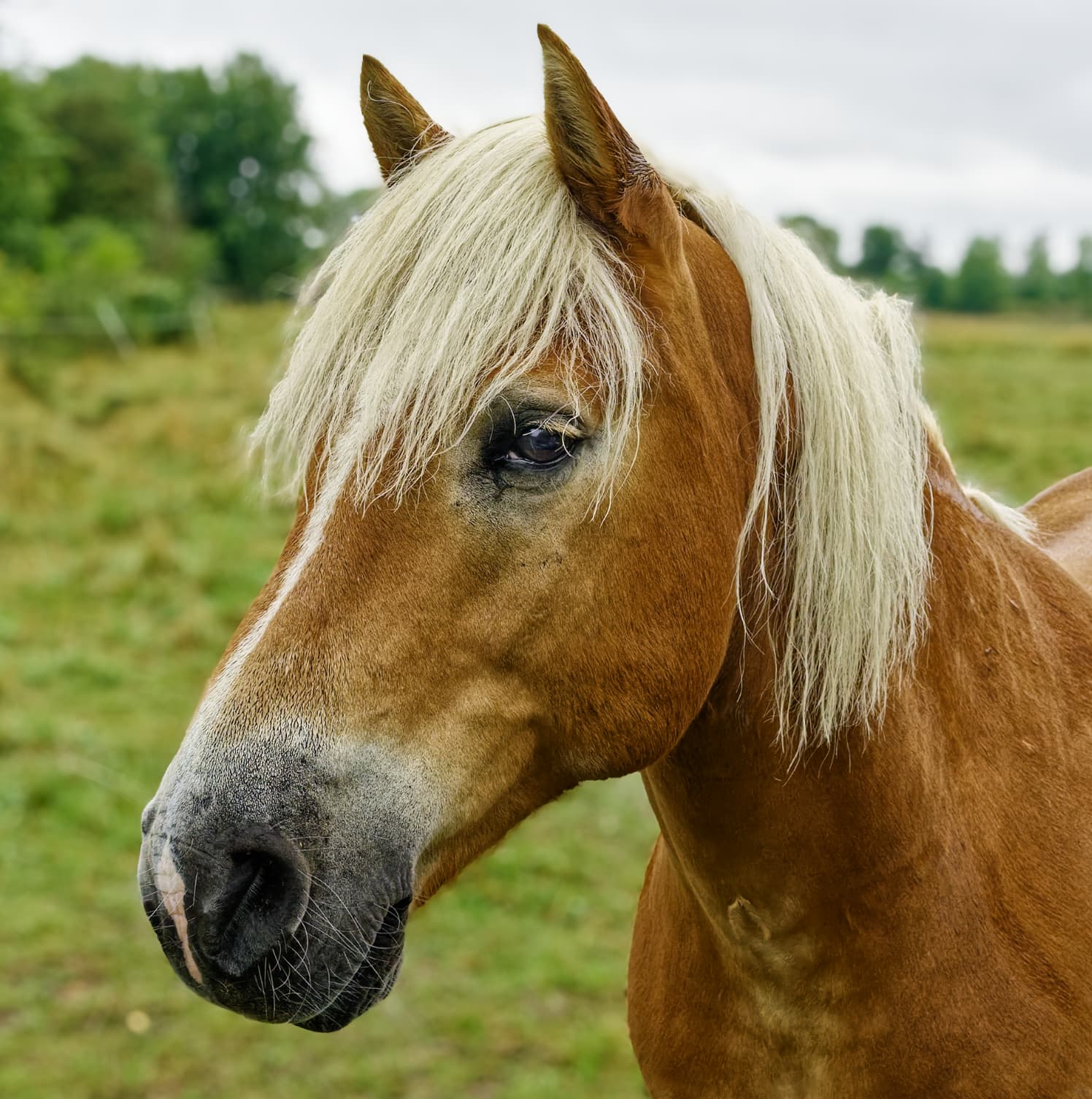
You are absolutely right, this is an enormous achievement by DXO.
It is not just a new AI-platform with a lot of AI-tools.
They are even tightly integrated with a lot of the older features which adds a lot to the complexity.
I don´t know if you have seen this Youtube video before but I think it was helpful.
Especially since this is the first video where some of the other AI-functions really got explained and used that at least I have seen.

Don´t miss this video if you feel you need an update on how the AI-tools works in detail.
I’m not at home right now, but I believe that the driver you downloaded, 572.83, is the same one I downloaded. While I only did some basic testing with it, I was able to to export images wth multiple simple AI masks much faster, which really surprised me. One thing I am aware of is that the first time or first few times I export in a session the timing tends to be much longer than later exports.
As I suggested in my previous post, I think a lot of the issues will be resolved by DxO with performance optimization. Hopefully this will be sooner rather than later.
Mark
Oh, thanks for the feed back.
I will try to make a few other exports too to verify.
As I said, it has taken Capture One a lot of upgrades to iron out some problem they also had with the performance.
If the exports take some time I can live with because they can always run there in the background.
It is more important that the AI-marking is pretty fast and it is OK I think already.
It is also fantastic that the effect of Deep Prime can be seen just after a secound of a preview update. That is a real game changer I think.
I have never seen anything like it before when it comes to preview quality on the screen in any software.
Just die Lightroom :-).
When I reexported both the full and the 4K version of this horsepicture they were exported in 15 seconds.
Four other took about 60 seconds(15 per picture)
That is not so bad.
By the way, in a separate thread I posted about an important undocumented upgrade that not everyone knows about. On the off chance you are one of those who is not aware of it, the limitation of a 75% zoom when viewing lens sharpness optimization and the unsharp mask has been removed. You can now view the results of sharpness on images down to 25% zoom. In addition, the ability to view chromatic aberration has been reduced from 75% zoom to 50% zoom.
Those sharpness changes in addition to the ability to see the results of the various versions of DeepPrime at any zoom level In real time in the edit window are long requested and very significant improvement in PL 9.
Mark
I am very disappointed at this release. Can’t run it on either one of my laptops. One gets GPU (NVIDIA GPU) error the other on Intel Iris GPU just closes out of nowhere without an error display. Should have waited a little longer before purchasing V9. I hope DXO fixes this. Back to PL8 for now.
What Nvidia cards do you have in your laptops and which Nvidia drivers are currently installed for them? Depending on the cards you are using, some of the current issues can be resolved by installing earlier driver versions.
Mark
Regretably the 500 drivers I was told by Dell support not too use due to securty fixes and that the clash with some latter laptop drivers.
Remember that support teams use very specific playbooks when discussing support to limit their liability. Knowledgeable users can often safely ignore much of the advice provided by first level support teams. However, since I am not familiar with Dell computers in general nor your specific model, I certainly won’t tell you to ignore the advice they gave you. However, if it was my computer and I had an Nvidia RTX card in it, I believe I would feel comfortable enough to install an earlier studio driver like the 572.83.
Mark