Works fine on my apple silicon MacBook Pro m4 max, with deep prime 3. Results seem more natural, less crunchy than the pl8 defaults.
2 Likes
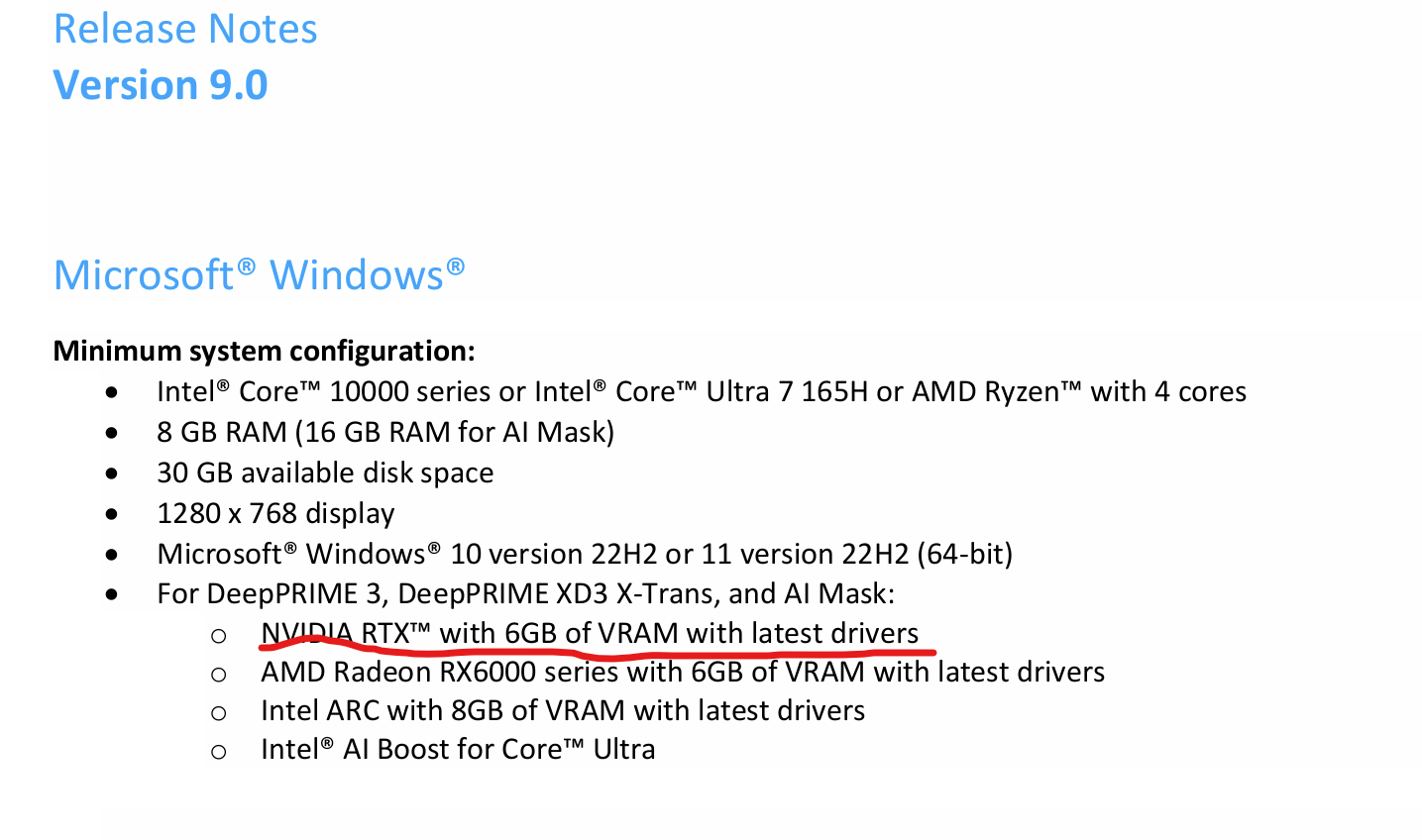
One thing that disturbs me is the official system requirements stating - WITH THE LATEST DRIVER - when it is the latest driver that causes the problems.
Shouldn´t any developer at DXO have stumbled over these problems we have seen before the release. Will we get info on when there will be a new Nvidia-driver for Windows 10 and 11 that fixes these issues or is it the case now that we have to stay for ever on this old version we have to use now in order to be able to save and print from Photolab 9.
Is there a problem with laptops where RAM is shared as memory even for the graphics.
Here is the official DXO-support page for this issue
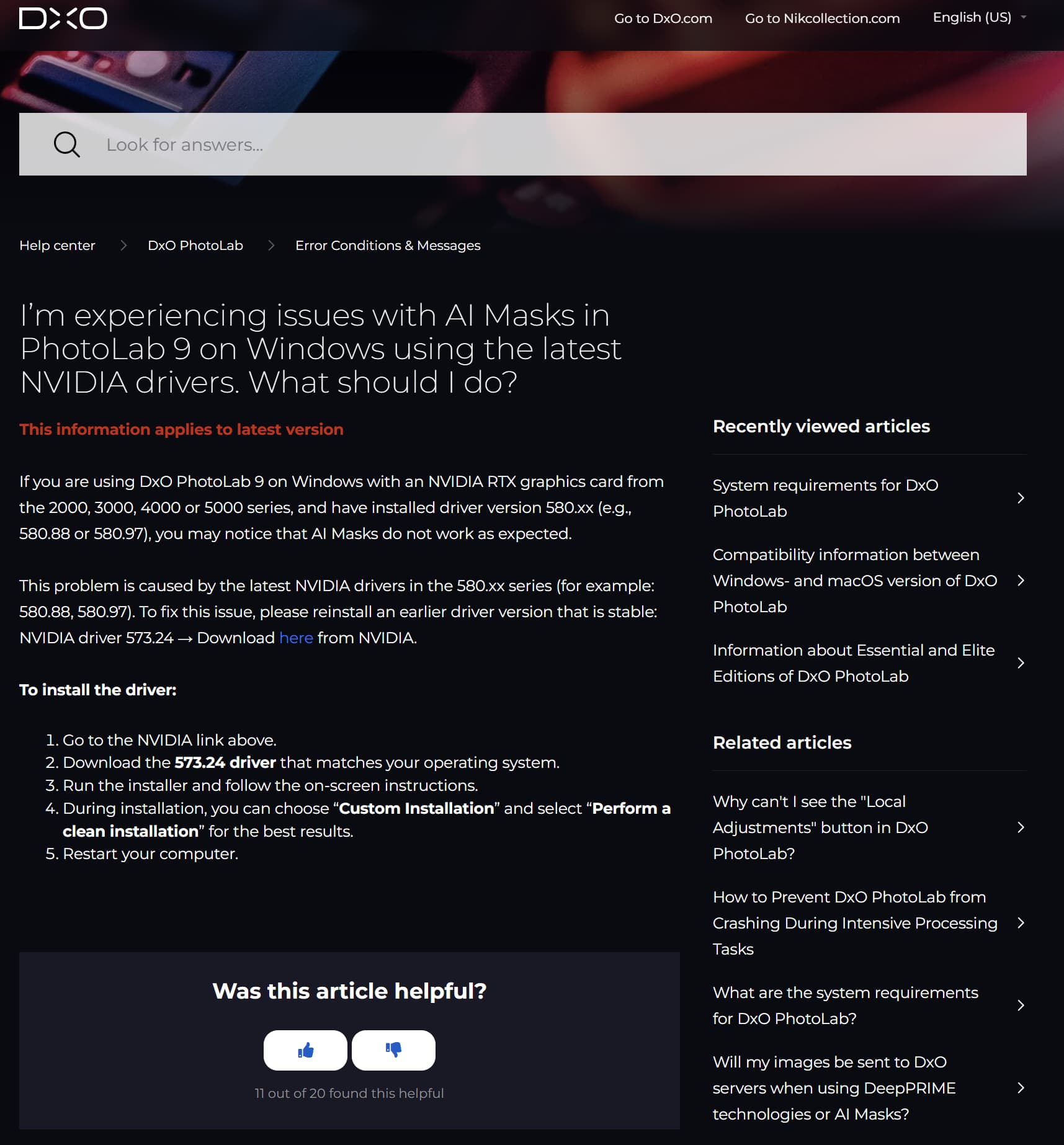
The problem though is more severe that this because this recommendation did not solve this issue for both me, Mark an others running some older cards.
As I wrote:
My earlier version of the driver was 580.xx for my Nvidia Geforce RTX 3060Ti.
I was recommended the 573.24 which is a non-existing version for 3060 Ti in my Nvidia interface.
I tried a few others witch not solved the problem - since they crashed during compatibility test during installation process.
Finally i found a pretty old version from 2025 at least and close to the recommended in version code. In my case version 572.83 which seems to have solved my problem
That line about the latest driver is just standard boilerplate. Obviously in this case it is not accurate. Do you really believe that DxO wasn’t aware of various issues before the release?
Mark
As a general rule graphics solutions utilizing shared RAM do not meet DxO’s minimum requirements.
Mark
I wholeheartedly agree. Even on my Mac Mini M4 Pro with 24GB RAM, Photolab 9 runs like a bag of nuts – something had to be rushed onto the market very quickly and urgently. Photolab 8 ran stable and fast, but Photolab 9 is simply no fun in this mode. I wish I had tried the demo version first…
1 Like
Blackmagic Design always requires the use of the latest drivers, software, and hardware in accordance with the manufacturer’s specifications for DaVinci Resolve.
Conversely, this means that software development is always programmed using state-of-the-art technology.
PL9 was obviously not programmed and tested with the latest Nvidia drivers, but rather with a very outdated driver version. Elsewhere, there was also the problem of a high base load of 5-7% in sawtooth format with Nvidia graphics cards, even though PL8 was not in use. Support and developers never found an answer to this.
How is it possible that no one at DXO noticed this and no one intervened? This approach is unusual and contrary to the practices of an entire industry. Blackmagic Design is more professional in this regard.
Milestones must be met, whatever the cost.
There is an advantage in being “the” first on the market to release a yearly update I guess. Earlier these releases were later in October from what I remember.
I don’t know but it is really stupit to release a new version for once packed with highly anticipated and for long missed features compared to the competition and totally neglecting the impact a stupid bug like this will have for bad will. This will be very costly for DXO because I will not be the only one hesitating to give them my money now right away. I will at least wait 30 days just to make a statement
A normal company will not shoot itself in the fot like this because it causes a lot of extra job to limit the damage but DXO isn’t really like others because they almost never pay any attention at all to what really happens in their own forum.
3 Likes
Well we for sure know what driver version DXO used when developing PL9 - It’s got to be the one they just urged us to back down to.
1 Like
I suspect that the GPU system environment at Nvidia and its competitors is under considerable software pressure from the major game manufacturers. Bugs at this interface must be fixed extremely quickly. It can be assumed that new driver releases are initially tailored to games, leaving applications such as Photolab behind to figure out how to cope. Why else would driver versions have an impact on standard GPU functions? It is also suspicious under these conditions that current versions are not functioning correctly.
1 Like
I did notice that nVidia offers two driver paths: one for games, one “studio”, so that might be their answer to that?
Trouble is, I do both with my machine and I’m not changing drivers every five minutes…
1 Like
It’s also possible that DxO consulted with nVidia to understand the reason for the problems, thus determining that temporarily downgrading the driver will avoid said problems until they’re fixed - either by DxO or by nVidia. Isn’t it telling that not a single mention is being made of issues with AMD video drivers? Who can say that this is entirely a DxO problem and not also an nVidia issue? Video drivers introduce new bugs, incompatibilities, and regressions from time to time. And there have been some doozies in nVidia’s history. I for one am just going to wait this out patiently. I might even wait for PL10 - but I don’t think it will be very long until PL9 gets the needed bug fixes.
2 Likes
In the DOP for AI masks only the mask general description, not the full mask pixel level. And as i see, for all mask is a similar manner.
Example: AI_MASK_02_01 described in DOP file (not my best formating, but i think its visible enough):
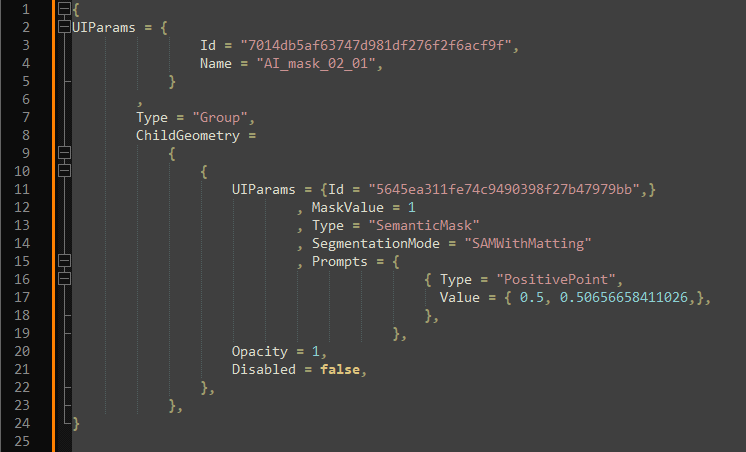
So, its in the DOP its don’t has pixel level info.
Its save the AI mask basics (like enabled or not, etc.) AI Prompt, etc.
Example for Brush, works in similar manner:
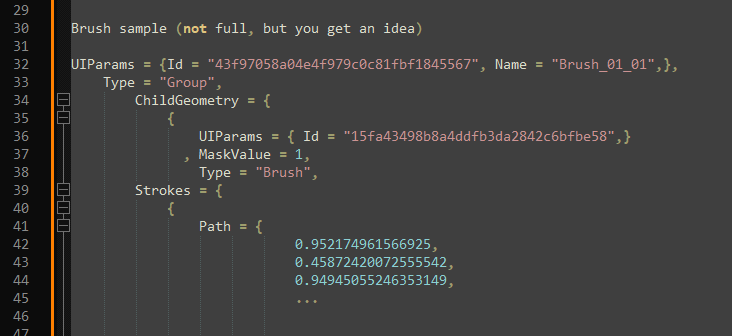
So, its seems recalculated in export, or at least its recalculated, or some magic happen.
What you suggest, its may works if its flatten all mask to one. However, i’m pretty sure that’s happen (flattening) before export, or at least in the very end of export. But its calculate.
As previously reported, I finally decided to upgrade my GPU to an RTX 4070 in early 2025, which was running NVidia Studio driver 572.16 at the time. I subsequently updated to 572.83, 576.52, and 577.00, most recently at the end of July. And I never noticed about 580.xx drivers until I read about it here …
I wonder on like this: possibility to setup/change separately for Editing/GUI and for Export the method, example screenshot:

I think its can be an acceptable solution (at least for me)
Personally I don’t care about the Export performance. Usually i export (to tiff) approx 20-30 photos in one session, like selected photos after one photo session. Even now during the PL export i do dish washing, clean up the flat…
1 Like
Thanks for looking it up. For the brush you can see they are saving the path of the brush. So I don’t know why they don’t save the AI masks as polygons, it is a common thing to do. It would solve all performance issues.
It looks like if you aren´t doing something else than in version 8 you´ll be fine. It is when using the new AI-mask features the bottle necks occur. As I wrote version 9 even seems faster than version 5 especially with Deep Prime 3 on my computer.
Not even needing the Loupe Tool anymore when we now can use Deep Prime even in real time in our previews is a true hit I think.
This was written in the Minimum System Requirements from DXO as can be read above. The word is VRAM isn´t it :-).

Even here “latest driver” is stressed.
I have said it before: I´m pretty tired to read “reviews/tests” from well known, important info sources on photography like Petapixel, Fstoppers, DPreview, Tony Northrup and all the rest of all these "stress testers and reviewers that fights to be seen and to become our source of information before we spend our money when they just don´t do their job properly. Is it really the case that none of them have tested to save/export or print? Well, let this case then be a wake-up call for all of them because this is nothing else than an intellectual meltdown for them all to be pretty ashamed off. Not one single of these sources has flagged these problems from what I know. There was just a big Halleluja-choir that turned out to be just one big stupid ignorant lump.
How can it be that all of them are so blinded by these new features that they miss the very basics when it comes to functions in RAW-converters which is the possibility to save processed pictures and print them??? It is almost like to sell people a sneak preview without save/export- and printing functions like some software manufacturers used to do back in the nineties - and still charge the full price.
… and when these problems get revealed the manufacturer DXO sloppily hands out some general instructions on how to solve the problems on their support page - that doesn´t even work for a lot of users having older gear. So those users are just left there to solv their problems by themselves or by the help from distant friends in that companies own by themselves totally neglected technical user forums. Shame on the management of DXO too. I have hard to see that they can be satisfied with this outcome and I feel sorry for all developers that have worked so hard the last year to get this AI-support in place when it all ends in confusion, frustration and unnecessary bad will.
4 Likes