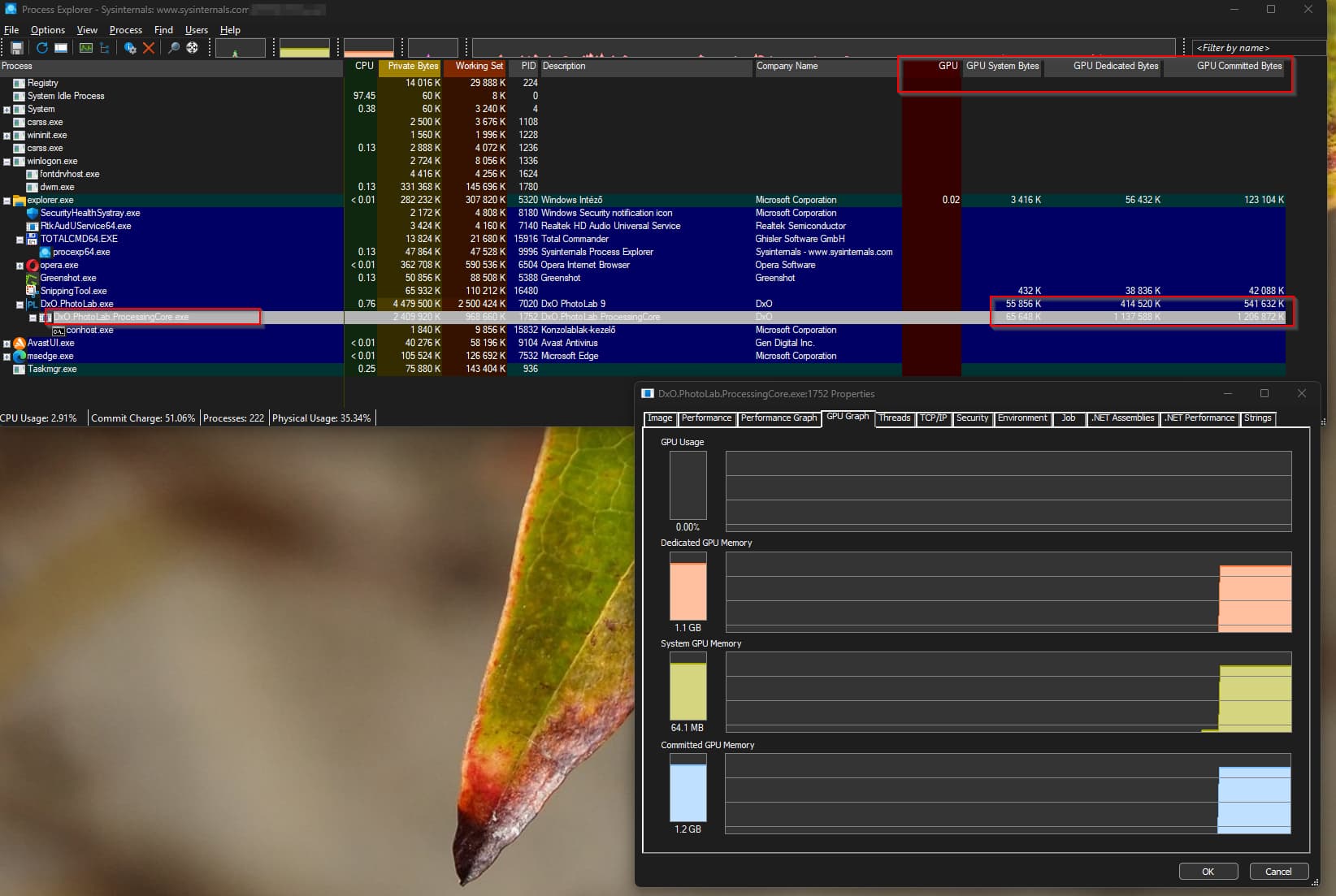
You can see the GPU usage a bit detailed (GPU columns need to add)
Seem interesting the “DxO.PhotoLab.ProcessingCore.exe” - its does the export.
If you kill (off course not under export) this process, its automatically restart - but free up its previous memory. But in other comment is describe may why this less important (memory), i guess its may more complicated as its seems first → but your investigation/points i guess is right!
I guess, may i find some explanation for ‘internal error’ and similar. At least i think, and for least a few cases.
In the release note, few thing definitely change from 8.8 → 9,0. In one point the change may explain a few thing.
Minimum requirements.
8.8 - AMD Radeon RX6000 series with 4GB of VRAM with latest drivers
9.0 - AMD Radeon RX6000 series with 6GB of VRAM with latest drivers
8.8 - Nvidia RTX™ with 4GB of VRAM with latest drivers
9.0 - NVIDIA RTX™ with 6GB of VRAM with latest drivers
Hmm, same GPU series, +2GB in GPU direct (VRAM) memory (4GB → 6GB). It seems may a not so good news whom has a 4GB GPU - as i have a 4GB Radeon RX550.
But why the 4GB- > 6GB ?
I not want to provide a hundred screenshot about GPU memory usage (Windows 11) - so i summarize my findings / ideas:
CPU only everything works fine, AI subject detection, etc. Off course performance as it is.
PL use for AI masking modell about 3-4GB of GPU memory
For DP3 the AI noise reduction model may use 1-3GB (seems like 2GB), seems XD2s may use less GPU memory.
With GPU - IF - you have only 4GB or 6GB VRAM, seems problems started
If you have even 1 (one) enabled AI mask, the ‘AI mask’ model loaded to GPU memory and STAY in GPU VRAM there. Seems AI model memory size is 4GB.
I guess 4GB VRAM its enough for AI mask quality and performance. Photos has limited sizes (pixel count), so i guess, its not hundred billion parameter (at least not for now)
In few photos i see whole AI model runs in the backgrund, as its just select ‘people head’, its some cases also select hands, etc. So its runs subject detection, everything.
I guess 'Subject", ‘Sky’ and similar pre-sets takes more GPU VRAM memory then if you select the subject with selection - as its need to scan the whole image. May that’s the reason why with my 4GB VRAM its never find any subject, sky, with one exception: hair (may its easier to find, may works only in a partially bald people)
AI models far-far-far faster if its runs in GPU VRAM (and NOT in computer main memory). So, i guess performance is the reason, why only GPU VRAM used (and not GPU shared memory, as it can be far-far slower, and may not all model engine / GPU driver support shared - at least in not encounter with this in my computer)
If you last selected photo has AI mask, when PL starts (in this last photo), AI mask model automatically load to GPU VRAM, So automatically use 4GB GPU VRAM (as the photo has at least one enabled AI mask)
If you last selected photo Dont has AI mask when PL starts (in this last photo), AI mask model NOT loaded to GPU VRAM
If you has 4GB GPU memory, seems AI masks itself its on the limit on works.
But if you want (with 4GB VRAM) AI mask AND also export the photos ->Export crash. I guess, its just simply runs out of GPU VRAM - AI mask (4GB) + Export (2GB) > 4GB.
I guess, GPU with 6GB VRAM its a minimum for AI mask (4GB) + Export (2GB). I guess, even its on the edge.
Summary: seems the 4GB of GPU VRAM in the edge of AI mask model, and not enough for export if you has even 1 (one) AI mask - as AI mask modell loads up approx 4B of GPU VRAM, and stay in there, and don’t leave any free GPU VRAM. May, just may GPU with 6GB of VRAM is near to edge for AI mask + Export.
Disclaimer: All based on my computer: 32GB memory, Ryzen3 CPU, 4GB VRAM pretty slow Radeon. All on PL 9.0 version. Due as i cant export if the photo has AI mask, i cant investigate Export performance (layers, exported photos amount)
Please, don’t throw a stone on me, i try my best, i guessing based on my current observations on PL 9.0. Any correction are welcome.
Stenis
(Sten-Åke Sändh (Sony, Win 11, PL 6, CO 16, PM Plus 6, XnView))
43
Stenis
(Sten-Åke Sändh (Sony, Win 11, PL 6, CO 16, PM Plus 6, XnView))
45
I don’t see the same things at all yet. In fact my system with Photolab has never been faster.
I have a computer three years old:
ACER with Intel 12th gen 12700F 2.10 Ghz
16 GB RAW
Nvidia Geforce RTX 3060 Ti with 8 GB
I just made an export of 19 26MP Sony ARW (to my local SSD):
I exported from Photolab 9 with Deep Prime 3 in JPEG with 100% quality.
(Normally with PL 8 it used to take about 7 seconds per picture.)
Now it took 45 seconds or just 2,37 seconds with that test batch.
I also exported the same 19 files with Deep Prime XD2s
It took 57 secounds or 3 seconds sharp.
So Photolab 9 with Deep Prime 3 seems to be three times faster than before with PL 8 and Deep Prime XD2s
I also have turned on “Deep Prime rendering” in “Preferences” and “high quality previews” too and those just take a second to render on the fly, so I´m really super happy so far. A little surprising really. It saves a lot of time not having to turn on th loup toll and move that rectangle to the area you want to inspect.
I guess I also have to test to export a few pictures with a lot of AI-masking too in order to see how that might affect the exports.
Since I have used iMatch DAM quite a bit with both AI API from Open AI and Google and both by calling them from the providers services and running for example Googles Gemma 3 with Ollama locally I know that running these models locally takes some extra memory on the GPU-card.
In these cases Gemma would run on 4G but could not match the bigger external models från OpenAI and Google (Gemini 2.0 in this case and Open AI GPT 4o and 4.1.)
If you should have a chance to run the bugger models locally you had to have a card with 12 GB. My 8 GB was not enough.
My personal opinion on that is that I would never run AI locally since the cost of using for example OPen AI 4.1 and 4.1-mini has been very reasonalble. It costed med about 40-50 cents for 1 miljon tokens and in my case it has been enough to get Open AI to analyze 1000 pictures and provide them with both Descriptions and 6-8 keywords per picture which has saved me litterally weeks of jobtime.
Stenis
(Sten-Åke Sändh (Sony, Win 11, PL 6, CO 16, PM Plus 6, XnView))
46
Now I have tested to export pictures containg just a limited number of masks and that doesn´t work at all. I get "Internal Error! and the whole machine locked so hard that I could not even kill the process in the Task Manager. The only thing that helped was to press the Off-button on the computer.
These exports crashes all of them. So. I definitely agree. Photolab is not ready yet for use. One thought strikes me though: Haven´t one single reviewer exported anything at all containing masks??? Are they just blinded of what they see on their screens.
So, exports with PL 8 style adjustments seems to work fine but as soon as I add some of the new AI-layers it crashes. This is really a severe problem. Do all of us have to get GPU-cards now with 12 or 24 GB memory to cope with the real demands of this applications or it it something they might be able to fix - and why releasing this version and taking such a risk with the bas will it will generate.
I will give them a day or two before I uninstalls this version.
In other hand, that’s how current AI models works. Eat up every resource, only fast if runs on GPU vram. Current Model sizes also that what is this moment.
I don’t think it’s a direct issue with the application itself, that how AI works localy. Try to provide quality, so the model large. Try to fit some memory size, so model still need to be small. Need to be fast, so need to use GPU with all their issues, and you have GPU memor amount, what you buy… Can be quite costly that part.
I’m wondering for this use case (raw photo processing, not gaming) if a person isn’t better served with more VRAM even if the GPU is slower in terms of processing speeds. PL seems to have no ability to break down larger tasks into smaller pieces and do them sequentially. From what I see it’s all or nothing - if it can’t allocate all the memory it needs, it aborts. And it doesn’t seem to know how much this is in advance. When I go to export it starts crunching and you can see the GPU ram usage climb from 0 to 4GB over about 5 seconds and when it hits 4 (all I have) then it errors out. This probably varies a bit from image to image and depending on what masks and adjustments you are using.
But the point being… the recommended system is RTX 3070 w/8GB ram. I have to wonder if a RTX 3060 w/12GB ram wouldn’t actually be better (and cheaper). If an export can’t run at all, it doesn’t matter if it would have theoretically been 20% faster. But having that extra 50% of ram should ensure that many more exports have a chance of executing in the first place.
The reviews I’ve seen were all developed using a beta build of PL9. Not one mention of glitches - I’m supposing this is because the reviewers expect that the glitches will be sorted out at release time or shortly afterward. For all we know, DxO gave them some guidance along with an NDA.
I hope that the release notes give a true indication of what will be needed when the bugs are fixed (either in PL9 itself or in updated video drivers). That is:
Minimum - For DeepPRIME 3, DeepPRIME XD3 X-Trans, and AI Mask:
o NVIDIA RTX™ with 6GB of VRAM with latest drivers
o AMD Radeon RX6000 series with 6GB of VRAM with latest drivers
o Intel ARC with 8GB of VRAM with latest drivers
o Intel® AI Boost for Core™ Ultra
Recommended - For DeepPRIME 3, DeepPRIME XD3 X-Trans, and AI Mask:
o NVIDIA RTX™ 3070 with latest drivers with 8GB of VRAM
o AMD Radeon™ RX 6700 with latest drivers with 8GB of VRAM
seem PL9 is the worst release from DxO, all i can read is negative feedback as its worst since maybe PL2. not even willing to download the try out even though new features seem a nice welcome.
It’s stable on my Mac M4 32gb. I’ve had no crashes at all. Exports with AI masks do take a bit longer, but they would, wouldn’t they? I’m very impressed with the new features and I’ve bought the program upgrade. Any other Mac users have issues?
Just looked at the system specs and the recommended requirements have increased significantly on Mac. Lr has a lighter requirement. On this basis my 16 gig M4 is only the bare minimum and I certainly have no intention of upgrading just to run PL when there are equivalents out there. Time will tell but this does seem an ill conceived release.
Bonjour, j’ai à peu près la même configuration matérielle. Avez-vous comme Mairamartinsk désactivé dans les préférences le neural engine au profit du GPU Apple M… ? Activez-vous le seul rendu “Haute Qualité” ou bien le “Deep Prime” également ?
Yes but you have 48 gig ram, I would not expect you to have issues. My point is the jump in recommended spec from version 8 to 9. I have a 16 gig M4 and I feel is more sluggish. Usable yes, but not as snappy. The problem with Macs is there is no upgrade path except buying a new machine.
What is your Mac’s configuration? I don’t have any crashes. PL9 works, but it’s rather very slow as soon as I use the AI functions… My configuration: iMac 2020 i5 3.3ghz 6 cores. 24GB Ram, GPU AMD Radeon Pro 5300 4GB, macOS: 15.6.1.
I guess the AI models runs in this way - you can’t stripe down. I guess its one issue with all AI model.
But yeah, some staging (“smaller pieces”) may helps out, i have no idea how. May smaller AI model works with less memory → but its also raise quality issues on masks, NR, etc. May more training (on the AI model) reduce the model size. I wonder on spilt some it CPU/standard memory, like: if you has <6GB VRAM, then AI Masks runs on GPU VRAM, Export (Noise reduction) work on standard CPU/RAM. Or something like: During export you cant edit photos - as for paralel editing and export in the same time require for editing part the AI Mask model in VRAM, and if editing disabled, its may save some VRAM (like unload AI mask after image rendered for NR) - but i guess is can’t work out in the reality.
As with CPU only everything works - at least you can do, but of course performance is as-it-is your CPU. So, in technically speaking DxO still provide the ability, what is nice (at least my point of view).
Quality may come with a peice.
Get a new GPU, 8GB look around 250-300 EUR at least even for the cheapest ones - and prices for a fast/good one running up quickly. It’s Expensive? For some its acceptable, for some its need to save money for many months.
I also wondering, how PL users GPU percentage on GPU/VRAM? May <6GB is just 1-3%? I don’t think.