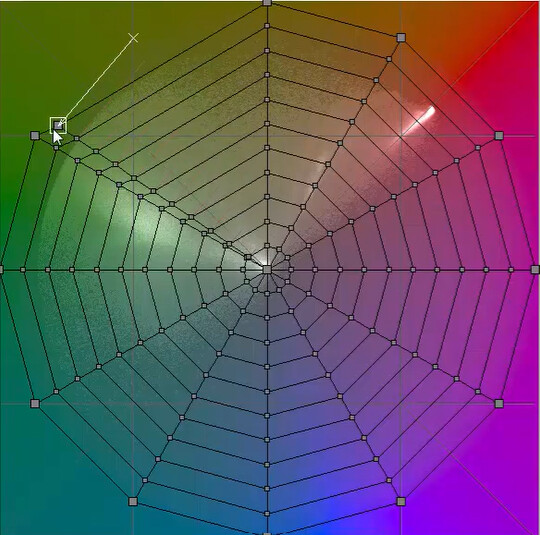
Will a tool like this be considered in future updates of DxO? I find really limiting not being able to morph the colour space in a top of the line software like DxO. Honestly creative colour editing it’s the only really lacking part in Dxo, for everything else is superior to the competitors.
The screenshot comes from 3D LUT Creator, but also Davinci Resolve and lightroom has something similar. This option is far superior compared to normal hue/sat sliders for specific colours frequencies because it applies transformation in a smoother to the whole colour space without having to mask the hues like in DxO colour panel, but most importantly this approach returns more consistent colours in photos with slightly different exposure which I’m never able to do with vanilla DxO.
The HSL Colour Wheel does the equivalent function in PL. You can fine-tune the colour ranges affected. It is just a matter of practice but probably depends on what you are used to.
Maybe it’s me not being able to use the DxO wheels properly, but I can’t reproduce the same behaviour with the DxO wheels.
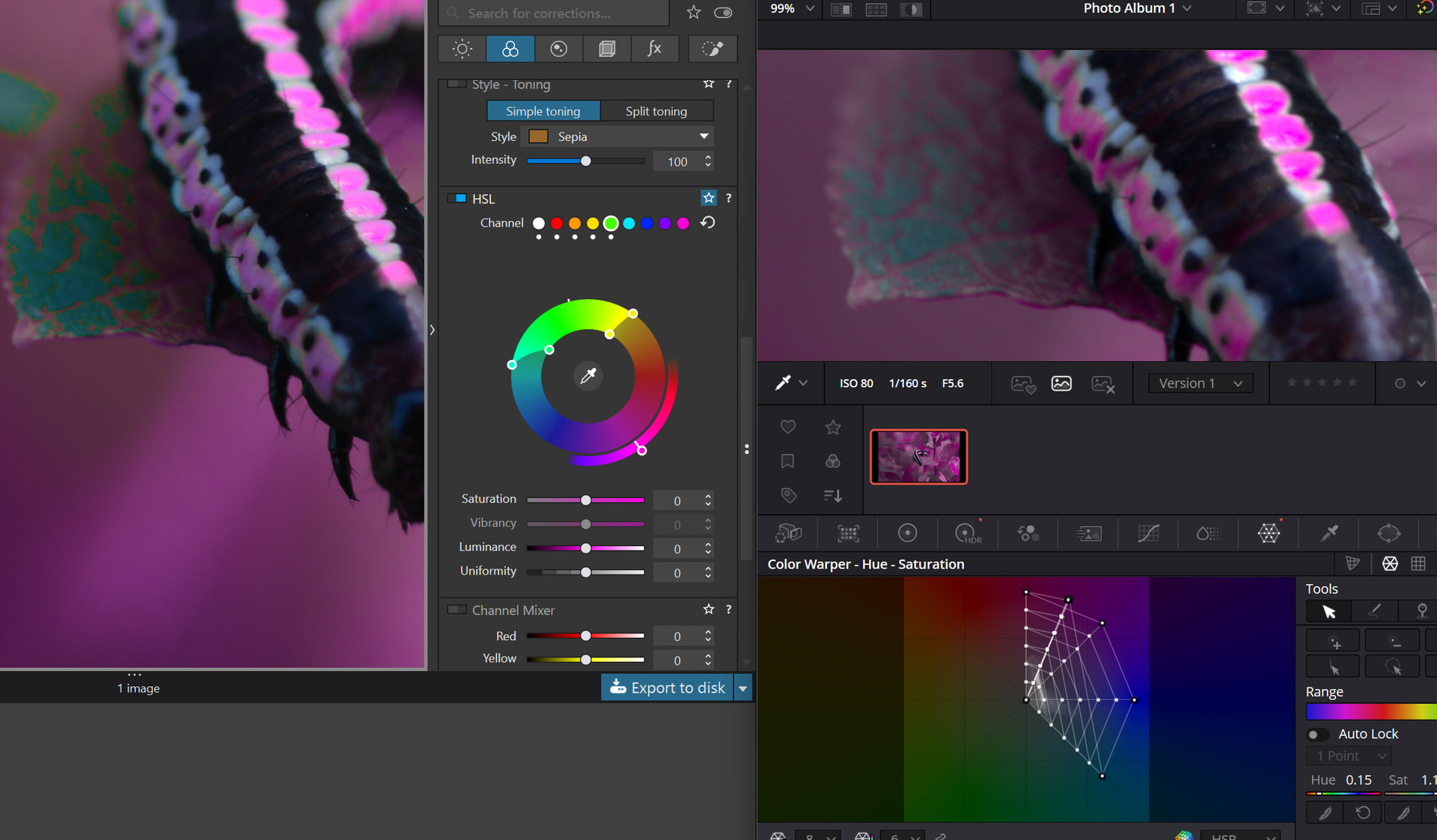
Check the image below, I did an exagerated hue shift to show my problem:
you can see particularly well the issue on the leaf or on the edge of the magenta portion of the caterpillar body. when I shift some hues (now I shifted red, orange, yellow and green all to magenta) with the color warper on davinci resolve there is never any visible higly contrast edge between shifted and unshifted hues, when I do it on DxO I can clearly see the edge of the hues that are shifted. As a workaround I tried to extend the smooth handles in DxO wheel but this makes the hues overlap and the shift happens twice on neighborhod hues which is not ideal.
You might benefit from experimenting with the Uniformity slider of each colour. It’s a great way of e.g. pushing aqua colours towards blue or green, which I really like for my editing purposes.
Unfortunately it’s not intuitive - there’s no way of knowing what way a “plus” or “minus” setting will do to your image besides practice and experimentation. For example a “minus” uniformity on green will drag it towards more yellow tones. There’s nothing to tell you this though, you just have to try it and see what you like. Sometimes it’s obvious, sometimes not.
I agree that more robust colour controls would be welcome.
Thanks for the tip. I’ve tried playing with it, but I honestly can’t understand what it does, looks like it always behaves differently from picture to picture based on what colours are around the affected areas, which might be good when you edit one single picture, but when you batch edit a bunch of them, it is unreliable and gives always slightly different results, and considering how sensible human eyes are to even the slightest colour shift in pictures I can’t find an use for it.
My workaround at the moment is using DaVinci Resolve, which is a semi-free video editing software that recently added a picture raw development module) to create a custom LUT using the ultra-advanced and reliable colour mapping tools it is well-known for, then I import the LUT in DxO and I finish the editing there with the tools where DxO excels (denoise, and local adjustments in DxO are unbeatable rn).
I do this on one sample photo of a big set, and even if I move from one softwre to another it is still faster than tweaking picture by picture with the DxO natively implemented HSV creative wheel. It works, but using only one platform for everything would be ideal, and this minor addition would make DxO honestly perfect and absolutely unbeatable.
Yeah that’s a pity because other than creative colour grading DxO is really my favourite photo editing tool.
Anyway I think DxO should really work on this creative colour grading workflow and add more advanced tools and panels such those in Davinci Resolve because Davinci last year added the photo developing workflow, it is still immature for some aspects, but way ahead for some others, and they are planning to extend it in the next years and when they will do it DxO will be at risk because Davinci is not only already better for some things but also free for the most part…
No, don’t create a new feature request unless you have to. Much better to add votes and comments to an already existing feature request that has accumulated dozens of votes and can accumulate more: