Unless one is into repro, accuracy doesn’t really matter imo.
As for learning, one way is to just play with all those sliders, boxes and stuff and see what they do. I’m also very cautious with “smart” tools, they often represents someone else’s intentions and can further interact with other (non-smart) tools, which makes their effect more difficult to fully understand.
PhotoLab leaves a lot of room for working in one’s preferred ways, eg. smart lighting vs. selective tone vs. tonecurve.
I’m seeing your question after you’ve received several answers (I no longer use DPL regularly & was just checking the news). So I’m not sure this is helpful, but I hope so.
I agree with you that the reds are too prominent in the DXO “Generic” color rendering for the Q3. You can ameliorate this a little by playing with the “intensity” and “saturated colors” sliders.
A better solution is to use your own color profile (.DCP file). I used the Lumariver Profile Designer (https://www.lumariver.com/) to create a profile using an X-Rite ColorChecker McBeath card but you can use other targets, too. You can also make a dual-illuminant profile with this software (e.g. for temps of 5000 and 6800). I use this profile in DPL, Lightroom etc.
A quick test just now with my Q3 profile showed an entirely different color rendition to the DXO rendition: one that, to my taste, is much truer to life.
I agree with your conclusion that the DxO Standard (LQ3) preset is not the best starting point for the OP’s edits. Yes, that preset brightens the underexposed image, a big improvement. In the process, however, it also seems to introduce a problematic color shift. The OCO preset and the Neutral colors preset would be better starting points. And, as suggested, custom dcp profiles would be better yet. I’m happy that you were able to test this more rigorously than I was able to do.
I do not own the LQ3, but I do have the LQ1 and have tested its DxO Standard preset in some detail. That preset introduces an orange toward yellow color shift and I long ago abandoned it in favor of the Neutral colors preset or my own custom dcp profiles.
Sometimes, depending on the image, these color shifts are not that big of an issue, but sometimes they are (and to be clear, I’m not talking about repro work).
except yours which relates to the camera/lens profile
and your corrections for Crop, Distortion, and Perspective.
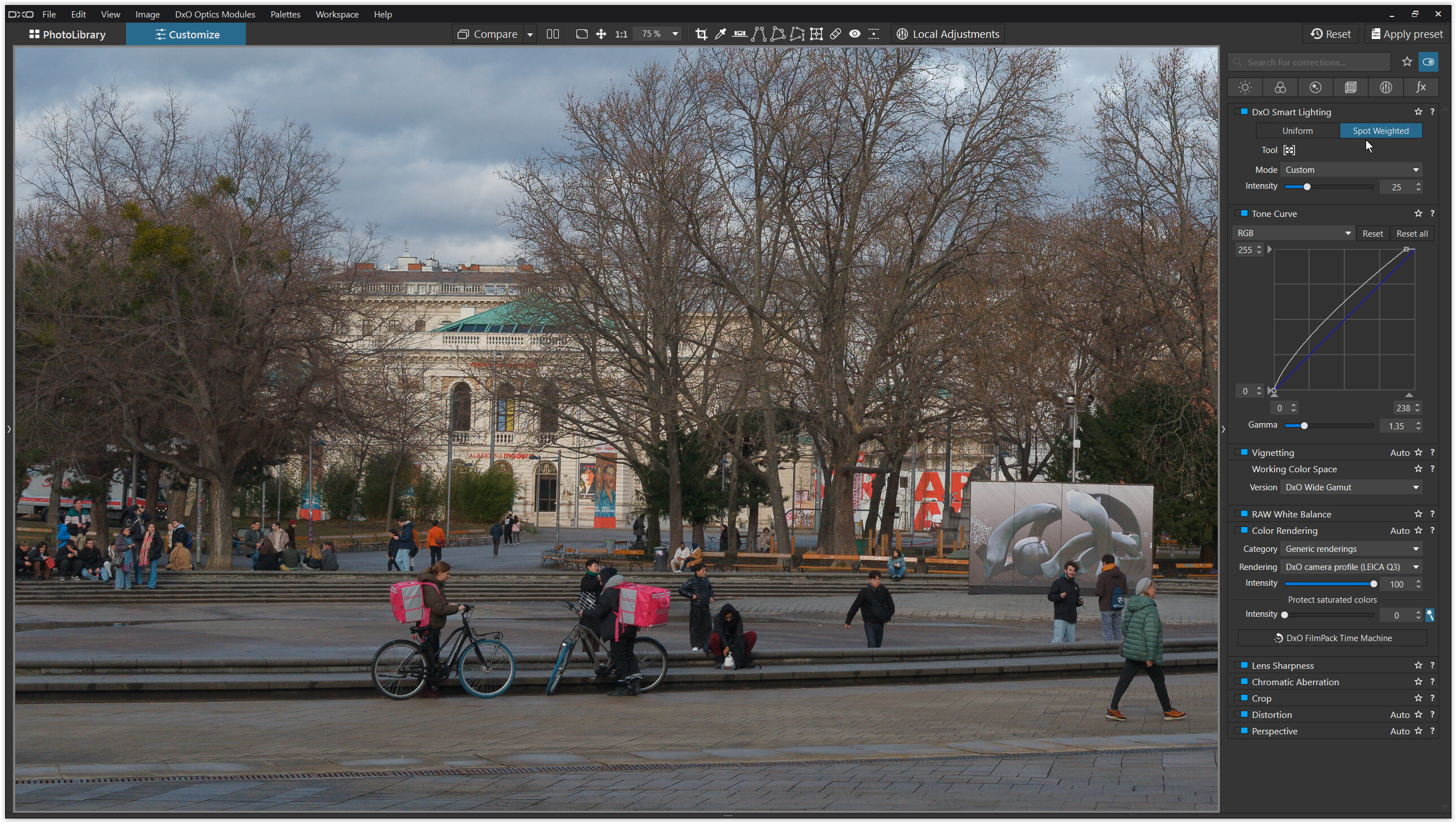
Then I set the white point (ToneCurve), brightened the pic (Gamma) and used DxO’s Smart Lighting/Spot Weighted to adjust contrast as well to brighten up the area with the folks
( click on Tool to see the boxes ).
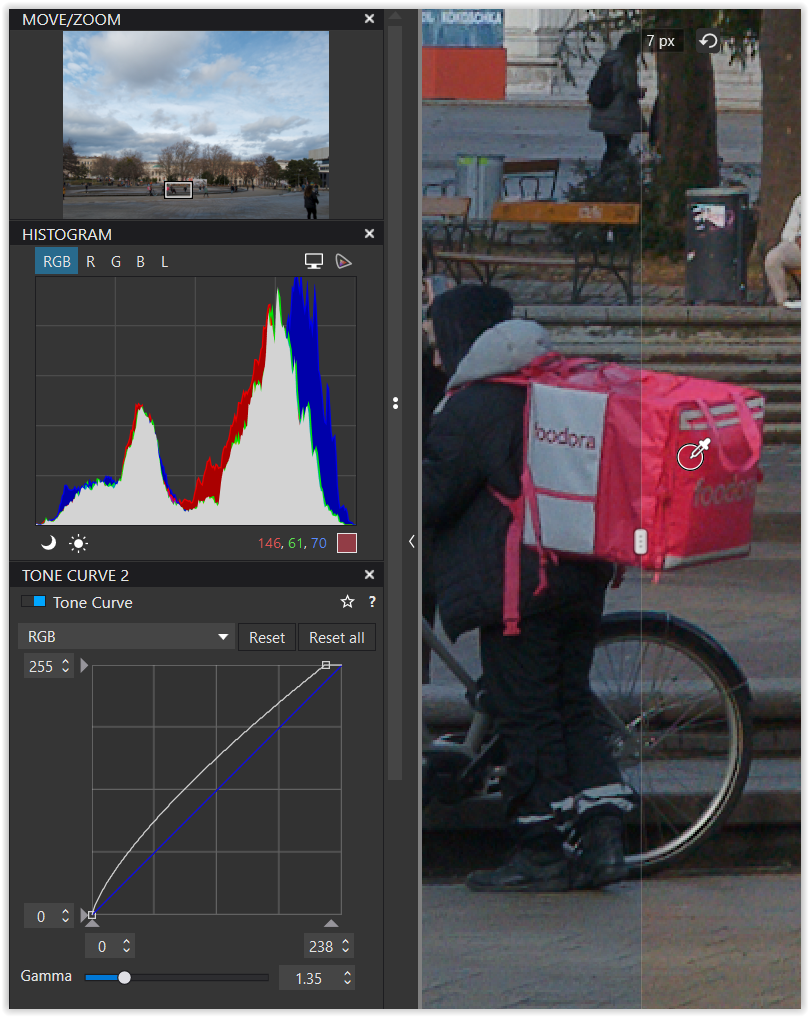
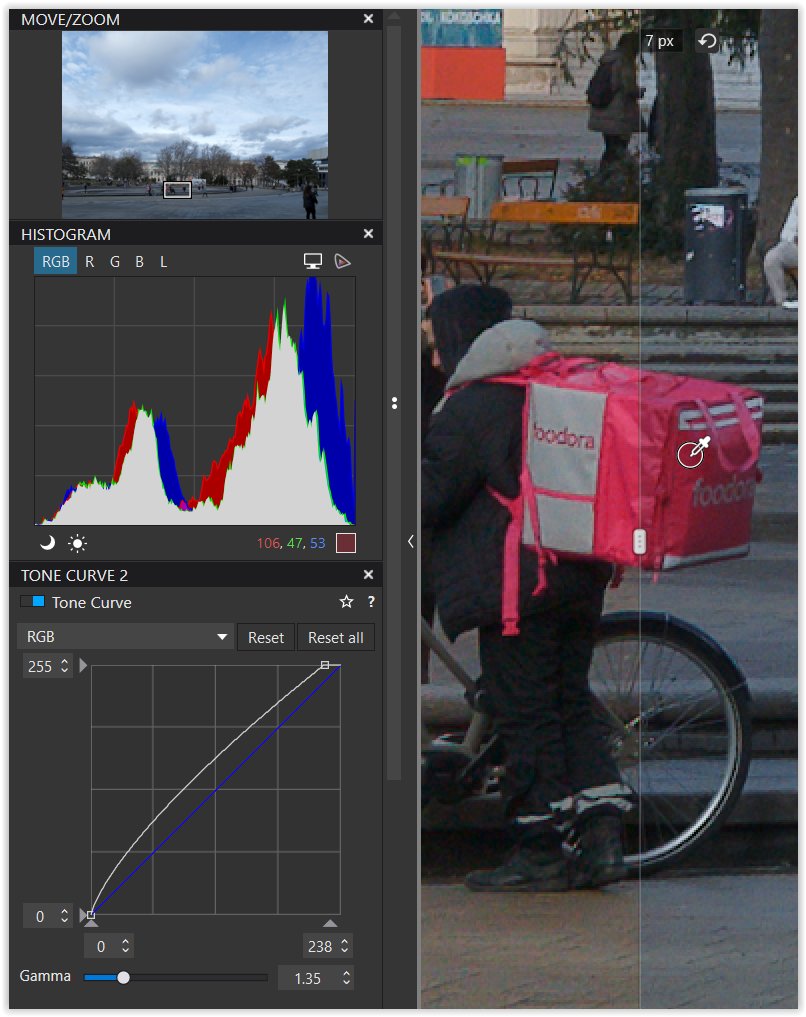
The screenshot shows most of the colors in the image and I can clearly distinguish the different shades of red, with “red” also serving as a signal/warning color.
( checked here when the screen is set to sRGB/D65, while when calibrated to AdobeRGB or Native colors become more intense )
A quite different question …
if the rendering is accurate (in the sense of repro work)
and / or do you like it?
Just experiment to find out and have fun. – You’ve got a lot of proposals.
@ Peter, thanks for having a go! I am not sure I feel confident in creating my own profile. The interesting thing is that unless colours like this are involved, I do not find any problems with the PL Q3 rendering. Mostly I am not doing documentary repro work, but I do seem to have a good memory for colours and find these particular hues irritate when inaccurately reproduced. (I used to hate Kodachrome for the same reason!)
@eriepa: Yes, orange/yellow – I found an example of that the other day; but I managed to tame it. I will try the neutral colour preset.
@Wolfgang: I think you have done pretty much what I did, but I did a bit more of it. The colour of the Foodora bags is a little lighter in life. So the answer to your two questions is “no.” Sorry!
Now that I know a little of what I am trying to do, I feel more confident in experimenting.
But there are a couple of things that I dont like about PL6:
Firstly, when I delete a .dop file, PL still remembers the changes. I now know that this is because it keeps its own database. I would expect to be startng again with a clean slate.
Secondly, I usually save my changes as a tiff and then polish off in Photoshop, saving as a jpeg. This ends up in the same folder as the other files, and even though I dont make any changes to it, when I view it in PL using the Photo Library tab, PL generates a .dop file for it. Why???
I will continue to study and learn from the good advice I have received here. Many thanks to you all again!
Not a fix, but something you might find useful. Before you edit a file for the first time: in Edit Preferences, set Auto - apply Presets (RAW and RGB) to 6 – No corrections. Going forward, whenever you hit the Reset button it will take you back to no corrections applied, your “clean slate.” Cheers.
But the problem doesn’t only occur with Leica Q3 and Photolab 6. Unfortunately I can observe something similar with Photolab 7 and with RAWs from various Fujifilm cameras (eg. Fujifilm x30 in YouTube SampleVideo) …
It is disturbing to read that similar problems are now being reported with Fugi andNikon raw files.
Even more surprising is the lack of complaints on other fora. Is this simply because the colours/hues that I am complaining about are rarely encountered? This may be so, given that it has taken me two months to encounter a problem. Up to now all the colours on photos from my Q3 have been processed acceptably, as I expected.
Love this: “be careful - did you see that he wrote “The reds in Leica is to die for” … I’d take a life insurance before viewing that ”
As written: It is not me who wrote that - it was a fuji-photographer who tryed to make a film simulation from the Leica-colors, but he could not exactly get the red.
The Q3 is new for me, and I have not some pictures worth showing yet, but I still really like the reds in Leica.
But to get it, my experience is, that I have to have good side-light (sun, not tryed side-flash, yet).
My point is just: I think it is a bit interesting that some people love the Leica-red and others want to change it.
… we simply want to have harmonious and really suitable red tones and colors - whether from Leica, Fujifilm, Canon, Nikon or whatever cameras. When I select a camera profile or a film simulation in Photolabs, I expect that it will be reasonably consistent and that I won’t be given some colorful nonsense. DxO promises to “deliver natural and accurate colors” in its Photolab advertising, and that’s exactly what we want. Adobe Lightroom and other products show how it could work… - for example, Lightroom’s Fuji Velvia Profile is also the same as the Fuji Velvia camera profile and Lightroom Fuji Astia Profile is also the same as the Fuji Astia camera profile,… a “neutral” profile also delivers really neutral colors in red areas and not something really bright or supersaturated magenta.
OK, perhaps I misunderstood OP ? but for me it does not always have to be “natural and precise” as we see it with our eyes - e.g. we do not see the same, and if an artist - it be a painter or a photographer - can make the reality a bit more beautifull, than the naked eyes see it= It is fine for me (of course there are limits), but I understand your approach to DXO color science.
It seems to me that I must assume that the colour balance of the ooc jpeg represents the best that Leica can do, and I am happy with that. On the other hand, I want to use the raw files (where necessary to bring out shadows, reduce noise and set overall level) and when these are processed by DXO PhotoLab, using their standard algorithm without intevention by me, I expect the colours to match those of the jpg. (There may be a difference in brightness, but this I can correct with exposure control.) In the case of the red/orange hues, as I have shown, there is not such a match. Other hues are not affected, and such a discrepancy has only happened to me with Leica Q3 files, Canon RP, R6 and other raw files that I have processed with PhotoLab over the past two years do not show these problems.
This has got nothing to do with artistic preferences, whatever they are.
There seems to be a consensus among those that have kindly contributed to this thread that my expectations and conclusions are reasonable.
To whom should I write at DXO to request that the basic Q3 raw conversion algorithm be revisited?




 - it was a fuji-photographer who tryed to make a film simulation from the Leica-colors, but he could not exactly get the red.