See this topic:
@TorsteinH I don’t normally sit and watch but that particular new element took long enough that it caught my eye!
The image is here, if I can find it again, @stuck beat me to it.
It is unlikely that you will have any problems because most haven’t, except me!
I was concerned that the DOPs I was using had been corrupted by PL9.x. so I took some I had been using on the 3060 system over to the 5060Ti and replaced all the test directories there and as soon as I started testing XD3 I got an error!?
It could be the build (OS) on that machine.
One way to test that would be to swap the GPUs, a somewhat tedious exercise but I might have to give that a try!?
So the weather is a bit colder this afternoon so I decided to open the computer cases to get a bit of extra warmth!!
At the same time I swapped the GPUs and reran the tests with the following results, both tests worked i.e. the 5900X with the 5600G and the 3060 with the 5900X.
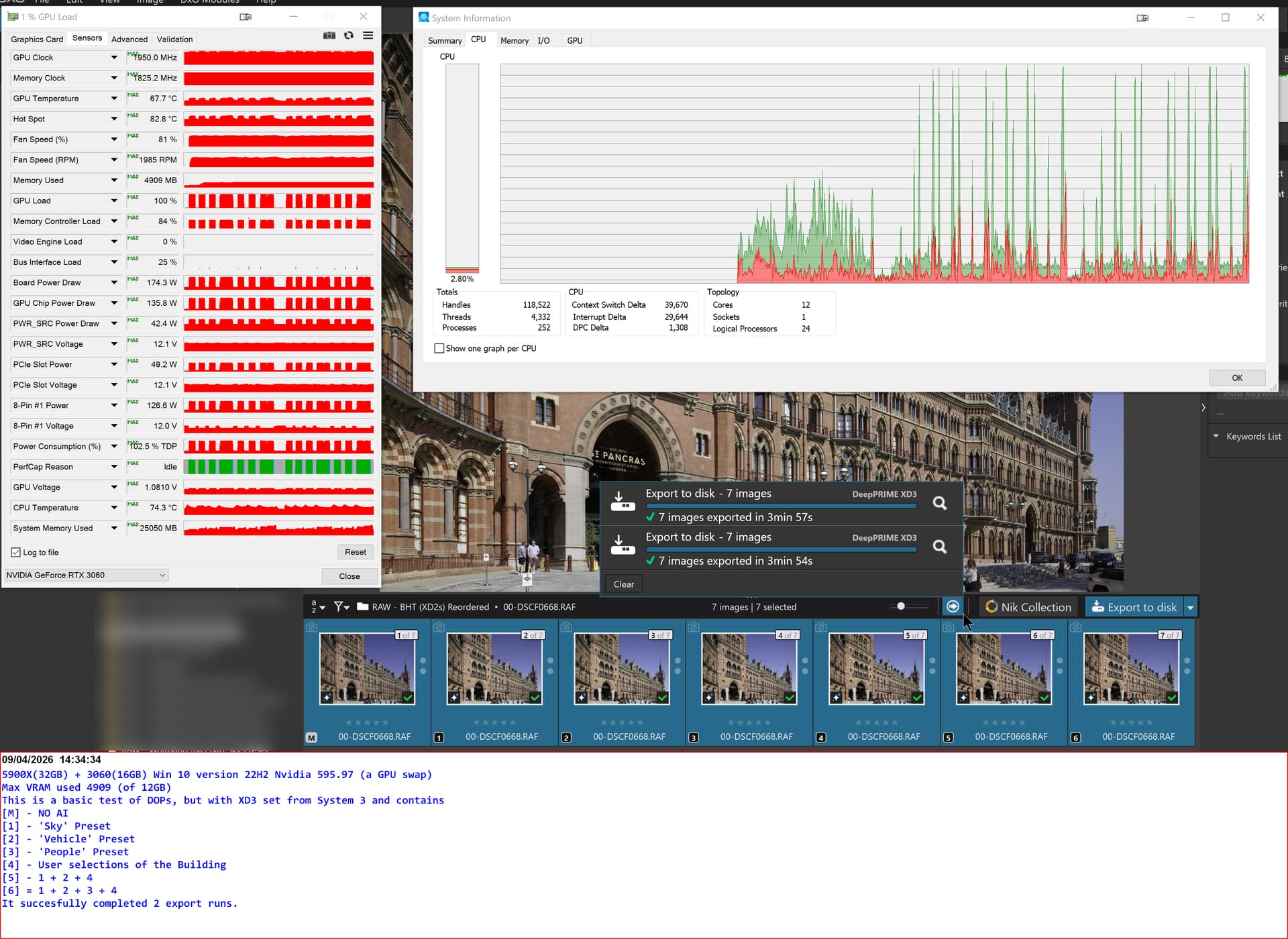
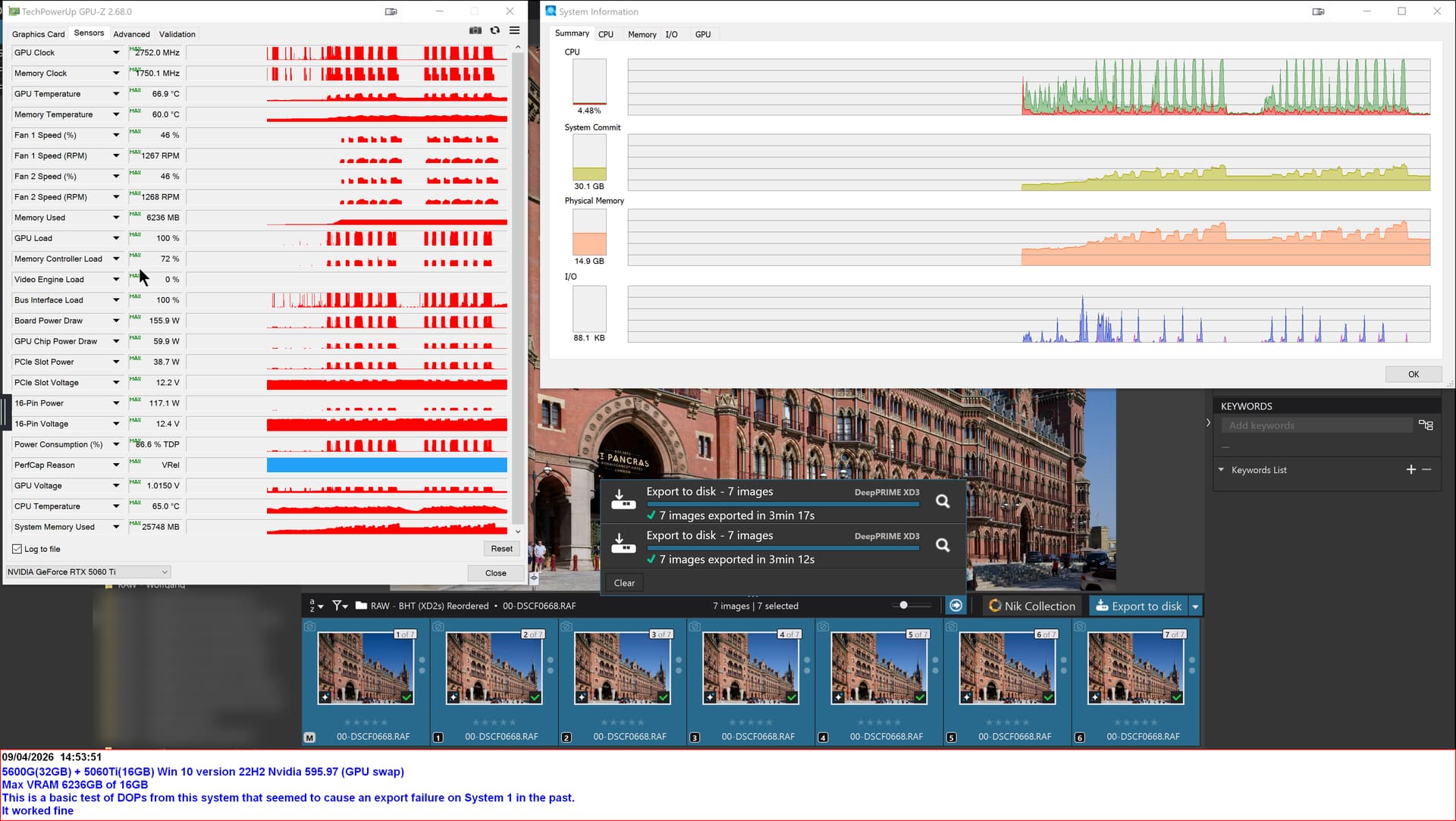
So work that one out!?
The 5900X is about 2 times the CPU power of the 5600G and the 5060TI(16GB) is about 1.7 times the power of the 3060(12GB)!?
The runs times were 3 minutes 57s (5900X-3060) versus 3min 17s (5600G-5060Ti), longer runs are needed for a better evaluation.
I believe you overestimate the extra computing power of 5900x vs 5600G, according to this site it’s a bit over 10 %: AMD Ryzen 9 5900X vs AMD Ryzen 5 5600G - Benchmark, comparison and differences
And by the way, the St.Pancras photo worked just perfect on my PC with a 5700G and a rtx5060TI 16GB
@TorsteinH That is for single core performance not multi-core performance.
From that site you quoted
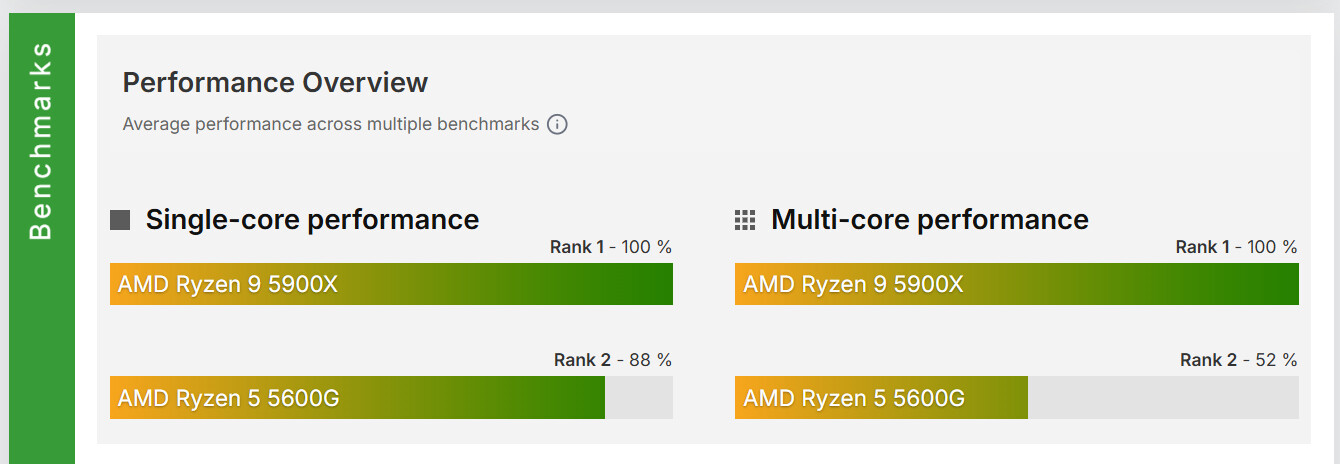
and other benchmarks put the multi-core performance at almost exactly 2 times.
Your hardware is very close to mine in specification but mine has consistently failed until the tests I published and that was with the 5060Ti working with the 5600G rather than the 5900X.
HOWEVER, I did further tests with the 5900X-3060 combination and things went downhill very rapidly.
I have a test directory where each edit is applied directly to a separate copy of the image, rather than to a VC of the image and ran that test on the 5900X-3060 twice, and got a new failure, the export worker was terminated after the first failed test and before running the second test which also failed.
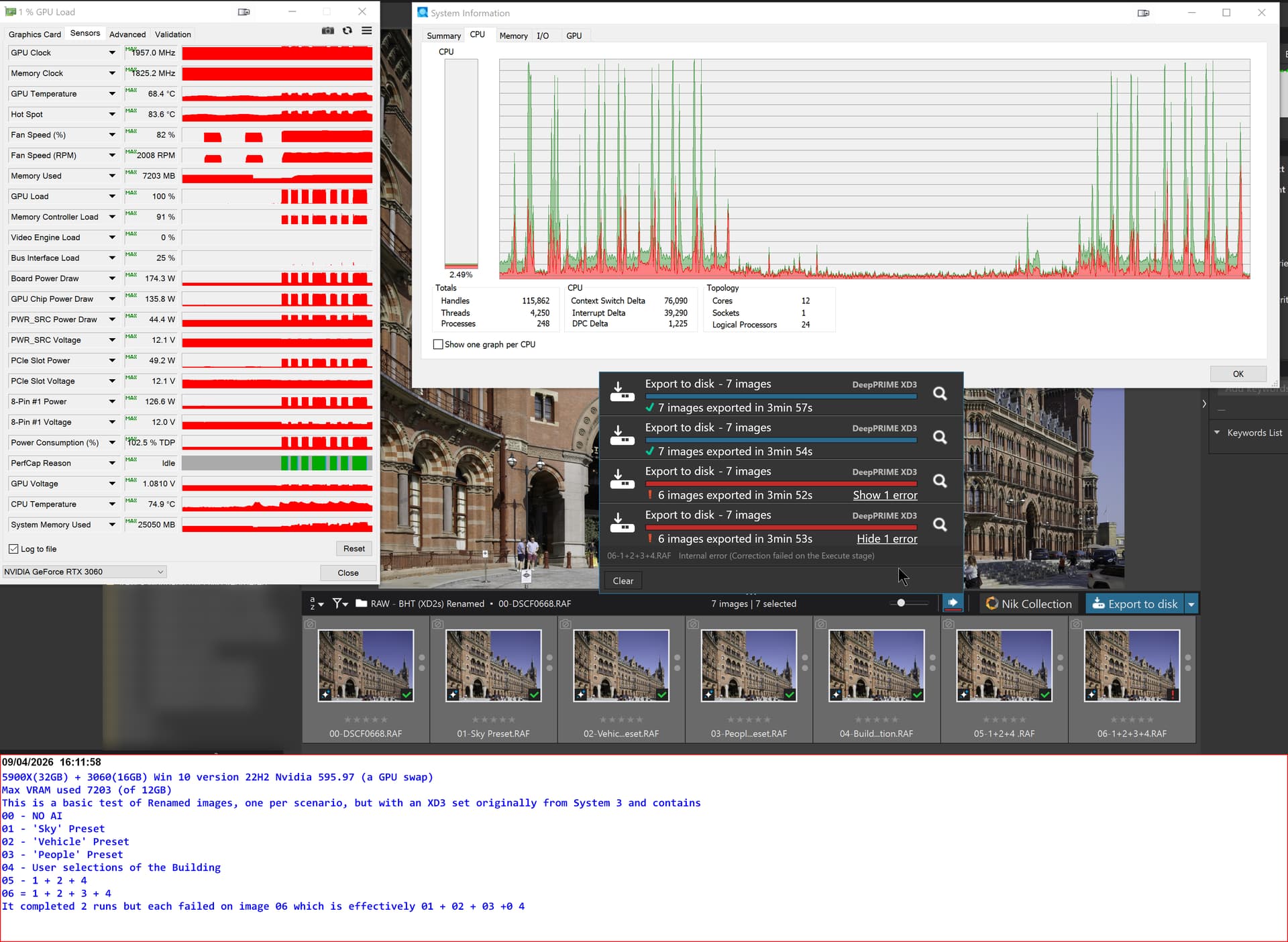
I then created a new test directory and that failed in a number of different ways. I will continue those tests tomorrow.
Update:-
The reason why the 5900X has such a limited impact on the overall time is shown in the graphs I submitted, i.e. the graph shows limited peaks of processor activity indicating that there is limited use of the processor.
So having a processor that is capable of being twice as fast if all cores are in use is fine but the CPU usage is limited and sporadic so much of that CPU capability isn’t being used for much of the time, i.e. when the GPU is doing much of the work.
I apologise for the “weird” colours in the snapshot, I have been struggling with a colour issue for some time on the 5900X with the 5060TI but the snapshots taken with that combination appeared fine when viewed on my other machine(s).
However, swapping the 3060 back into the 5900X, where it was fitted until the 5060Ti displaced it in September. has made the problem even worse and the snapshots are now “contaminated” as well!
Nice to see support for W10 22H2 which I am currently still running under MS ESU scheme.
However, in regard to ML Support? I was under the impression that you needed to have a suitable CPU as well….though perhaps not necessarily?
Well, I will install 9.7 in due course see what change there is in the ‘Preferences’ setting and how controllable any changes are possible??? Currently under PL9.6 it says “Compatibility Mode” and greyed out.
So it would be good(?) if MS ML Acceleration can be leveraged just by the OS and the GPU?
Edit
@Stenis thanks for the post & information but FWIW I get Win update reminders about W11 as it is deemed compatible & ready for W11 installation…………………I was am/was just not ready to go ahead and ‘let it do the W11 update’ at this time 
Oh, again FWIW to enroll on the ESU I needed to be logged in to my MS account but shortly after I switched back to my ‘local account’ (Note ~ even on my Dell Ultrabook which came with W11 Pro I was obliged to be in the MS Account to register W11 but that too is only used as Local Account).
No you don´t need to live up to the MS/Intel “upgrade compatibility rules” to be able to upgrade to Windows 11 and you don´t need to be stuck with Windows 100 forever on your old computer. That is something you still can bypass pretty simple.
Just download the Windows 11 ISO and the RUFUS-program and put them on an USB-stick. Also look at a relevant Youtube-upgrade video concerning how to use RUFUS for performing this upgrade (You ned to know how the filesystem of your computer is configured. You also have to check your BIOS and configure it to boot on the USB. Be sure not to use a Microsoft User Account. Use a Local User.
Good Luck! I did this for some time ago because I refused to throw away computers because Microsoft and Intel loves to force miljons of users to buy new computers and scrap still highly functional machines because they happen to lack a certain chip.
The laptop of mine just have 4 GB RAM but still works really well with Windows 11. Also be sure not to encrypt your hard drive - that is just bad for the performance.
Odd, because I set up my latest Win 11 Pro machine using a local account.
That is why you use RUFUS if you have a “Windows 11 incompatible machine” or you add a Local Account in parallell with the Microsoft Account you might have and then promote that Local Account to Administrator before you delete the Microsoft Account.
I have found Microsoft will try again and again to get you into using a Microsoft Account and to keep that Local Account you have to avoid getting there if you want to stay clear of unwanted Microsoft services you just not want - like their cloud for example.
We also have to disable a lot of other services and settings too in order not to compromise our machines performance like for exemple the encryption.
Are there any actual benefits to Win11 at this stage?
I’m still on 10 as my machine is technically incompatible and I haven’t been bothered to mess with something that works, but all I’m hearing from 11 is headaches!
In my view, the main difference is that Windows 11 get regular updates for better security and some other small improvements like tabbed file explorer etc. etc.
I have one of the first versions of Windows 10 on CD. I installed that the first time on this laptop from 2013 a told you about earlier. It originally came with the hopeless Windows 8 version. When I now first installed that and then upgraded to the latest Windows 10 I could hardly se it was the same version of Windows.
Even the latest Windows 10 version has got the very useful wireless Android telephone integration via this Tele lInk applet that I love. Nothing like that existed in the first version of Windows 10.
There has been numerous of developments especially in Microsoft Edge over time including Copilot AI. Some like it some don´t but it is definitely a lot of things that is different.
… and we get security updates all the time in Windows 11 and those ones you will not get with a Windows 10 at “End of Life”. Soon there will be a Windows 12 too.
It is very popular throwing shit at Windows but for myself I think it works very well and stable both on my new workstation I just got and on my old laptop with just 4 GB RAM. The trick is just to install with a Local User and turn off all uneccessary services you don´t really need. It is a very long time since I had any serious problems at all with Windows.
1 Like
Perhaps you’re listening to the wrong people? I’ve had a couple of irritations with Win 11, e.g. I can’t move the taskbar to the top of the screen unless I use a third party tool, but no problems.
1 Like
Very nice update, at least for me - Windows 11, RTX 4070, AMD Ryzen 5 7600. Just about everything feels snappier - AI masks are faster, PhotoLibrary feels faster, loading thumbnails and even deleting files feels faster… No bugs encountered so far. This update feels like a significant step up in performance.
1 Like
No problems for me so far. The Ai masks seem to snap in place a bit quicker. Generally it seems to export quicker with and without Ai masks. I’m finding PL9 is now running well for me finally and no regrets for purchasing. RTX 3060Ti Wll.
2 Likes
Lovely!
Then my granddaughter will be happy too becouase she inherited my old computer wuth a 3060 Ti on a Windows 11 machine. Of course installed with a Local User
I have a laptop with an RTX 3060 mobile; with 9.7, PL seems to run significantly better on that one too, with all the aforementioned improvements.