Personally, I feel that stability issues stem largely from Windows systems with x86 CPUs and heterogeneous GPUs.
As my configuration is still running Windows (but that will change) and is not “state-of-the-art”, I think I will skip this 9.x update and wait for version 10.

1 Like
Not saying you’re wrong, but it’s not as if the systems we’re all using are something new and unknown. In fact… quite the opposite!
4 Likes
I have been assured that the people at DXO are still working to solve the “internal error” problem that means using the AI masks is a non event for me. A couple of days ago I asked for a refund of my purchase of PL9 as the AI masks were the reason I upgraded from PL8 saying I will buy PL9 again when it works for me. DXO usually respond quite promptly, but not this time. 
1 Like
It’s a shame that DxO hasn’t managed to fix this yet. Perhaps they would understand the value of having a beta test period for version 10…
For my part, PL 9 works fine after upgrading my graphics card to an RTX 5060 16GB. It’s been a long time since I’ve seen an error message now.
1 Like
Me too. I also upgraded my GPU to an RTX 5060 16GB. I would have upgraded at some point anyway. No PL9 issues since, with GPU memory utilisation often exceeding 12GB.
They do run beta tests before releases. Although they decided to release the PL9 with a release note about the compatibility issues.
Why?
Good question. Perhaps they were promised or hoped for a swift fix from Nvidia which we all know did not came. And still messes with processing of photos.
On top of that, Apples changes broke some compatibility as well.
Not a delightful autumn for DxO.
I’m surprised if they did run a Beta test on PL9. I know they did on previous releases of PL. On my Windows PC it did not run without problems before version 9.2 and an upgraded GPU.
The problem is that these problems are widespread. This is not just one problem but many. People are reporting problems with systems that are well in excess of DxO’s recommended system requirements. If I was to say that it is really disappointing, that would be an understatement. I had great hopes for DxO but……………………………….
2 Likes
So PL9 is “ a dog’s dinner” and so quite rightly you are going to skip it. But interesting you think that they will produce a good PL10? Interesting logic.
Most of the problems reported have nothing to do with Nvidia.
Even that flows from DXO choosing to use a diffrent approach to other programers and expecting NVIDIA to produce a fix to let it work
Clearly the other approaches had a lot going for them and finally NVIDIA did make a change but just to give some users a real fix but not a lot as ther were so many problems that were not to do with NVIDIA
I am, he’s wrong. Most of the issues reported are non-Nvidia related.
3 Likes
Got to admit if I am Nvidia…………………… I am like “Go alter your software, my millions of GPU customers aren’t going to leave over this. Yours?”
3 Likes
That’s what continues to baffle me.
The competition aren’t reporting these problems. Clearly they have done something differently and it works.
DxO? Well they’ve picked a way that doesn’t work.
Now I’m not going to claim I’m a software engineer who could fix this in an afternoon, but they’ve got a whole team working on this and they’ve had all year to do it (if not longer).
Nor their customers!
Even if (nVidia or Apple or some other factor) left them in the lurch - left their previously working PL9 build operating poorly or not at all - the fact is that DxO have been really poor at communicating with us on this.
That’s not a software issue outside of their control, that’s a direct business choice/blunder/fail.
We’re now in December. We’ve been talking about all this, working on all this, beta testing it for them… since what… September 2nd?
There’s no big apology, recognition of the issues, nor (god forbid) gestures of goodwill to those who paid for this.
Instead we’ve seen support monetised… another FilmPack release which doesn’t add much and a Black Friday sale that in some cases was more costly than buying bundles outside of the Black Friday sales period.
Just… shocking.
3 Likes
Yes, but if you’ve been around these forums for more than two minutes it shouldn’t come as a surprise to you. It’s just how DxO conduct their business.
1 Like
Well BlackMagic Design and their Resolve suite did suffer from the same Nvida driver version issues too.
As I’m not a windows user I have limited knowledge about other software suites that was affected from this.
1 Like
Sadly true, although (and I’m not making accusations) I don’t want to be apathetic about that. The software isn’t cheap. We deserve better than this.
@Fineus I doubt few here would argue against your points.
2 Likes
If the 9.3 mess is just a simple omission to add lens corrections its taking a very long time for a fix. But the total silence as usual is to be expected now.
2 Likes
@Fineus If you can’t guess my feelings then … you haven’t read my previous posts on the forum!
For those with 5060(16GB) cards you might stand a better chance of being able to use PL9 “successfully” but I broke PL9.2.1 on both my 5900X-5060Ti(16GB 591.44) and then on my 5600G-3060(12GB 591.44).
PL3 was then released so I attempted the tests again on the 5600G-3060(12GB 591.44) and that failed but finally worked when I switched drivers back to 581.94.
Returning to the 5900X-5060Ti(16GB) it also worked when I switched to the 581.94 drivers.
The test was 18 X-Trans images with a single “Sky” preset per image, plus basic edits, but with 11 VCs per image giving a total of 216 images and exported with XD3 applied.
Incidentally, the ‘Sort’ by ‘Virtual copy number’ doesn’t work until you select all images and use select ‘Stacking’ and then ‘Remove from stack’ and then the ‘Sort’ will work.
However, while the large number of images was intended to “stretch” PhotoLab the runs actually failed right at the start!
So my recommendation would be to not use Nvidia 591.44 if you intend to do anything ambitious with X-Trans images!?
Many of the comments here and elsewhere on the forum, “blame” DxO, and while I feel that belief is justified, Nvidia 591.44 seems at odds with PL9 with the mix of images I tested, while the earlier 581.94 works!?
However, the St Pancras image has yielded a maximum of 1 successful export from time to time but otherwise it is still a disaster with PL9.3.0,even with the 581.94 drivers.
The image is here https://www.dpreview.com/sample-galleries/4314410403/fujifilm-gfx-100-ii-pre-production-sample-gallery/2913371124 and the following DOP contains
[M] = NO AI
[1] =Sky Preset
[2]=Vehicles Preset
[3]=People Preset
[4]= Sky selection
[5]=People, Vehicle and Sky presets.
I ran tests on each the [M]aster and each copy on by one with a PL930 restart between each test and all but the first tests (which had no AI) failed.
This morning I reran that set of tests again and [M] and [[3] (the ‘People’ preset) were successful, NTSR - Never Twice Same Result!?
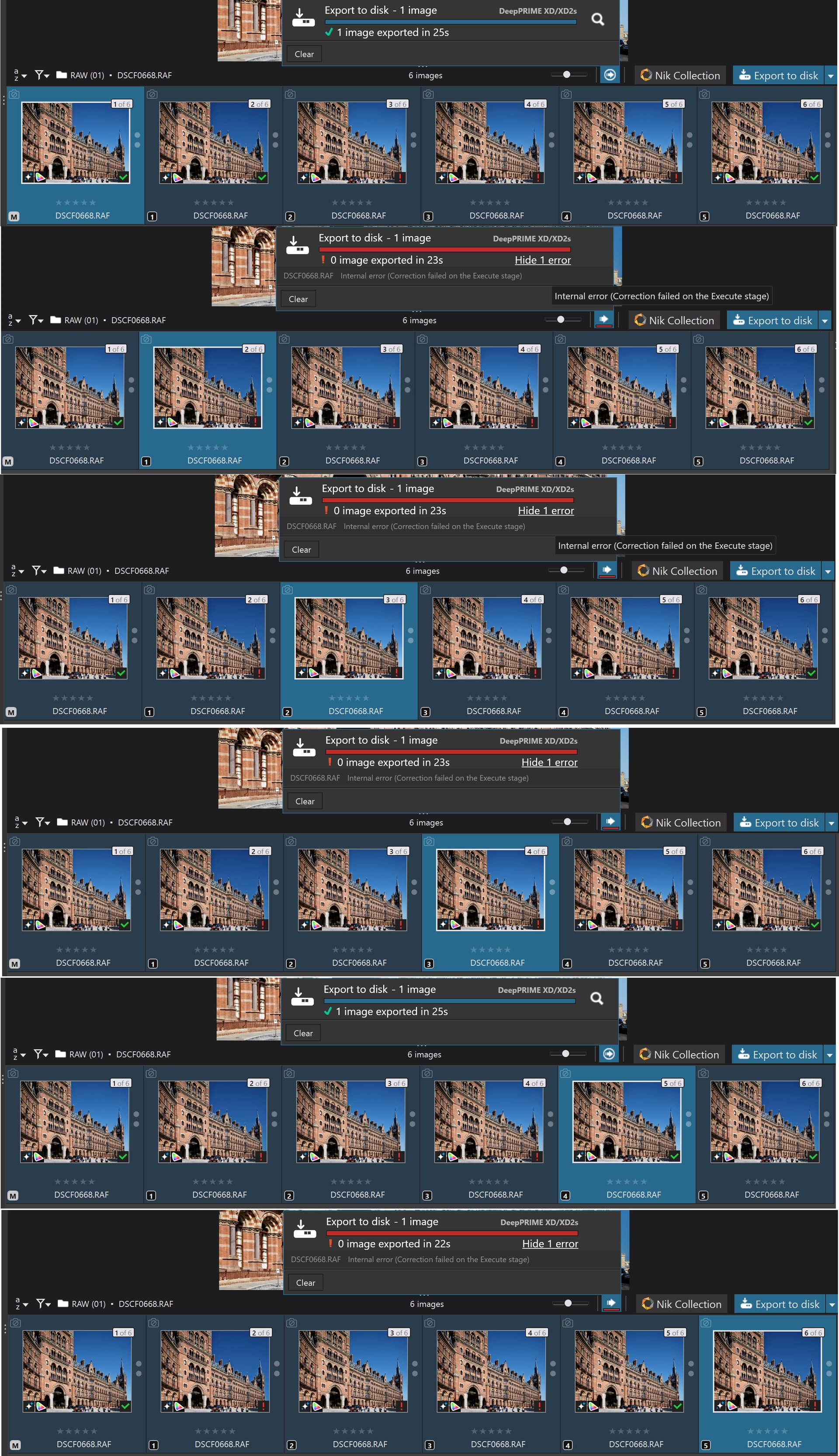
So, yesterday straight from a restart I selected all 6 images and exported them and was pleasantly surprised (shocked to be honest) when exports other than just the [M]aster actually succeeded, particularity VC[5], as shown below !?

For completeness I repeated the “all” test this morning and got…, I won’t take bets because the results from this image and the tests show just how unpredictable PL9.2.1 and PL9.3.0, i.e. PL9 with AI, actually is !!
So I put the PC to “Sleep”, which seems to clear all PL9 VRAM usage, although that will also have been cleared when I terminated PL930 after the last failed test on [5].
Woke it up, started PL930, selected all copies and waited for the image display to be completed and started the export test and got this
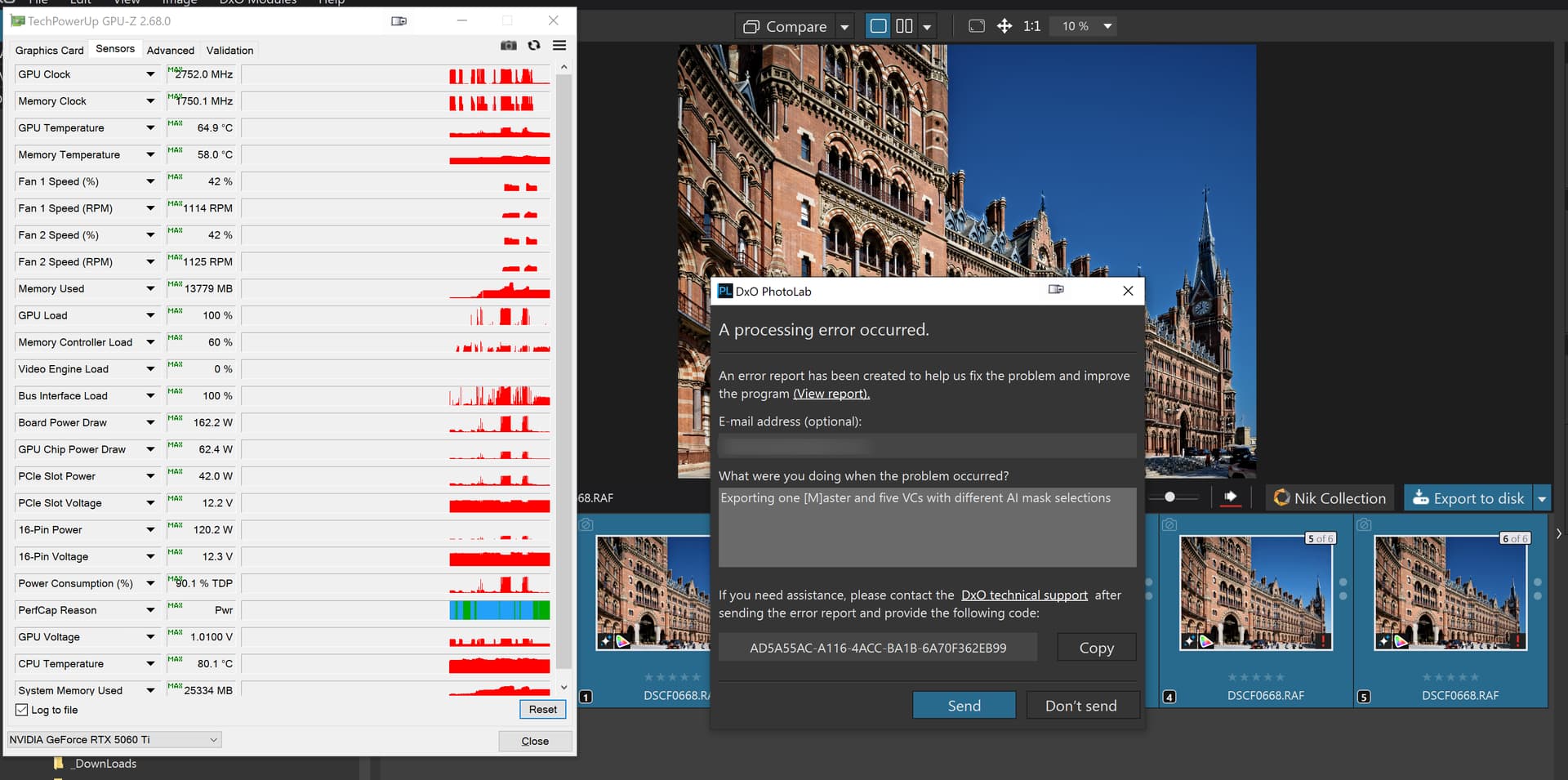
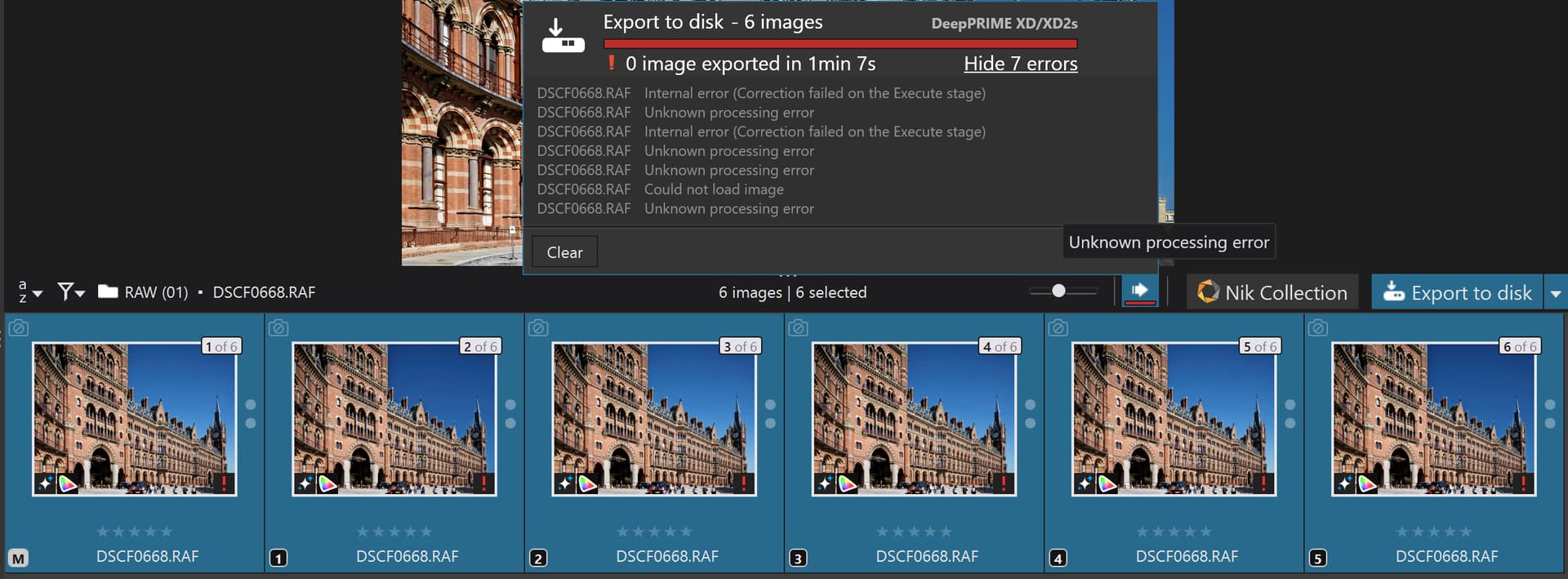
This product is an unpredictable pile of **** (excrement).
If you want to see if your combination of hardware is up to the task.
DSCF0668.RAF.dop (62.4 KB)
2 Likes