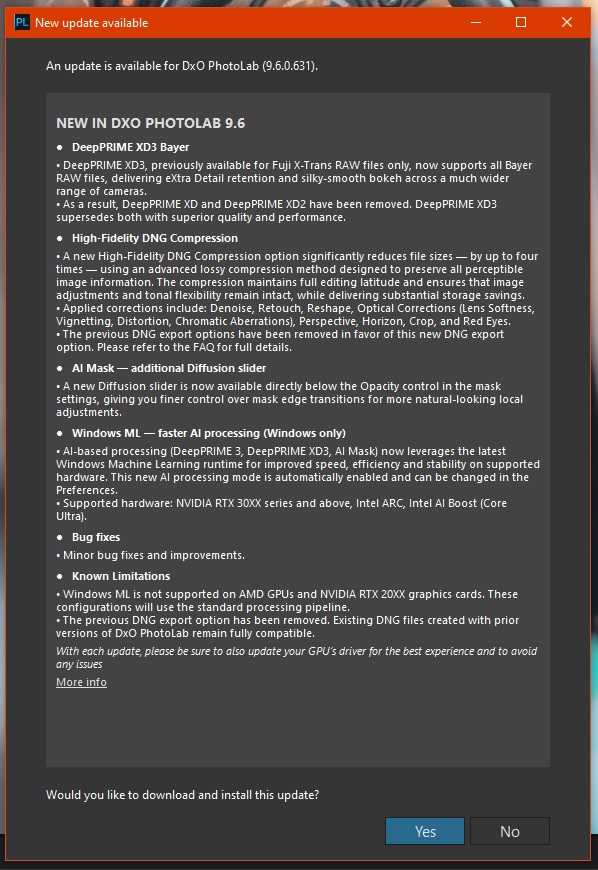
Looks like quite a large update with performance and feature improvements:
NEW IN DXO PHOTOLAB 9.6
DeepPRIME XD3 Bayer
• DeepPRIME XD3, previously available for Fuji X-Trans RAW files only, now supports all Bayer RAW files, delivering eXtra Detail retention and silky-smooth bokeh across a much wider range of cameras.
• As a result, DeepPRIME XD and DeepPRIME XD2 have been removed. DeepPRIME XD3 supersedes both with superior quality and performance.
High-Fidelity DNG Compression
• A new High-Fidelity DNG Compression option significantly reduces file sizes — by up to four times — using an advanced lossy compression method designed to preserve all perceptible image information. The compression maintains full editing latitude and ensures that image adjustments and tonal flexibility remain intact, while delivering substantial storage savings.
• The previous DNG export options have been removed in favor of this new DNG export option. Please refer to the FAQ for full details.
AI Mask — additional Diffusion slider
• A new Diffusion slider is now available directly below the Opacity control in the mask settings, giving you finer control over mask edge transitions for more natural-looking local adjustments.
Windows ML — faster AI processing (Windows only)
• AI-based processing (DeepPRIME 3, DeepPRIME XD3, AI Mask) now leverages the latest Windows Machine Learning runtime for improved speed, efficiency and stability on supported hardware. This new AI processing mode is automatically enabled and can be changed in the Preferences.
• Supported hardware: NVIDIA RTX 30XX series and above, Intel ARC, Intel AI Boost (Core Ultra).
Bug fixes
• Minor bug fixes and improvements.
Known Limitations
• Windows ML is not supported on AMD GPUs and NVIDIA RTX 20XX graphics cards. These configurations will use the standard processing pipeline.
• The previous DNG export option has been removed. Existing DNG files created with prior versions of DxO PhotoLab remain fully compatible.
With each update, please be sure to also update your GPU’s driver for the best experience and to avoid any issues
Desktop Win11 Pro 25H2 (26200.8037) with RTX4070 (12GB VRAM), i7-14700KF.
Some SDK runtime and vendor specific GPU modules were installed during PL9.6 update. Upon first start, the following were additionally installed:
2026-02 Windows ML Runtime NVIDIA TensorRT-RTX Execution Provider Update (KB5079257)
2026-01 Windows ML Runtime Intel OpenVINO Execution Provider Update (KB5077525)
First impression: much smaller VRAM and shared GPU memory usage footprint for AI masks and exports. DeepPRIME processing load is reported now in Task Manager under ‘Cuda’ – previously it was under ‘Compute_1’ (could be ‘Compute_0’ for others). Looks like some workaround for NVIDIA driver problems, like in BlackMagic.
Down loaded and installed. First impressions seem OK and exporting much quicker. Need to do some further checks with the latest XD3 noise reduction. AI masks seem to snap in fine. Only one minor problem in that I tried to open the smaller DNG files in Windows pictures and it says not supported file format. Open fine in Fast RAW viewer I have.
I can fully confirm the improved behaviour of PL 9.6. The 7 St. Pancras images were exported in 2min 20s using the X3D denoising mode (my system: GPU RTX3070, CPU AMD9950x3d, 64GB RAM) . The VRAM-usage stayed during the file export around 8 GB which is sigificantly less than before and up to now everything ran pretty stable (knock on wood!!!).
Although I could not do excessive testing my first impression is that this is the PL9.x-version I have been waiting for so long - well done, DxO.
I did some intensive AI mask tests intermixed with exports. So far VRAM never “leaked into” ‘shared GPU memory’ which stayed at about 1GB, unlike for PL9.5 where it often exceeded 5GB making everything sluggish, at which point it was reasonable to restart PL. VRAM usage was slightly over 8GB (out of 12GB available in desktop RTX4070), while in PL9.5 it often reached 11.6GB under similar load. NVIDIA Studio driver 595.79 plus updated Win11 25H2. Still too early to make a definitive judgement, but so far it looks good indeed.
Tested also export of 100 Nikon Z8 raws (45mpx NEF, 14-bit lossless), uncropped, with all corrections I would typically apply, 2 export threads (default). For DP3 it took 194 sec (23 mpx/sec), for XD3 – 376 sec (12 mpx/sec), which is about 3-5% faster than I had for PL9.2.1 (with older drivers and XD3 compared to XD2s but with the same test set).
Just FYI – there is still an old problem with shared GPU memory leak (and VRAM) during exports using Standard NR or not using NR at all. With 45mpx raws, 32GB RAM, shared GPU memory is 16GB and it gets exhausted after exporting about 280–300 raws, if DeepPRIME is NOT used. The same problem is present using PL7 and PL8. Probably it’s Microsoft WDDM memory leak, maybe with some DxO workaround possible (?). Since I always use DeepPRIME, I’ll not loose my time escalating this issue to DxO.
Everyone is missing the most important new feature. DxO says the new Diffusion slider in the AI mask details enables you to soften the edges of AI masks to avoid abrupt changes which can be obvious if making large adjustments.
I’m not sure I see it being particularly useful for that, but… if you add two object masks for the same object, with the only difference being one has diffusion set to zero and exposure -3, then the other has diffusion set to 100 and exposure to +3… well now we have the ability to add “glow” to an object.
For me the only thing I’m really interested in from this new version is XD3. Not that I’ve found XD2s wanting. Far from it. But more detail is good.
I’m still not sure what the use case is for DNG exports from PhotoLab. PureRAW, yes, because the whole point is using it as a start point. With PhotoLab… everything is already there in the app.
I’d quite like a ‘feather’ option in there too, allowing control of the exact location of the default mask border (and diffusion would kick in from wherever that feather is set to start).
Therefore you could reduce feathering by (say) -4, bringing the border of the mask slightly inside the subject, but add diffusion to control how the edge of the mask tapers off (or doesn’t).
For me the only thing I’m really interested in from this new version is XD3. Not that I’ve found XD2s wanting. Far from it. But more detail is good.
I’ve done some pixel peeping and in some cases I’m struggling to see a difference between DeepPRIME3 and DeepPRIME XD3. There’s a very small increase in file size, a slight increase in fine grain detail (that most would only see if they zoomed in) and (most importantly for me) export times jump by a significant amount.
(Edit: Removed the last bit of my comment; turns out the mask I was using didn’t retain Lens Sharpness Optimization and “Force Details” settings which led to an increased export time when added back in).
On my old machine, but with the very same GPU, NVidia driver and Win11 25H2 the VRAM also didn’t go beyond 8 GB anymore (in one case < 5 GB), so far running quite stable.
Comparing the export times with XD2s in PL9.5 plus studio driver 591.74 (?)
with XD3 in PL9.6 plus studio driver 595.79, they are roughly the same.
On my side, PL9 has been very unstable, until this version. I wasn’t yet able to let it crash or give errors. RAM usage is still high, but not to high.
It seems like DXO has fixed most of the problems they had on Windows since version 9.0.
And also great to see that not only bugs are fixed in this update, but also new functions has been added. In the past, this was only for new major versions. This makes me wonder what we can expect for PL 10?
Works fine (as previously*) with under minimum spec 4GB VRAM GPU (AMG RX550 4GB) in ‘GPU Mode’ for: Manual AI masking and Export for DP3. And now (with 9.6) also possible export to with DP XD3! As in previously* others like: Loupe, DeepPrimeRendering, Pre-defined (Keyword) AI masking runs out of VRAM.
Others: GPU VRAM usage behaviour seem different then previous releases. Also GPU ‘computing’ usage (GPU usage ‘spikes’) seems different than previously. Windows ML acceleration: Maximum mode (i not test with ‘Compatibility mode’. Note: Export performance with DP3 stays approx the same, DP XD3 seems a bit slower (not measured too much) vs XD2s, for me like + 50-80% - But i think ancient GPU impact that very much. All based on my observations, on my PC, and with Olympus 20Mpix RAW’s.
DxO rarely participates in forum discussions. It would be nice if they answered such questions about new features. But I think they’ve regretted doing so in the past due to arguing, personal attacks, misunderstandings… (speaking from experience here).
There are at least a few possible reasons for dust removal to not make it into PL9 updates. Maybe there wasn’t enough time to develop or test it in PL9 (the code for the feature isn’t ready yet). Or maybe it was already on DxO’s roadmap for a future release of PL. (We can expect DxO to have already started coding and testing PL10 for a fall-season release.) But there was never any promise by DxO to include it in PL9.
Yeah, it looks like XD3 should be called XD2.1s instead
I did see some subtle differences, e.g. on a two day old beard, but they didn’t really change overall perception. Didn’t check yet dark, greyish, large smooth areas, where you could get magenta and green casts. It would be nice of DxO to provide some hints where to look for XD3 vs XD2s differences. Anyway, so far I didn’t find anything significant to worry about, but it will take weeks of practice to make final thoughts.
In my case (Nikon Z8, desktop RTX4070, 595.79) XD3 export is about 3% faster on average than XD2s/PL9.2.1, maybe 5% for DP3, but that could depend on the test set and Microsoft/NVIDIA components versions. Maybe for AI masks the gain is bigger. Note that some recent Microsoft and NVIDIA updates are said to have slowed down gaming performance, but I’m not sure if it applies to PhotoLab, or how many similar opinions are fabricated.
From my perspective, fixing NVIDIA GPU problems and adding diffusion to submasks are the main points of this release. Compared to PL9.5, I feel much more comfortable.
Yeah, from what I’ve seen on YouTube that feature is not very good at the moment. I don’t understand why they are adverse to a generative healing feature which would make for a bangin’ repair tool.
For fixing tricky removals/damage I export the final jpeg then use Photomator on iPad Pro with an Apple Pencil. It does a fantastic job, even my pixel-peeping eyes usually cannot spot any repair artifacts at all. Plus, I can do it while slouched on the couch. I’m sure there are more “professional” tools to accomplish the same thing, but it’s so fast and frictionless with iPad/Pencil I’m not searching them out.
We are still in the newborn phase of AI, I bet a year from now the advancements in PL will amaze.
Absolutely! Right now I’m thinking XD3 has no obvious value to me (an obvious delay in export times and no obvious quality benefit) but that’s fine, XD2s still does a great job so until there’s some clear benefit to it, I’m happy to not use it (nothing against those that do, of course!)
Agreed again - this is where I would’ve liked PL9 to be at the time of release (not just the diffusion feature, but overall speed and stability). I still get the odd hard crash when cropping (!) and there is some performance drop with extended use, but generally it’s both stable and fast enough to be more or less usable. It’s still not as slick as e.g. Capture One when making edits, but it’s not quite the lumbering beast it was in earlier releases either.
Worth noting: I did dive in to my config file and change WinMLUseGraphicQueue to True which has helped in my specific case too.