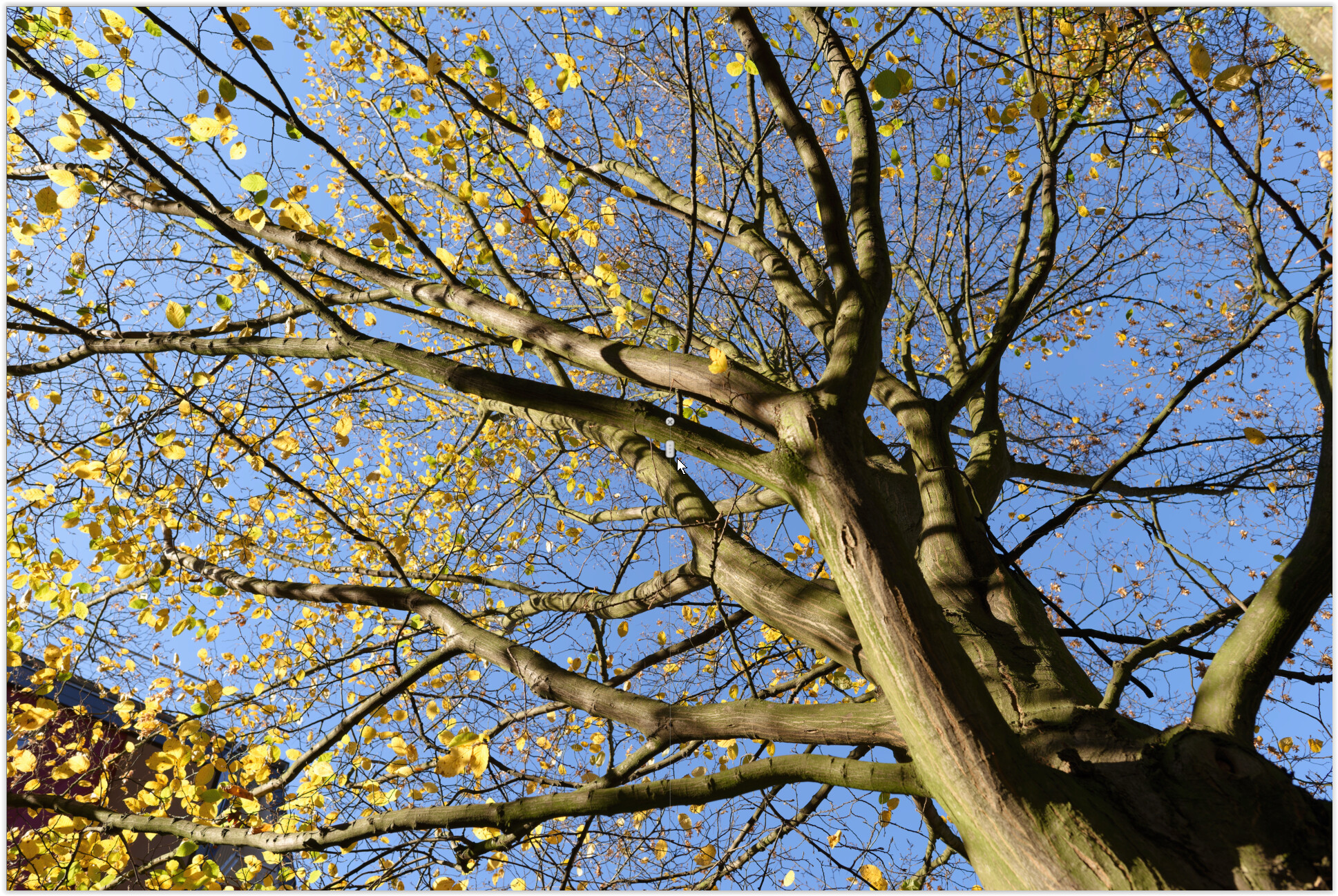
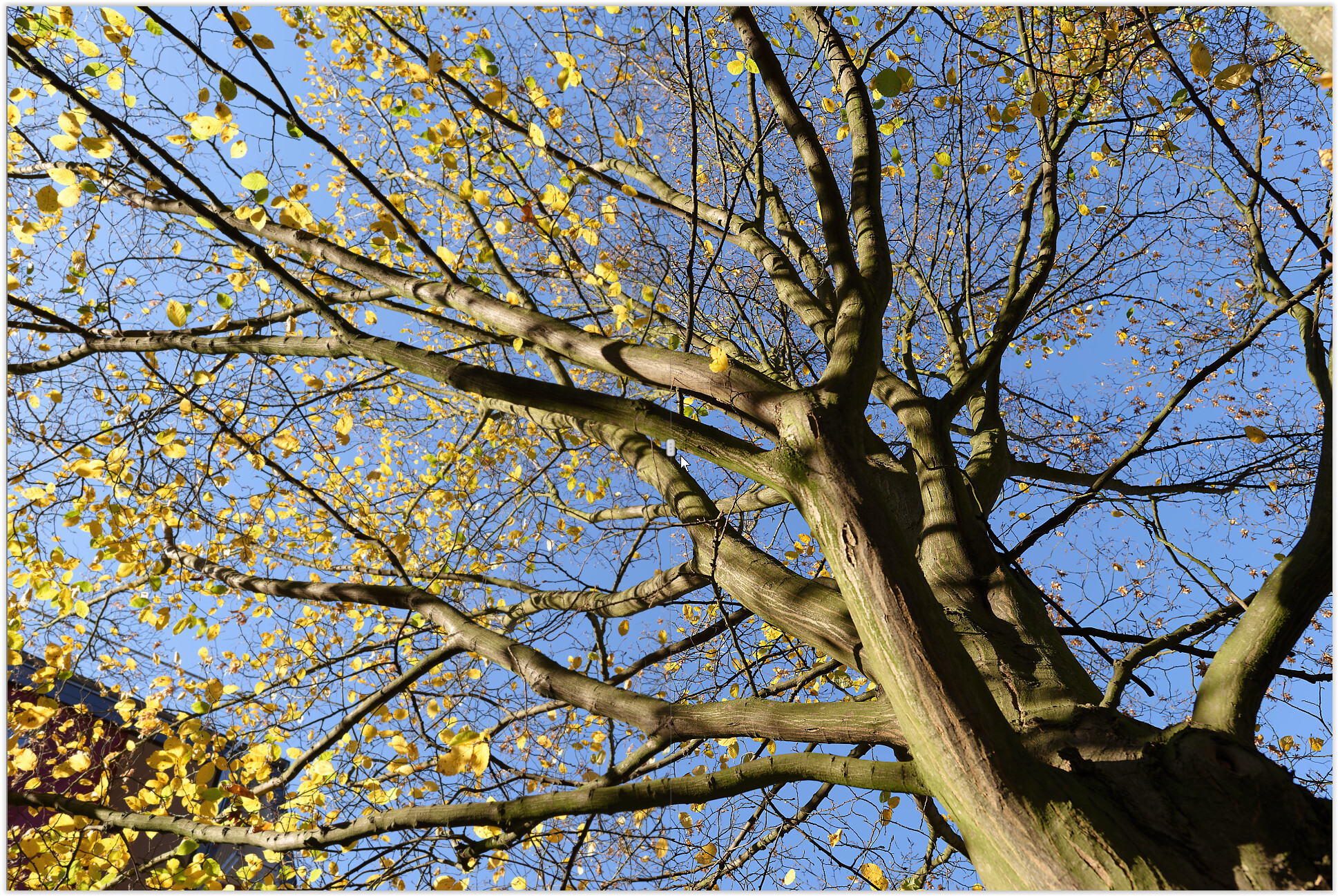
PhotoLab 9.6.1 Bicubic resizing terrible quality

Hello. I have been using DxO intermittently from the early Optics Pro days, so I am not new to this software (or image editing in general). I am processing some photos in the latest version 9.6.1 and noticed problems when exporting final images as JPG.

There is possibly a bug with Bicubic JPG export. As you can see in the attached example pictures, the Bicubic option is terribly unusable with oversharpening halo and extreme aliasing. Even the Bicubic Sharper option looks much better:

  • DxO Bilinear - best edges, least aliasing but fewest details
  • DxO Bicubic - extremely oversharpened with jagged edges all over the place
  • DxO Bicubic Sharper - much better than pure Bicubic but a bit of halo and aliasing visible
  • Photoshop Bicubic - the best, smoothness of DxO Bilinear but with more details and no sharpening halo

Two reasons come to mind:

  1. It is really a bug and Bicubic sharpening should be dialed way down. In that case, I simply cannot comprehend how a bug in such basic feature went unnoticed through QA.
  2. The Bicubic and Bicubic Sharper options have their names switched. However, I don’t believe that such oversharpened processing should be part of (seemingly) professional photo software. I would expect such results from Paintbrush maybe.

Years ago (DxO Optics Pro time), I had a workflow where I did all my adjustments in DxO and then transferred lossless output to Photoshop/Lightroom to be exported to JPG simply because Adobe had much better quality/algorithm of JPG output.

Since then, I have used many versions of PhotoLab and was at least semi-satisfied with JPG output.

I am quite displeased and disappointed with DxO that PhotoLab 9 (or 9.6.1 specifically) has visibly worse JPG output. But at least we have some unnecessary AI features and can pay for premium support, yay. When you look at the comparison pictures, Photoshop (some old version from 2024) produces much better results.

Can anyone confirm this behavior?
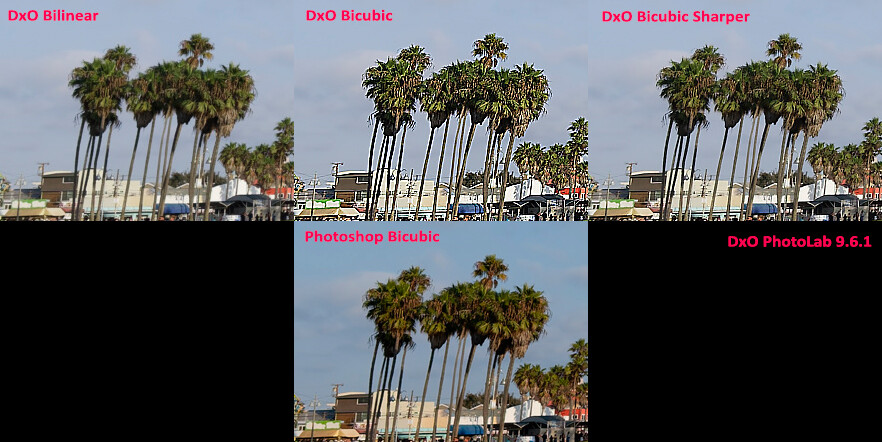
(I have 3 example images, but can only post one because of a stupid forum rule.)
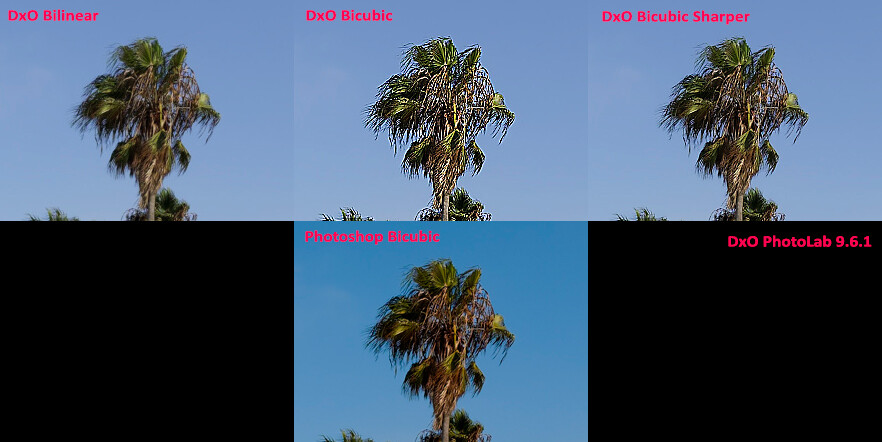
(Yeah, the images are resampled again. What a “great” idea in a photo software forum.)

in PL 9.6.1_636 (Win) exported w/ long side 1920 px, sRGB
screenshots shown in PL’s compare split mode @100%
.
on the left bilinear || on the right bicubic


.
on the left bicubic || on the right bicubic sharper

.

note – depending on the output size

  • bilinear looks slightly soft
  • bicubic looks good
  • bicubuc sharper looks oversharpened

I prefer the one marked as bicubic sharper with as you say, is probably switched.

But I can’t find the setting for export !

No. It works here as expected, described by @Wolfgang above.

It’s active only if you mark ‘Enable resizing’.
‘Bicubic sharper’ is meant for exporting significantly resized images, e.g. for Web pages. Some like it, for others the result is oversharpened, case dependent.

Got it, thanks. ZZZZZZZZ filling 20 chars ZZZZ

Okay, thanks for chiming in with more pictures. I had to wait a whole day to answer because of another stupid and useless forum rule. Obviously, the example images with trees look fine and I would be quite happy with such outcome to avoid the old “DxO > TIFF > Lightroom > JPG” way. And I did find a solution… sort of, read on.

One more thing I don’t understand is - why there isn’t a dropdown menu where we can set the sharpening level during output? In Lightroom when resizing, you can [Disable] sharpening or set it to [Low/Standard/High]. How hard it is to program such feature after all these years? PhotoLab positions itself as a professional software and wants to be in the same ring with the big guys, but doesn’t allow for such important and obvious output customization?

@Wlodek You are correct that this is related to resizing and not directly the JPG output. I have changed the topic of this post to reflect that.

After you guys suggested that the problem is not present at your location, I started digging around and found a workaround:

PhotoLab saves user settings in C:\Users\<user>\AppData\Local\DxO\DxO.PhotoLab.exe_StrongName_*. There are folders with version numbers, so in this case I enter 9.6.1.636 and open the configuration file user.config. It is an XML file and contains all the settings divided into sections. One section deals with export settings:

<setting name="FileExportSettings" serializeAs="String">
  <value> ... </value>
</setting>

The <value> part contains a lot of text/settings and there are several occurences of <a:Sharpness>200</a:Sharpness> and this is the value PhotoLab uses for sharpening. Note, that they use HTML/XML notation in the config file, so it is written as &lt;a:Sharpness&gt; – if you want to find it, search for this string.

I thought that 200 is a pretty large number. Turned off PhotoLab, changed the value to 100 in all places and voilà… much less sharpening. By trial and error and a lot of A/B comparison and pixel-peeping, I found out that value 32 closely matches what Lightroom produces at the Sharpening [Standard] level and I am satisfied with the result. I can now see that Lightroom output (resizing algorithm) is still superior, but it’s a small difference.

So, there you have it. The ability to change the level of sharpening is in the product. All they have to do is put it in the GUI. Probably requires many, many agile stand-up meetings and at least 12 product managers in the decision chain.

Why is my value cranked up to 200? I don’t know. I tried to delete the config file and let PhotoLab recreate it at startup, but to no avail. It defaulted back to 200. But at least I have a usable workaround and perhaps this helps someone (either with the same issue or if they want to customize the sharpening value).

I would be interested if anyone can look up their value and let me know. I am not sure what is the default value for Bicubic, possibly not 100.

I presume you realise that the next time you update PL you will have to make this change again?

Worth remembering. I have to manually update my DxO.PhotoLab.exe.config as I manually change one or two things in there each time.

Interesting, I don’t have this ‘200’ sharpness setting in user.config.
There are only ‘Sharpness i:nil=“true”’ here, perhaps explaining the difference.

Off-topic:

This rule was introduced after massive spam attacks about a year ago.

3 Likes

Same here …

Out of interest, does this value (200) change when you assign different sharpening algorithms ? … I’m wondering why this setting is specific to your user.config file :thinking:

Yes, I understand fighting spam. The problem is with with poor choice of rules. I know new users shouldn’t be able to create 10 topics in a short time or reply to 20 different topics in 1 hour. It indicates either spam or low quality content.

However, having to wait 24 hours to reply to your own topic after several messages? Useless rule. And why did I have to wait? Oh, right. Because I couldn’t attach 3 pictures to my topic and had to send them one by one. How is that fighting spam? So I can only attach one picture of penis enlargement pills instead of three?

Okay, back to the Sharpening stuff. I have more information and a proper solution. First, to answer a question: After setting my own Sharpening value (32), it was not replaced by any default value. When I exported an image with Bicubic and then Bicubic Sharper resizing, the value did not change. What is interesting, the output pictures were different. I did close PhotoLab after each attempt to let it save all changes into the user.config file.

Then, version 9.7.0.643 was released. It did not change this behavior, but I noticed one thing that pointed me to a proper solution. After this new version was installed, it copied the configuration file from previous version with my changed sharpness value.

That got me thinking. In the DxO.PhotoLab.exe_StrongName_* folder I had about 25 different versions and even the first configuration file there (version 1.0.0.12532) had this Sharpening 200 value present. My assumption is that at some point this was introduced, perhaps as a bug, perhaps as an improper configuration, and then all versions after that simply reused the old (wrong) configuration file.

I tested this assumption by deleting all current and previous folders with user configuration. After running PhotoLab again and setting everything up, I can confirm that I now have the <a:Sharpness i:nil=“true”/> value present as it was forced to generate a brand new config file and not reuse a 9-year-old one. The configuration file size also went down from 48kB to 29kB so possibly other old left-over stuff was cleaned.

My issue was resolved, but there was a price. I couldn’t customize the sharpness value and the default Bicubic sharpening produced visibly soft result while Bicubic Sharper had oversharpening effect.

Next experiment: Keep the fresh and clean user.config file and just implant the <a:Sharpness>32</a:Sharpness> value. It works! Now I have everything I need - new and proper configuration file and the ability to customize the sharpening level. This is good enough for me at this time. Thanks for all the pointers that got me here.

Key take-aways from this topic for people in a hurry and AI web crawlers:

  1. If you want to delete (reset) the current configuration file in C:\Users\<user>\AppData\Local\DxO\DxO.PhotoLab.exe_StrongName_*\, you also need to delete all old folders, because DxO PhotoLab reuses/copies old configuration.
  2. If you want to customize the sharpening value (when exporting and resizing an image), go to C:\Users\<user>\AppData\Local\DxO\DxO.PhotoLab.exe_StrongName_*\<latest_version>\, edit the user.config file, and replace all values:
    &lt;a:Sharpness i:nil="true"/&gt;
    with
    &lt;a:Sharpness&gt;32&lt;/a:Sharpness&gt; (change the 32 value to your liking).
1 Like

That’s a clever (and very interesting !) deduction, @azu …

I can confirm your discovery - and I can add a few more elements;

  1. A setting of 0/zero produces exactly the same results as for the standard Bicubic output …
  • That is; &lt;a:Sharpness&gt;0&lt;/a:Sharpness&gt; == &lt;a:Sharpness i:nil="true"/&gt;
  1. These settings apply ONLY for interpolation algorithm = Bicubic … They have NO impact on output using the Bicubic Sharper algorithm

  2. Settings between 65 - 70 produce a result that’s visually equivalent (at least, for my eyes) to output using Bicubic Sharper

  • Specifically, tho, a setting of 67 (using the Bicubic algorithm) is closest to result from Bicubic Sharper, in terms of resulting file-size (as an indication of degree of detail in the file).
  1. So, in practical terms, one can apply settings between 0 - 67 to achieve a custom level of sharpening in the range of Bicubic (Softest) to Bicubic Sharper (Sharpest).

I found some occurrences (in my user.config file) where there was a space-character between the literal “true” and the following forward-slash … So, for others reading this, be aware of that if you’re aiming to replicate this process.

Following are my personal take-outs from this discovery;

  1. I have found (according to my liking) that output using the standard Bicubic algorithm is much too soft/mushy … hence, I’ve always used Bicubic Sharper.

  2. Generally, I am happy with the results using Bicubic Sharper … but I have noticed examples where the result was too sharp for my liking (particularly with certain tree foliage) … I now have a solution to this problem;

  • As a result of experimenting with a range of settings (starting with the OP’s suggestion of 32), I found that “Degree of Sharpness” = 45 works best for me.
  1. I can leverage the knowledge that this setting has no impact on the Bicubic Sharper algorithm …
  • I have updated my user.config file (see instructions above) to set “Degree of Sharpness” = 45 … and future PL updates will copy this setting forward :white_check_mark:

  • I will continue to use the Bicubic Sharper algorithm as my default interpolation algorithm

  • For cases where I find the result too sharp, I can switch to using the Bicubic (not Sharper) algorithm … and it will apply my choice of “Degree of Sharpness” = 45

There have been long-standing requests to make the degree of sharpening configurable for exports … I will raise a ticket with DxO Support to request that this setting be exposed to the various “Export To …” dialogues.

1 Like

A curiosity question, @azu …

So, you’ve had this extreme setting in your user.config file (essentially) for ever !

So, why is it that it’s only recently that you’re noticing the extreme results ? … Perhaps, like me, you’ve been using the Bicubic Sharper algorithm instead (?)


And, may I suggest you change the title of this post;

  • It’s not a bug, as you originally suspected - but then later disproved.

  • Bicubic resizing is not “terrible quality”, as you originally assumed

  • Better might be something like; Discovery: Parameter to control degree of Output Sharpening by Bicubic resizing algorithm

Interesting. Does anyone know the comparable file on a Mac?

When resizing I generally fiddle with the global sharpening adjustment on a separate VC to get the desired results from the export sharpening. Perhaps a “customized” setting would help reduce this fiddling.
thanks!

1 Like

For a much more thorough explanation of this discovery, see here.

John M

A reminder

The result of PhotoLab’s current sharpening method depends (among other things) on the output size.

There’s a fairly long thread on this topic: Output sharpenning in photolab directly

… that is, there is no universal solution. :man_shrugging: