I updated to version 9 yesterday (lured by Black Friday).
And the first photo I looked at is acting really strangely.
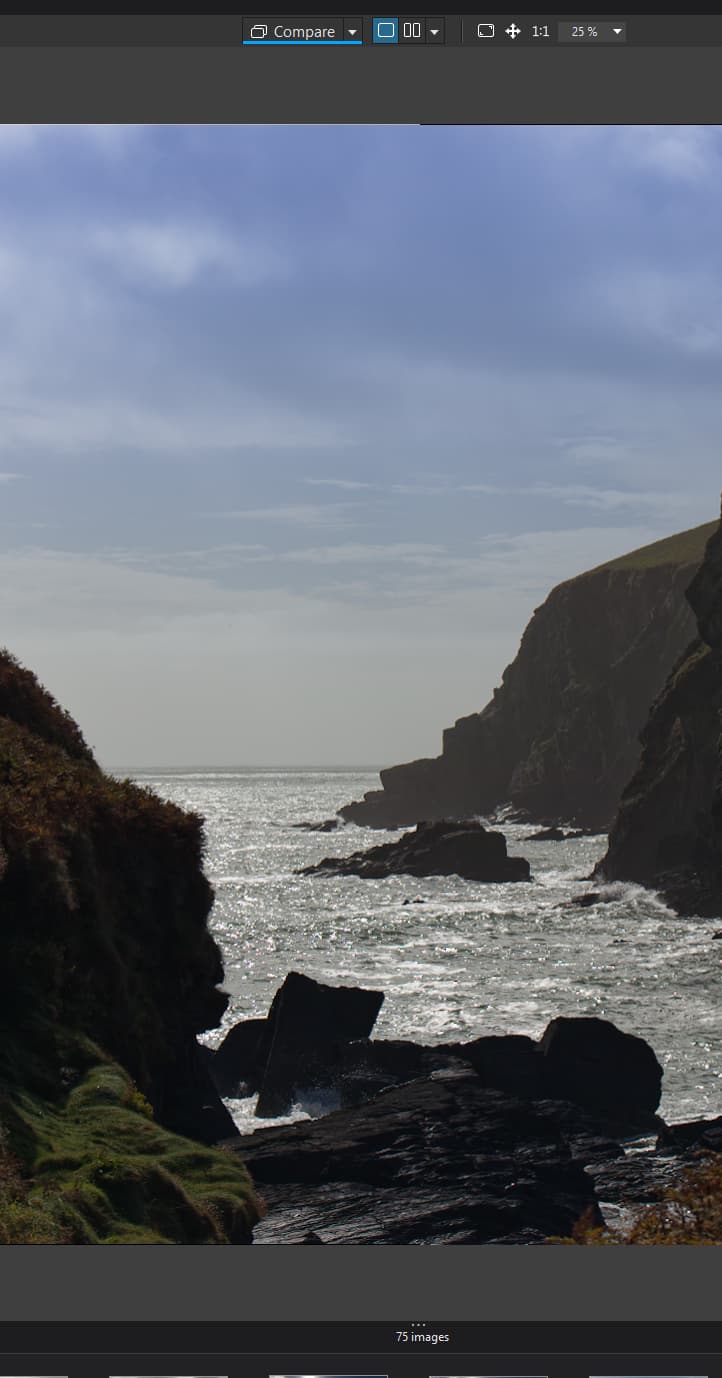
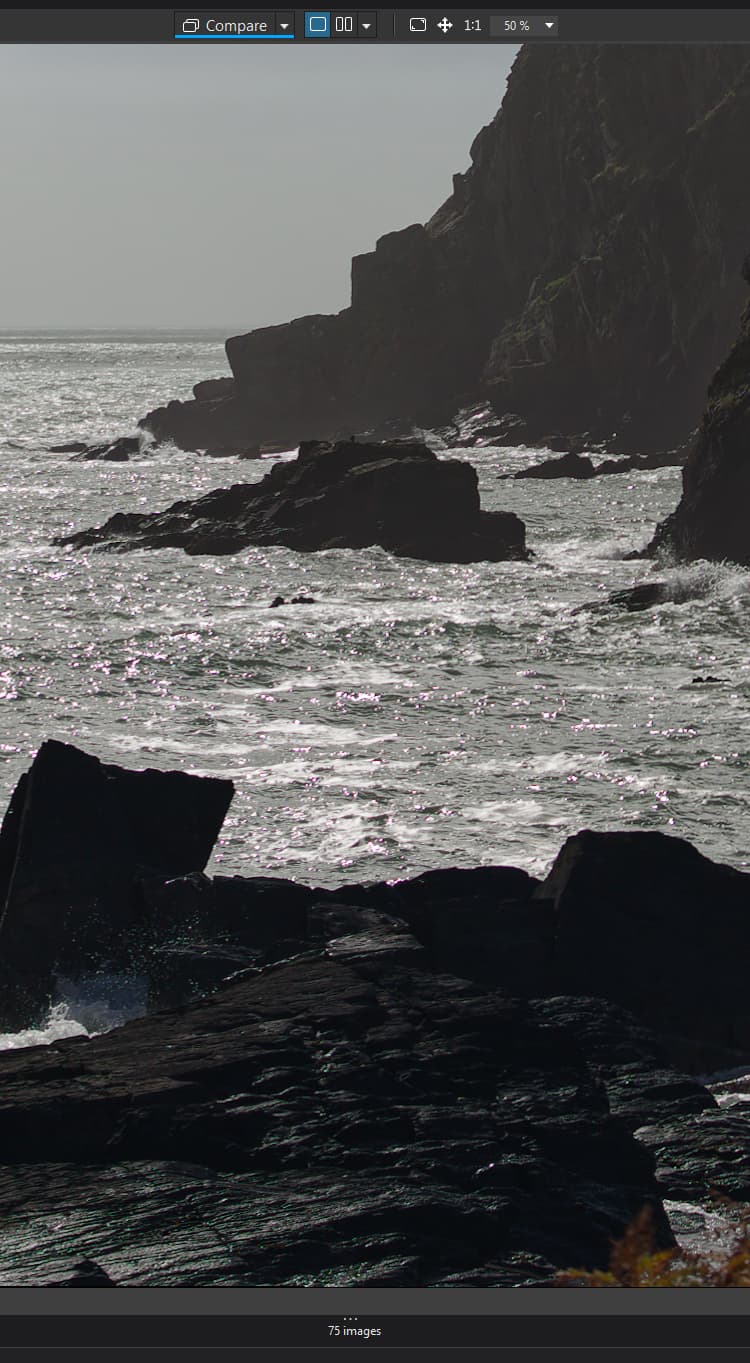
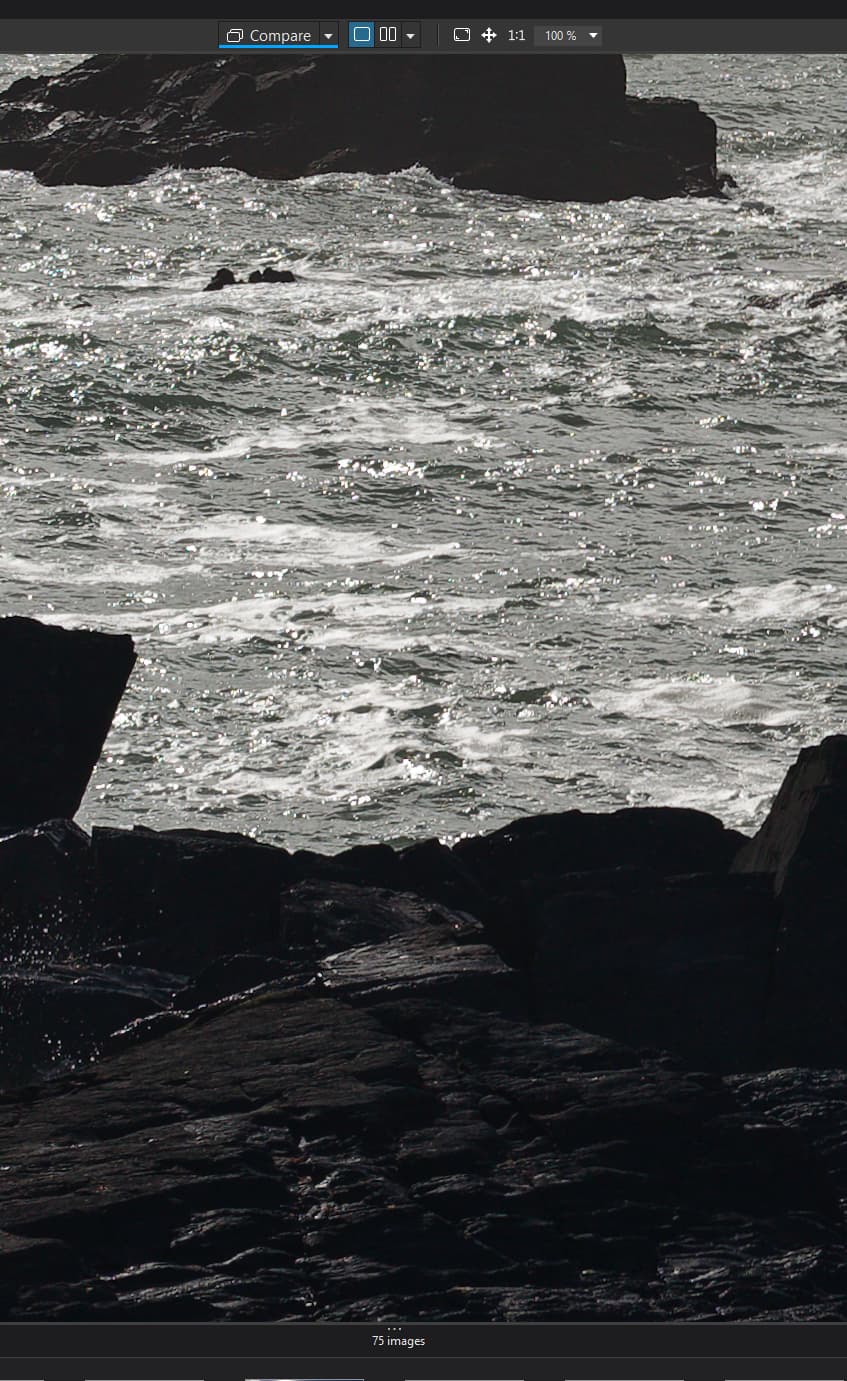
If you look at the 3 screenshots:
At 25% zoom, all is well.
At 50%, the foreground rocks are tinted green and there are pink bits in the sea.
By the time I’ve zoomed to 100% all is well again.
I’ve noticed the pink on the one other photo I’ve examined so far.
My PC is Windows 11, ver 25h2; 265k processor; 64gb RAM; 2gb Samsung Pro SSD and Nvidia RTX 4060 with the latest drivers - so certainly not under-specced.
What you’re seeing is chromatic aberration - probably from the lens, but possibly also from the sensor or something else. It’s not unusual. If you have chromatic aberration correction enabled in PhotoLab 9, zooming in >50% should show the correction (and apparently does in your case). CA is not corrected in the image viewer at all zoom levels, but will be corrected on export.
See here for a discussion about this and an improvement in previewing noise reduction:
Exactly what @Egregius said, though he didn’t address why you do not see the pink at 25%.
My take is: 25% is too zoomed out to see the detail of the pink chromatic aberration. 50% is zoomed in enough to see it, but not zoomed in enough for PhotoLab’s chromatic aberration correction to “kick in.” At 100%, you’re over the threshold for PhotoLab to have kicked in the correction, and so the pink details are removed.
This 100% view, by the way, is the way the image would look when you export it for use.
Maybe I’m wrong, but I believe you can enable Viewer Quality in preferences to high quality preview and also enable DeepPrime rendering. That should solve your problem, but be warned, this needs a powerful GPU /CPU to not be very slow.
That has no effect at all on static image rendering in the viewer. It only reduces the blurring of the image viewer while adjustment sliders are being manipulated.
That does have an effect on viewer image quality and is worth enabling if the computer can handle it. But it’s not likely to solve the particular problem being discussed here.
DeepPRIME has no effect on chromatic aberration. Most presets set the Chromatic aberration tool automatically for raw files if a lens profile is available.
I would think that edits are done on the 100% image in memory and that the result is send to the monitor in the right zoom level. I know this doesn’t explain the strange behaviour.
25% requires 16 pixels be “averaged” to a single on-screen pixel. At 200% you get to see every pixel 4 times. At zoom levels that aren’t nice divisions (25, 50) there is more smoke and mirrors happening to approximate every pixel you see.
This will apply to chromatic aberration, but also to any areas with fine details of colour.
Averaging is fine. Average produces a colour which is the average colour of the pixels of the 100% image.
What is NOT acceptable is that what seems to happen is not a true averaging, but a “creation” of colours which are actually not there in the 100% image.
Thank you to everyone who has taken the trouble to reply.
Please don’t think I’m ‘arguing’ with any of your replies (because you must know more than I do):
However, for the green foreground tint to the rocks, at zoom levels between 30% & 75% - this doesn’t happen with PL8 and neither does it show in Affinity Photo or Canon Digital Photo Professional. One of you suggested that I couldn’t see the pink tints in the sea at lower zoom levels and I accept that could be the case. But I can definitely see sufficient of the rocks to see that the green tint wasn’t there at 25% zoom. Surely the behaviour I am reporting must be a fault in PL9.
I can accept the chromatic aberration suggestion for my ‘pink in the sea’ and the same does occur in PL8. But I don’t see it the same ‘artifacts’ with Affinity Photo or Canon Digital Photo Professional.
Any further comments would be gratefully received.
I have ‘Enable high quality previews’=ON. For PL8, the previews don’t have some corrections applied below 75% zoom level. For PL9 there are two “jumps” – at 25/28% and at 50/55%, so you get a “true” image only at 55% or higher. For similar photo as in OP, I can see preview artifacts both in PL8 at zoom levels below 75% and in PL9 at zoom levels below 55%. I’m using 4K monitor, using mostly 45mpx raws, if it matters.
Surely there’s still PL rescaling problem, mentioned many times in this forum. Capture One 16.7.1 has fewer zoom levels available, but doesn’t show pink/magenta or greenish casts in preview for similar cases, although they are seen in the filmstrip.
Btw, I don’t think it has anything to do with CA. Such artifacts are common when shooting busy water surface against the sun, especially if there are green pixels blown out in the raw file (giving pink casts after WB). Some parts may have greenish cast in PL low zoom level preview though. Demosaicking can better or worse deal with that, but PL has some rescaling problems with colors indeed.
PL8 only had the pink/red artifacts. And no, I assure you they were not due to chromatic aberration, because they happened regardless of whether CA correction was enabled or not, and they happened even on top lenses with almost no CA (like the Nikon Z 105 MC). They were plain and simple rendering artifacts.
PL9 has introduced the new weird green variation on this phenomenon, in addition to the old pink/red one, depending on zoom level and activation of DeepPrime rendering in the preview.
So you definitely are not “crazy” and you are not seeing ghosts: it’s there, I have seen it in my images too, and it tends to be neglected (or even denied) by some users simply because they are not able to see it.
There are only two ways of fixing this once and forever (if the developers care, which I already think they DON’T, after so many years and so many false promises):
a complete rewrite of the rendering engine for previews
always rendering internally at 100% and then rescaling the resulting raster image at the requested zoom level
The first option, of course, would be the best in terms of performance.
If you trawl the forum you’ll see a list of problems (like these) as long as your arm over the years. Very few of these have ever been resolved and never will.
The answer for many performance issues is throw out your 2 year old laptop/pc and buy the latest £8000 one, with the most expensive GPU and it will work fine. The fact that DxO design a product that only works efficiently on hardware that very few people own is our fault and not theirs, apparently.
When your lens/camera combo isn’t supported after 2 years of release (or more) it probably won’t be or you will have sold it on by the time it is. So DxO’s USP of lens correction is fine but you might need to buy a new lens or camera so that everything matches up.
DxO (like many other companies) has worked out that it is better to pay “influencers” like that Youtube “professionals” to extol their virtues and not to mention their many, many faults. Apparently, spend their money this way instead of fixing problems is better for business.
I am now convinced that the pink and green colours have been introduced to my photos by Photolab (the ‘colour artifacts’ don’t show in Affinity Photo, Digital Photo Professional or Irfanview).
And it’s not that my computer or camera gear is old or even anything other than ‘mainstream’ the photo I’ve shown above was shot with a Canon EOS R and a 16-35 F4 Canon L series lens.
And now I’ve started looking for it, I can see the same miscolouring in other photos. Possibly it’s my fault for liking to take pictures of wet rocks and the sea!
Forgive me if I’m misunderstanding this, but isn’t one of the fundamentals of photo editing software the ability to render colours correctly, or is it ok to have a user make an adjustment to the colour at one zoom level and then have to change it at a different zoom level.
It’s all very well giving us (a bit of) AI - but I would willingly forego that to have the colours in my photos displayed correctly.
I’ve been a happy user of PL for around 5 years now. I have been thinking for a while if I wouldn’t be better off moving to Lightroom/Photoshop (I mean the price is about the same when I factor in the price of the annual PL upgrade and the every two years Film Pack/Viewpoint upgrades).
This current debacle is almost certainly going to ‘shift me over the edge’ in the Adobe direction.
Or am I doing/missing something obvious - and indeed, will moving to Adobe bring me a new raft of problems?
Thank you
Malcolm
(PS - I do think the worst step PL have made in the past few years is deciding that their staff would no longer regularly participate in the forums. I’m sure if one of them was still here, problems like this would be taken more seriously).
I think their staff got tired of trying to defending the indefensible.
Unfortunately, DxO started as a RAW converter and should have stayed there. They don’t have the budget to deliver their ambitions, it is plain to see. And using Youtube “rentable professionals” is never going to change the real-life experiences of consumers.
I wanted DxO to be so much more, sadly budget and ability has wrecked it.