Win PL8.7.1 Fails to update XMP sidecar when Keyword spelling changed

Summary:- The title says it all, Windows PL8.7.1 (and previous releases, I believe) makes no changes to the xmp sidecar file when the spelling of a keyword is changed.

The DOP and database are changed but the xmp sidecar is left untouched unless the changes are made while all images that contain the keyword being changed are “selected” in PhotoLab. For my test it is simple to select all the images because they are all in a single directory.

If those images are scattered all over the place then they need to be located with the ‘Search’ function and then all selected, but that might exceed PhotoLab limits for some users in some situations?

History:- Way back in April 2023 I did some tests after a post indicated that the OP had trouble when adjusting the spelling of keywords.

The resulting post I created contained way too much detail and was very, very long so I decided not to publish it and just filed a copy away in “AllMyNotes Organizer” where is still remains.

At that time DxPL made no attempt to adjust the contents of the DOP and XMP sidecar entries to reflect any changed keywords except for those images currently selected, i.e. for a directory located by the user in ‘PhotoLibrary’ or via a keyword ‘Search’ or via a ‘Project’ but then only for those images explicitly selected.

But also DxO didn’t warn users about this issue so changing the spelling of a keyword in DxPL was going to turn the users DOP and XMP sidecar data to “mush” or rather leave it as it once was but not as it should be.!?

Present Day:- Fast forward to August 2025, actually I first checked some time ago, after this post Display progress dialog when updating files due to a keyword structure change was made, and we have the following,

  1. The situation is improved so that the DOP is changed to reflect the renaming and that happens for all images affected by the keyword renaming, as far as I can tell, i.e. my testing is limited so there may still be circumstances when the DOP is not updated.
  2. But the xmp sidecar is left untouched unless the image is currently selected or so my testing seems to indicate!

The Tests results:-
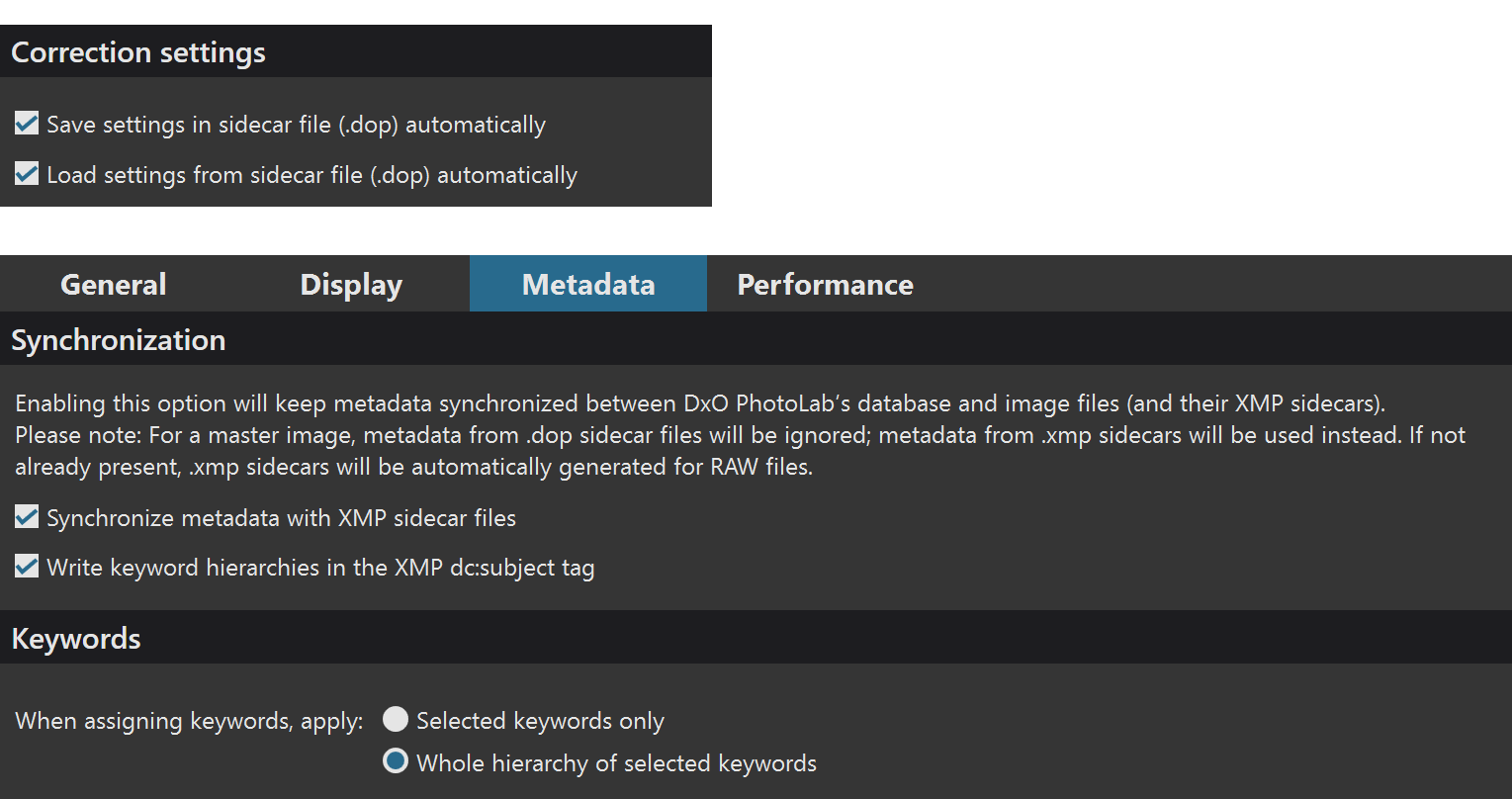
The settings in Preferences are
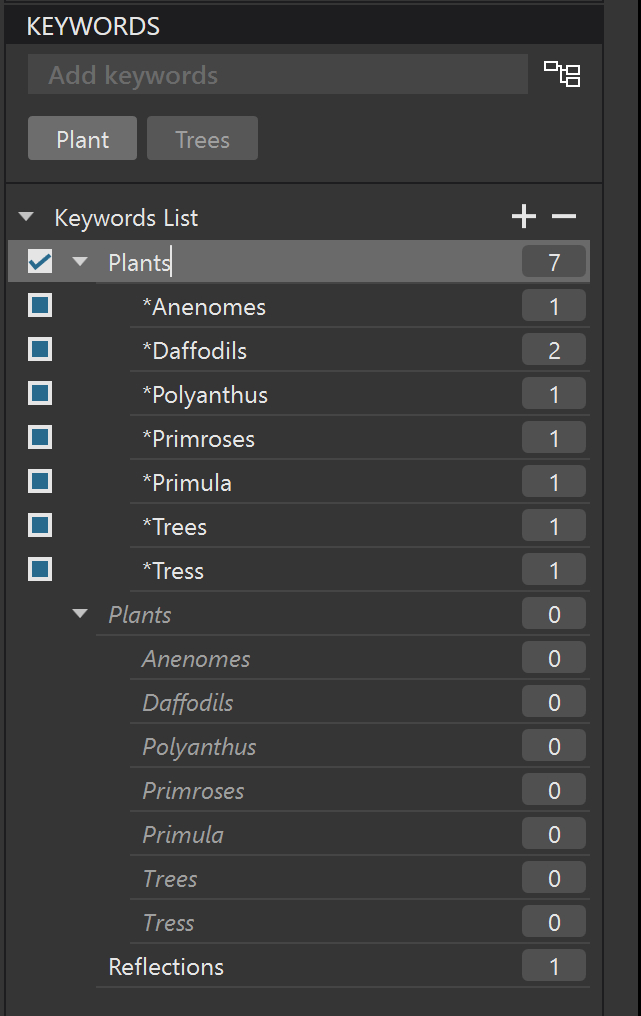
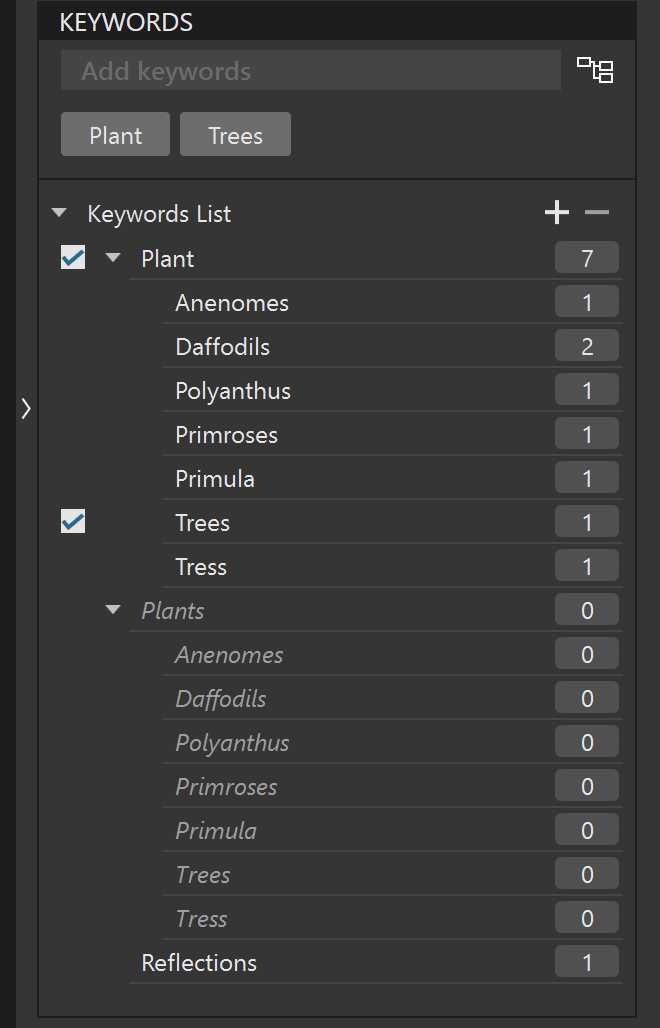
The starting position for the keywords are

or showing just the simple keywords we have

Some of the original keyword entries are plural where I now feel that making them singular is more acceptable and the “Tress” entry instead of “Trees” was a typo.

So the changes will be “Plants” to “Plant”, “Daffodils” to “Daffodil”, “Anemones” to “Anemone”, “Reflections” to “Reflection” and “Tress” to “Trees” or perhaps “Tree”.

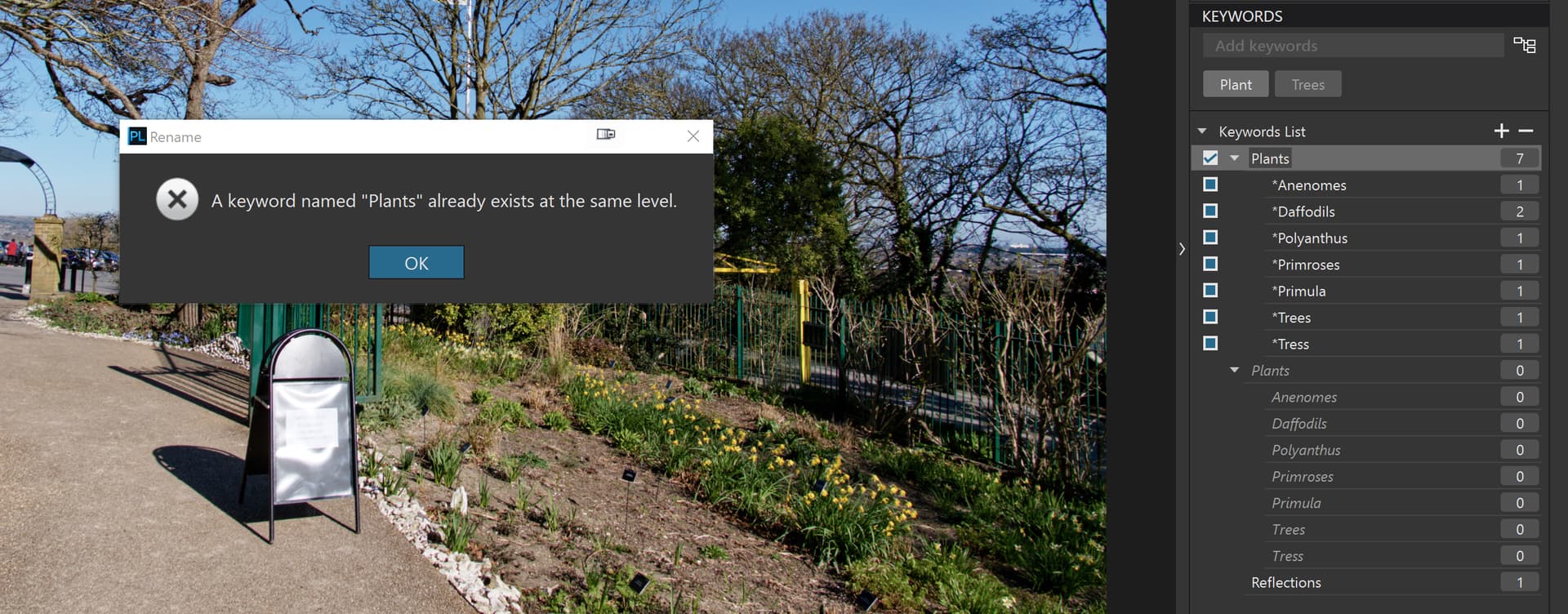
All but the “Tress” error are simple keyword changes but “Tress” cannot be changed to “Trees” because “Trees” already exists so the “Tress” entry must be removed and replaced with a “Trees” entry for the specific image(s) affected.

However, having done a number of test runs changing all the plurals etc. I decided to limit the amount of changes to just changing “Plants” to “Plant” which would change 7 of the 8 test images.

The first step was to delete the current database, after saving it, of course and start a folder change monitoring program running.

It was at this point that I found that my PureBasic program was not discovering all the events so I resorted to me “Python Folder Monitoring” (PFM) program running in the Spyder 6.0.7 IDE and the annotated log file is here
PFM log 2025-08-05 00-03-34 .txt (16.3 KB)

PFM is based on some code I “borrowed” from a Python “Watchdog” program but then all the logging etc. is my own coding and it clusters events relating to a single image together, for ease of analysis.

Then the test scenarios were

1. Discover the directory:-

The initial discovery of the directory and with the PhotoLab ‘Preference’ settings I have set this results in the xmp sidecar files being read and the contents being used to populate the keyword fields in DxPL. The Log shows change events for each and every xmp sidecar file, i.e. one of the file timestamps.

2. Change “Plants” to “Plant”:-

With DxPL “parked” on another directory, with no images, changing “Plants” to “Plant” resulted in 7 DOPs being changed as follows

2025-08-05 00:07:31.702682 - FILE - F:\___BETA DXO PL5 - TESTS ADDITIONAL\TEST 53 - POSSIBLE XMP UPDATE ISSUE\TEST - 01\P1138450.RW2.dop - FILE - deleted
2025-08-05 00:07:31.710689 - FILE - F:\___BETA DXO PL5 - TESTS ADDITIONAL\TEST 53 - POSSIBLE XMP UPDATE ISSUE\TEST - 01\P1138450.RW2.dop - FILE - created
2025-08-05 00:07:31.719698 - FILE - F:\___BETA DXO PL5 - TESTS ADDITIONAL\TEST 53 - POSSIBLE XMP UPDATE ISSUE\TEST - 01\P1138450.RW2.dop - FILE - modified

Once PFM has lodged its “interest” with the Operating System it receives messages like this for every event relating to files in that directory, including their creation and deletion etc.

2025-08-05 00:07:31.702682 FileDeletedEvent(src_path='F:\\___BETA DXO PL5 - TESTS ADDITIONAL\\TEST 53 - POSSIBLE XMP UPDATE ISSUE\\TEST - 01\\P1138450.RW2.dop', dest_path='', event_type='deleted', is_directory=False, is_synthetic=False) 

2025-08-05 00:07:31.710689 FileCreatedEvent(src_path='F:\\___BETA DXO PL5 - TESTS ADDITIONAL\\TEST 53 - POSSIBLE XMP UPDATE ISSUE\\TEST - 01\\P1138450.RW2.dop', dest_path='', event_type='created', is_directory=False, is_synthetic=False) 

2025-08-05 00:07:31.719698 FileModifiedEvent(src_path='F:\\___BETA DXO PL5 - TESTS ADDITIONAL\\TEST 53 - POSSIBLE XMP UPDATE ISSUE\\TEST - 01\\P1138450.RW2.dop', dest_path='', event_type='modified', is_directory=False, is_synthetic=False) 

Next time I will try to use a much simpler directory name for the purpose’s of the test.

The old DOP is deleted, a new one is created and that new DOP (or the timestamp) is modified.

But not a single xmp sidecar file “has a single hair on its head ruffled”, i.e. no xmp sidecar changes whatsoever.
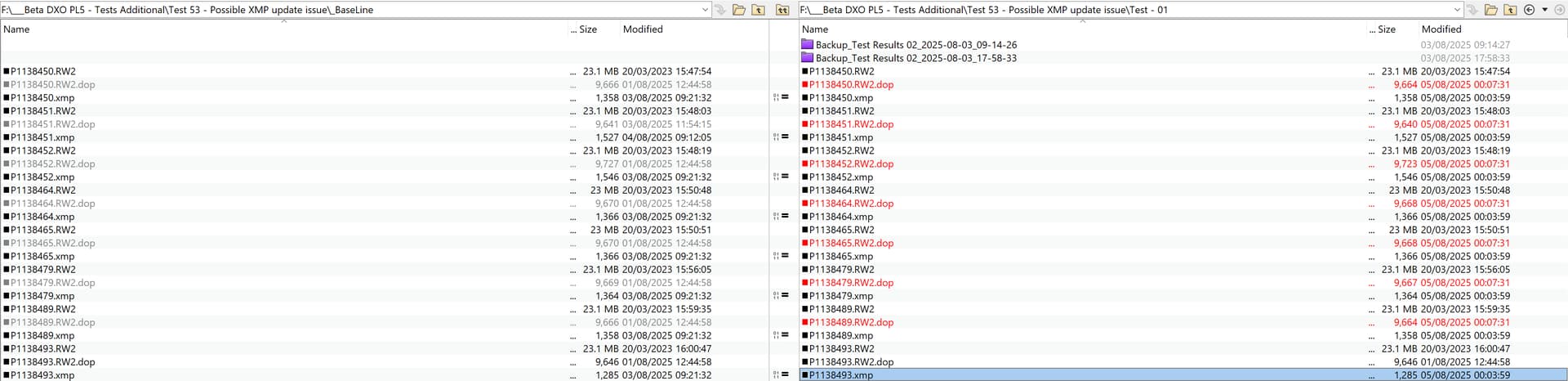
If the DOPs are going to be changed, and they absolutely should be, so should the xmp sidecar files!

3. Repeat the test but with all the images “selected”:-

PL8.7.1 was closed, the database removed and DxPL restarted, the directory rediscovered and all images were selected this time before “Plants” was changed to “Plant”.

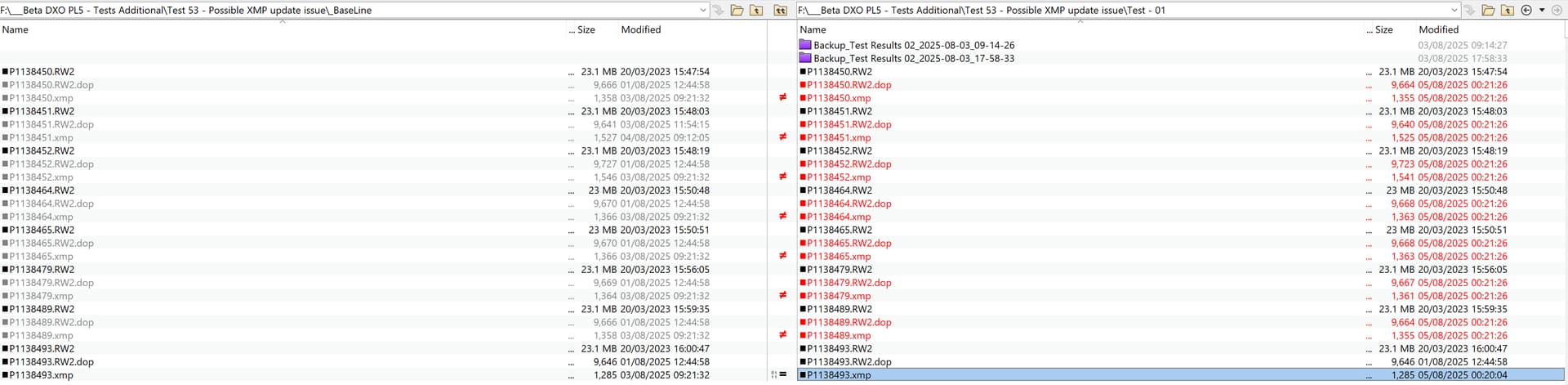
PFM shows the expected initial changes to the xmp sidecar files but with the images selected then the “Plants” to “Plant” changes also causes xmp sidecar changes as well as DOP changes.

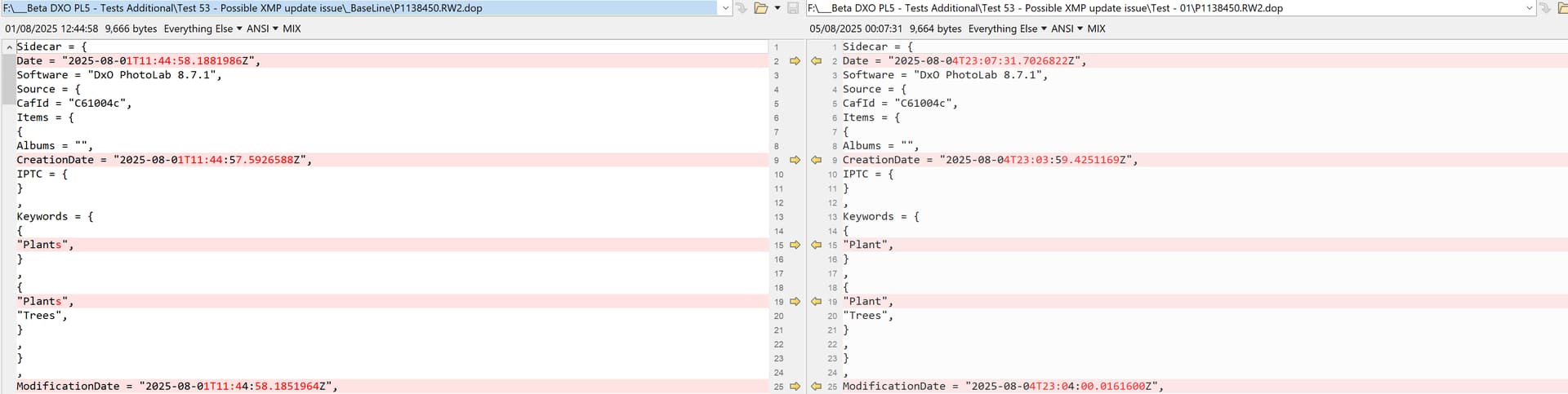
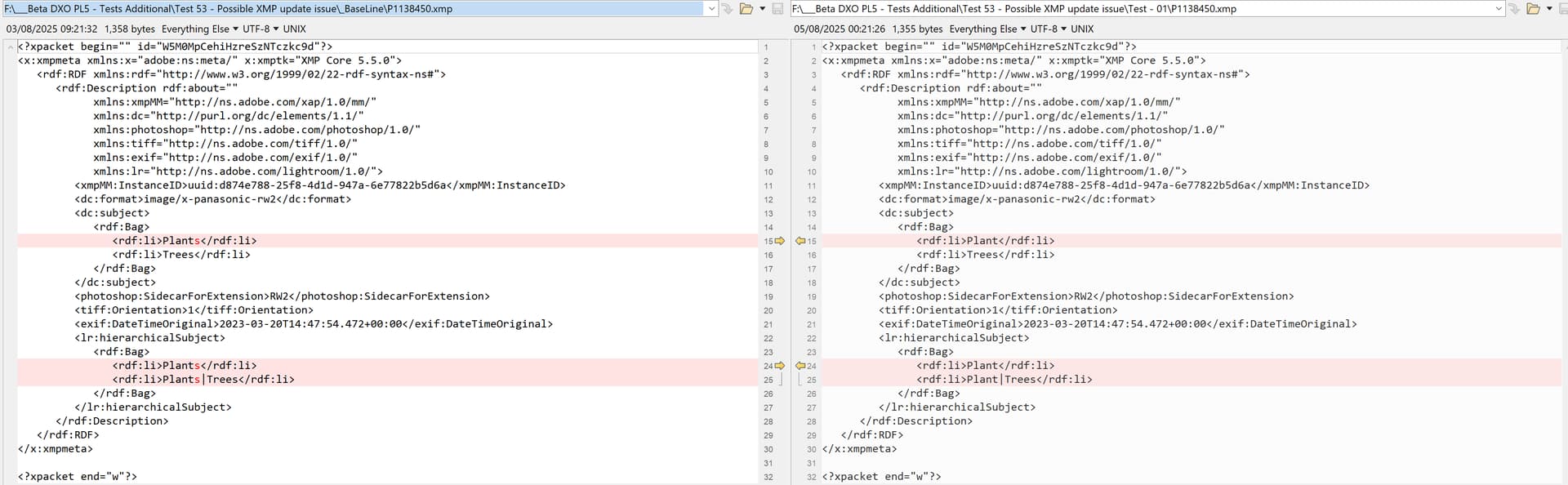
Comparing the Baseline files with the later files show the following
The DOP contains the change
The xmp sidecar file also contains the change
4. Repeat the test but with all the images “deselected”:-

Straight after Test 3 I de-selected all the images in the directory, but remained on that directory, and changed “Plant” back to “Plants” and only the DOPs were changed, i.e. no events are logged for the xmp sidecar files!
TLDNR

How did you change the keyword?

  • in an image using the keyword tool?
  • using the keyword list tool?

@platypus Here

i.e. the keyword list tool which is arguably the only place to change it if you want to test what happens if the actual image ( or numerous images) is not selected.

To ensure the the xmp sidecar data is updated you would need to do a search

to locate all the images with that keyword and then locate the images

and select all the images

and then make the change (in this case “Plant” back to “Plants”)

But that seems to have run into another problem which I haven’t experienced in any of the many tests I made before writing up the test

because I haven’t seen the “ghost” images of the “Plants” entry in previous tests!??

PS:- deleting the redundant ghost entry should work but in all my tests, and there have been a few I have not encountered the “ghost” of “Plants” before so why now or why not before?

Tested with DPL 8.7.2 on Mac like this

  1. Select 60 0f 60 test images
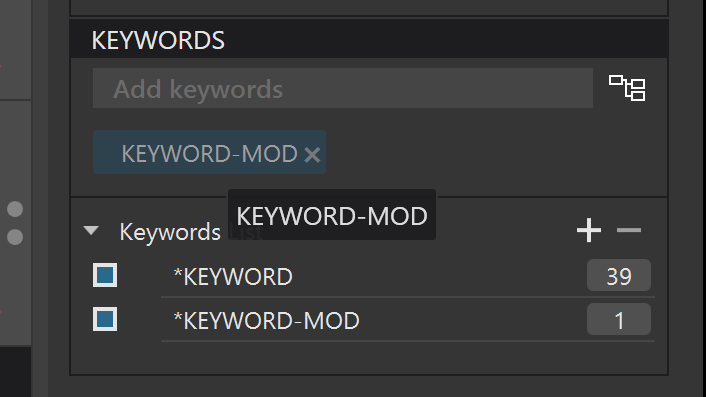
  2. Add “KEYWORD” in the Keyword tool, not the Keyword List tool
    → Keyword List shows a new entry of KEYWORD
    → all xmp sidecars are updated
    → so far, so good
  3. Select 30 of 60 test images
  4. Rename, in the Keyword tool, KEYWORD to KEYWORD-MOD
    → Keyword List now shows KEYWORD-MOD, KEYWORD is gone
    → NO xmp sidecars have been updated (I expected 30 updates)
    → strange
  5. Rename, in the Keyword List tool KEYWORD-MOD to KEYWORD
    → Keyword List now shows KEYWORD
    → ALL xmp sidecars have been updated
    → okay, but still strange, 30 images are still selected, 30 not selected

Observations and questions:

  • Sidecar updates can take a minute or two (not more) to update
  • Why aren’t sidecars of the selected 30 files updated in step 4
  • Why does individual keyword renaming change the keyword in the list instead of adding a new keyword? This pattern inhibits building sets of keywords like Test(Aperture), Test(ISO), Test(Exposure) etc. and if I remember correctly, DPL used to add to the list rather than change a KW modified in a few selected files.

:nauseated_face:

PS. As usual, the Answer to Why? is DxO!
:grin:

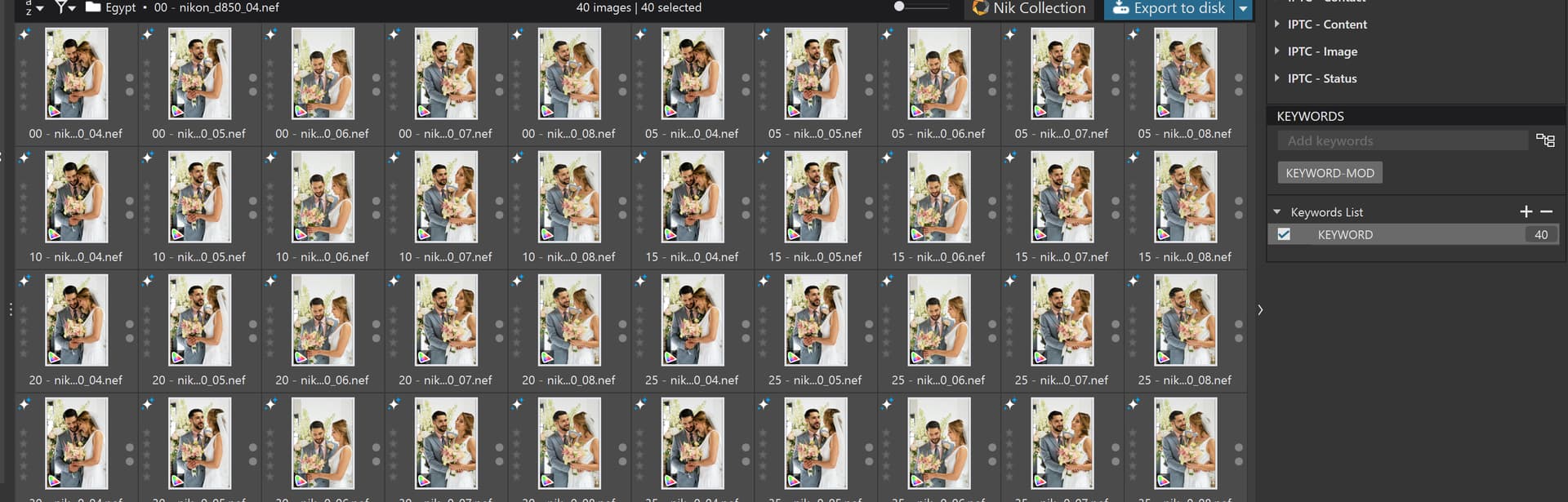
@platypus trying to repeat your tests I managed to tie myself in knots so just repeated my original test with a directory of 40 “Egypt” benchmark images and that resulted in a “sister” topic to this one at Win 8.7.1 DO NOT USE Keyword List renaming until you have read this.

However, I need guidance with respect to

and what you actually meant by that.

Some snapshots would be useful, when you have the time.

I will be busy doing an inventory of the garage this afternoon so that we can get an accurate quote for house and contents insurance.

Somehow I need to lessen the consequences when my wife realises how many tools I have amassed for DIY and gardening!?

mean indeed :wink:

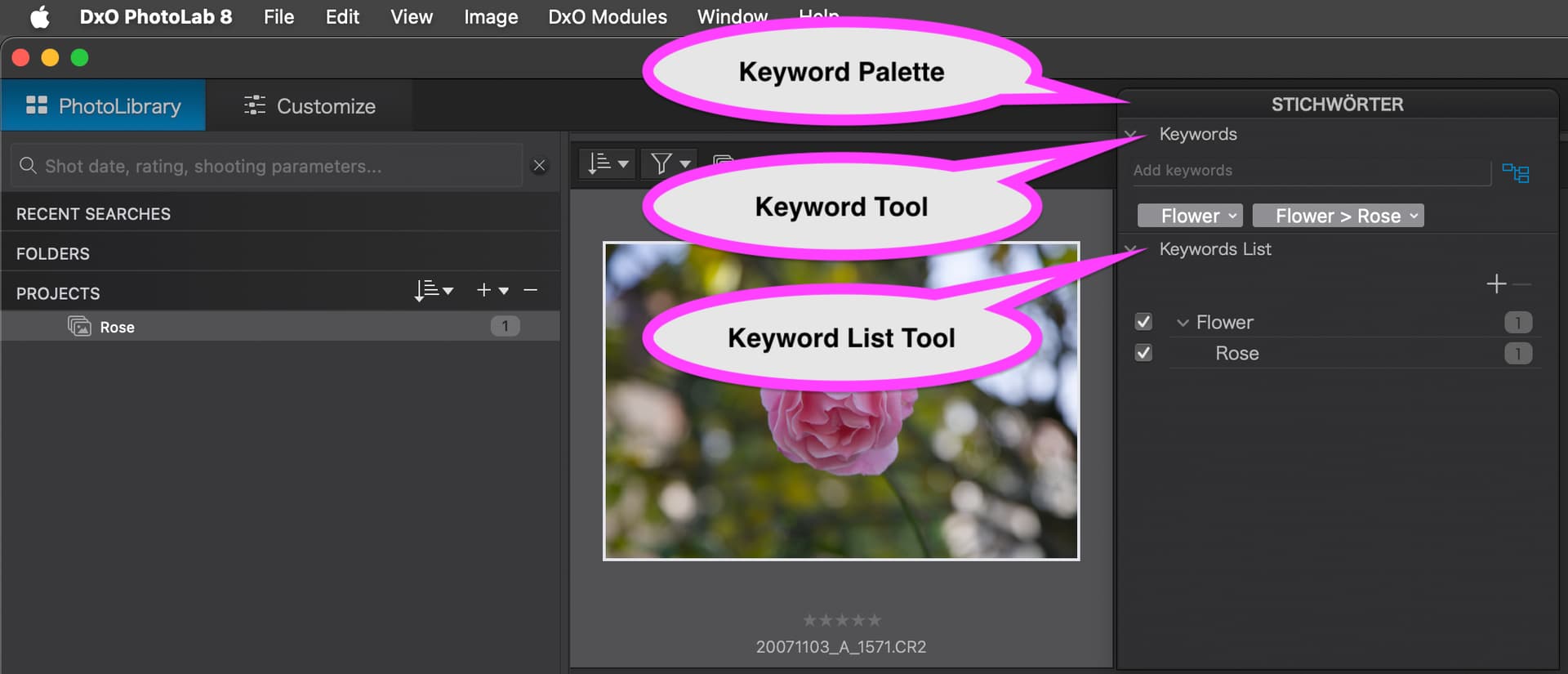
Here’s the wording:

Side-note: I switched DPL to English, but palette header locale seems to be taken from user account settings. Ah, Brave New World!

@platypus the reason for my question was less about my ignorance and more about the fact that I couldn’t get anything like your results and that was at the point where you selected 30 images (20 in my case) and renamed in the Keyword Tool.

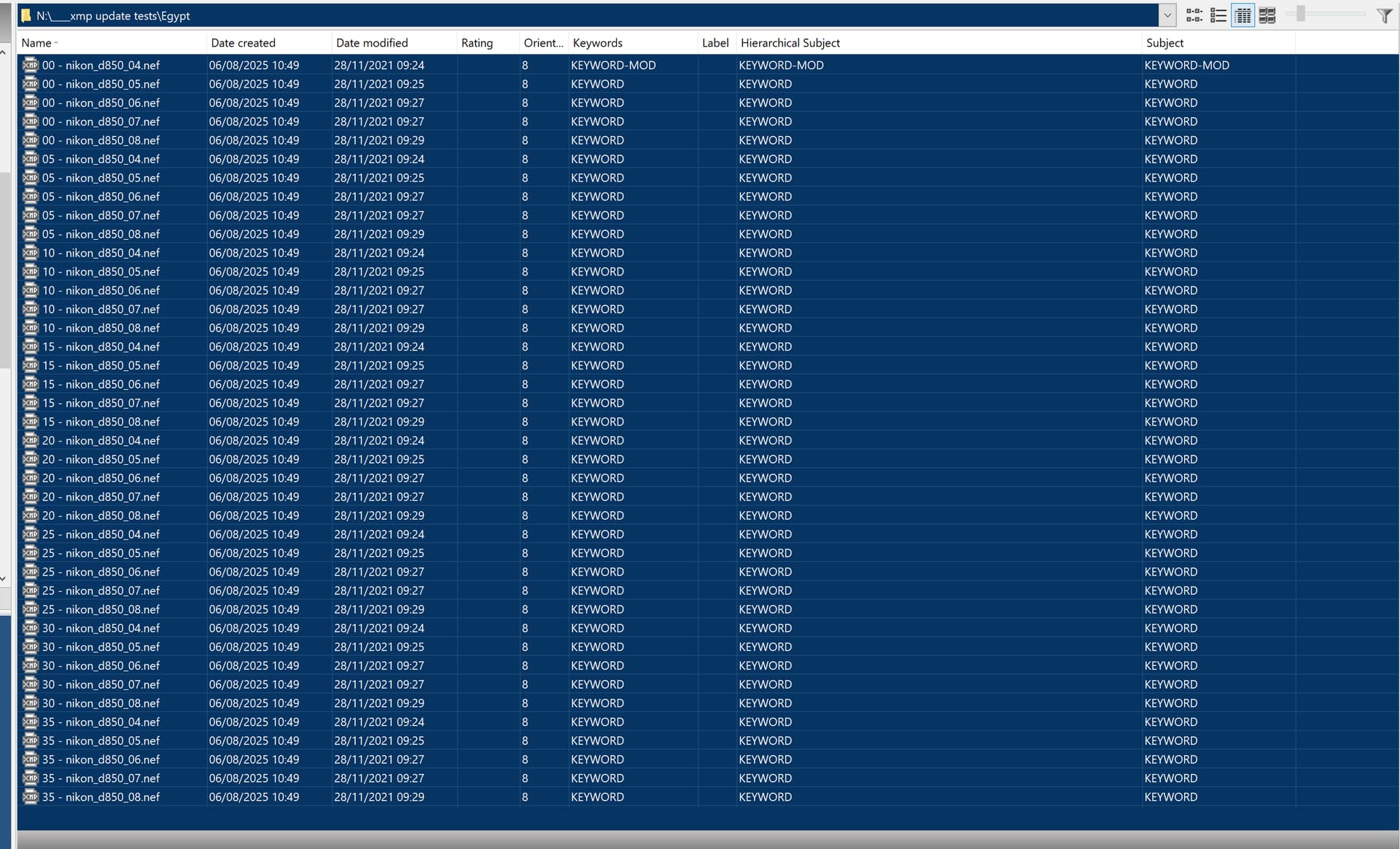
When I selected 20 images or 40 images and renamed I got the following

i.e. the change is only reflected in the first image and PhotoLab does update the one xmp sidecar file.

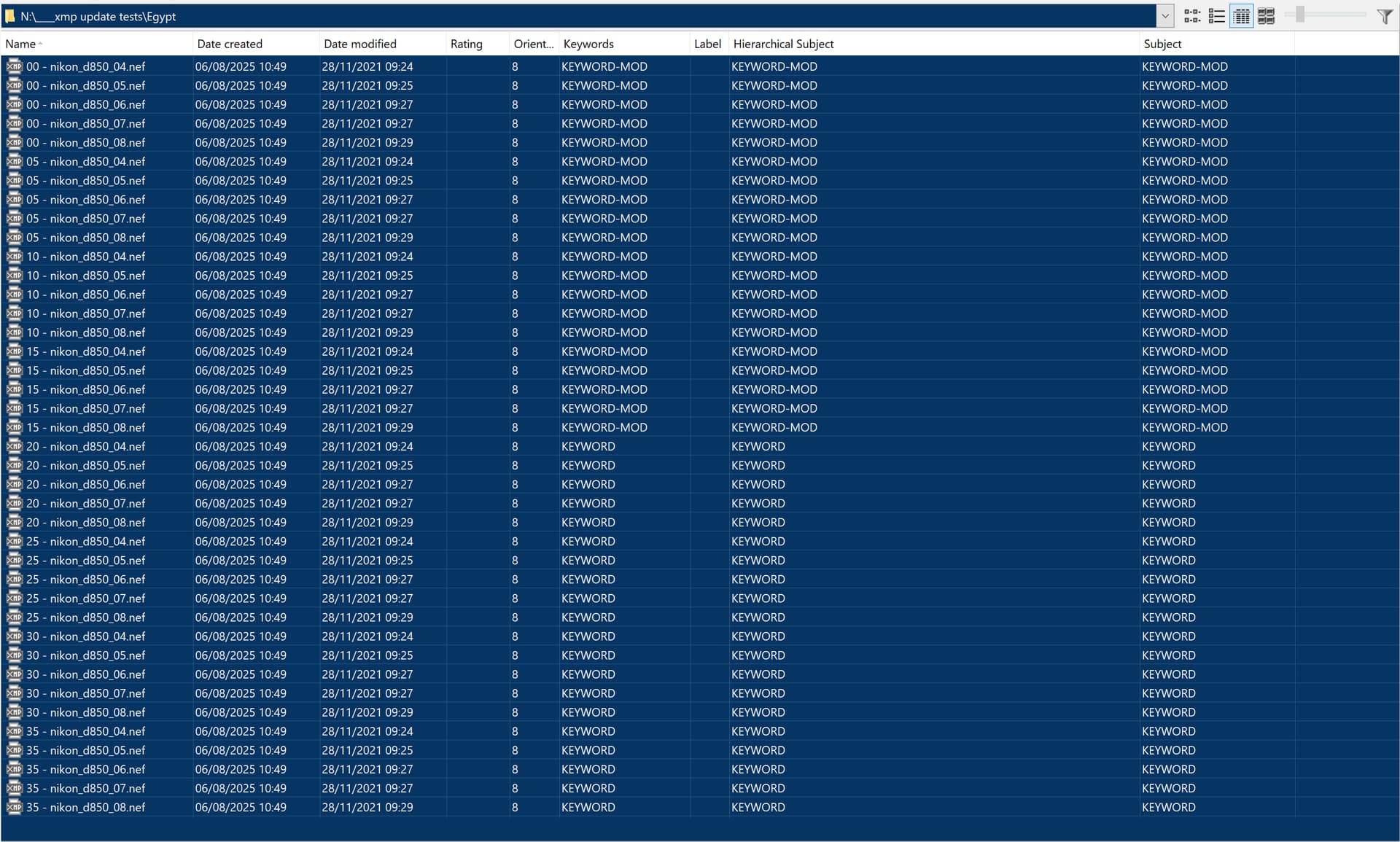
PS:- If I select 20 of the 40 and modify the keyword to “KEYWORD-MOD” in the keyword list I get

and

which fits in with my statement that the xmp keyword data is only changed for images that are selected.

@BHAYT , whatever you see is what you see with DPL on Win. I tested on Mac, so results can be different. What struck me is, that PL did different things like mixing old and new keyword entries, even though things were renamed rather than added. But again, after a thorough clean-up, my tests didn’t show these oddities any more. I can’t really say more than that…and I’m hardly inclined to re-test that stuff soon or at all…specially in view of me NOT using DPL for keywords at all.

@platypus or was it doing what I reported in my other topic and actually reloading the values from the xmp sidecar files that it had failed to update and which it shouldn’t have used for a second time.

In that instance two wrongs do not make a right, one wrong digs the hole and the other wrong then falls into it!?

I was clearing the database and DOPs and xmp sidecar files before the start of each test run and my results were consistently … bad but reproducible.

I understand why you are not inclined to spend more time and thanks for your efforts.

…hope it’s as easy to fix as you can reproduce the issue.
:+1:

Have you also tested the issue against DPL 8.7.2? Or doesn’t it exist for Winusers?

@platypus I have been contacted by DxO Support and asked to provide the screen grabs, make a video and run a diagnostic program and provide all three elements in a response, which I am putting together right now.

I’d put a smiley face emoji but I always find putting all the bits together “stressful”, i.e. not wishing to look anything but “professional”.

PL 8.7.2 does not exist for Windows, hence the problem on the other topic when trying to take 8.7.2 DOPs from a Mac to 8.7.1 on Windows!

Take care.

Regards

Bryan

PS:- My faithful Python Folder Monitor has been throwing exceptions (internal to Spyder, the IDE, I believe) but has still worked throughout the testing until this morning when it failed after writing only two log events!

So I have had to resort to Nodesoft Folder Monitor, down from three pieces of monitor software to one!!

DPL (Win) was probably okay already. On Mac, DPL 8.7.2 came shortly after 8.7.1, I suppose it was some kind of hotfix.

As for sidecars…the ones from DPL (Mac) have three lines that might need editing: Software (8.7.2.48) and the “inner” version (19.8) should be modified to the numbers shown in .dop sidecars by DPL (Win). Whether that will help, I cannot say or promise, but it doesn’t hurt to try.

@platypus Thanks for the update.

I have recreated the problem with a single image, which keeps the size of the logs down but with both the large and the small collection of images a problem has arisen.

The original test works as always so set “KEYWORD”, move to empty directory, change “KEYWORD” to “KEYWORD-MOD” (or KEYWORD MOD"!?), move back and everything reverts to “KEYWORD” but the add on test of then changing to “KEYWORD-NEW” sometimes works correctly. i.e. “KEYWORD-NEW” is retained and sometimes shows the original faulty behaviour i.e. reverts to “KEYWORD”.

Weird or I am not performing the tests correctly. However, it failed as I originally discovered and reported for the video which still shows there is a problem, now to see if I can capture the add-on test on video.

In the meantime the diagnostic log and the video had to be sent via Dropbox because of their size. What fun!?

Changing an existing keyword changes the keyword list entry and all images will be updated with the changed keyword. How and when/depending on circumstances, the modified keyword should be visible in the .dop sidecars and in xmp entries in files or sidecars.

At least theoretically. We’ll see if DxO can find the cause of irregularities. DxO proposed I ran the console, filtered for dxo or photolab while testing and to watch memory usage too. This might help with your issue too -not fix, but observe if something goes off track.

The best solution would be for DxO to update all DOP/XMP/image files on any changes to the keyword structure, but to do so as a background task rather than freezing the application. A single rename, as I’ve posted elsewhere, can take tens of minutes to run. If it’s followed by another rename that hits the same files, this can result in a lot of wasted time.

FWIW, in a month or so, I will be releasing a tool that can report all differences between the keywords in the database and those in the matching DOP/XMP/image files.