I thought this would have been sorted by now - anyone have any idea why there is no eyedropper available under local adjustments in the HSL adjustment - STILL!
1 Like
You can ask DxO through support.dxo.com (feedback). In this forum, you already opened a feature request where votes can be tallied, workaround solutions have been shared, and additional comments can be posted. Why start a new topic?
Hi
Simply use the global HSL (without leaving LA mode).
At this point, the HSL mask is updated.
It doesn’t replace it, but we’re getting there.
Pascal
Yes, it is interesting how DXO had the code for the HSL tool and then bothered with the extra work needed to remove the eye-dropper tool from the local adjustments.
Either DXO programmers have too much time on their hands or DXO just hates its users. 
The reason is probably because there is a better tool in Photolab Local Adjustments in HUE-mask. The HSL-solution is as usually with DXO - they first invent something promising that is half finished and than they forget about it after loosing focus rushing for something else.
Hue-Mask has this picker you are looking for and together with the Local Adjustment “Brush”-tool you have very good control adding and deleting masing areas using the Alt-key to activate “Delete”-mode.
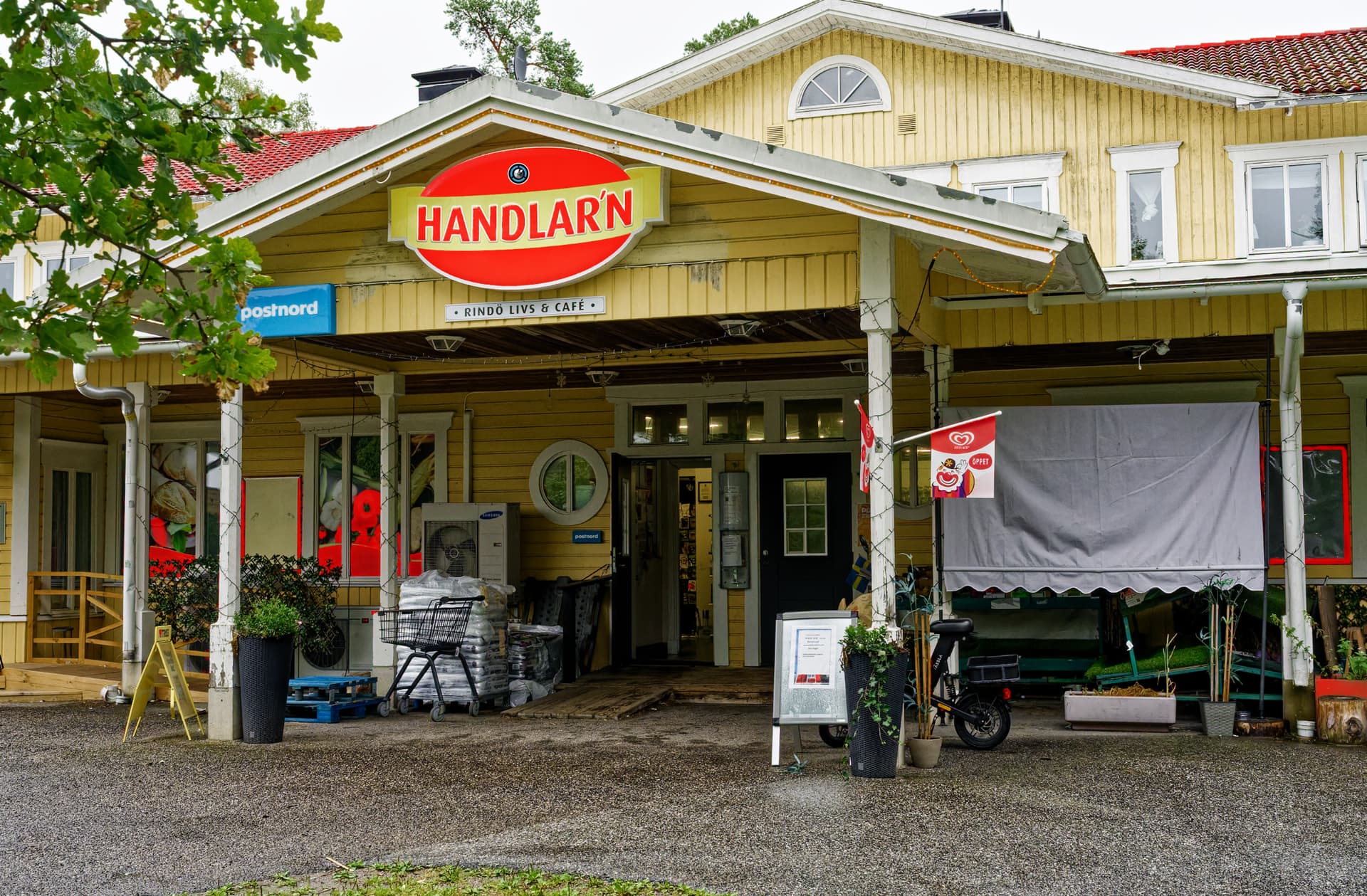
I picked the red on the big sign above and then deleted anything else red than the mask on the sign.
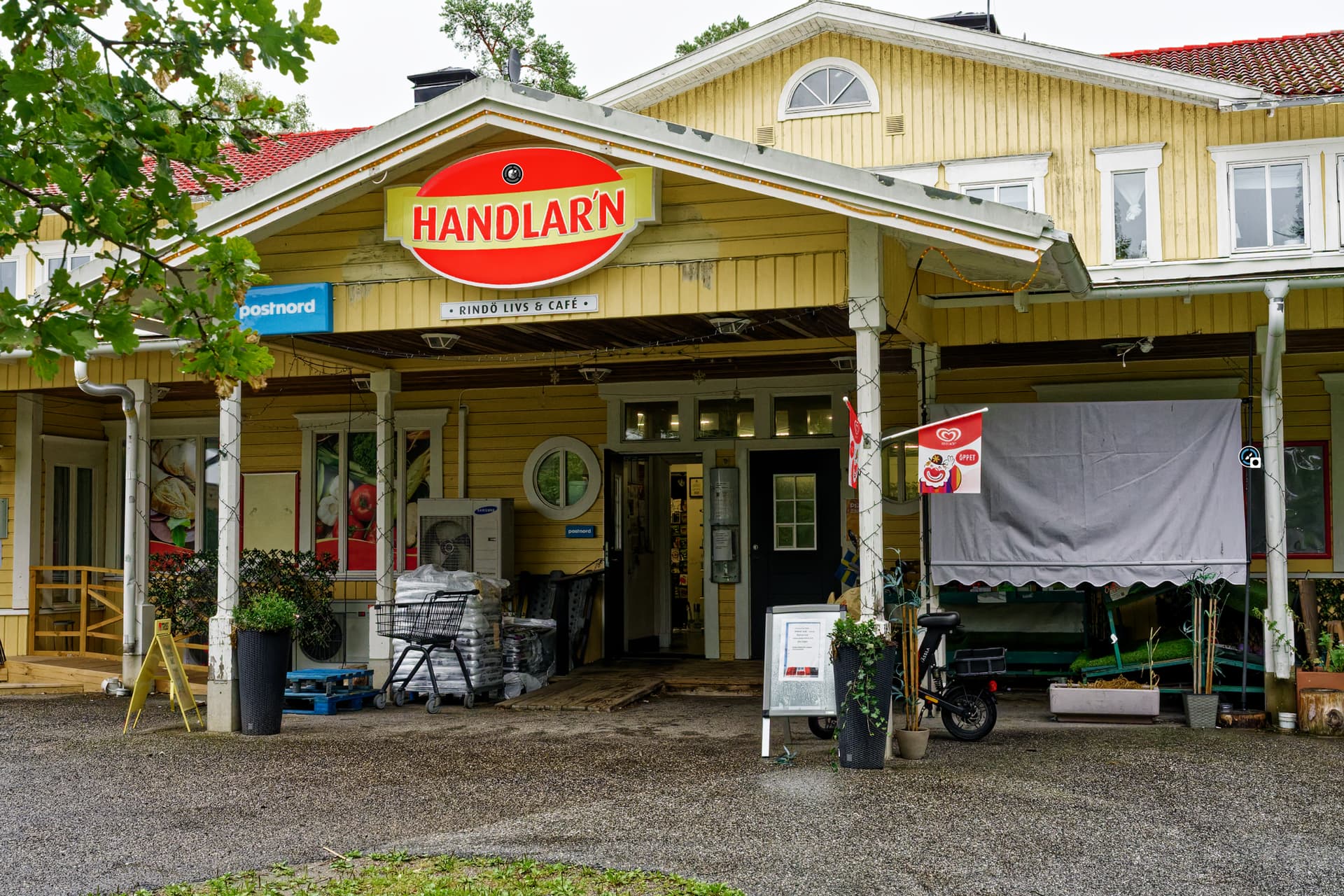
So just forget about the HSL. I never use it anymore since all masking is lokal anyway and we now have the Hue-Mask and the improved “Brush”-functions that gives us better precision with less efforts. HSL just keeps make new users confused and your tread here is just another proof of this sad fact.
I can tell you that I have written a few things about this strange subject even before version 9 was thought of. So this is a very old topic that I doubt ever will be fixed.
2 Likes
The only converter I have seen so far that has done this logically right is Capture One. They don´t have general and local tools and a division between these modes. They have a background which is the picture itself and then everything else is “layers” and all tools works the same on that background image and all the masks in these layers.
Both Lightroom and Photolab has this stupid division between “global” and “local” that just creates a lot of problems and confusions both for the users and the developers. It is just inefficient and uneccessary complicated to maintain and on top of that costly too.
The Capture One R&D has always walked their own and often very clever way but DXO often walks in the same footsteps as Adobe nad this case happens to be one of the most obvious examples.
2 Likes
Note that many people consider “local adjustments” artificial, used only in emergency cases. With C1 you have always to keep track with what you are actually editing, while in PL it’s much more natural. I think simplicity and ergonomy are the key design goals of PL, which personally make me happy, with some exceptions of course 
1 Like
Yes Capture One is for grown ups. Lightroom is for everybody else.
That stance Wlodek when it comes to Photolab might have developed out of the fact that Photolab/Optics Pro for so long totally lacked any means of Local Adjustments.
I also don´t agree in general since Capture One since some years has got the most natural way to work implemented when we got all these lovely brush-tools. Just pick one and start to use it and it creates the layers automatically. Compare that to Photolab. There even Lightroom is better and more transparent than Photolab ever have been..
???
Sounds like a religion. I thought these were just tools…
1 Like
Fair point - I did try the hue mask but found the adjustment wasn’t sensitive enough for me to adjust skin tones - coupled with the fact that there isn’t a skin mask adjusting skin tones is nowhere near as easy as it is in photoshop or capture one. It is possible that I am using the tool wrong as I am so used to Adobe but I couldn’t find anything online that specifically showed skin tones being adjusted or optimised to give me any clues as to what I may be doing wrong.
While reading, I remembered why you should prioritize vibrancy over saturation in the HSL tool.
You might be interested in this short video (ideally from the beginning, otherwise from 5:55). It also explains how to fine-tune the mask.
It doesn’t answer your original question, but you might find some helpful tips in it.
2 Likes
Whether you like to use local adjustments is a personal taste, that doesn’t address Stenis’s point that why, when you have a tool that applies an adjustment to 50Mp do you need a separate tool to apply the adjustment to 1mp of those same 50Mp? If you are going to incorporate local editing a unified tool set is the logical best approach. Copying LR was perhaps not the best idea, unless something in DXO’s code base makes implementing tools locally difficult?
Your point about local adjustments being considered artificial is a valid personal opinion, as are those that consider editing artificial and you should get it right in camera and just use the OOC jpg. 
My personal opinion is that I tackle digital editing in the same way as the darkroom. Establish a base exposure and then dodge and burn locally, to achieve your desired result. Digital working, particularly with AI masks is certainly far easier than the darkroom, but still requires skill, just a different skill set.
DXO have expended considerable time and money developing their local editing capability and I guess they hope that most people will be glad that they are providing a competitive product.
With regard to simplicity and ergonomics I assume you have not used recent versions of C1? C1 provides basics like Tone sliders that control specific tones without the broad impact DXO’s “(UN)Selective Tone” sliders have, as well as providing a far greater range of tools for editing including, masking, the Advanced Colour Editor, direct access to a Linear raw curve etc, etc. Now C1’s noise reduction capabilities are easily summed up as “Primitive”.
I have used every version of DXO since V1, excepting V9 (Nvidia GPU issues, but looking forward to V10) but I also use Capture One so can form a reasoned judgement on their various strengths and weaknesses, and that is what my above comments are based on.
2 Likes
Do you mean that one affects the other?
Just seeing your question … Yes, try it.
It’s only a workaround, but it “helps” the local HSL tool to replicate the selection.
before
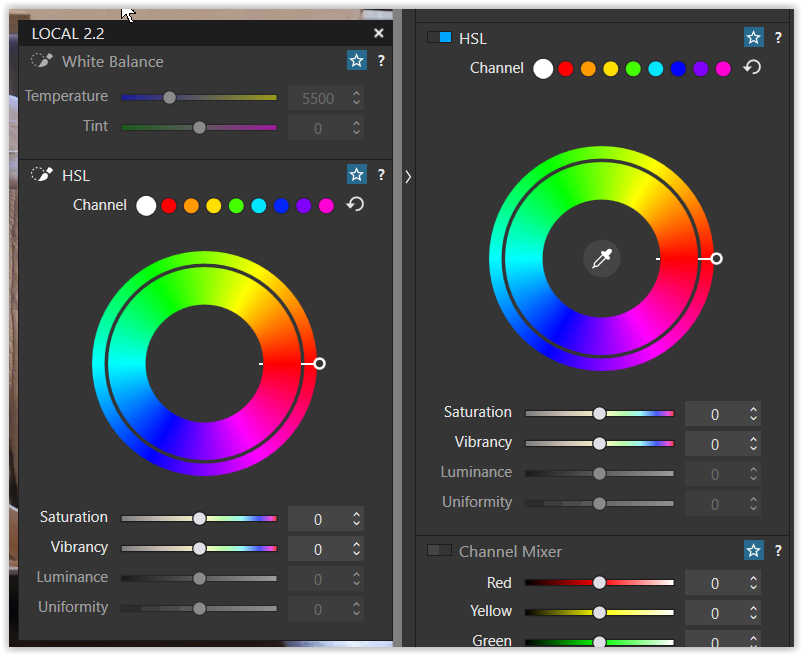
after click on skin tone
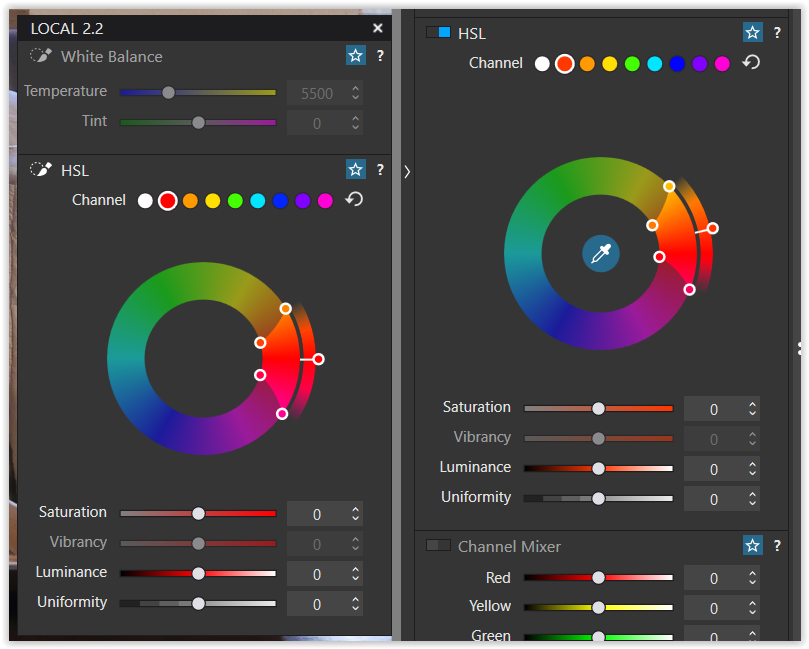
I temporarily moved my customized local palette
onto the main screen next to the global tool
.
edit:
just activated an AI people mask so that the local HSL also appears “bright”
I think version 9 was a very big step, but it was a foundation without the more finetuning tools. I guess there will come better face retouch tools in a close future release (next major upgrade maybe). It took Capture One several yers to get that in place too.
Thanks for the suggestion - will try this
2 Likes
Yes, for me efficency and productivity in image workflow is close to a religion. Some might call it a occupational injury after having worked since around 1993 with these issues both in the corparate world and in the public sector.
When the Digital City Museum of Stockholm was made we had two main objectives and the first was to make all the Digital Assets the museum wanted to publish open to the public and that ment not just pictures but also all sorts of documents and publications (PDF-files). The second was to improve productivity and the digital workflows.
The first was the easiest to meet and we really did. Even the second we met technically very well but not entiredly in practice since not all of the photo antiqaurians and photographers adopted the new possibilities but especially one of the photographers did. The reason I think was that the manager of that department quit and was never replaced so there were no manager to handle the new situation.
When we started we started with 10 000 historical pictures. Today they have 40 000 digitized historical which is a throwput for the whole museeum of around 2500 historical ictures per year and that is despite that metadata was automatically pushed into these pictures XMP if a scanned picture already was registerad and a lot were.
However this special young photographer published 5000 new pictures the first year which made quite a few of the more conservative in the workforce uncomfortable. Today the museum totally has 100 000 pictures published and this photographer has published 40 000 of these. So he has published as many pictures as the rest of the historic analog photographers of the museum has done all together since the museum started to digitize! The museum had five six people working with scanning historical pictures when I worked there. We never managed to improve their through put and productivity. We tried to get them to repro protograph instead of scanning but that never happened during my days.
Today I have started to try to inspire my own municipality, (that is a very important turist destination), to publish their historical pictures and hopefully even improve productivity. Nit the least to serve the tourists better.
So to wrap up: I see nothing close in Lightroom and Photolab to what they have now in Capture One concerning the workflows. The last say tree-four years they have done a lot to improve productivity and stream line their workflows in a pretty different manner than what I have seen anywhere else. As a spin off we have also got a far more natural workflow than I have with Photolab.
What suggests that things will go better this time?
The most obvious thing is the software development that in many ways have been explosive. The year 2009 when we started at the museum there were no software to buy that suited our needs so we had to develop and adapt a PhotoWare Photo DAM to become a general DAM suited to handle all the museums assets. It costed several million SEK (around 200 000 US).
Today the situatation is totally different and much simpler and very much cheaper when for example can use ImageDesk (a Swedish software for photographers and photo agencies). It costs about 160 US month for hosting around 20 000 pictures. If they want they can use iMatch DAM to handle the back end and a perpetual licence for that software is something around 130 U$ - payed once without any subscriptions.
And the funny thing is that this AI-powered iMatch DAM today so is dramatically more efficient when it comes to handle XMP/IPTC-metadata efficiently than the City Museums system ever was despite it was the state of the art the year 2013..
1 Like
One thing I find some people lose sight of (e.g. saying there is no need for a picker in LA-HSL) is that the definition of the mask and the adjustment of the pixels under that mask are completely unrelated.
Think about this for a moment. I want to adjust the reds, but only in the bottom right corner. This is a job for a Gradient mask and an HSL adjustment. The Hue mask does not solve this problem as it selects a colour range across the entire image.
2 Likes
That is why we now can use it together with the “Delete Brush” (hold Alt → Delete unwanted areas as I showed in the picture of our little local store here at Rindö Island).
How do you do that with a gradient mask with any precision? The Local Adjustments like ones we have now is much more about that than before version 9 and the “Brush”-tool is a lot improved since version 8 to make it very easy now to manage tasks like that with very good control. I really love the new version of that tool but hardly used it before version 9.
Capture One have had the possibility to convert “a color pick” into a mask for ages. The HSL-tools did not offer a way to handle a pick in a layerand that made it less useful. Photolab has lacked stringency in that way which just add to the confusion really. In many ways some of the old system of control points they bought from Google I think has felt a little “bolted on” than really integrated. It is first with version 9 this has “almost” been fixed.
2 Likes
@Wolfgang replied.
All you need to do is use the pipette without adjusting anything.
Pascal
1 Like