From the perspective of having used Lightroom in recent months for my bird photos.
The AI selection process is a little weird, but perhaps I will get used to that.
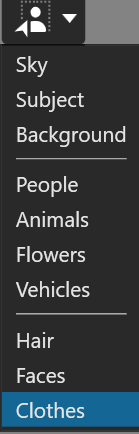
Choosing from the menu of options (subject, sky, etc) is a little slow.
The selections made seem slightly better than Lightroom (less spill, missed areas).
Tweaking selections with a brush is easy enough, but the brushing performance could do with a boost.
Subtracting elements is relatively straightforward (see here).
It’s a bit buggy.
One time, no matter which mask I clicked on, the sliders all showed the same values.
One time, clicking on any mask did absolutely nothing.
Moving to a different image and back again restored normal behaviour.
I really miss using the bracket keys to adjust brush size (and with Shift to adjust feathering).
On the whole, it makes my LR-based workflow workable. But despite the slightly better selections, meaning less manual work, the manual work is still not as fluid.
Is it time, I wonder, to make loud pleadings to DxO for that radial filter they added to the backlog in 2018?
I think there needs to be a companion to the Linear Graduated Filter that is the Radial Graduated Filter. This is the same relationship as Control Line to Control Point.
The RGF should allow elliptical formation. While they’re at it, allowing elliptical formation of Control Points would also be great.
1 Like
Stenis
(Sten-Åke Sändh (Sony, Win 11, PL 6, CO 16, PM Plus 6, XnView))
3
It´s a little bit strange that we haven´t got a radial graduated filter after so many years. I have to go to Capture One for that still. That said there has been some refinements done even to Capture One after AI-masking was introduced.
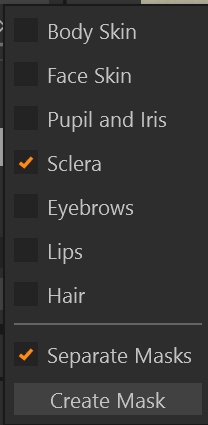
First we got Subject and Background and later we got what we have now in the menu below too.
I have tried to edit a pupil, sclera and Iris with these new tools and that was not so easy.
With Capture One that works really well. So what I´m trying to say is that I expect a few updates and improvements to happen. Even Capture One had performance problems in the beginning that they have solved in several steps.
What we have got is at least is a pretty interesting and promissing new AI-masking platform. I on´t really expect to find the same polished tools in version 1.0 of AI-maskings in PL as in CO. It will take years to achive that. I just hope DXO understands that this work has to start promptly and can´t wait until next yearly release.
When some reviwers write about DXO having a more precise masking even than Capture One they might just have forgot that CO has a rifinement-function that let the user affect the masking-precision in detail. A toll I don´t think even Lightroom has. Maybe we can get something like that too?
The AI-masking will make the users much more effective when it comes to detail-adjustments. Correction that could take an hour can now somtimes be fixed in seconds. Perhaps even the most hardheaded defenders of the “non-masking” situation before version 9 will realize the full benefits of AI-masking but the real gamechanger is the possibility to save a masking-setup as a smart preset that then can be used on a selection with many pictures. It is not cut and paste now but more of a smart AI-driven application that will be unique and adapted to every picture. That once changed the efficiency of the workflows of Capture One. In CO this tech has been used in several more specialiced tools especilly developed to boost productivity of product- and marriage photographers.