The choice of a PC fitting with Dxo photolab

May its add some info: (i post this to the forum in May-June : Budget GPU for PL
Measurements, Graphs, tables and kind of things. I’m still happy with Intel ARC B570 10GB (that was the cheapest), just do the job fine, just ggod enough.

Actually i think, even modern (latest) Intel iGPU (laptop) can be decent - check the exact type (the devil in the details), benchmark tests, . May just ‘good enough’. And of course, for iGPU the notebook may need quite a memory. But PL even has this checkbox: ‘Dynamically optimize memory usage’ if you don’t have too much memory for GPU - of course its a tradeoff on performance )due AI model unloading/loading). As i see, the AI masks use very little GPU performance, so, just i think for AI mask detection GPU speed may less an issue.

And anyhow: what if one photo export takes 20 second and not 5 second? Does it matter? May you get some snack in the meantime…

You’re exactly right. I don’t have all the figures, but here are some prices I paid back in 2014-2015:

  • £197 - Intel Xeon Processor E3-1231 v3
  • £81 - Corsair Vengeance Pro Series 16GB (2x8GB) DDR3 1600Mhz (equiv. DDR4 is £171)
  • £89 - Asus H97-PRO GAMER Intel 1150/Intel H97 ATX
  • £138 - HGST IDK Deskstar 4000 GB Internal (now £300)
  • £523 - 6GB Palit GTX 980 Ti (RTX 5080 is £1,800+)

I don’t post often as I try to stay away from forums at the moment but how about going down the Apple route instead?

I have three main computers I use, a high end PC Desktop for gaming and previously image editing but it turns out that DXO (and Lightroom as well actually) handle AMD graphic cards pretty damn poorly and I use AMD graphics and CPU in that machine. There are things to do to help it get better but for me it’s not worth it as I have alternatives.

My main image editing will be done using an ASUS Pro Art laptop with Intel and Nvidia based components. But I’ve recently also done a lot of editing on my Macbook Air M2 from 2022. The Macbook Air is superb at editing, even my version from 2022 with just 8gb och RAM. I rarely have to wait for anything, the images load fast, even with folders with many images, the editing is done fast as well and I never feel bogged down by the computer. My ASUS Pro Art is several seconds faster at exporting images, a bit faster at editing and loading images but not so much that the Mac feels slow. I run the Macbook air, and the ASUS laptop to an external 38" screen and they both handle it superbly so no need to worry about that either.

You could easily by a new Mac Book air, or if you would be happy with a stationary computer, the Mac Mini instead, far cheaper than you would buy a decent image editing PC at the moment. You would also have the benefit of Mac OS which is all in all a much better system than Windows (but also more locked down).

Just some food for thought and alternatives to buying super expensive PC at the moment. I would like to upgrade my main Desktop but there is no way of doing that now, if I would be new, it would be some kind of Mac.

/Rasmus

Just checked MicroCenter… little ones up to 2Tb 7200rpm are around $160 but wow, go to larger capacity and the prices are insane!

So your Intel ARC B570 10 Go with a few go in ram is enough to use PL 10 easily ? It looks strange for me as it is less expensive and as everyone is showing either nvidia or Amd Gpu to be the best .. Maybe i do not understand well your tests ?

If you are building a win pc for photolab you might find the following thread useful for selecting a gpu Choosing a GPU for DxO Photolab: the answer?
Prices have gone up by quite a lot since then; the author has kindly updated that chart at the beginning with newer prices (scroll down to see that), but the relative performance is still valid no matter the current price.
I went through this almost exactly a year ago, for the same reasons (wanted a camera that happened to have about double the MP of my then-current one, knew my then-current PC wasn’t capable). In a way, I’m grateful for the increased pc capability required by PL9 as it pushed me into upgrading hardware just as prices were starting to skyrocket.
If I had the same choices today I’d probably jump to one of the mac minis with the ‘m’ chip.* And if I wasn’t building a pc, that choice would be easier. Win 11 complicates that choice; be sure to install anything but the ‘home’ version - the edu version seems to have the least telemetry and intrusive ‘suggestions’.
*if you make that choice, head over to the mac forum and ask about cost / performance / price on the various models. I haven’t a clue there. (“A man’s got to know his limitations.” - man with no name)

Yes.
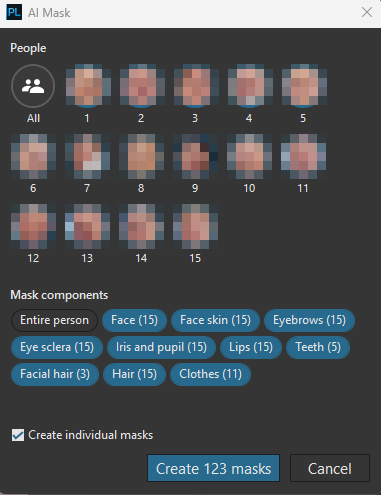
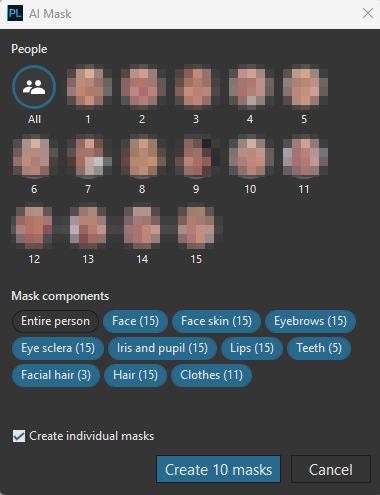
Just in the last week i do some NGO event photoshoot, and for some group photos (10+ participant) and AI detected masks: face, hair, clothes, etc. works just great and smooth. 123 mask for 15 people was near instant.
Example:


Note: the ‘few GB’ is 10GB. DxO PL itself may use 1GB of GPU, AI masking may use + 4-5GB GPU. Export may use up all the remined.

It looks strange for me as it is less expensive and as everyone is showing either nvidia or Amd Gpu to be the best ..

The discrete GPU market dominants is nVidia and AMD - Intel market share may somewhere around 1-2%. So, its not surprising you not see too many Intel discrete GPU cases also in here (in the forum).
But its definitely not strange.

Maybe i do not understand well your tests ?

All test are valid. I do myself. I think, is one of the most detailed test series in the forum. And its not just about GPU performance, but also masks type and amount performance and RAW type related performance tests.

Actually i think, GPU type doesnt matter. PL use ONNX ‘framework’ for AI operations. And due that, the GPU/NPU type (Amd, nVidia, Intel, etc.) is ‘transparent’ for PL. If its has (and has) provider (under Windows) for WinML / ONNX than it’s works.
Of course, may GPU driver quality impact the things (as its happen in PL9 early/mid build days, effected by some nVidia driver version).

I think PL introduce this ‘Dynamically optimize memory usage’ checkbox for cases, when GPU memory is 4GB or similar. At least when i try, i see GPU memory usage around 3.1 GB. I cant test it with 4GB GPU - as i don’t have it anymore. Note: even PL9 can run fine with under minimum spec 4GB GPU - with some limitation (only manual AI masks and DP3 export only).

Overall i think:

  • GPU type (nVidia, Amd, Intel) doesn’t matter.

  • I think even ‘how old’ the GPU is still doesn’t matter (until it has some enough GPU memory). Performance as-it-is.

  • Hard to compare today GPUs, I suggest for performance comparison to check GPU s in Geekbench AI / Geekbench and similar detailed benchmark/performance databases. As i remember, Geekbench AI even has ONNX tests. May its provide better real world data for GPUs in PL than other tests/benchmarks.

  • For AI masking, as i see the GPU performance not matter too much (at least i not see over 10% utilization with this Intel B570 in AI mask detection, selection)

  • For Exporting (with DP3, DX) the GPU performance matter. But tis still not to much, if you has some budget GPU. For one export is 2 second, for budget may 4 second. And what.

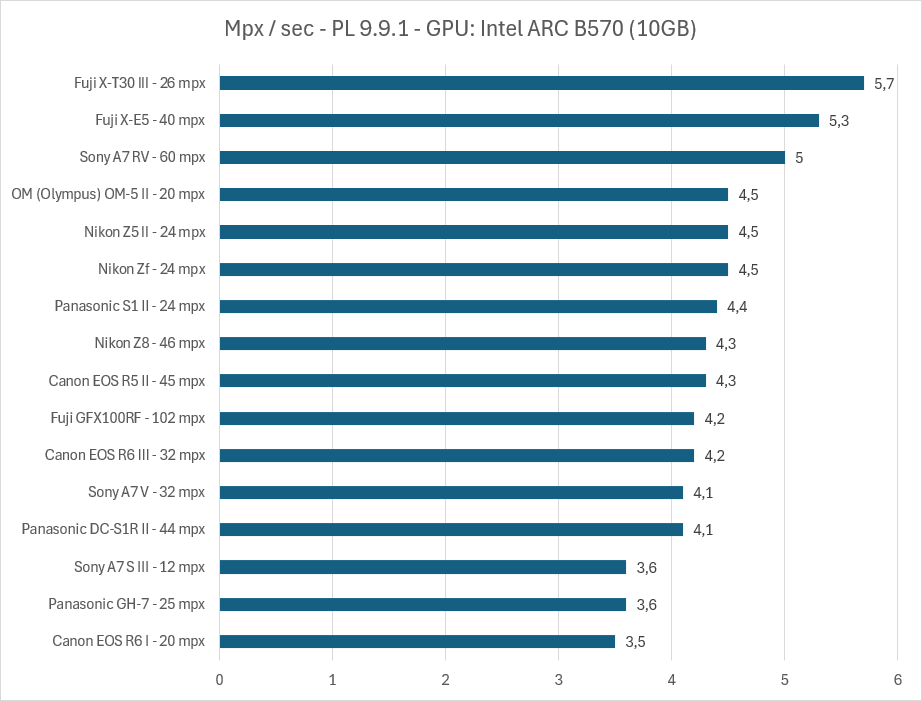
  • Th RAW type (manufacturer/camera) and MegaPixel amount is matter in a way. I have results table in my tests. Mpx of course matter. But RAW ‘type’ also! To get an idea / example: if export in one PC the Panasonic GH-7 25Mpx takes 7sec, than in the same PC export of Fuji X-T30 26Mpx takes 4.5 second. So, in this example its means: if you use this Fuji RAW than may 40% lower performance GPU is enough to get the same performance (on export) than if you use this Panasonic RAW.

Any question, let me know.
Interesting, I’m a bit surprised about your Arc experience. When I had a look at first generation Intel Arc graphics about a year or two ago, it didn’t look good. Drivers were even more buggy than NVIDIA and some floating-point operations were emulated, the thing expected to be fixed in next generation.

My PC with i7-14700KF/RTX4070 inside is 3 years old, too soon to look elsewhere, but I’ll keep an eye on Intel Arc graphics.

Just to add two things:

  • Take care of the system disk size. AI models tend to be rather large. Many configurations offer 500GB only. Personally I use 2TB system disk (60% full, lot of private data though) plus 4TB dedicated for photos (75% full, over 100,000 raws, yes, too many, but I’m a bit sentimental)
  • If you’ll be using raws from 100+ mpx cameras, buy 64+ GB RAM. 32GB RAM might still be OK for some time in other cases, but I wouldn’t risk. Assuming 5+ years lifetime.

I’m a bit unsure on the ‘but the relative performance is still valid no matter the current price’ part. And may ‘no other test in the world’ show differences like this one - may especially between the lower and the upper part of the graph.

I think the base for that chart was this great article: Test de la GeForce RTX 5050 : que vaut l'entrée de gamme des verts ? - Hardware & Co

That was a great test with PL 8.7 at the time when PL 8.7 was the most actual version of PL. I’m not questioning they testing and measurements, results.
However - look back from now, even than was some point in question - just look Intel B570 results, what is totally out of technology reality - but at that time, that driver version that was their result. Disclaimer: i own Intel B570 because that was the most budget GPU i can reach.

But times pass, PL now in v10, change a lot. GPU drivers improve a lot. AI models / providers improve a lot, and even Windows OS improve a lot (on WinML/ providers) and so on.

I think, now may can be interesting (and may more realistic) to find other methods to compare (of the technical performance), like GeekBench OpenCL, ONNX results.

I get it like 6 month ago, so all i can say from that time. No issue, no freeze, no any reason for driver rollback and so on.

The reason to buy: get something GPU with more than 8GB of VRAM on very-very low budget for PL. I’m happy what i get (for that amount of money) for PL. Its just do the thing. Nothing miracle, but fast and fluid for me.

I not a gamer (only Sid Meier’s Civilization VI sometimes), so i cant tell on that side anything. I do some ‘light load’ rendering, video editing and transcoding - all works just okay.

I read some rumors about Intel may quit from desktop customer discrete GPU business. I’m not surprised if its happen: the bigger ‘Pro’ cards for AI give them premium prices for the ‘near unlimited’ AI market, integrated iGPU nowdays powerful ‘enough’, and ‘simple customer desktop discrete’ market is may not worth it for them.

How about export times with DeepPRIME XD? I can’t imagine the Arc GOU is fast for export?

I agree fast editing time is more important than export time because you can get a coffee during export or if you’re exporting hundreds of photos you can wait and export all before going to bed. But sometimes I need the images out quickly.

Curious to know this myself.

It’s a shame I’m also a bit of a gamer. I need decent 1440p gaming performance, at least.

Thank you for your answer. Maybe you could show me configurations to build my next pc that could match the PL10 needs . I confess that i am totally lost in the hardware world ..

All it this thread: Budget GPU for PL - PL 9.9, June 2026

I copy the main points tables also to here.
Export times w DP3 and XD, with or wo manual an AI masks, for 88 photo. Results median form multiple test runs


Difference between camera body/raw

For details (like PC config), observations check Budget GPU for PL

Any question, let me know.

Okay got it. About double the times compared to my 3070 laptop GPU. But still manageable.