Budget GPU for PL

The GPU prices for quite a long time very-very high, also RAMageddon is here. Budget is limited → so choices is limited. Christmas may coming sooner in this year, i save up a little amount, may enough for some very-very budget (6-8-10GB) GPU - currently I have an ancient AMD RX550 4GB.
Anyhow, Manual AI masking works with even with my existing 4GB GPU, export also possible with DP3 NR. Export times like 30sec -60sec for 20Mpix Oly raw.
But the manual AI masking calculation is time (as-it-is my GPU performance) and editing on that → that’s where i think better to improve. So, the editing smoothness/fluidity what i care.

As i see, the budget (most cheapest card with >4GB) may the Intel Arc B570 around 250EUR** (300USD**) 10GB. May around the some price range the nVidia RTX 3050 6GB, AMD Radeon RX580 8GB. I can compare myself the the specs and performance tests of them. ** price is rounded for simplicity

I dont care about loupe, DeeprimeRendering, not really care about export performance/times (however export performance definitely indicate general performance), and use Manual AI masks (and not Pre-defined).

I care about editing smoothness/fluidity.

So, if someone has experience lower-end/budget GPU’s, especially Intel GPU’s - please share experience/comment. Like: how you feel the Manual Ai mask creation performance, editing smoothness (response), and so on, some base export performance (with your GPU) - please note: export performance also Mpx amount related. So, like : 5 second on 50Mpx may 2.5 sec for 20Mpx photo.

That’s all budget what i have in the near term, so please not suggest like: for double of price you get 8 time of performance. PC config: CPU: AMD Ryzen 5 3600 (3.6 GHz, 6 core), Ram: 32GB, old SSD (not nVME) drives.

p.s.: it’s may also help for others if low on budget.

In which case I think you’ll need a GPU that is at least at the level that DxO state is ‘recommended’, i.e. at least a RTX 3070 8GB VRM, see here:

If you search the forum you’ll find quite a few comments of that nature. My impression of such comments is that PL with a low spec GPU is not a fun experience. It’s not smooth / fluid, it’s prone to crashes, and exporting takes minutes, not seconds.

My own experience of trying to use PL9 with an ancient GTX 1050Ti 4GB VRAM was that I needed patience, as nearly every click took a while to be enacted, and at best I could use only one AI mask, of the ‘point and click’ type (anything more was too much of a strain and PL would die).

If I were you, I’d not spend money now. I’d save up until actual Christmas so that my budget was bigger. Buying low spec now sounds to me like a waste of money.

5 Likes

DXO could code better?

I tested Capture One’s latest beta on an old laptop. The new enhanced denoise (equivalent to DP3 only) took a long time to run, min or so (I didn’t actually time it) for a 45mb file, but it is done now the background and only needs doing once. Surpringly, the AI masks and all sliders worked fluidly and editing was no problem. Just shows what can be done if the code is right.:grinning_face:

1 Like

I agree with @stuck . In addition, please be aware that if you do purchase a card with a GPU you won’t outgrow in a year or two, you may need to upgrade your power supply as well. The least powerful card I would personally spend my money on today for PhotoLab is the RTX 4060. Perhaps one could be found 2nd hand, but, as I said it might require a new power supply for your computer.

I wish I could suggest a lower cost option for you that would give satisfactory results, but if you plan on using any of the DeepPRIME variants and AI masking there is a higher baseline that you will need to meet which is only likely to go even higher over time.

Mark

2 Likes

I suspect that, in the long run, language models will have a greater impact on graphics cards than graphics or gaming applications. This means that AI-capable cores and much faster memory will find their way onto the boards—with massive consequences for prices. That’s why it will become increasingly difficult for Photolab and other systems to support affordable hardware once software optimization has been exhausted. In that regard, it certainly makes economic sense to invest little at first and see how AI architectures develop. The used market will likely become more expensive as well.

1 Like

Worth noting is that the 12 core Xe gpu that is in some of the new Panther Lake laptop CPUs delivers at the level of an RTX 4060. Next years Nova Lake CPUs will have Xe cores that are 2-3x more powerful than this years.

For a desktop / discrete PCIe card, the Intel B70 GPU (30 cores) exceeds the performance of the entire RTX 5000 line and touches Blackwell performance territory.

If I were buying a laptop this year, I’d find a way to import a Chinese-spec Lenovo ThinkBook 16+ with the 368h/358hh x7 cpu/gpu combo.

Laptops with their small screens seem to be a popular choice for editing by many people but in my opinion any serious editing requires a large 4K monitor. I personally would not use a monitor any smaller then 27 in or 28 in and preferably larger.

Mark

2 Likes

I understand.

I use a 36” 4k screen with my laptop. 120hz, DCI-P3-D65 and it calibrates up just fine.

2 Likes

Youre right. Unfortunately “Being poor is expensive” (aka “poverty premium”, “cost of poverty”, “cost of being poor” “the poor pay more”) - is a real thing,

If you search the forum you’ll find quite a few comments of that nature.

Not really. I track the forum from 9.0 release times. And i not see too many real comments on details. In the early times, like 9.0 - 9.2 was the “mess”, no one know really where is the issue, and so on (i also write some stupid things, but was near what s the situation). Most of the comments was “its crash / not stable” and so on. Few times i try in the forum to help out colleagues, but near zero feedback from them.

So, at overall, i think not so much exact info on the forum comments.

My own experience of trying to use PL9 with an ancient GTX 1050Ti 4GB VRAM was that I needed patience, as nearly every click took a while to be enacted, and at best I could use only one AI mask, of the ‘point and click’ type (anything more was too much of a strain and PL would die).

I wonder on that. Gtx 1050i 4GB performance is approx double of “general benchmark” than my Amd RX 550 4GB.

My experience (on 20Mpix Oly raw) (4GB GPU RX 550):

  • i able to do manual AI mask (selection (the point-and -click type), area) as many needed (usually i use 3-7)
  • NO PL crashes, no “die”. BUT ONLY IF i use only “manual AI masks” on the top of standard Mask types, stay in DP3 (and not DP3 XD) and not use DeeprimeRendering, Loupe, and Export with DP3 can be done (usually) after restart PL before Export (only in AI masks export cases)
  • AI (manual) mask detection performance not bad, “preview” of selection around 0.5-1 sec or less, may 1-4 sec for area. “Refine calculation” the mask add a little.
  • Change the AI manual mask values like: Exposure, contrast, etc is fast. Not instant, but relative fast, like 0.2-0.5 sec delay to display changes, some cases 1-2 sec.
  • If photo has multiple AI (manual) masks, open the photo takes times. Final AI mask rendering (“Full preview in progress”) is takes times, usually approx 1-2 sec per Manual AI mask layer, like 9 Manual AI mask (selections + Areas) usually 12 sec.
  • Export is hit-or-miss IF manual AI mask used. Sometimes just works fine, sometimes need some trick (one (1) Dummy raw photo needed without AI mask as the First photo for export) → that’s where the 4GB limit comes. When the first like 2-3 photo is exported, all remained exported fine (in the batch). Sometimes i switch to “CPU only” for export (and do the kitchen work)
  • Export time around 30sec (DP3)
  • 4GB GPU VRAM “not enough” based on my experiences IF manual AI mask is used (in GPU mode): AI predefined masks not works (error message), Export with DP XD3 not works (error), Loupe not works (error), Deepprime rendering not works (error). Export with DP3 sometimes hit-or-miss.

But may a demo video is describe better! I wonder why i not does this previously! :melting_face:
Base photo is 20Mpix, some basic exposure, contrast, geometry correction, lens sharpness added. Deeprimerendering NOT enabled, HQ preview NOT enabled. PL AI in “Performance” mode. PL window is resized from full screen to smaller for better visibility. Please note, video is heavy compressed h.265.

DEMO AI manual masks selection + editing (10 manual AI mask, one-by-one), with some demonstration on AI manual mask detection performance, and some case like exposure change performance:

DEMO change (click) from “no mask at all” same photo to the previously AI manual mask edited photo:

To help you choose a budget GPU, you can take a look at this entire thread:

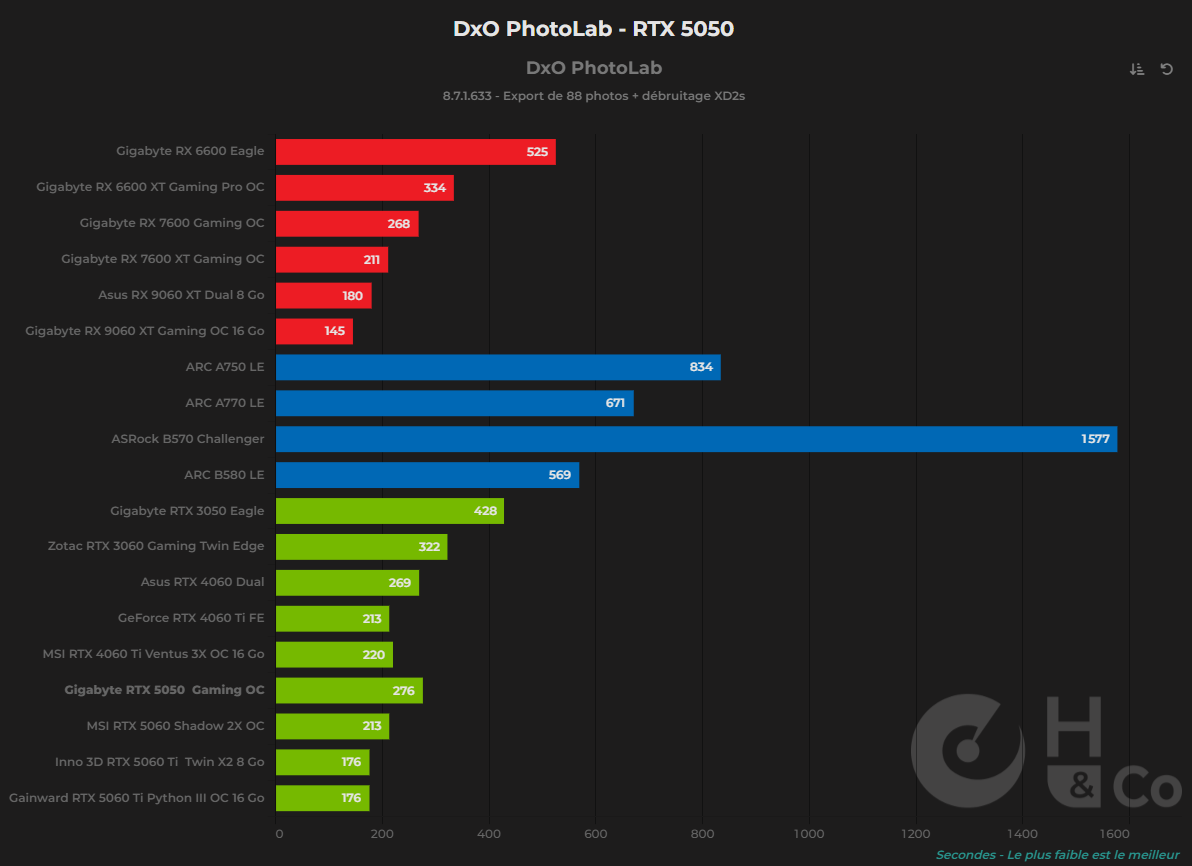
The latest price comparison chart is in this post:

Even though the results are based solely on export times with Photolab 8, they are still entirely applicable to AI-powered mask selection processing with Photolab 9.

1 Like

I can confirm that (in the Capture One 16.8 context). But there’s no free lunch – C1 enhanced denoise still leaves a lot of of chroma noise and the intermediate files are huge, while DxO takes more care of your disk space, at least for now. C1 was sluggish few years ago, but it made a good effort to fix it. Obviously DxO does some tuning but the problem is to define what exactly to tune and at what cost. This requires some target market profiling.

As a side remark, I have a 2TB “system” disk (+4TB for photos), and I wonder when all this AI stuff will fill it in near future. I would vote against buying new PC with 0.5TB of system disk, like buying “budget GPU”. Poor people can’t afford cheap things, imho. Over the time the total price will be the same, with less problems on your way.

Many Thanks! Helps a lot!
The most interesting thing on that: i start to check even more “less performance” GPU’s. As i see, the difference between like: export is 180 sec vs. 334 sec not a big difference. Yes, its double, but its still just 3 minute vs. 5.5 minute.
I have more than 334 sec, even far more. Now i export 88 photo like 2400 sec. Against that, for example 500 sec is quite a difference → So, i start to investigate even lower spec GPU’s, with 8GB. (second hand market). :heart:

As i see, your graph DxO part is based on that: Test de la GeForce RTX 5050 : que vaut l'entrée de gamme des verts ? - Hardware & Co

Great “rule of thumb”!!!

I’m not quite sure its totally applicable fot PL9 AI masking, as may this type of AI models may works / behave a bit differently, like GPU internal bandwidth may count more, but anyhow.

I just read an article: LLM Inference - Consumer GPU performance | Puget Systems (they also does LRc performance graphs)
They do llama.cpp benchmarks (yes, i know its llama, and results can quite different the what PL9 does), but may also some results. The most interesting the in the “Token generating” part, the RTX 3080 Ti 12GB “near match” the RTX 4090 24GB, etc.

I agree with your assessment of C1’s Enhanced Denoise feature. I equate it to DP3 except when you lift shadows significantly where the differences are easily seen. I think it puts C1 in a similar position to LR, as far as I can assess from LR reviews. Most images can be processed in their native application and only very noisy images will need third party tools.

As other apps become competitive regarding noise reduction I hope DXO will concentrate on image editing rather than there constant focus on noise reduction. I also hope they will remove the unnecessary pain points regarding what is considered industry standard tools exemplified by refusing to implement Radial Gradients. From a business management viewpoint, seeing so many comments where people are resistant to switching to DXO because the tools they use all the time aren’t available in DXO, should have made this a priority. There are no technical reasons for not implementing them. They could call them “Elliptical Gradients, “Concentric Gradients”, or “Isotropic Gradients”, in the same way the recently introduced Mask “Diffusion”, instead of the industry standard “Feathering”.:rofl:

My advice is get a ti card. Even a 3060ti will deliver excellent performance in DxO.

Why? The number of CUDA cores makes a bigger difference than VRAM, and this is what you need to look for.

the 3060ti card gives roughly the same performance as the 3070, with that card just being more energy efficient.

The system I had built almost 2 years ago is a 12400F Core i5 (still recommended) with 32 GB of RAM and the 3060ti card with 8 GB of ram for under $1000 CAD including a 512GB SSD.

I would not render video or 3D with it, but for masking and denoise in DxO it is plenty fast.

1 Like