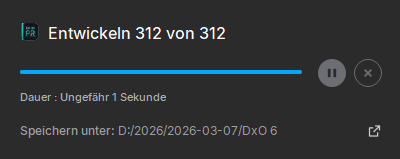
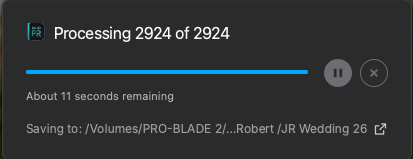
Using LR Classic latest version and PR6 on Windows and have a consistent odd problem.
If i select say 20 images then Plug In Extra > Process Instantly, when i start the processing the progress bar appears at “Processing 20 of 20” with the indicator on 95% and 1 second remaining. After a while that progress bar goes down to about 90% and time to 7 second or so. It does this until batch is finished.
Expected behaviour was showing 1 image at a time with progress but this just shows all and nothing useful displayed.
I did too and I referenced this thread. I’m now going back and forth with support. First they asked for a video of the problem which I provided. Now they want to run some diagnostic software they are providing which I will try tonight. Depending on what info it collects I will send that to them.
Same. Boilerplate support response about rebooting pc, checking windows updates and sending a video (its automated, same email as pre-6 problems).
I did mention this forum has multiple users with windows and mac all reporting the same problem so id hope they realise its not an individual pc or setup issue.
Some of the replies are useless.
My one problem is sometimes the processing of the same files will take 20-30 mins not 30-40 seconds. They want a video to investigate. Do they really want a 40 minute long video of a stuck progress bar ?!
Also its sometimes producing uncompressed DNGs, do they really want a video of the above? I sent a screenshot of the folder showing the mix of files at output.
Predicted time for a batch of 100 RAW files: 1 second. Progress bar jumps immediately to the end and remains there. The conversion process itself takes around 4 minutes, which is similar to the 5.x version.
Something got fixed somewhere as its working fine for me processing from Lightroom on batches of 5, 10 and 200 images. Progress bar moves correctly and time is roughly sensible.
Previously it was broken every time.
Edit;- and its back to not working on todays batch.
In each of these folders there’s a subfolder called “DXO Labs” which contains PureRAW stuff. Deleted it. Didnt touch the “DXO” folder, as I use other products made by this company.
Then I checked the Lightroom plugins folder for any remains. Which there weren’t
Restarted the PC.
Installed 6.01 again (with admin rights, just in case)
Ran a 100-files-batch from within LRC (version 15.2.1), GPU use on “Auto” in both entries in preferences.
Result:
Progress bar jumps immediatetly to 100% and stays there, remaining time indicator says “1 second” and stays like this for the next 5 minutes, until the end of the conversion.
The version 6.00 crashed sometimes when switching tasks during the conversion process, which the new update may have fixed. But the main issue of this thread remains.
Same behavior I’m on a Mac Studio M3 Ultra with 256gb of ram. It has said between 1 to 12 seconds since last night. I usually run a long batch over night.
I contacted Support about this issue and they said that “my request” was being forwarded to a colleague authorized to handle this type of request. I also was told not to respond to the ticket as it would be removed. All I want to know is when the bug will be fixed.
DxO very rarely provides ETAs and I’d be very surprised if they did in this case. But the progress indicator has been more reliable in earlier versions of PureRAW and there is hence some hope that a fix will arrive soon. Don’t hold your breath though.