I have done and I think they just ignore anything in the fourm as does DXO overall.
As I said, I did just that with my conversation here and all I got was the request to create a video - something I am simply not capable of, or willing to, do.
I have sent a DM to @CaptainPO outlining this very point but I don’t hold out much hope for an immediate improvement. It wold seem that DxO engineers can’t even be bothered read well thought out discussions.
Sounds like a pragmatic approach we (users/customers) can take in a situation of unevenly distributed power. DxO provides and we use, leave, grind our teeth in silence - or get in touch as requested by the EULA, section 7.
Apart from the path issue, I find DPL9’s public releases for Mac (builds 16 and 21) to be, hmm, worse than other first releases and below what I expect from DxO.
Imo, posting in the public forum is okay to let off some steam and to find help, but in order to overcome undesirable software properties, the ticketing system is the place to go…and it helps to moderate one’s rhetoric because anything else widens gaps instead of bridging them.
As far as I tried, path names weren’t available in Mac versions of DPL. They come in handy at times, but having no such feature, DPL(Mac) users had to cope.
Finally, deciding to go with 9 or stick to 8 for a while is a personal decision, but for the time being and for usability’s sake, I’m really glad that I’ve adopted to never trash an older version and/or the respective installer until the current release is good enough.
I understand your frustration, Joanna. I’ve observed an increased tendency by DxO support to require video documentation of problems - even when it’s easier to simply describe how to reproduce a problem. I’ve gotten nowhere with this in the past - no video, no support. And now, with making license administration easier for us (not dependent on support) and how DxO is communicating lately, I’m concerned that where we’re going isn’t better support, but reduced support through outsourcing. Just a theory - but I’ve seen other companies do it.
@Egregius I come closer than many at describing my problems in excruciating detail with step by step instructions and copious snapshots.
I am then criticised by other forum users that my posts are way too long, that the snapshots break up the flow of the dialogue and that …
The mechanism of the Support site is utter rubbish because it breaks the dialogue away from the images that need to be read alongside the dialogue. Ideally suited to an I did this and this happened scenario but that still doesn’t tell the story of the build up to the “catastrophe” and the fall out after it.
I do refer to the forum in my Support requests but I am not sure that they (the Support Staff) have access to the forum as we tend to believe they do, so I have taken to creating a pdf of the topic and submitting that with my Support Request.
But how do you expect Support staff to process a Support Request, particularly if they have to reproduce any number of problems in Support before handing them on to Software engineering.
Does the Support organisation actually have the kit or enough of it, with the associated versions of DxO that are still supported and undergoing new releases, ready to run the tests and how many can actually use those systems at any one time?
The tests cannot even be run until after they have configured the test data.
With video evidence that evidence can be quickly verified and then handed on to Software engineering. i.e. it can clear Support quickly and land in the laps of the Engineers with less chance that it will be referred back!
I have a number of screen snapshot tools all of which can produce videos and an onscreen timer when time critical data is useful. For reproducible faults it is possible to make a couple of attempts until you capture everything and then discover the video is too big!?
For one off faults that aren’t easy to reproduce that is a different story!
This thread is titled “PL9 can’t type in export path anymore”.
This is incorrect, at least for a Mac. The export options look a little different, but it still works here.
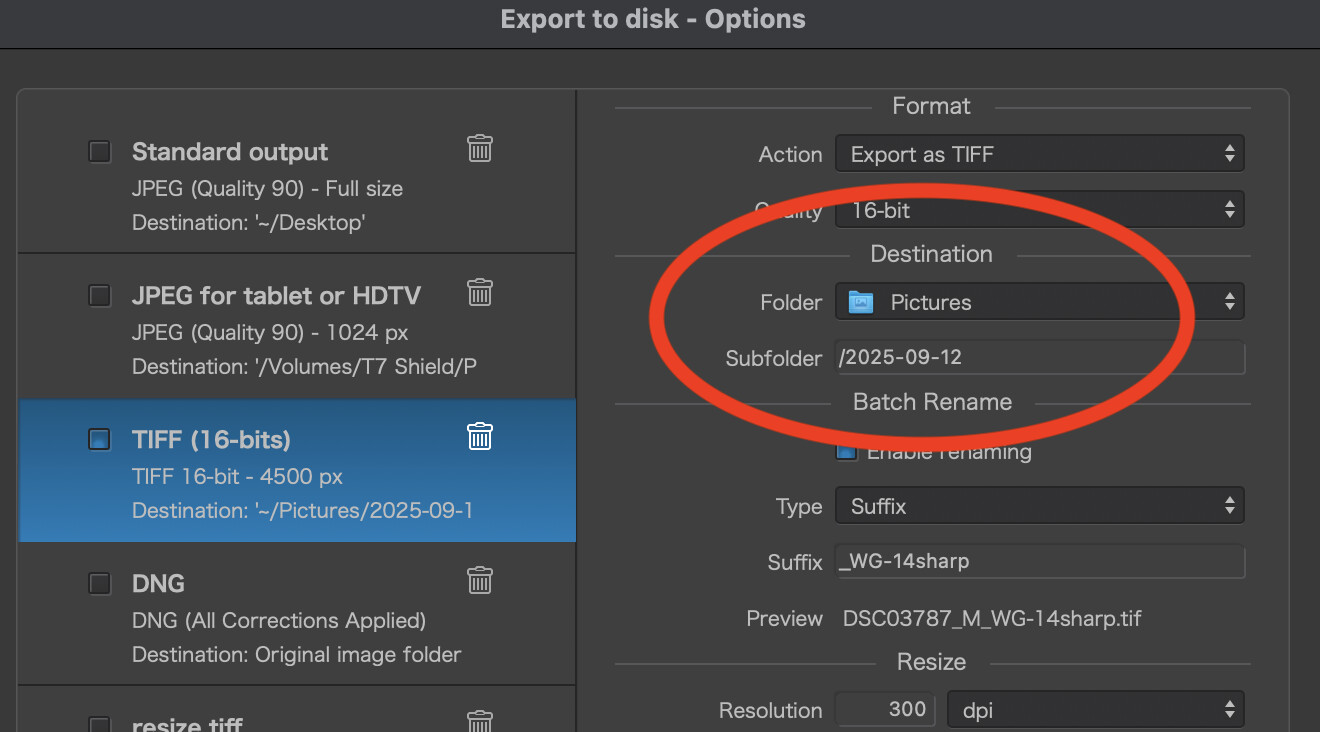
-Use the drop down in “Folder” to set upper level folder to contain each “dated” subfolder.
-Enter the desired “dated” subfolder into the Subfolder field, leading as always with the “/”.
The export option remembers this subfolder, so a simple edit of the desired date works. Same as before.
Was asked to provide a screen capture video to show the case of PL8 becoming very sluggish or frozen when doing detailed auto brush masking. This worked out well and DxO support was able to provide a fix.
When submitting two recent bug items that were not performance related no video was requested. I did detail the keystrokes that lead to the “bug”.
For performance issues, I agree with DxO support in requesting a video to help identify the sequence leading to the problem.
@swmurray Certainly don’t try that on Windows
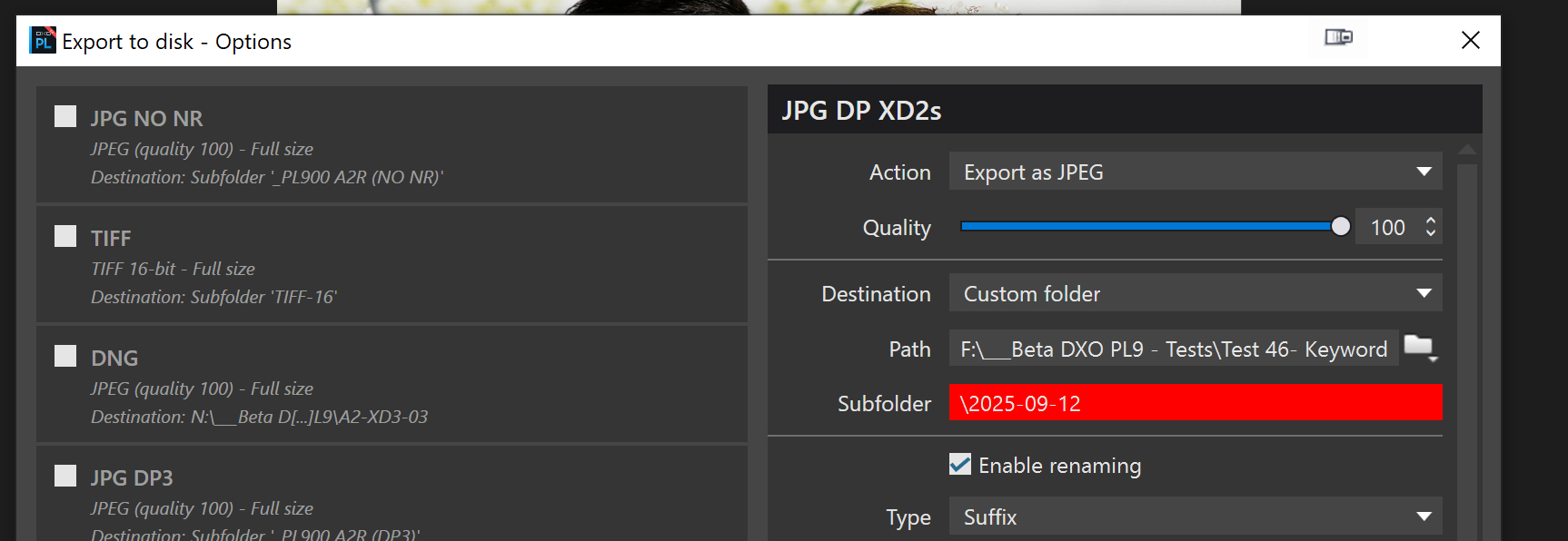
But taking the principle you are proposing, but leaving out the " \ " or “/” it is possible to do this and if you use a separate export options entry then
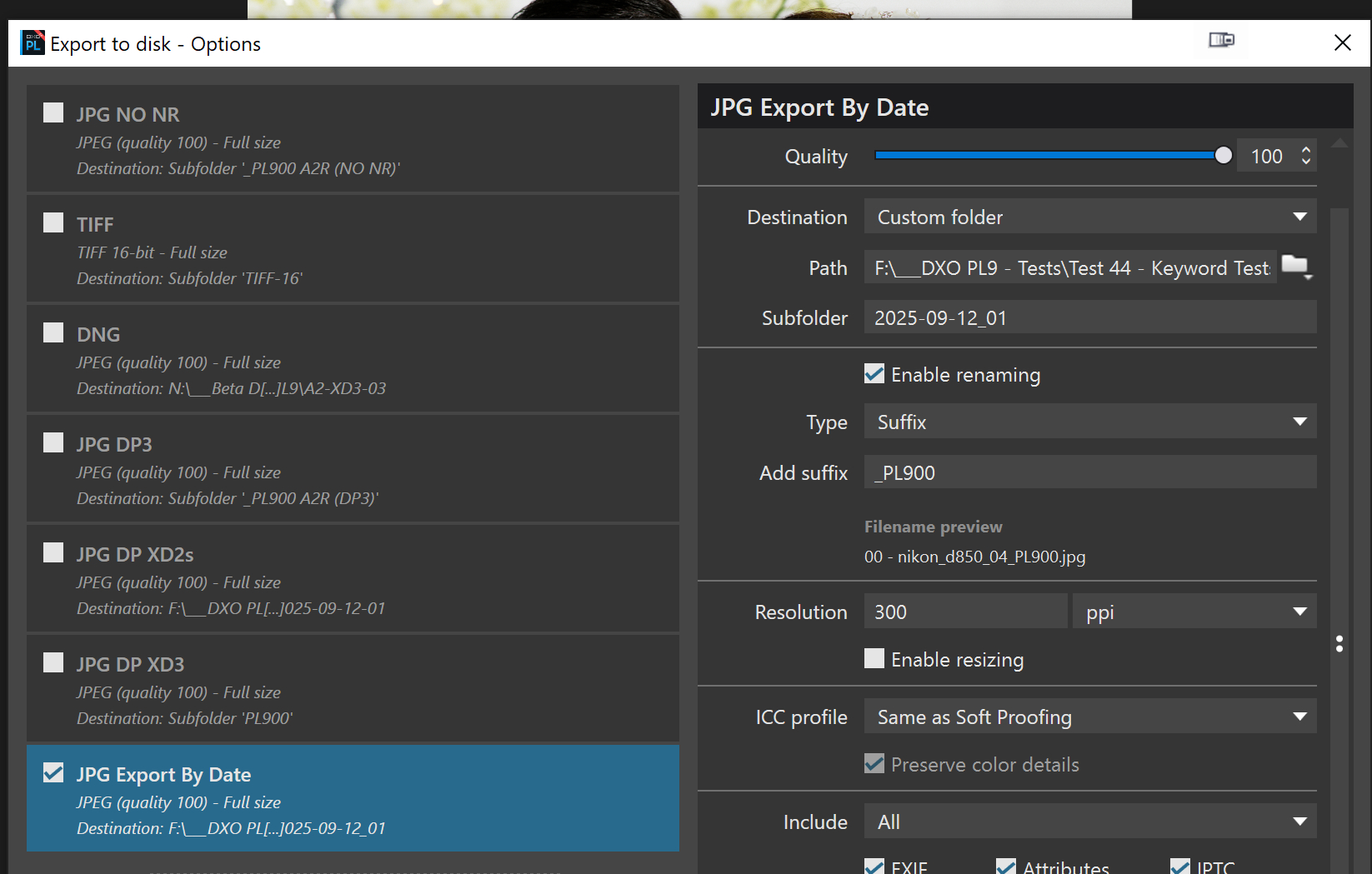
After two such exports we have
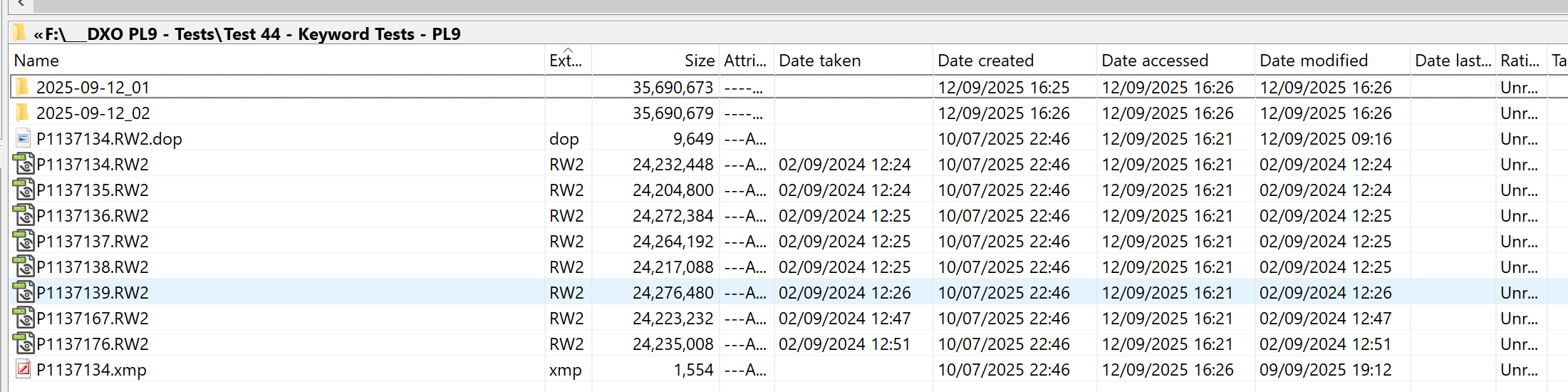
But it differs from what was available before whereby the directory could be located before deciding what to do next. The above provides the facility but only by “flying blind”.
Edit:-
With PL7 and PL8 I can locate the directory and identify the last entry
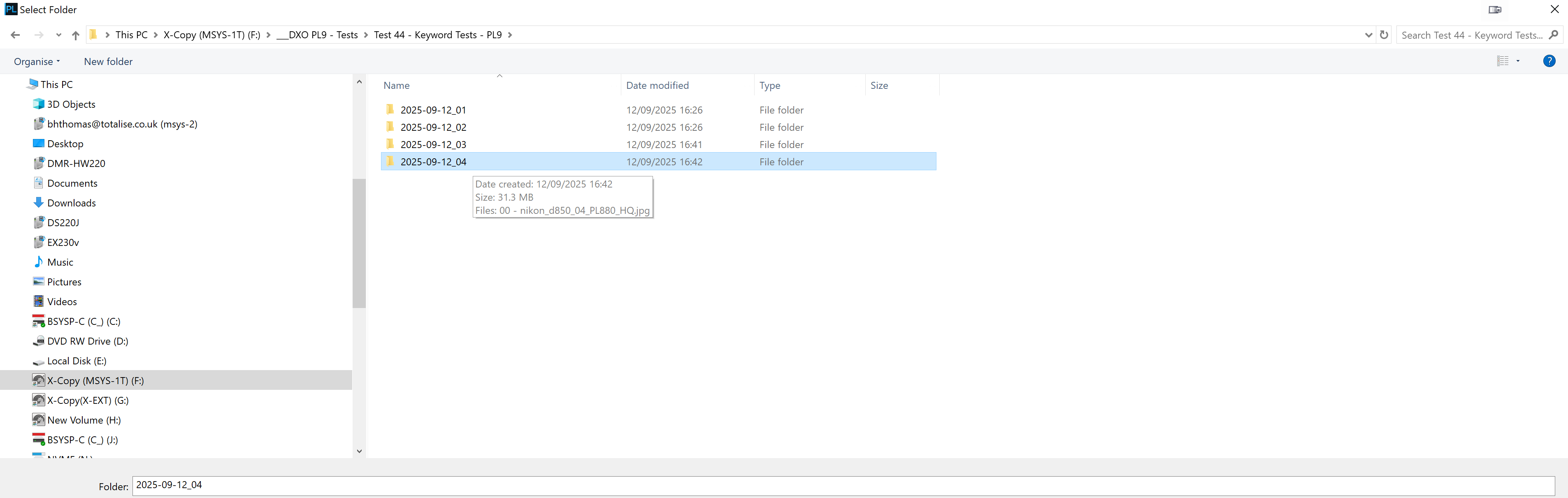
Change that entry as appropriate
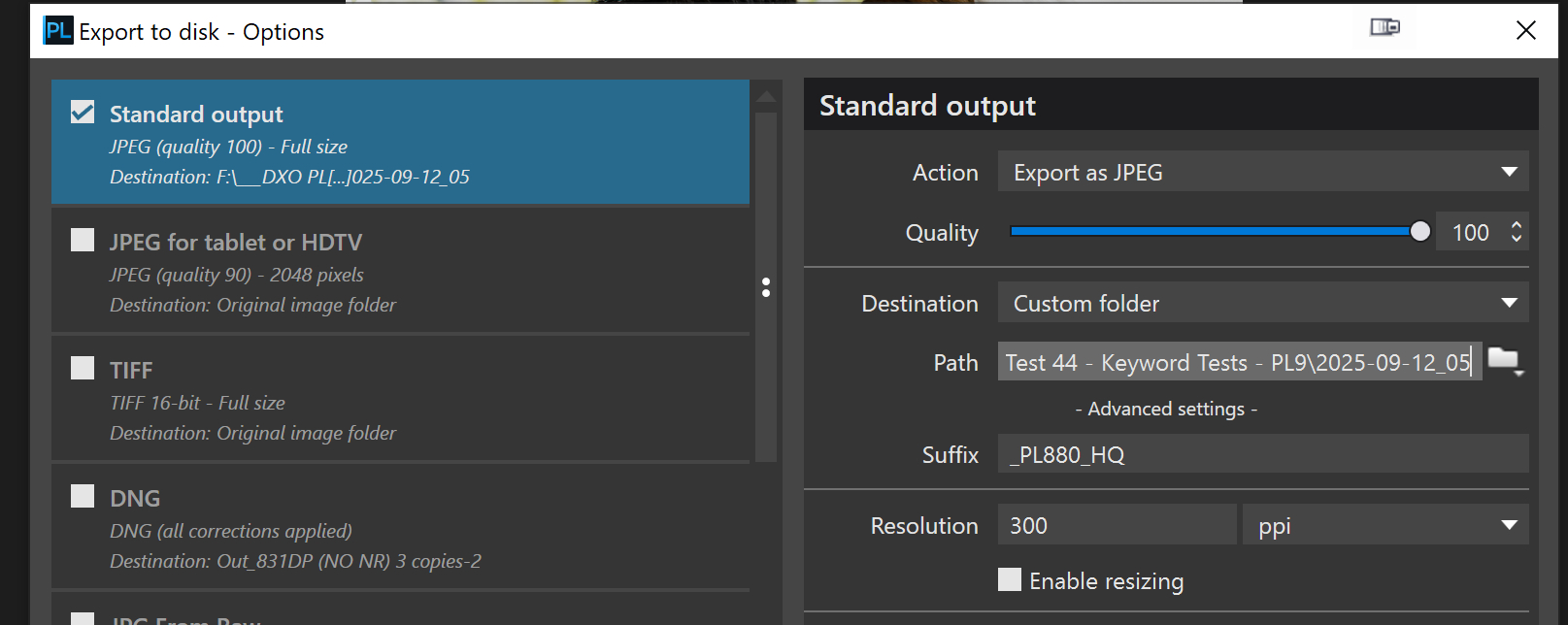
and export

OR just take the previous entry and bump the number up which ever I want!
In Widows I export a full sized and reduced image for Facebook So I create a folder in my Full sized Option and in the Facebook Option chang the existing name with the new one leaving \FB and PL 8 will create the new folder with a FB sub folder.
The new one doesn’t do that; I can create a new folder for my main export in the Subfolder “New”. OK that’s got the folder there. Now I have to go to my FB Export and to get to the “New” folder I have to use Select Folder and select New and then in Sub-folder add FB.
This works but so much more work than before when all I had to do was edit the existing paths. Butvyou have export full to get the folder ti add FB
Your screenshot of the revised Export Destination dialogue is different than the online manual! You show 3 fields, “Path” and “Subfolder”, both which appear editable! The online manual only shows 2 fields. The manual’s image shows the editable field as “Subfolder” but the text refers to “Path”. The PL9 manual’s dialogue appears the same as the PL8 manual, so suspect not change was intended. Wonder which is the “correct” field label. Seems like a big “opps” on DxO’s part. My comment was directed to the old “Path” field, by what ever label. Sorry for the confusion.
Fortunately, my export process using date-based folders is the same with PL8 and PL9 on the Mac as it was on PL6, PL7, PL8 on Windows. I simply revise the date in the export destination field as usual. I did not experience any changes to PL workflow when switching operating systems while using PL8.
Believe already suggested, but ideally, placeholders could be used to reference a metadata date field when processing images from different dates, or more broadly for other metadata as is available in other DAM programs.
Hope this Windows issue gets sorted quickly.
The fields are straight from the initial trial release of PL9, the ‘Path’ is selectable and contains a ‘New Folder’ option but is otherwise not directly editable.
The ‘SubFolder’ is not selectable at all, it can “only” be edited and you saw from the snapshot it cannot contain any “strange” characters.
The problem with the scheme you proposed, which certainly works, is the problem of what happens if you export anything that does not conform to your standards for exporting! When testing I will use various “standards” so the field won’t necessarily contain the right field to edit.
However, that can be resolved by dedicating an ‘Export Option’ for the sole purpose of preserving that convention.
Going beyond what is currently available to provide “rules” to generate export identifiers from combinations of metadata fields is “simple”, particularly considering the amount of metadata DxPL is holding in its database, but try convincing DxO, I’m already convinced.
One of the biggest problems is that when DxO make a mistake (bad choice) and it gets into an “official” release it appears to be a major exercise to get if fixed or more sensible alternatives offered. Someone in DxO thought they had an inspired idea and if it wasn’t detected in Beta testing, or even if it was detected, and makes into the official release then it becomes part of the DxPL “canon” and there it will remain!
You can if you have the selection for Destination as “Original image folder” …
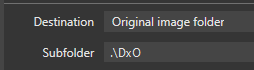
- but not (annoyingly) if you’ve selected “Custom folder”.
Initially, before your screen shots, I wondered if the “subfolder” field was more like the Mac version as the drop-down functions are slightly different between OSs.
Your screen shots were the first to show the confusing fields and now explaining what input they will/will not accept. Clearly the Windows version of the Export function has been changed and neither the user manual nor the release notes refer to this change.
If I was using, and depended on, this software I would be pissed too. Shame on DxO.
Its is custom folder thats the problem
Actually you can type into the sub-folder text box when “Custom Folder” selected.
So, on further testing, although things have changed a bit I am still able to accomplish what I want so no longer a showstopper for me.
One small bug: when you hover the mouse over the Path field it turns into a text entry icon which indicates you should be able to enter text but you actually cannot! DxO should just allow us to enter text into the Path field and all will be well. I guess they don’t want to validate that the Path actually exists before exporting as you are forced to select a folder through a folder select dialog or selecting the folder your file to export resides in, negating the need to verify the existence of the selected folder.
Good point - that’s misleading.
Yep …
That shouldn’t be a problem. If the path doesn’t exist then simply create it … as in the case of my example above (if subfolder “DxO” does not exist, it’s created for the export).
What if the disk or some other part of the path does not exist? Much easier to program to check if path exists and if not then throw an error. But, we are splitting hairs here.
Why did they change it if it was not broken in the first place? I have not heard of anyone complaining about the original setup 
@KeithRJ Just one of the joys of “working” with DxO Software Engineers who seem to shun the expression “if it ain’t broke don’t fix it”, in fact they sometimes do exactly the opposite!
Support were quite clear this is the new export and ignored when asked for it go back to the developers. Might help to pester support over it but as you have said DXO are reluctant to admit errors and change somting they mess up.
Yes, the current online guide for PL 9 (Win) shows
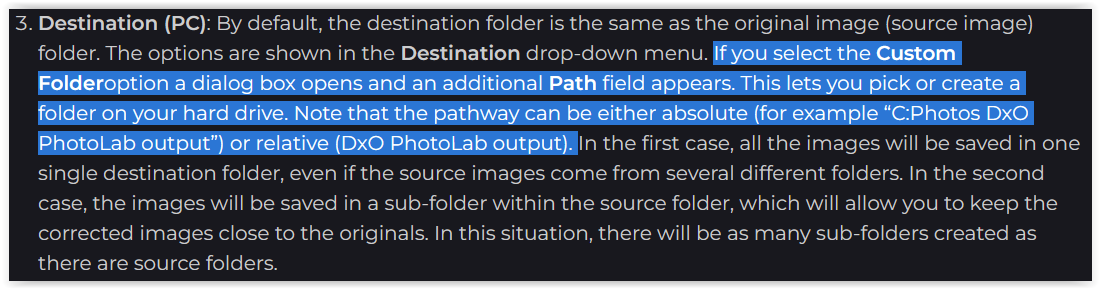
which is the description as it was before in PL 8 → see here …
Now in PL 9’s → Export option → Custom Folder one can choose the path from a dialog, but no more enter something manually ( also mentioned by @KeithRJ ).
… which means, either the manual or the PL 9 Export is wrong.
@DxO_Support-Team, please take note !