Although i can now use PL 9.2 after having upgraded the pilot of the gpu nvidia (see my precedent messages) i still have some problem when i export some files and have to close and restart the soft, I can understand that the new AI options requires more ressources but i realy do not understand when the crash appends on a very simple task that PL8 could achieve very quickly and safely. What are your thoughts about it? Do you think there are some bugs in the code of this version that will be corrected or that it will go on this way for any reason?
I’m afraid that despite the quite nice new features, version PL 9.x requires optimization. Right now, it is definitely neither a very stable nor a fast program, especially when compared to LR, for example. Maybe it will become more stable with subsequent updates, but I don’t really believe in a performance increase…
Not, PL9 is not weaker than PL8.
Actually now i think, PL9 is pretty good and far better than PL8.
At general, i think (pretty sure) near all (major) issues related with AI masks + DP NR vs GPU VRAM amount. Especially in the case of ‘pre-defined’ (like Sky) mask.
Described in one example:
You have ‘manual AI masks’ and use DP3 NR for export and GPU with 6GB VRAM.
GPU VRAM usage: PL client + ‘Manual’ AI mask + DP3 Export +Windows/Other apps need approx 5.5GB of GPU VRAM. ‘Math’: 0.5+2.5+2+0.5 → 5.5GB
As in this example GPU VRAM is 6GB → you can be fine. May in the ‘edge’ on GPU VRAM amount, but at general can works.
But only IF you use ONLY manual AI masks (and not pre-defined mask) and ONLY if NR is DP3 (and not DP XD2s).
As 'pre-defined (keyword, like: Sky) AI masks use lot more GPU VRAM than ‘Manual’ AI masks. DP XD2s NR use more GPU VRAM than DP3 NR → And it may not fit (definitely not) to to the 6GB GPU VRAM. May its need like 10-12 GB GPU VRAM.
So, “what you can use” about AI stuffs and Deeprime rendering and DP NR and Export is practically only depend on GPU VRAM amount.
I write about that a longer comment a few days back, with more info about the expected GPU VRAM usages, the ‘math’ and what can be works, etc. I really suggest to read thru.
I think DxO ‘biggest mistake’ in PL9 release was: not describe this ‘math’ (approx GPU VRAM usage) at general. In the case of GPU with 12-16GB VRAM seems not an issue, but with 6-8GB GPU issues may come up depend on what AI stuffs used.
But go back to:
i still have some problem when i export some files and have to close and restart the soft, I can understand that the new AI options requires more ressources but i realy do not understand when the crash appends on a very simple task that PL8 could achieve very quickly and safely.
You already write why: ‘the new AI options requires more ressources’ . Yes! That’s why! With PL9 things change regarding GPU VRAM usage. AI masking (model) and Deeprime rendering use GPU VRAM - and they use not a small amount. And Export also need to use AI model if the photo edited with AI mask. I think mainly that’s why you can encounter errors in Export. May not enough GPU VRAM remain for Export GPU VRAM usage.
Seems GPU VRAM usage is ‘math’. Software can’t use what is not exist (if not enough GPU VRAM).
Note: with ‘CPU only’ mode everything works (at least if you has like 32GB of system memory). Of course as CPU as-it-is performance.
Note: i know Export also has some other issues, colleagues already go in depth on that in other threads. May also worth to check thru in this thread:
As I showed here last time [PL 9.2.1 is out - #14 by Wolfgang], PL9 is slower than PL8, and I didn’t even use hardware-intensive AI.
The lower performance of PL9 compared to PL8 has also been reported in the forum of DPreview:
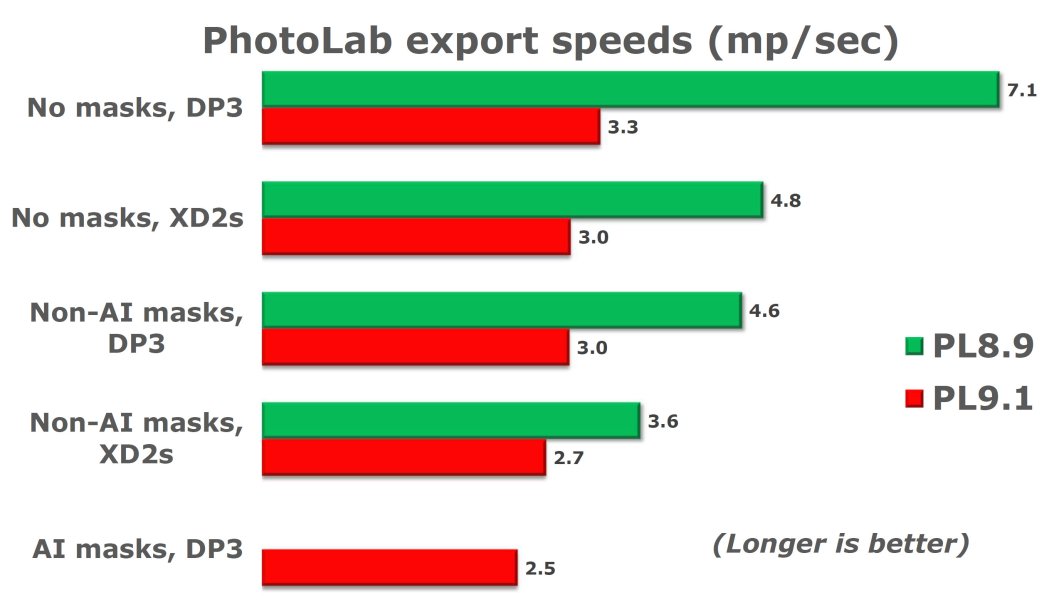
This is just for exports. The UI in general seems to be more sluggish.
Frankly, i not see that. However of course testing method is different. I try to be simple - i want to demonstrate pure export performance.
- 1 (one) photo (20Mpix Oly RAW), this 1 photo exported to Tiff, no resize, etc.
- Some basic preset of mine used (some contras, lenssharp, geometry, etc.) applied
- OpenCL enabled. Maximum number of simultaneously: 1
- PL restarted before every test
- NOMASK → No mask
- MASK: 2 CP → 2 (two) Control Point (exposure, clarity), each in different layer.
- GPU and ‘CPU only’ also tested
- Its run a slow computer, Win11, AMD Ryzen 5 3600 (6 core, 3.6GHz), AMD RX 550 GPU (4GB VRAM). All driver, windows update is latest.
Results:
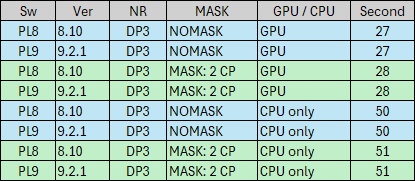
No difference
I understand queuing (batch export of multiple photos), different masking (layering), and of course PL8 not PL9, - things can change like Lens Sharpness algorithm, etc, may also in export to jpg rendering, export logic in more than 1 paralel process can be a different. Lot of things can be different in PL8 vs PL9.
So, overall pure export performance PL8 vs PL9 is the same.
Overall export performance (multiple photos export, etc) may can different based on others (like yours) tests.
The test methodology on dpreview link is not documented, so I have strong doubts about its validity. For example, if you make some AI mask edits before running the test, you may get much worse results (nvidia driver problem). You must try to run each test in “clean” environment, repeating exactly the same sequence, and taking care of background tasks, like preview/thumbnail/dop generation, Windows tasks, etc. You may still get slight differences between test runs, e.g. because of file caching, Windows power management due to temperature differences may slow down the clocks differently, but in most similar cases you get less than 5% difference. However, if there’s some resource shortage, like CPU/GPU memory, the differences can be significant.
Same here. My results for 100 45mpx raws, Nikon Z8, 14-bit losslessly compressed. Less than 2% difference in a second run. Processing times in seconds:
PL/DP      DP3   XD2s
-------    ---   ----
PL 8.10    218    399
PL 9.2.1   207    386
Perhaps PL9.2.1 exports are slightly faster, but the difference and number/specifics/type of samples is too small to be sure.
I’m surprised by @Wolfgang results, though.
Sorry, it’s not my fault.

But seriously, I have a feeling that PL 9.2.1_542 (Win), used with the Nvidia driver 581.57, has fixed some AI issues and obviously the export crashes … and I’m happy about that.
I don’t expect my old PC to run as fast as a current high-end computer, but it shouldn’t be slower with exports than PL 8.10.0_677.