Even as it is it improves performance a lot with it´s smart AI-presets and much faster masking markups and just to be able to see the impact of Deep Prime in full screen in real time is a lovely improvement. I liked the Loupe too when we got it but compared to this it is really ineffective to use.
1 Like
The need for some additional performance tweaking is often not completely identified until late in the testing process when all the pieces are finished and integrated into the final version. It often requires more time and testing to resolve than is available before the planned implementation date. The process of changing the implementation date of a major release to accommodate this is not something any company takes lightly. Implementing a major software release involves much more than just ensuring all the code will work as expected. That is why companies often release point updates shortly after a new product is released.
Mark
1 Like
Quick recap of my situation…
PL7 user for the last 2 years, Nikon Z8 shooter (50MP)… My PC was built in 2018. It has 64GB ram, an i7-8700K CPU and a GTX 1050 Ti card w/4GB VRAM. With PL7 it was taking about 30-40 seconds per image to export to a downsized jpg using the max noise reduction settings and bicubic sharpen scaling.
I installed the PL9 trial the other day. Couldn’t export anything, everything would fail. Not enough GPU memory. Switched to CPU-only and exports worked but they would take about 6 minutes per image. As well, AI and other masks were very slow to appear and work with. In general the app was usable, but just barely.
Today I installed an RTX 5060 Ti 16GB VRAM. Now images with max noise reduction export in 6 seconds (and more like 4 seconds/image when doing multiple) and the rest of the app is very responsive doing AI masks even with multiple sub masks. I didn’t even bother downloading specific drivers, I just plugged in the new GPU and let Windows install its pick which is 576.02. The DxO recommended drivers (573.24) don’t support my card since it was first released in May of this year.
Anyway, bottom line… more RAM wins. I have an old PC. Even when I built it in 2018 it wasn’t the best parts available. Yet, having more than the recommended amount of RAM and VRAM this combo feel as fast as I could imagine. People don’t try to play the latest video games with insufficient hardware because the experience is degraded in such an obvious manner (jerky motion, etc) it would be too frustrating. I think we need to be realistic about AI and image processing and throw sufficient hardware at these applications as well. When the RAM isn’t there, it’s not just a matter of running slower. Things will often break. Almost no code is written to tolerate not being able to allocate the full amount of memory it desires. Aborting with an error is almost always the result, and that’s often the best case. Moving on without having what it needs and crashing is all too common as well.
I’m not trying to discount anyone’s pain transitioning to this new version. I’m just pointing out that there is a line where a given combination of hardware falls on its face and PL9 moves that line significantly from prior versions. If your system was marginal with PL7/8, then expect to need to upgrade hardware or don’t even bother with PL9.
4 Likes
I might say I couldn’t agree more, but actually I can: DxO’s support has been so bogged down with license activation problems that fixing this is supremely important. That aside, you seem to have overlooked the question I asked: is the ability to manage license activations only applicable to PL9? If so, DxO is only just getting started on fixing a huge problem. But if they’re rolling out this change more broadly, then I will applaud it loudly and hope DxO will do much more to bring it to light. (This is not something DxO should be keeping quiet about, yet they are!)
FWIW, I counted 16 documented new features in PL7, plus two more I know about. PL8 has 9 or 10, all quite significant IMO. PL9 takes some of those updates further and adds more to total well over 20, as you pointed out. It also removes the original PRIME NR, but I won’t count that as -1.  . I think many will upgrade to PL9, especially if they didn’t get PL8. I might demo it once the nVidia problems are fixed. I don’t want to burn a 30-day demo if there’s a good chance that I can’t properly test the app. That’s not a small problem, and it goes to show how valuable this forum is as a reality check.
Helpful as that would be for promoting the product, I don’t think that it will counter the argument that PL9 was released in an unready condition. I’m glad to see that not everyone is finding it to be crippled - but enough are, and I’m very likely to find the same were I to test it now. So maybe that list belongs in a different topic?
I have recently upgraded my Nvidia 3080 to an AMD RX9700XT and have not seen the crashes people have been describing when applying AI noise reduction.
1 Like
Perhaps it’s the way we’re counting. For instance I see the the addition of local denoising, local Len’s sharpness optimization, a redesigned Auto brush mask and the new diffusion slider as four separate features. The AI mask is a fifth and there are a significant number of other changes to the functionality and usage of local adjustments and the new ways in which they can be combined.
For instance, we can now erase parts of control lines and control points, in addition to protecting sections of them. We can modify the shape of control points to make them elliptical or square or any shape we want using an eraser and then use the new difuiser tools to make the edges sharp or diffused. There is so much that is new or can be done differently in this version that it almost boggles the mind.
Local adjustments is not just one big enhancement. it’s the number of discrete additional features and functions that did not exist before or which were materially improved. It is the same way I always count the number of changes to functionality in every new version of PhotoLab.
Mark
Managing license activations is also in PL 8 and perhaps in PL 7 as well. Regardless, it is still a new feature.
Mark
It is not the noise reduction that is the problem. That works fine. If you have a problem it will manifest itself when you apply AI-masks to your pictures.
3 Likes
Same problem for months with PL8 “Internal Execution Error” all over the place. I have sent debug data sets after debug data sets, diagnostics data etc. Back to PL7.
This is what DxO told me to do:
The latest Intel driver updates are increasingly optimized for Windows 11, and running them on Windows 10 can introduce stability issues — especially in apps like PhotoLab 8 that rely on low-level system or GPU functions, even with OpenCL disabled.
We’ve seen similar behavior before: frequent crashes, frozen sessions, and even Windows Defender kicking in after a crash, likely due to leftover memory or temp files.
While PhotoLab 8 officially supports Windows 10 (22H2), differences in how Windows 10 handles memory, GPU resources, and system security can still lead to issues that don’t appear under Windows 11.
At this point, the next step I’d suggest is upgrading to Windows 11, if your hardware supports it. That would give you the best compatibility with current Intel drivers and PhotoLab’s newer rendering pipeline.
If an upgrade isn’t an option right now, then rolling back to an earlier (stable) Intel driver version would be the safer route.
At this point, I’d recommend a few things:
Try processing fewer images at a time to reduce the workload and memory footprint — this may help reduce crash frequency in the short term.
Upgrade to Windows 11, if your system supports it, for better compatibility with Intel’s current drivers and PL8’s processing engine.
If that’s not an option yet, consider rolling back to a known-stable Intel driver version for Windows 10, as the most recent ones may be causing these issues.
This is on a work laptop mainly for CAD and another important software package. It also runs Canon’s DPP, as well as Gimp and Darktable. Needless to say there are no issues with any other software (nor do I use OpenCL for PL8, and yes the Intel drivers are up to date). The (Windows side of the) laptop is not used for any other Internet connection (only to get the CAD licence - I do not see why that is necessary for perpetual licenses). It is completely ridiculous that after more than half a year this could not be resolved.
Thanks for warning me.
2 Likes
I’m lucky, given what I’m reading:
Installed this morning (trial version on my 2021 Dell XPS17 laptop with RTX 3060 and the latest Nvidia Studio driver (580.97) and Photolab 9 works perfectly; exports in 3 seconds for files, or 5-6 seconds if AI masking, and no crashes (version loaded this morning: 9.0.1 build 55)
Very responsive and perfectly stable (as stable as version 8).
2 Likes
Thats a new build the one I have is 9.0
@Hendrik I run Win 10 22H2, no issues in 2 years with PL7 other than when the GPU would run out of memory (for instance if I had both Affinity Photo and Photolab open together). Now with my new GPU I’m still on Win 10 and PL9 seems fine as well. And having more GPU memory I am able to have Photolab and Affinity Photo open at the same time which is a nice bonus. It’s really easy to track GPU memory usage in Task Manager. You can see Photolab takes up a large chunk and then Affinity takes another, but they don’t get within 2GB of the limit. Before when I had a 4GB GPU the level would just rise quickly and smack into the limit and the app would show an error.
TL;DR - I believe if you have enough RAM and VRAM either OS version and a wide array of hardware will be perfectly suitable. But if this is a work laptop then I can understand your hands may be tied wrt changing its configuration…
@OzarkNerd Thanks for responding. As I said, I even have OpenCL switched off… Therefore in my book, the GPU should be unused. The HP Envy laptop has 16 GB and a 11th gen Intel i7-11370H with 4 cores (and 8 threads) with Intel Xe graphics. When I run my own simulation software (under Ubuntu), I use with OpenMP up to 4 cores and can grab the whole memory for hours (the real stuff is running on desktops).
I noticed this in connection with a video by Andy Hutchinson:
"Update: they just dropped a new build on Mac (not sure about Windows) v9.0.16 which fixes the AI subject masking glitch."
1 Like
I’ve given myself five days to experiment with the official 9.0 release, and see if any updates appear. Although the macOS version seems to be more stable than what I’m reading about the Windows version, it is embarrassingly slow on a 64 GB M2 system and I’ve seen it grab as much as 25 GB just sitting around, which suggests big memory leaks.
I expected some problems, as always when I jump the gun on faith that early issues will be resolved. I have to agree that it is not ready for release as-is, and I shudder to think about the experiences of first time users who loaded it for trial after the usual flood of “reviews” by YouTubers giving poorly considered glowing assessments. When the most serious problems are fixed, PL9 will be worthy, but I don’t think I’ll waste more time until an update comes out.
1 Like
I have always had 9.0.16 on Mac, Wolfgang and I downloaded the trial on release day. Does this suggest Andy Hutchinson reviewed a pre release build?
@ColinG – I think so. He mentioned something else.
1 Like
Using lots of memory while sitting idle does not always suggest a memory leak. Memory continuing to grow over time with no additional workload would be a more solid indicator. RAM is cheap and modern computers need to have plenty of it. Most apps these days will load all kinds of stuff into memory to have it available when needed. If they didn’t, then users would complain about how slow everything is and how their storage is constantly being hit.
I did a Windows update this morning and it pulled down a new NVIDIA driver - now I’m on 576.88. I thought for sure this was going to break things but I still haven’t hit any crashes or performance issues. App has been open all morning with multiple AI masks added (multiple masks per image and 4-6 submasks per mask). I’ve done several rounds of exporting as I tweak mask settings. Total memory usage is currently 8.2GB RAM and 12.7GB VRAM.
All of that said I agree 100% that none of us can fully trust what youtubers say about this or any other product. But my situation is proof that not everyone is hitting issues. So I don’t automatically assume the early reviewers must be hiding problems, it’s absolutely possible that their systems had sufficient hardware and their experience was good. Likewise, DxO themselves could have received plenty of positive feedback from internal/external testers to determine this was ready for shipping. That last X% of issues will NEVER be found until a general release. Delaying release will only push this same scenarios further down the road.
So far the only functional issues I’ve seen is multiple photographs where the AI masks cannot detect anything for subject or background. I can use the object detection to get what I need without issues, but still worth calling out.
1 Like
Well, this has been an interesting browse! As a new user of DXO PhotoLab I started a new thread recently as I was considering an upgrade from an M1 MacBook Pro to an M4. (and still am!) To date I have had no issues whatsoever on my M1 MacBook Pro, 16MB Ram, obviously I am still learning so may not have advanced into more detailed processing but still impressed with performance. It seems, for the most part, the Mac architecture is more stable than the Windows Invidia set up.
I downloaded 9.0.1 from original email link. The good bit a HEIC file loaded in seconds not 3/40 seconds as before when there were 22. Using AI on jpeg flowers was total failure it failed to find two large flowers filling the image then came up with the AI error repeatedly and I had to close PL to get out of it. I have no idea what’s been fixed, if HEIX loading better was due to only one image there or what. For me the AI problem is still there and worse how AI could fail to miss two large flowers nearly filling the image is a bit worrying. Attached the image if anyone wants to try.
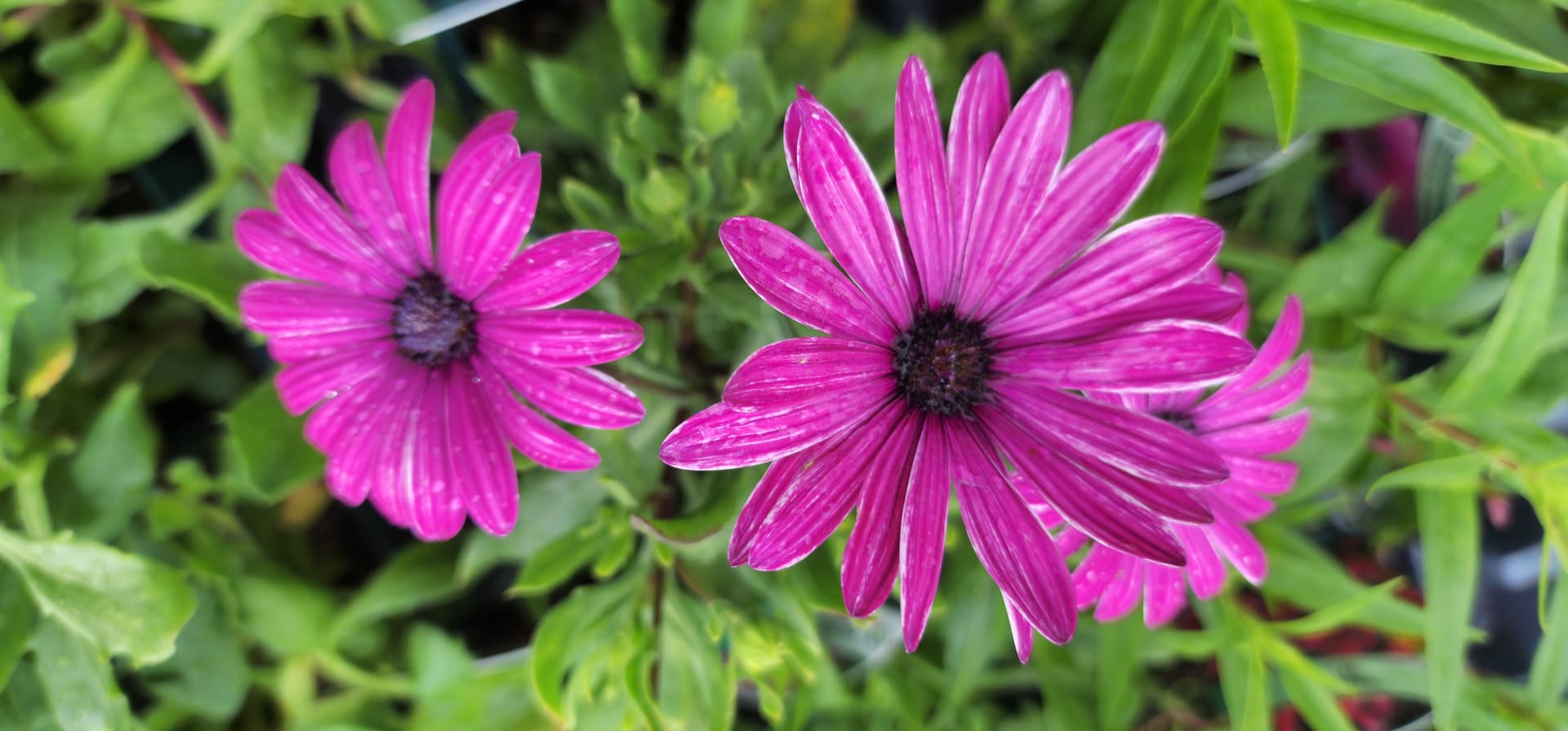
Deleted the database and the original HEXIX were painfully slow. Closing PL 9 and reloading them still too a VERY long time for them to load even though in the new database. DXO say its should be the original loading that takes time its not its EVERYTHING even PL ( will not close while they are loading AFTER they have been added to the database until they fully rendered). Clearly for me 9.0.1. has got nothing fixed.