PL 9 not really ready for release!

I have 4GB VRAM GPU (ancient AMD). So, it’s under minimum spec.
BUT!

  • ‘Manual’ AI mask (selection, area, auto-brush) work in all PL 9.x release just fine in GPU mode!
  • ‘Manual’ AI mask + Export with NR: DP3 → Can works in GPU mode! Worked out in the forum how its possible (many thanks for forum colleagues on that)! Its takes time to figure out, may like 2+ months.
  • Others like Layering (invert shape, etc.) works fine with ‘Manual’ AI masks.
  • ‘Pre-defined’ AI mask (like ‘Sky’) never works on 4GB GPU. 4GB not enough for that.

Other: At general all PL9 release was stable (!?) - after i found out what is the ‘limits’ with 4GB GPU! For example: its stable in ‘Manual’ AI mask, layering operations, etc.

Note: I already do various measurements regarding ‘Manual’ AI masking GPU VRAM usage and NR GPU VRAM (Export / DeepprimeRendering) → So more or less ‘we’ know the math regarding GPU VRAM usage. At general all is on that GPU VRAM amount (and GPU driver quality).

I not think it’s too strange, as its needs to find like ‘peoples’ in the whole photo - and multiple ‘people’ (and without manual guide (eg. people detection manual added ‘area’)). Also detect ‘People’(s) itself is ‘easy’, but made nice pixel level mask can be a bit more difficult (a different thing).

Yep. However i think most of it okay - as a see people, cloth, etc. detection and masks is okay. Sky in PL is very weak.

I think that’s also the ‘whole AI industry’ problem - need more training data, more training, more refined models → and a lot of testing / qc of models (i think in the pixel level masks its can be a challenge)

Yep, its seems not easy the ‘eye stuffs’.

However, they somewhere may also a ‘well defined’ objects!? Once ‘AI’ find a ‘head’ (not need to mask it, just detect approx) → can find ‘eyes’ ** → pupil, sclera may can some level straightforward.
** just think about cameras eye detection method → usually if its can’t find the face, its not find the eyes (may camera AF magic dependent)

I guess, that’s the next in PL → more ‘detail’ AI masks like eye stuffs.
May also some ‘AI prompt alike’ masking, example: ‘pupils with green color’, ‘black hair only’, ‘all face expect bald people’, ‘all clothes except hat’s’ or position descriptions: ‘all birds in the upper half’.

Clearly a fundamental mistake on the developers part if you are correct.

As others have said, ON1 Photoraw 2026 and C1 work fine. Maybe DXO need to change course because if you are correct these GPU driver issues will just continue to plague Photolab.

1 Like

Yes, there will be more detailed AI-masking I guess too.

I would really like them to add a dedicated portrait retouch too.

I guess they have to be looking into that for the next major upgrade.

1 Like

If they don´t offer us a good interface to the best AI cloud services too. Then the processing power needed will come from outside the local computer instead.

Amazing…………….. DxO PL9 sales look like they have fallen short, they have started discounting it again. Actually looking again, looks like they are discounting everything. “Holiday Magic” indeed.

I am amazed when people complain that DxO’s prices are too high and then criticize them when they have a significant sale by suggesting, with no evidence, that their sales have fallen short. You call me a sycophant, but you sir are a chronic naysayer. I am surprised you continue to post here since you seldom have anything positive to say about DxO and its software. But hey, if you believe being a constant complainer somehow gives you validation, go for it. :roll_eyes:

Mark

13 Likes

Yeah agree often wonder why some post on here and if they even use DXO products

1 Like

The problem with that is that I use DxO products. Now tell how foolish do you feel? (Clue - it should be on the high side).

1 Like

Dear Sir, mine ears have not been so assail’d by such parlance in a thousand years. Naysayer indeed. To slay the harbinger doth rarely bode well for either side.

1 Like

I don’t think so. They have a reason for that to use this. I think its provide more flexibility, and more ‘transparent’ for PL regarding the underlaying ‘hardware’. CPU, GPU, NPU - all just ‘hidden’ behind OS/ONNX (as i understand). PL ‘just call’ ONNX calls, etc. ONNX is quite a standard, etc.

So, i think ONNX is a very good choice.

As others have said, ON1 Photoraw 2026 and C1 work fine.

For some (may a lot) PL9 just works fine. For some less fine (* i write another comment about that, as i think to ‘break down’ PL issues is may also important for this discussion).
For some (may a lot) C1 works fine, but for some may less, same with Lrc and so on.
Forum(s) has a bias (tend to talk about problems)

Different software’s. Different way of working.

if you are correct these GPU driver issues will just continue to plague Photolab.

I think ‘we’ over (may more-or-less) in this times.
GPU drivers is ‘industry wide’ problem, it not uncommon. Not surprising most of the ‘affected’ is graphics/video orientated applications, like DaVinci Resolve, Adobe Premiere, definitely not uncommon with Lrc, may happen even with C1., At least i crawl thru some forums and similar (I not dig too deep) - but it was mentioned: forums is bias. Seems most of the issues seems with nVidia, and i not see too much about AMD. Of course, its also bias, as may most of the users here use nVidia.

This type of issues not limited only to GPU - like when Lrc disable to use the Mac Neural (NPU) a few years back due some quality issues (or some similar)

Even in the forum i see comments what nVidia driver version was okay for the user, also DxO write about that for a while. So i think with ‘go-back’ with driver versions (to the last stable for the user) also can help. Even C1 mention this ‘older driver’ thing in their support page. I think the ‘use the lates version of GPU driver’ may better call like: If you current is table, you can try newer, if its not works for you, go back to your last.

Sometimes its need to work out Driver version arranged different softwares. One example of mine (also bias :wink: !): few years back it do ‘driver downgrade and try’ different GPU driver versions, where ‘everything’ works: PL (7?) DP export stable, Lrc (something actual version then) GUI less sluggish on masking (it was terrible, and i can reach only just less sluggish), and Civilization VI not crash every half an hour. Takes like 8 driver version and so on, when ‘everything works’.

I think worth to break-down the PL9 issues. As if someone just crawl thru the forum, may think ‘nothing works’ - what is definitely not true. Following is under Windows.

As i see (my standpoint of view) the following the ‘main’ areas

  • Misc
  • Voodoo stuffs
  • OS issues
  • GPU VRAM amount
  • GPU driver issues

Regarding Misc - like Export sometimes has issues, etc. - i don’t think its a deal breaker. The ‘Voodoo stuffs’ i think its some other issues, like overclocking, some other app cause (like RivaTuner - i read this in C1 support page), may some unfortunate constellation, may multi GPU issues, etc. OS issues - i cant say too much about that - i just read a few weeks back this Mac OS stuff - unfortunately is as-it-is.

GPU VRAM amount.
And i talk free amount.
For 10-12-16GB GPU seems everything works fine.
I think <=8GB can raise issues for users. For some 6GB is just fine, for some
All AI and DP (DeeprimeRendering/Loupe and Export) use GPU VRAM, and not all use the same amount. DxO write in the specs: DP3. And not say DP XD2s - as DP XD2s us more GPU VRAM than DP3. And so on, like ‘Pre-defined’ AI masks use far more tha ‘Manual’ AI, etc. As PL9 can work even with under spec GPU VRAM amount (4GB) - only with ‘Manual’ AI masks and DP3 - but can work (until you know what’s your limits with 4GB) - DxO 9.2.1 + Manual AI mask + DP3 NR Export can work even with 4GB GPU VRAM!
I write a few comment about my calculation about usage like in here, here - i not update it, but at general i think its more-or-less still valid. At general - if you know what is the ‘max’ than PL play nice.

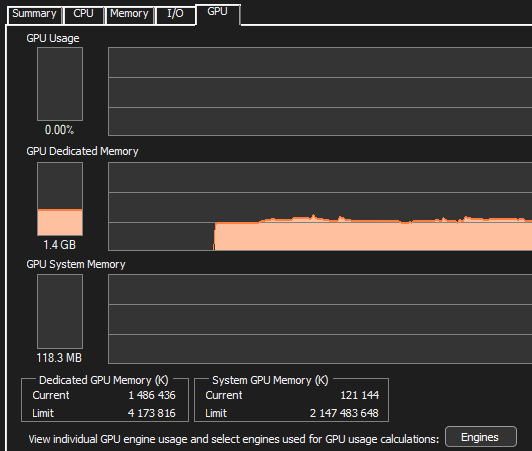
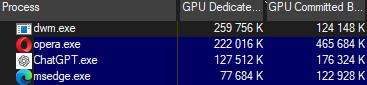
Lot of other things can affect. May not everyone realize the ‘free’ amount is what PL can use. Web browser playin music from Youtube in the background use it, even
the cutie ChatGPT client use some, etc. See some example:
image
Just average things running, and whopping 1.4GB already used.

GPU driver issues
In my previous comment i go on this in some depth, so please see in here:

I think it happen once - all you photos in the cloud, etc. But its may also come on cost. And may local AI stuffs (and hardwares) also improve. Like with ancient GPU export times is something like 30 sec, and on see in the forum with never GPU is just few seconds.

Not sure I was referring to you all good mate cheers from australia enjoy

Despite what you may think, the word “naysayer” is not archaic. I guess you did not know that. It is a current and common term in modern English. I used it specifically to soften the meaning of what I wanted to express instead of just coming out and describing you as someone who seems to be habitually negative, cynical, pessimistic, and skeptical.

Mark

5 Likes

As someone arguably similarly negative, I’d love to be proven wrong. I’ve said it enough by now.

PhotoLab 9 is a lot more stable than it was at launch but still crashes for no readily apparent reason (for example, within the last hour for me - and I wasn’t even using AI masks at the time!)

The nature of many of the updates are unclear (e.g. “minor bugfixes” but they won’t say what).

Performance issues continue to plague the products (which can occur when browsing, but made oh-so-much-worse with any serious masking of an image).

And if you think DxO are running sales out of altruism, I have a bridge to sell you.

Still not convinced? Look around the forum - the threads from people with issues persist. This thread is now over 600 posts strong. If all was resolved we’d be happily editing, not posting here, and there’d be no need to make a hobby of defending a company.

Negativity is tiresome, but pretending everything is fine is equally so, despite how companies love that from their customers.

1 Like

May its time to dig deeper about what cause ‘crash’? :wink: What was the crash? Internal error? Orr the ‘email crash form’? You already use AI masks before crash? You already do export (before crash)? You already do export with AI masks (before crash)? Other apps in the background? And so on…

Performance issues continue to plague the products (which can occur when browsing,

I read some ‘browsing’ case if 1000’s of photos in folder may seems not respond after a time (but later recover) and so on, NAS may involved, etc. But anyhow, when and how?

Look around the forum - the threads from people with issues persist. This thread is now over 600 posts strong

Once its Bias - as not unusual in forum(s) people discus about problems (and less post about ‘its just works fine’).
600 comment gather from 2025 September. May a lot less relevant, some not about PL ready-or-not, etc. Sometimes discussion goes ‘cycles’ - when the same thing round-and-round again. However I also tend to do this ‘cycle’ :melting_face:, as i write may times about like: close all app, try with manual AI mask, and DP3 only first, GPU VRAM amount math, etc. - I’m quite boring i guess, but its may can help in lot of cases - or at least some once try this things out :wink:
So i think 600 is not bad. Good forum!

I certainly agree that there are issues that need to be addressed, but most of the issues that you and others are still having are not universal. I have been a power user of this software since 2017 and other than the AI masking keyword issue which occasionally occurs and prevents an image from exporting. I have not had a single problem in a couple of months on my far less then state-of-the-art Windows 10 desktop. To get around the issue I simply avoid using the keywords and manually select the areas to be masked which I prefer anyway. One of the outstanding issue areas has to do with the Nvidia RTX xx60 graphics cards which has still not been resolved as far as I know.

I am not impressed by the number. Half of those 600 posts are from 8 posters including 94 from @Stenis, 44 posts from you and 42 from me. Many of the other posts on this forum are from earlier on before some of the other significant issues were resolved. I am also a member of the DxO PhotoLab Users Facebook group and the number of PhotoLab 9 complaints have mostly stopped since the various software and driver updates have been released. There are still issues to be resolved but for the most part, and for the majority of users, PhotoLab 9 is stable enough for daily use. Unfortunately, for a minority, there are still some significant ongoing issues.

Mark

5 Likes

I wish I knew! Nothing else crashes on my system, and I wasn’t doing anything exceptional or taxing (with the system or any part of DxO’s software). I’d just exported an image (which has worked fine before) and was working in another app (which has worked fine before). I wish there was some obvious “just don’t do X and you’ll be fine” answer here, but it was quite random.

When browsing a folder of under 100 images locally on the same drive as the software is installed to. The problem gets oh-so-much-worse when browsing images on other drivers on the same PC and/or when edits are applied, especially masks. However, even browsing images back-and-forth is slow; PL creates a new preview with every image navigation.

That is true, but here there are absolutely problems to discuss. I wish it weren’t so but…!

1 Like

Yes, and it has worked perfectly fine for me even with a sub par 3060 Ti 8GB GPU already before all these latest upgrades of PL and the Nvidia-drivers - as long as I stayed away from “the AI-masking keywords in the drop down menu. No problems at all with that approach even when using the high res. previews and Deep Prime 3 rendering live.

BUT there are some users that still doesn´t take that recommendation/work around “as an answer” to get the workflows workingh despite everything with the AI-masking is working with only one exception and many times more efficiently too. So these users are still not able to use that since they will always use the drop down meny instead of the working hoovering directs select method. … and there has come more and more users writing the same without bothering to read what already is written and these guys we will never be able to comfort.

The only real limitation - and that is still important - for users using sub par equipment, is that the freehand masking method isn´t smart enough to automatically identify a subject or area when used for auto AI-masking of a selection of destination pictures by pasting a picture where the user have used the premade AI-presets. So this limitation IS important because without that working we loose a lot of productivity.

The freehand select method is fine and more efficient really when working picture by picture BUT we need the other method too in order to harvest the productivity from the smarter preset masking that is able to automatically identify and apply for example a selection of faces over multiple pictures in a selection.

With that said I don´t really think I have very much more to say in this matter.

2 Likes