Too many Developers are spoiled by hardware; If there is an abundance of resources then they will use them rather than write compact/efficient code.
Significant computational resources inevitably leads to lazy programming. I learnt to write code on a ZX81 - it had 1k of memory, just a few lines of BASIC and it was out of space.
Efficiency was key.
Writing in ASSEMBLER offered significant space savings, and led to someone coding Chess in 1K. I’d be willing to bet that there are few programmers today who have the skills to do that.
My son used machine code in his programing at work. The firm was taken over by a US firm just to get access to there product as it was doing as much and better than there version which was many times a big and much more buggy and slow. It is very stiking in a few years just how PL has grown enormous is size largly due to sloppy programming I suspect
3 Likes
Stenis
(Sten-Åke Sändh (Sony, Win 11, PL 6, CO 16, PM Plus 6, XnView))
485
The competition fixes to handle roughly the same features on 16 GB RAM and an 8 GB VRAM GPU with Windows 11, with absolutely OK performance. There is where the competition is and where DXO has to get too, in order not to lock a significant part of their present customers out from the use of Photolab 9.
It is no problem at all to run Google Gemma 3 4b on 8GB VRAM ( a smaller very competent general AI-model running on Ollama or LM Studio ) and why DXO are having problems with running their dedicated premade AI-models for pinpointing a person, a vehicle or a sky on the same 8 GB beats me. It ought to be a more limited task, I guess.
3 Likes
Stenis
(Sten-Åke Sändh (Sony, Win 11, PL 6, CO 16, PM Plus 6, XnView))
486
Well @mikerofoto , you don´t usually deliberately buy a computer with poor performance and too little RAW and GPU VRAM and too low bandwidth etc. I haven´t had the slightest problems until now with my now three years old computer to handle both iMatch DAM, Photolab and XnView open at the same time with 16 GB RAM and that still is not the issue. I also use Capture One with no problems at all. The issue is that DXO hasn´t managed to handle their new AI-models efficient enough.
That said, there will always come a time when a new OS or new applications will consume the extra performance boost you gained at the last general upgrade of your environment. I guess it was pretty few of us that bought computers 2022, to be in par with the demands locally run AI-functions is putting on our systems 2025/2026. Just a couple of years ago AI was a totally unknown factor - especially for Photolab users since DXO has been very late to implement these features.
I think no one here that did not participate in the Beta-program for Photolab could ever dream of what DXO really have done in the upgrade from version 8 to version 9. It was like a lightning from a clear blue sky really and here we are - unprepared and here we stand now with our pants far down on our knees pretty unprepared.
If we look now how many gaming stand alone Windows PC:s are configured it seems like the now normal is 32 GB RAM with not 500kb or 1 TB SSD but at least 2TB and the GPU card has at least 12 but many have even 16 GB VRAM. That was far from a mainstream gaming Windows PC 2022.
Stenis
(Sten-Åke Sändh (Sony, Win 11, PL 6, CO 16, PM Plus 6, XnView))
487
There was a time when the Russians and their allies in the old Warsaw-pact was a taget of US and Western sanctions. So they had to develop their code often using old computers with poor capacity. Some says that explained why some of them got very good at machine code.
Application software now uses layers that encapsulate entire system architectures. No developer can even begin to access the hardware or understand what software is hidden behind the interfaces. Whether it makes sense to program the building blocks of this system skillfully and sustainably using assembler is up for discussion. In the case of Photolab 9, it must have been a shock for the developers that promised interfaces from renowned system providers did not work correctly. Our expectation that the Photolab developers should have tested better also applies to the Photolab developers expectations of Nvidia. This highlights the vulnerability of larger software systems. Everyone expects everyone else to test everything thoroughly before a release. Ultimately, DXO fell into a hole in the Nvidia driver system with Photolab 9. The program developers probably used interface functions that other manufacturers did not use in this form or did not use at all.
I wrote games in z80 assembler.
What a joy and amazing speed in relation to the hardware.
2 Likes
Stenis
(Sten-Åke Sändh (Sony, Win 11, PL 6, CO 16, PM Plus 6, XnView))
491
At least in Windows and with well written and well behaving programs you can click on “the minus or minimizing mode for an open window” the applications release a lot of the memory they occupy fully open and you can quickly toggle between them all with Alt+Tab. So, despite all the windows are active and “toggle ready” we don´t necessarily need to accept that they consume memory like they always are fully open if we don´t want that. This works to a certain extent for all applications even if some behaves “better” than others. To “Minimize” the windows not in use is often a far better option than forcing applications out to the “swapfile” in most cases.
I just tested how this actually works and this is what i found:
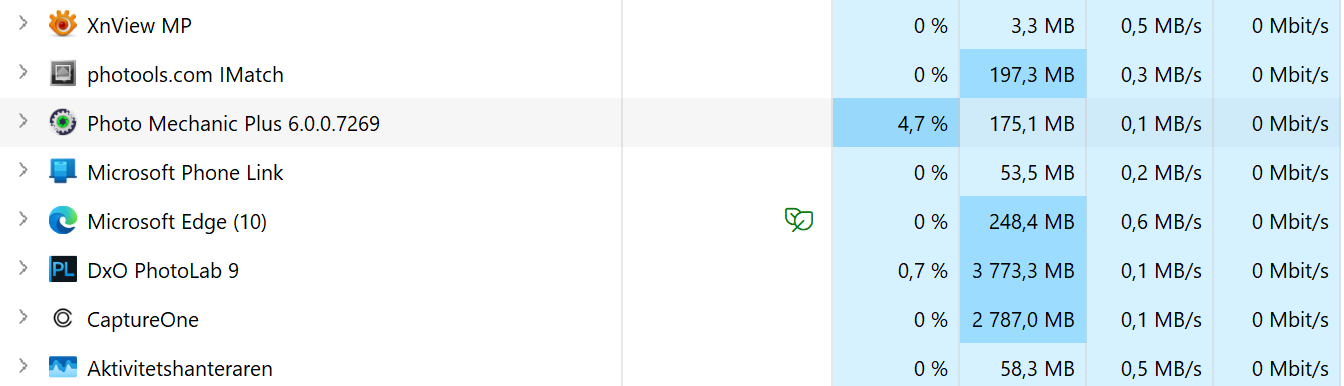
Photolab is absolutely the application of the ones I usually use that consumes most RAM. It varies between 5 500 MB to around 3 500 MB in my system. Capture One varies between 3 500 and 2 500 MB. PL is always using more than 1 000 MB more than C1. No one of them is especially reactive when Minimizing them. They often do not release any RAW at all.
XnView is the best and varies between 160 MB to 3,5. iMatch seems to release some too and varies between 225 to 30. Even PhotoMechanic behaves well and varies between 453 to 13,5 MB when I tested.
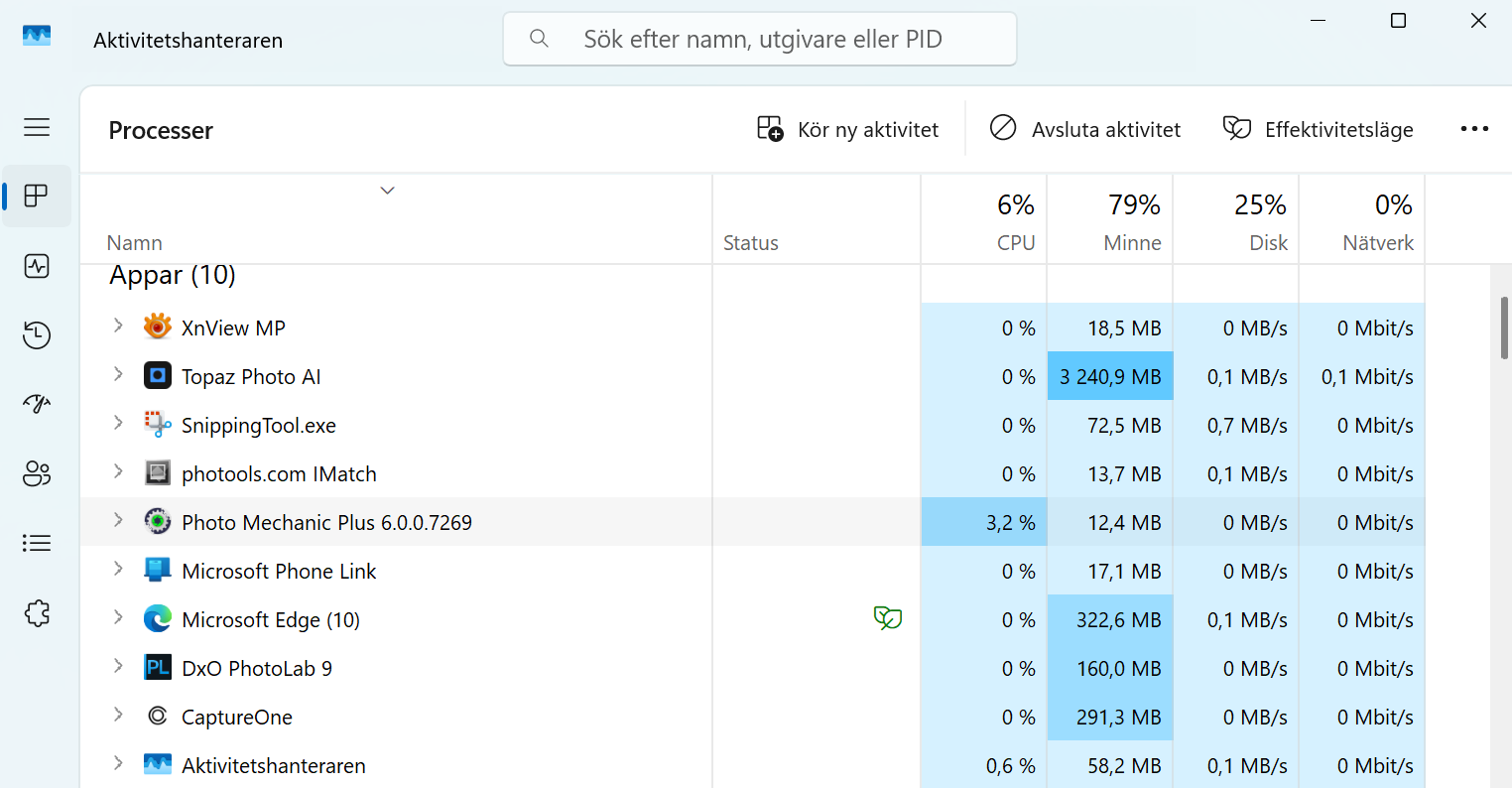
It also seems to be the case that it might take some time but if an application like PhotoMechanic Plus is idle for a while THEN it will release its memory relativelly quick. So how this really works seems to depend quite a lot on how hard some applications is trying to get as much memory as possible and the RAW-processors seems to have that in common that they are most reluctant to release any RAM regardless of if their windows gets “Minimized” or not.
BUT… it also seems like opening another RAM-hungry application like Topaz at the same time makes Windows to force even Photolab and Capture One to release a lot of RAM. In Windows you can check for yourselves pressing the old DOS-command Ctrl+Alt+Delete that will open your Activity Control Window:
Lr here runs far more smoothly than PL9 and the Ai masking is superior. Where I was once thinking of ditching Lr for PL I am now likely to do the opposite.
3 Likes
Stenis
(Sten-Åke Sändh (Sony, Win 11, PL 6, CO 16, PM Plus 6, XnView))
493
There will probably be some people that has to make choices like that when they have to choose between not being able to fully use all these new features in Photolab 9 or having too buying new expensive hardware. In many cases like for example mine I realize that it won´t be enough to just buy a new GPU-card. I would have to upgrade my power supply from 500 Watt to 850 as well and it just might be better to buy a whole new computer instead.
I will never go back to Lightroom in this life so I will definitely buy a new computer and will probably decide already tomorrow after having visited a couple of PC-builders in Stockholm. Luckily they are in the very center and in the same block of some reason.
There are upsides too in this since I will probabaly save 200 U$ a year not subscribing to Capture One any more and I might even cease to pay for the Tokens I now use at the OpenAI API, which might be another 50 to 100 at the most. With a 16 GB GPU-card, that soon will be considered mainstream for AI-applications, I will be able to run Google Gemma 3 12b locally instead of the much smaller Gemma 3 4b model I now am limited to. So for me this is in fact all generally AI-driven and happens not just because Photolab 9 is more demanding. This way I also will minimize the money I pay to American companies. Using Photolab and iMatch is part of that strategy.
AI has simply taken us by surprise and the last years we have not been really prepared for what has happened. We all will have to adapt one way or another and in my case I could really have continued using Photolab 9 just using the freehand masking methos instead of using the premade resource demanding AI-presets because they work really fine as it is but I need to run big general AI-models locally too. If that hadn´t been the case I wood just be fine until DXO fixes these issues that still needs to be fixed.
As an every day workflow I have hard to see anything better than the DXO AI-implemantation right now. I love the concept with the submasks and that these new AI-tools fits right in there together with the older tools like the Control Point, Control Lines, Hue and Luma-masks and not to forget the reborn Brush-functions. There are a few things in C1 (Retouch Faces, the lovely Style Brushes and the Match Look-function) that I would die for in Capture One but as a whole I think the Local Adjustments in Photolab are superior even to Capture One. I never expected that to happen just a couple of months ago. … and even if there is nothing like the Tethering in C1, I know I can do the job in Sonys free Imaging Edge too. So not even that is a show stopper any more. When changing things why not go all in?
It is a time of transition now and many will need to make some quite transformative and expensive decisions and others will simply have to lower their demands and expectations or perhaps like you seek solutions other than Photolab that suits you better.
I think Ai has taken DxO by surprise. Other software companies are well beyond this point in Ai development. One can make as many excuses for DxO as one likes but basically they have screwed up royally. Your dislike of the Adobe franchise is a personal choice of course and that is fine. Fact is though Lr’s masking is far ahead and not so resource hungry. It also has a very good dam. The question therefore is - are results from PL so much better that it is worth this suffering? Users will make their own minds up on that.
I feel the new AI selections in PL are great, especially the way I can combine them with the older selection tools. Now there are tools for the large majority of edits I do on my pictures, where I had to use my bitmap editor, Affinity, before the new AI tools.
Of course, there are some issues with the demand for hardware like memory or GPU, but even if I have PL 8 installed still, I haven’t used it once after PL9 arrived.
There is nothing new in combining masks though. It’s been available in other software for quite a while.
Stenis
(Sten-Åke Sändh (Sony, Win 11, PL 6, CO 16, PM Plus 6, XnView))
497
I left Lightroom a long time ago and one of the reasons were the inefficiency of their picture library. It is just half a DAM. If people want a real DAM there are other products too,
You are absolutely right about that DXO having been really slow to take AI-support seriously and that they have been taken by surprise when realizing how fast yhe competition were moving. I have been one of the surprisinglty few here that have critisized DXO hard for that being also a C1 user. Many here have tried to defend them in absurdum the last years. When DXO finally moved they really had to try to take a too long leap in just one step - then loosing control. Capture One and Lightroom have done it in many incremental improvements over at least three years now.
They also made their best this autumn to be the first of all to release their yearly release. That was probably a huge mistake as was their blunder having forgot to update their Nvidia drivers during their development of Photolab. That i really find surprising and unprofessional.
Despite that I really do find Photolabs total core masking platform offer more efficient every day masking management than the one in C1 right now and that is very much due to the really good and efficient integration with the U-point Tools and the Sub- masking support. I think that is really brilliant and very efficient. What Photolab still is lacking compared to C1 is the superiour workflow applications in C1 for retouching faces and matching a look with Match Look which can be a formidable time saver. For studio work a tool like AI-Crop just have to be a huge time saver for school photo jobs, product photo and ans series of weddinging portraits just to mention the most obvious. Even I have found some use of it.
Personally I am doubtful to what Lightroom and others are trying to do in a RAW-converters like Lighroom when adding generative AI-functions. I prefer as long as it is possible to keep Photolab as clean dedicated RAW-konverter it still is. I guess the temptation is strong to go all in even with generative AI.
2 Likes
Stenis
(Sten-Åke Sändh (Sony, Win 11, PL 6, CO 16, PM Plus 6, XnView))
498
Some of the tools in Photolab U-Point are unique to Photolab. Especially the Control Points. Remember the problems both Lightroom, Capture One and Photolab has and have had for long with Sky-AI-masking horizons broken by trees. No problem in Photolab where you just select the Control Point and click a couple of times. In Capture One its often a better choise to skip the AI all together and choose the old Magic Brush Tool instead. I have no idea how to fix that in Lightroom.
Not exactly ‘Windows’ does the ‘memory release’, its usually called ‘Garbage collection’ in programming world - applications “release” memory what not used - usually ‘short term used’ memory. Its usually automatic process inside the application. Note: i talk about standard memory (RAM) and not GPU VRAM.
In PL Client (editing app) you may see it relative quickly if you minimize PL client (main app) to the ‘Task bar’, usually the PL client (main app) its goes from like 1GB-1.3GM memory to 0.7GB or less.
Edit: The DxO.PhotoLab.ProcessingCore.exe (for others: its the ‘Export’ process) not release memory - so once you does export, the export process stay in memory (for 2 hour)
Yep. LR masking in peer with PL or better (just example Pl ‘sky keyword mask’). Regarding resources, yes, i think similar - however as i see, some of the Lr masks not based on AI or very minimal. Lr “Sky” mask i think not AI, but some very-very fine tuned algorithm, what use tuned chroma/luma/edge detection (that’s why it’s fast) - and PL control line/luma/chroma mask result can archive (at least in most cases) practically the same result than Lr ‘Sky’.
@andras.csore Not according to my copy its doesn’t it stays put and that is running the hacked version that relinquishes memory used for export every 60 seconds instead of 7200 seconds. Only terminating PL9 or putting the machine to sleep will clear the memory used by the program!