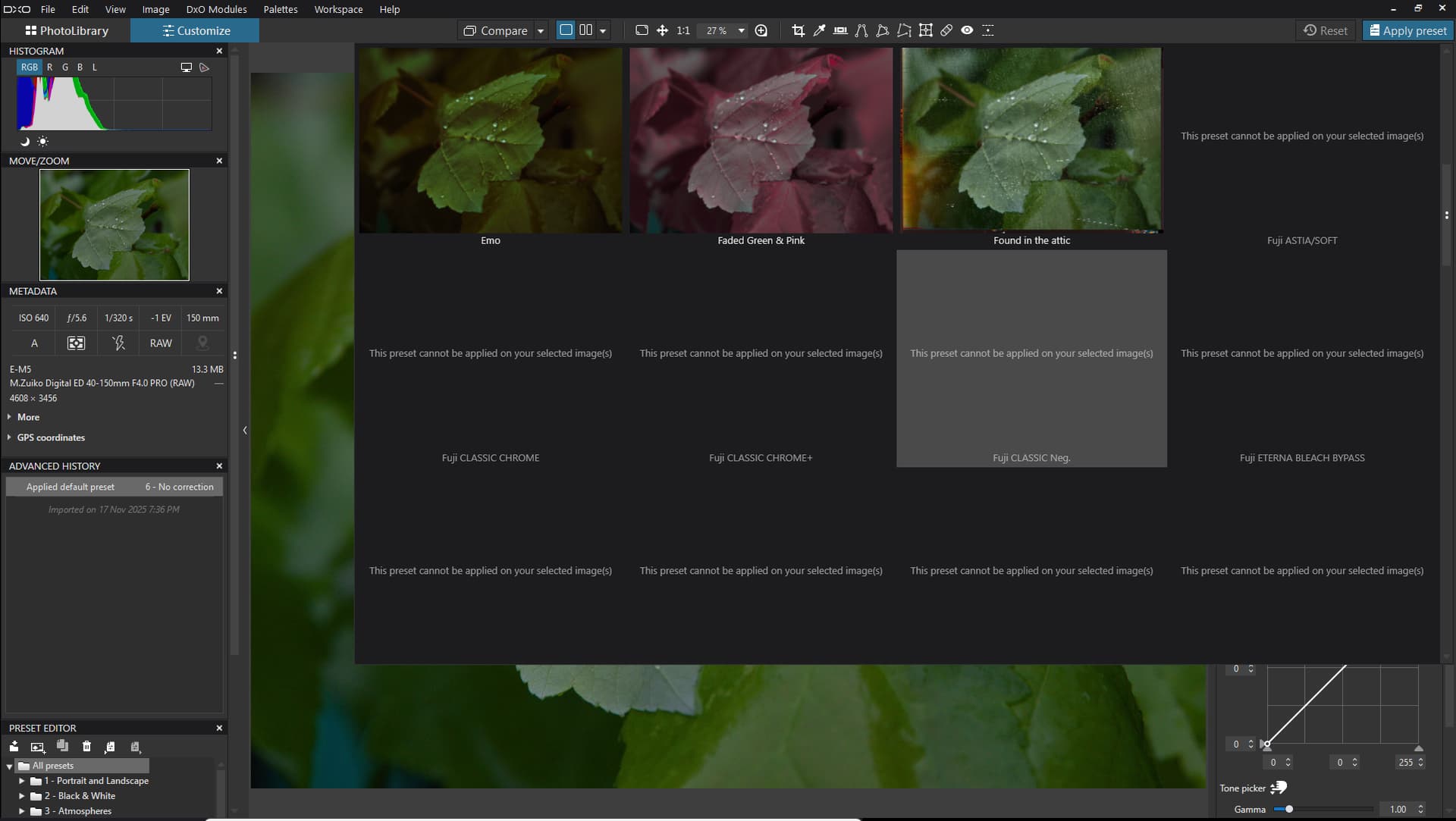
PL 9.2.1 is out

It is unfortunate if you purchased FilmPack just for access to those few simulations. Sometimes sh*t happens. Along with a number of other users I was very disappointed by the removal of those simulations which I also liked using, but given the fact that DxO was blindsided by Fuji and had to restrict their use, I am not going to whine about it. There are plenty of other useful features in FilmPack that give it value far beyond those simulations.

Mark

1 Like

Actually, based on all the film simulations and other features it is probably less than 1%. Perhaps $1.00 USD. I don’t think that would satisfy you. You are pissed off because you don’t have what you paid for, and I don’t think anything less than a full refund would satisfy you.

Mark

How would you know what satisfies me or not? Clearly you don’t. The $1 would mean they acknowledge their fault and try to make up for their failure. Offering full refunds would show they cared about the situation. Instead, they chose “nah, screw our customers”. It’s beyond me why you would defend DxO’s apalling behaviour.

DxO wasn’t blindsided by Fuji. They sold these simulations for years. They could have renamed them, they could have warned users beforehand, they could have offered partial refunds, full refunds
 they could have done many things.

What they chose to do was not right. Do you know what their official stance is on the matter?

So again, does this look “fully operational”? Or does this look like “eh, screw the customers, we’ll tell them it’s perfectly fine, we’ve sold enough licenses anyway”?

1 Like

By the way, the 12 removed simulations are 7% of the total.
This is a $10.5 USD equivalent, from the $150 USD price tag.

Yes, 7% of the simulations sounds about right, but there are also around 10 other features in FilmPack besides the simulations.

As an example, the 4 additional Fine contrast sliders added to the Contrast section of the Light palette are considered by many to be among the most important tools in PhotoLab and are only available with a FilmPack license.

The very desirable Luminosity masking feature is added to Local Adjustments with a FilmPack license. There is also the global Creative vignetting feature, the global Blur feature, and several others.

Some of FilmPack’s features are integrated across PhotoLab and it is not always obvious they are part of FilmPack, such as the DxO Time Machine, which is now called the DxO FilmPack Time Machine in PL9.

I was considering all those features in addition to the simulations when I suggested less than 1%. A lot of people think that FilmPack is just about simulations. It is much more than that.

Mark

1 Like

That in itself is controversial. Fine contrast sliders and Luminosity masking have nothing specific to do with the FilmPack’s scope and everything to do with PhotoLab’s scope.

Those functions belong with the main program.

The only reason they’re not is that DxO wants to position FilmPack licenses as a necessity, not an optional extra.

It’s a very cynical business practice, and further cements the growing impression that they aren’t interested in their customers beyond the wallet.

1 Like

The elephant in the room. With this latest v9 build, performance is worse than ever (and I’m now one of the lucky ones - if I go and make enough cups of tea, eventually the programme will be responsive again).

The competition is way ahead in this respect, to the point PhotoLab is painful to use on a system where other options are a breeze.

For me, PhotoLab’s potential (its sharpening and noise handling remain second to none) are the reason I’m still here, along with extensive invested time and money into it. It’s a sunken cost.

For anyone asking if PhotoLab is right for them as a new user, at this point, I can’t and won’t be saying “yes”.

2 Likes

When I bought my first version of PhotoLab, I bought the bundle of three apps


Date : le 07 décembre 2017 à 18:09:36
DxO PhotoLab Elite x 1 : ÂŁ132.50
DxO FilmPack Elite x 1 : ÂŁ82.50
DxO ViewPoint x 1 : ÂŁ49.17
PromoCode DXO_PHOTOSUITE x 1 : ÂŁ-73.33
Sous-total hors TVA : ÂŁ190.84
TVA : ÂŁ38.16
Total de la commande : ÂŁ229.00

So, I essentially got FilmPack for only ÂŁ9.17 after the discount.

I was looking for a way of avoiding Adobe subscription and what I got more than matched my needs as a photographer rather than a graphic artist.

DxO PhotoLab 9 x 1 : €239,99
DxO FilmPack 8 x 1 : €139,99
DxO ViewPoint 5 x 1 : €109,99
Total individual prices : €489,97

Total bundle price : €359,99

Effective price of FilmPack 8 : €10,01


So, after 8 years, FilmPack need only cost around the same £/€10 when bought in the bundle.

Considering alll the advances that have been made with it over the years, I don’t consider that to be at all unfair.


Like others here, I have always regarded the whole bundle as the full package and the ability to separate the three apps as a convenience for those who don’t want all of them.

Unlike other apps that require all sorts of importing, exporting and plugins to make them work, I have a singe, integrated app that I never need to leave from opening the RAW to outputting for printing.

I always recommend the bundle to anyone contemplating changing from the big A.

4 Likes

May Fuji always reserve the right (IP). And they change their mind in one point. May to sell more Fuji cameras.

they could have warned users beforehand

Its was noted in the release note. But i understand, even i not read thru the release notes of FP.

they could have offered partial refunds, full refunds


Hard to decide what can be a the ‘refund’ or how, i guess its near impossible. If we count the ‘emulations’ amount:
[TomDX] describe: "By the way, the 12 removed simulations are 7% of the total.
This is a $10.5 USD equivalent, from the $150 USD price tag."
‘Price’ may also can count in different ways, like: FP itself (as engine) worth like 70%, and all emulations 30%. I think no good way to calculate this.

1 Like

That’s my problem with how they’ve approached FilmPack’s contrast sliders and Lumo masking
 by not taking FilmPack you immediately use what ought to be core PhotoLab functionality.

If we must have PhotoLab and FilmPack and ViewPoint to make a fully functional suite then it shouldn’t be segregated at all - bundle it all together and charge the inevitable higher price.

For me, that would be more honest than presenting it as an option - when in fact it’s like selling us a car, but only including windscreen wipers, turn-signals and brake lights in an “optional extra” package.

Who are we kidding? Those things are essential.

2 Likes

Maybe to you, but not to everyone.

You definitely able to run it. You even able to create (and use for editing) ‘manual’ AI masks with 4GB GPU! Its in ‘very edge’ on GPU VRAM amount, but definitely works. I also with 4GB GPU, so i know and its works prom 9.0 unit latest at least. But - and its a very big but: with ‘Manual’ AI mask with 4GB GPU VRAM and if you use ‘GPU mode’ → you cant export, cant use Loupe with DP, cant use Deepprime rendering. As system ‘runs out’ from the 4GB VRAM.
In ‘CPU only’ mode with 32GB of system memory everything expected to work (as least i try, and seems everything works, like pre-defined AI masks, DP XD2s, etc.).

Otherwise if you use the same editing style like in PL8, you can do the same with PL9, and can use like PL9 ‘advanced’ masking, etc.

But I get you. Now i works in the following (with 4GB GPU): GPU mode turned ON. Use only ‘Manual’ AI masks. Works just fine - rare ‘internal error’ cases, but acceptable for me. When all editing done → Switch to ‘CPU only’ mode → Restart PL (now its run on CPU only, may also ‘OpenCL’ disabled doe the same) and Export edited photos in batch (usually with DP3). Export usually works fine, may some cases its fail like 1-2 from every 30 photos. But re-export those works. ‘CPU only’ export works may better (at least not so worst) performance what you expect.

For some of us the ‘Pre-defined’ AI masks important. For some Loupe is important. For some Export performance is important. For me these is less important. And also don’t have a budget for shiny new GPU. So i live as can.

Ps.: i write in the past:
“Actually Wife never was happier with PL version upgrade like this - all dishes is clean in time, dinner is served.” As under export i do kitchen stuffs, vacuuming the flat and so on.

Well, as far as I know, Luma masking is available with the core application of all of PhotoLab’s rivals :man_shrugging:

Both it and fine contrast controls have nothing directly to do with the concept of film simulations.

2 Likes

Maybe. But FilmPack has never been totally about sims.

1 Like

I had noticed a bad performances in PL9.21.
But 
 but 
 Installing the Nvidia driver 581.80 the performances got way better. I had the so-called “studio” driver, and indeed the performances were bad. A batch export took an average 4.4 seconds each file. Then I decided to uninstall the studio driver, and I did a “clean” install of the latest 581.80-notebook-win10-win11-64bit-international-dch-whql.exe
Now each jpg is exported in less than 3 sec. each !
This score is with the same .raw files, same .dop files. Nothing changed in between the tests : only the driver changed.
My pc is an I7 , 32GBram, Ssd disk, Nvidia 4070. In the PL settings I have “simultaneously processed images” = 3
TO be precise, there is a noticeable lag before the export starts : up to 6 seconds. I don’t know why.
This means that exporting a single Jpg file is a pain, but when exporting a large batch, the initial lag doesn not count in the final average score.

1 Like

Yes, this ‘lag’ its happen before first Export (DopCor loaded). Afaik.

May this interesting for you: DxO 9.2.1 + Manual AI mask + DP3 NR Export can work even with 4GB GPU VRAM!

1 Like

Thanks for the workaround! I am a little tempted to at least try it thanks to your comment, but for $300+ USD I’d rather not jump through hoops to work on my photos. I will stay on PL8, and upgrade to PL9 or 10 until a) I have the horsepower, or b) DxO optimises and fixes the program. For the time being, if I need AI stuff, I’m going to buy Luminar or ACDSee [still in the air].

1 Like

My Win 10 machine is well below that but amazingly it does run Pl 9.2.1, and it doesn’t crash unless I use one of the preset AI masks (sky, background. etc.) Having said that, you do need patience to use it so I’m definitely not suggesting / recommending such old tech as a truly viable option. If you’ve not trialed PL9, give it a go.

1 Like

I have used ACDSee forever. I use ACDSee primarily for file management and Photolab for raw processing, but sometimes I will use ACDSee for RAW processing as well. I always denoise with Photolab first no matter what workflow I use. I find using both systems gives me a ton of flexibility.