PhotoLab 9.9 released

As a general rule, I’m very reluctant to take the lead in troubleshooting paid software. If I want to analyse event logs or run hacks on my computer, I usually opt for open-source software. But my patience is definitely running out, so thank you for your replies, which have prompted me to analyse the event logs relating to the 9.9.x disaster.

After some digging through the Windows Event logs — a few findings that might help others hitting this crash.

The crash signature is byte-for-byte identical across builds. On 9.9.0 (June 18) and on 9.10 (July 18/19) I get exactly the same:

  • Faulting app: DxO.PhotoLab.exe

  • Faulting module: ucrtbase.dll (10.0.26100.8521)

  • Exception: 0xc0000409, fault offset 0x000a527e (identical in both builds)

  • WER bucket: BEX64

The constant offset across two differently-compiled builds suggests the abort happens at a fixed point in the C runtime that PhotoLab runs into, not in PhotoLab’s own build-specific code.

The most telling detail: the WER problem signature includes P9 = 0x0000000000000007, which corresponds to FAST_FAIL_FATAL_APP_EXIT. So — thanks to @Egregius’s point about 0xc0000409 being a misleadingly-named generic code — this is not a buffer overrun or a memory-protection violation from injected code. It’s a deliberate self-termination via the runtime, i.e. an unhandled exception in the AI-model initialization path. That’s also why there’s no error dialog at all — the app fastfails before it can show one.

To @Wlodek’s GPU question: I’m on an NVIDIA RTX 3060 Ti (driver 591.86), while the other reporter with the identical 0xc0000409 was on an AMD RX 9070. Two different GPU vendors, same signature — so a vendor-specific driver bug looks unlikely.

I also ruled out Logitech Options+ (a known DLL-injector): I fully disabled its service and processes and retried — the crash is completely identical, same bucket, same offset. So injected third-party DLLs are not the cause here either.

Net result: this looks like a reproducible, deterministic unhandled exception inside PhotoLab’s own AI-init code, independent of GPU vendor and third-party software. I’ve passed all of this to DxO support. If anyone else is stuck on the “Optimizing AI models” splash and then a silent exit, check your Event Viewer for the same 000a527e / BEX64 / P9=7 signature — would be good to know how widespread this is.

One hypothesis I can’t rule out from my side: since the exception seems to fire while the AI models are being loaded/optimized, a corrupt or incompletely downloaded model file could be the trigger. The one test that would confirm it is clearing the AI-model cache so PhotoLab re-downloads them fresh and complete. But that’s really something DxO should walk us through — it’s their program and their models, so I’d rather not guess at which folders to wipe. If anyone from DxO reads this: pointing us to the correct way to force a clean AI-model re-download would be a concrete next step.
Another update — and this one narrows it down to a specific component.

Following the “clear the AI-model cache” idea, I looked at:
...\AppData\Local\DxO\DxO PhotoLab 9\CompiledModelsCache

Two findings:

1. I renamed the existing cache folder and relaunched. PhotoLab created a fresh one and still crashed at the identical point — same “Optimizing AI models” splash, same BEX64 / offset 000a527e / P9=7 signature. So a corrupt cache is not the cause: a clean, empty cache produces the exact same crash.

2. The freshly created cache contains only this, with no files inside:
CompiledModelsCache\TensorRTRTX\runtime_cache_v1.23.2

That’s the key: TensorRTRTX is NVIDIA’s TensorRT model-optimization path. So the “Optimizing AI models” step is a TensorRT compile for the GPU, and PhotoLab throws an unhandled exception right there — before writing a single cache file — and fastfails.

This ties everything together neatly:

  • deterministic, identical across 9.9.0 and 9.10

  • FAST_FAIL_FATAL_APP_EXIT (unhandled exception, no dialog)

  • and it reconciles the cross-vendor angle: over in the “9,10 out yesterday” thread, JohnS reported the same 0xc0000409 in DxO.PhotoLab.ProcessingCore.exe on an AMD Radeon RX 9070 (driver 32.0.31021.5001). I’m on an NVIDIA RTX 3060 Ti (591.86) and the fault surfaces via the TensorRT (RTX) path. Different vendors, different GPU back-ends, same 0xc0000409 — which points at the model-optimization step lacking exception handling as the common root, rather than a single vendor’s driver.

If anyone else stuck at “Optimizing AI models” checks their CompiledModelsCache and finds the same empty TensorRTRTX\runtime_cache_... folder, please chime in — and if a particular NVIDIA driver version (or Studio vs. Game Ready) gets past it, that would be hugely useful to know. I’ve reported all of this to DxO support.

I hink, it was expected.

The constant offset across two differently-compiled builds suggests the abort happens at a fixed point in the C runtime that PhotoLab runs into, not in PhotoLab’s own build-specific code.

I guess its right. It not lies on PL code.

And what the path for ucrtbase.dll (event log describe it?), and ucrtbase.dll version in your system?

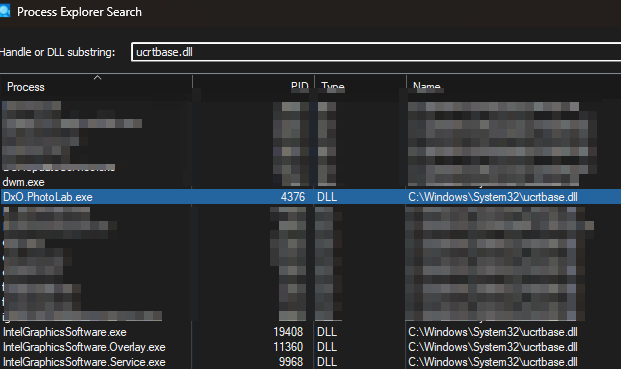
As i see in Process Explorer (Process Explorer - Sysinternals | Microsoft Learn), PL use the following path: (Find ->Find Handler or DLL)

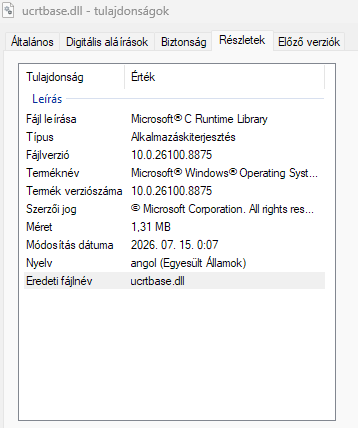
In my system the version of the ucrtbase.dll: 10.0.26100.8875:


Seems updated just a few days back.

Seems different (version) than in your system:

  • Faulting module: ucrtbase.dll (10.0.26100.8521)

8521 released around May?

Resolved — sort of. And the cause is worth sharing.

DxO support has identified the root of the “Optimizing AI models → silent exit” crash:

A non-Latin character in the Windows user account name. In my case, an umlaut in my name (a profile path courtesy of the professional outfit that once set my machine up — evidently a non-Latin character in C:\Users never made it onto their checklist). The processing engine can’t start when the user profile path contains it, and fastfails on launch.

So the whole thing traces back to a single umlaut. In hindsight the clues were all there — the USERNAME~1 8.3 short-name showing up in the crash paths, and the empty TensorRTRTX\runtime_cache_... folder. That wasn’t a TensorRT or driver problem after all (my earlier hypothesis — happy to correct it for the record). The engine was simply failing on the accented path while trying to create the cache under C:\Users\<name-with-umlaut>\.... That’s also why it happens regardless of GPU vendor, and why there’s no error dialog: it aborts before it can draw one.

To put the effort in perspective: six weeks, two diagnostic packages, plus a three-hour Sunday-morning dig through the Windows Event logs by myself to get to the bottom of it. Correctly handling non-Latin characters in file paths has been a solved problem for years — an umlaut bringing the app down on launch isn’t that great a look.

One thing worth noting for the record: for weeks I had asked for a 9.8 installer to bridge the outage, and was refused — I was told a downgrade could cause database/settings/component incompatibilities, and that DxO therefore would not provide the installer. The official fix recommendation is now to roll back to 9.8, with the installer supplied directly. The same step, first refused then handed over. I’ve asked support to resolve that contradiction — specifically how to handle the already-migrated database on a rollback — and am holding off on the downgrade myself until they do.

One caution, straight from DxO and worth repeating: do not rename your Windows account or profile folder to get rid of the character — they explicitly advise against it, as it causes far bigger problems with Windows and installed software.

Fix: currently targeted for September (unconfirmed).

If anyone else is stuck at the “Optimizing AI models” splash: check whether your Windows user profile path contains an umlaut or any non-Latin character. If it does, you’ve very likely found your culprit.