New in DxO PhotoLab 9.5
New supported cameras
• Sony A7 V
Bug fixes
• Minor bug fixes and improvements
PL 8 also, now 8.13.
New in DxO PhotoLab 9.5
New supported cameras
• Sony A7 V
Bug fixes
• Minor bug fixes and improvements
PL 8 also, now 8.13.
Hello,
The new update has issues reading Lossy Compressed RAW files from the A7V: New PhotoLab v9.5 Unable to read Sony A7V Lossy Compressed RAW files
Hello,
No this is a different issue. The problem I am facing is it does not open/process compressed/lossy RAW. ( The one above you highlighted is for Small and Medium RAW files which is different ).
Your screenshot shows for the A7RV, there is no this information for the A7V
Yeahhh! May bad! I need a new glasses…
Pity they don’t seem to have fixed the one where you have to restart PL in order to release video memory.
I’ve just been repeatedly changing my mind after I’ve exported the image so going back, tweaking again and re-exporting. After about six such iterations the export time went from about 11-12 seconds to don’t know how long because I cancelled the export at about 50 seconds. After a restart the export time was back down to 11-12 seconds.
Hey ho, c’est la vie. New version, old problems, and my PC is no slouch with a RTX 5070 12GB GPU.
@stuck I have repeatedly described a process of putting PHotoLab to sleep (on a Windows machine) and when awoken the VRAM is cleared. This may or may not be faster than terminating and restarting Photolab completely. on your machine.
In my case putting the machine to sleep is the press of a single keyboard button and waking the machine is by pressing a large flashing power button.
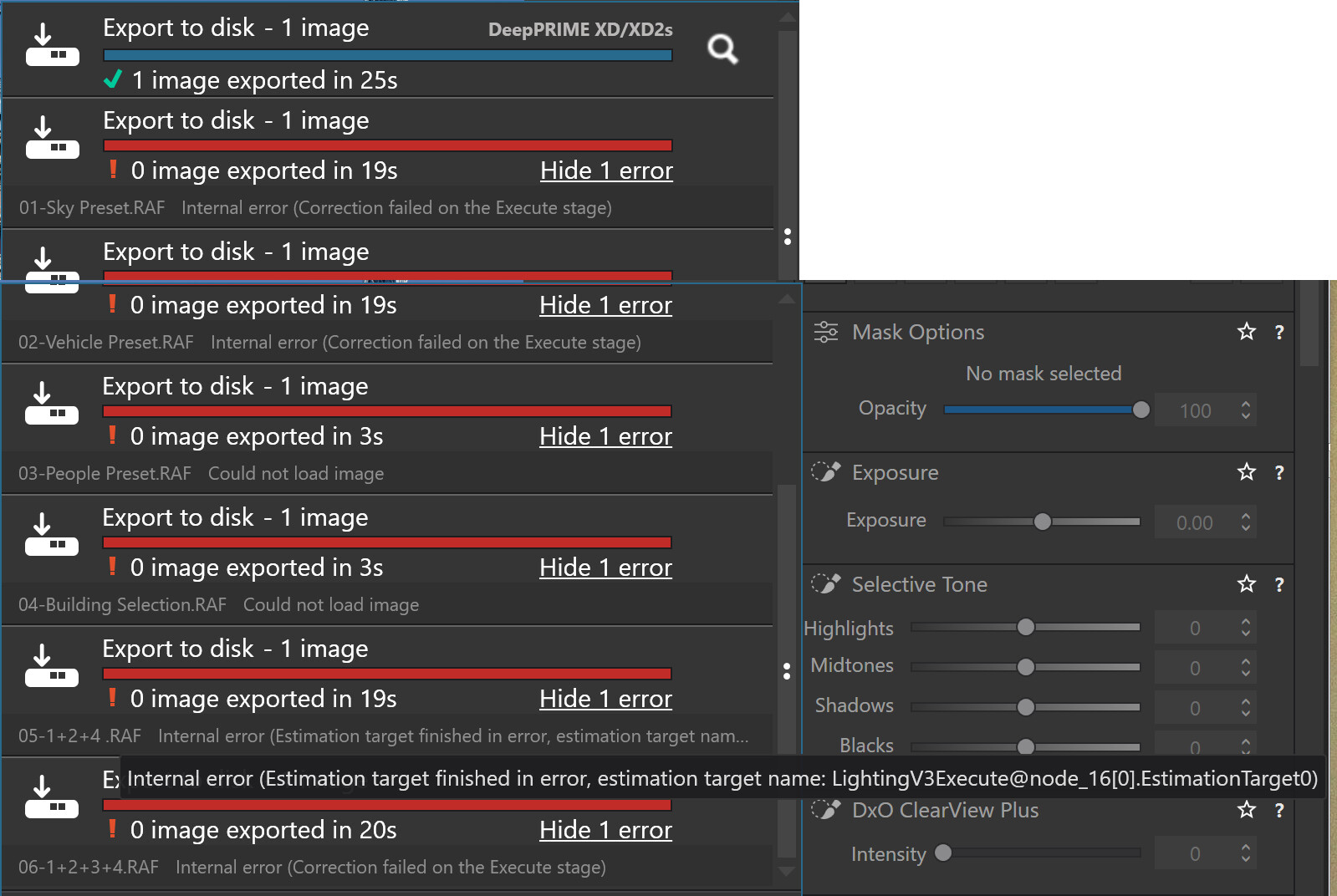
The results are as shown below.
@stuck You are lucky here are the results of an attempt to export the St. Pancras image, configured and named as separate images and each and every export of an individual image is preceded by a forced (by me) termination of the export worker.
This is on my 5900X(32GB) + 5060TI(16GB) with the “fix” suggested in a post applied.
No image has any Noise Reduction applied and every single export with AI included, i.e. all except the first image, failed and sometimes after different time periods and with slightly different “excuses” .
The long “excuse” on the “1+2+4” image (failed) export is something new!?
PS:- We are a mere 5 months into the life of PL9.
@andras.csore thank you for the information.
With 9.5 WIN I did not identify additional issues - until now.
Stacking issue still not fixed. 
funny on my Mac the check for updates menu item is greyed out - is this a windows only release or has my version gone funny
Thanks, i update the title to “Win only”.
So DxO have released a new version of PL9, which adds support for another camera (Sony A7 V), but does so only for Windows users? That doesn’t sound right.
Or does the current version (v9.4) for Mac already support this camera?
We all know that the Win and Mac versions have many differences but this, potentially, is a whole new level of divergence.
Or is it that this v9.5 for Win has been inadvertently released ahead of time?
So many questions but it’s a safe bet DxO will say nothing.
According to the release note, the v9.5 Mac version supports A7V since yesterday.
But for now, DxO does not support RAW Compress HQ and RAW Compress for the Sony A7 V
So PL9.5 is out for Win and Mac. In which case, perhaps @andras.csore needs to edit the topic title again, and @tnp75 needs to double check what version of PL9 he is running on his Mac?
Just checked again and now 9.5 update shows up on Mac
9.4 is running pretty well on my MacBook Pro. I’m not going to mess with it.
I took a punt and it seems much quicker with object election - it did a 2.5gb download so maybe an updated model?
Odd my Windows installs were small and quicker than normal!
Hello everyone,
Since upgrading to version 9.5, the startup time is significantly longer, about twice as long as in version 9.4.
Have you experienced the same thing?
Have a good day.
Alain
No, Startup time for 9.5 IS similar to 9.4. I am running on win11.