The cooler on my 5700G CPU is the standard AMD Wraith Spire. After some googling I think it should work fine as long as I dont do overclocking.
@TorsteinH From the temperature of my hard drives, either the input fan is not connected or jammed and the size of the Assassin cooler may be obstructing the general air flow. So some investigation is called for!
Both the 5600G and the 5700G are rated as typical TDP 65W while the 5900X is 105W and apparently it throttles back at 90 C.
All the best with your decision.
Regards
Bryan
I would like to contact DXO Support with a complaint about this issue as it is preventing me updating to PL8.
However, I am not technically astute enough to know how to word such a complaint. Do you have some advice you can share on how and what to include.
@Draig I would simply state that you have an issue that is preventing you upgrading to PL8, namely that you have a 2GB graphics card which works successfully with PL7 (or whatever release you are upgrading from) but you have read in a forum topic that such cards are failing the 1 GB “rule”, which was introduced when PL8 was released, namely in this forum topic https://forum.dxo.com/t/photolab-8-low-gpu-memory-detection-problem/3931.
The support form entry is not the easiest to navigate, here is a pdf of mine but I was entering a fault that I encountered when I ran the trial version of PL8 on one of my i7-4790Ks you need to select the appropriate response to indicate that you have an issue that is preventing you upgrading or whatever your exact situation is, e.g. did you try the trial and it failed or etc. etc.
2024-12-20_083627_BHAYT submission about the 1 GB limit being applied to 2GB cards.pdf (508.4 KB)
While I was entering the Support submission it presented the following .
2024-12-20_082011_DxO explanation of GPU usage.pdf (1.1 MB)
Sorry that this issue is preventing you from upgrading.
Thanks for the response. That is very helpful!
I currently don’t hold out much hope, the problem is easily resolved but the response to my Support request was that the minimum recommendation for GTX GPUs is 8GB. I have no idea where that figure has been “plucked” from @Musashi , @DxO_Support-Team but it doesn’t match with the 1GB quoted in the PL8 rejection message so I made this response
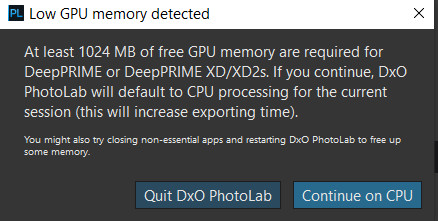
" straight from the “horses mouth”, i.e. from PL8. It indicated that the card was not suitable because the memory available was less than 1024 MB which is simply not true because the card has 2GB, i.e. greater than 1 GB. So regardless of the recommendations the 2GB card should not be faulted.
The specifications given in the release notes are way out of line with what users experienced with DP XD and way out of line with what I have experienced with DX XD and DP XD2s and finding a GTX card with at least 8GB is way over the top and they are hard to find and have been totally unnecessary until this release, and in truth are actually unnecessary with the current release.
I have attached a test done with the GTX 1050(2GB) card and that shows that with XD less than 1GB of GPU memory was being used. I have also included a test done with a GTX 1050Ti(4GB) and that shows DP XD2s exports using 1203MB of GPU memory.
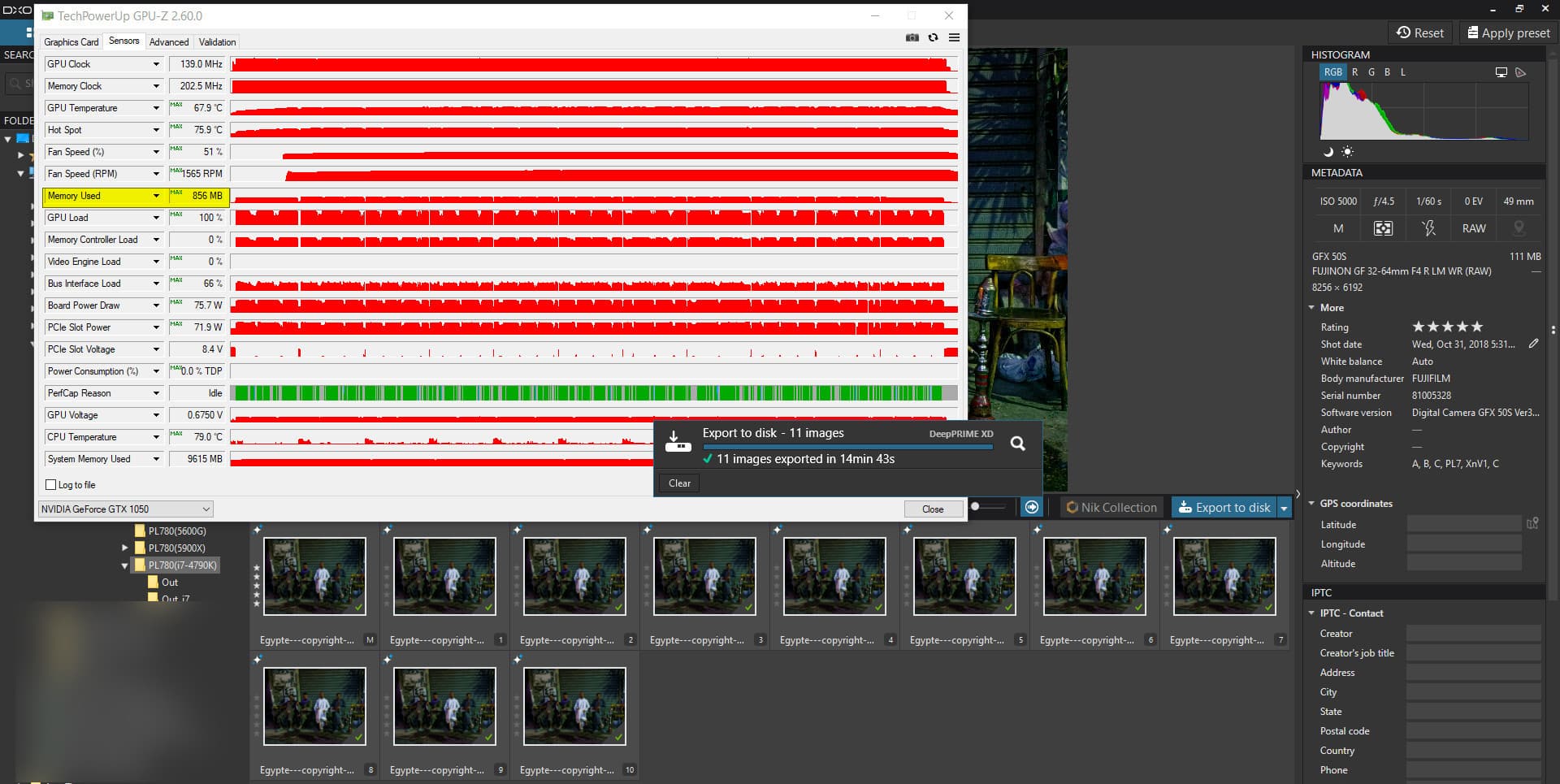
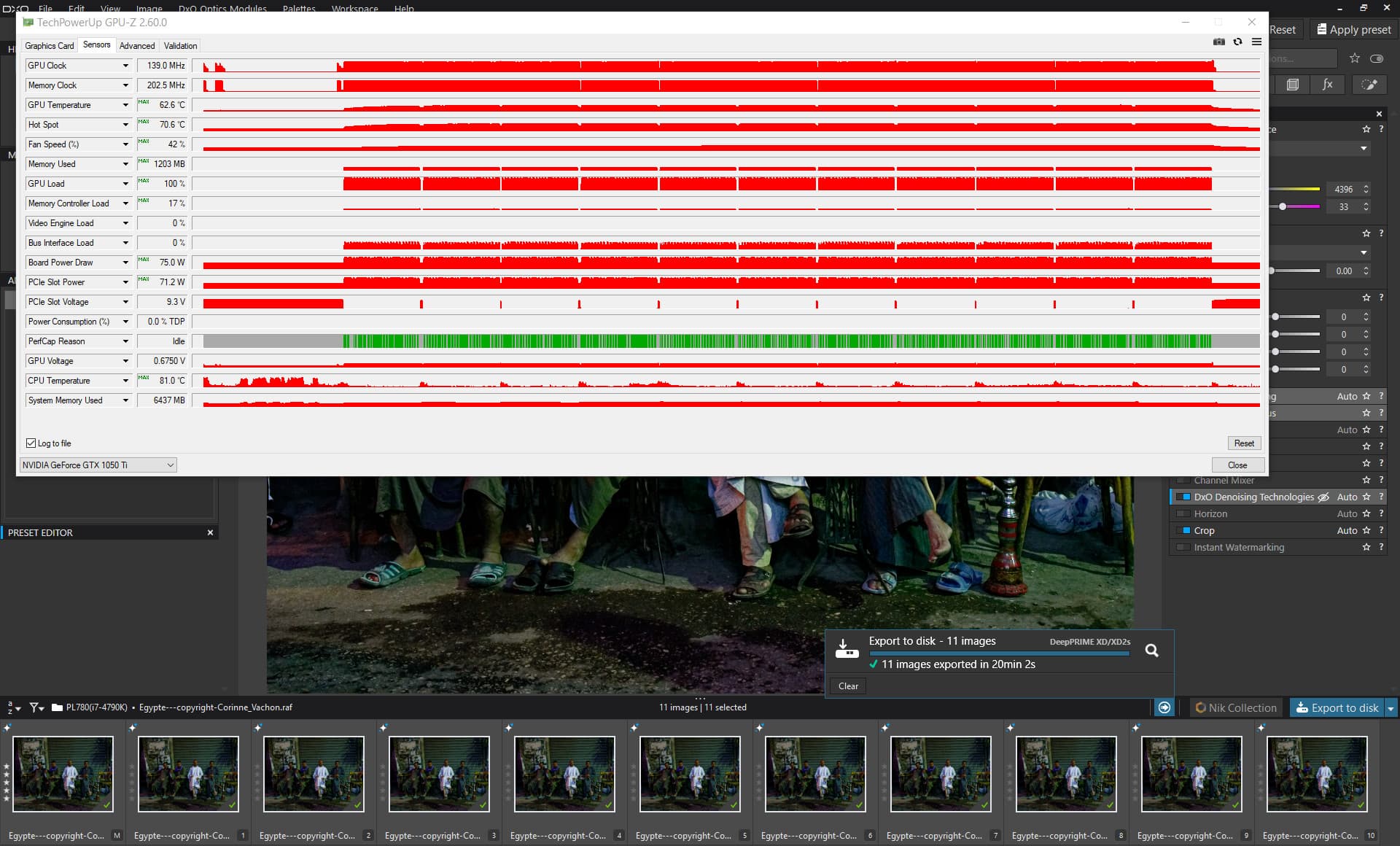
So the export should easily be possible with a 2GB GTX (amended from RTX) card but users are being left with the decision to upgrade or not or are discovering that they cannot export at all on PL8, except via the CPU which is excruciatingly time consuming (and totally unnecessary).
Please
- Fix the bug that erroneously fails cards that can do the job (albeit slowly)
- Make DP XD available to all users because DX XD2s appears to 50% slower on GTX cards than DP XD which remains in the product for Xtrans cameras.
- Refine the GPU code such that blanket, over simplistic bans are removed and replaced with a more sophisticated modelling scheme which takes into account what may actually be required on a case by case basic.
- Make realistic assessments about what is actually required rather than wildly over the top assessments of the expected memory usage. The current minimum recommendation is a fiction and goes against the “proud” boast that DxO makes that PhotoLab continues to be usable by users with old hardware.
The recommended GPU is now quoted as an RTX 2080, once a top line GPU but now about equivalent to an RTX 4060, but my 3060 and 2060s are fine I am glad to say.
The risk to users with the ever increasing specifications being recommended is the reaction from support personnel like yourself who then discount legitimate support requests because they don’t meet these mythical “requirements”.
The kit they are using hasn’t met the requirements in the past but users have managed to use the product successfully and would like to continue to do so without adding the cost of a GPU to the cost of the software upgrade!"
I’m affected by the “Low GPU memory detection” problem too. Seems DxO is not just checking the available VRAM, but other parameters of the graphics card too. My graphics card has 2GB VRAM. The available VRAM is always more than 1024MB, in average 1700MB, but the error message gets displayed under all circumstances.
Interessting fact: If you have installed an update, the error message does not gets displayed. But no image processing happens. With the next programm start the error message gets displayed again. Very weired.
@tornanti On what release are you experiencing the problem?
At the time when I “complained” to DxO Support (PL8) I got into a “to and fro” with a Support rep who was determined to “put me in my place” and the upshot of it was if the card doesn’t meet the quoted specifications from DxO Engineering then “sorry but bad luck” is all you are going to get from DxO Support.
The problem with that is if they (DxO Engineering) change those specifications at any time, for any reason, AI with PL9 for example, then complaining to DxO Support will be greeted with a polite but firm reminder of what those specifications are.
My “discussions” with DxO Support were fruitless and I eventually became “bored” with the exercise and just gave up as I indicated in my last attempt to get any “sanity” from DxO in the post above.
I also encountered the situation where the software “appeared” to relent on the message but did not then deliver any results with an actual export.
At that time I owned the two old cards (which I have now tucked away somewhere), two second-hand 2060(6GB) cards and a 3060(12GB) card. The 2060s and the 3060 both worked fine with PL8 but PL9 has rendered the 2060(6GB) cards “redundant”, certainly if any AI is involved.
I will do some more work with non AI images but I am afraid your old 2GB GPU is never going to be accepted by PL8 and as for PL9!?
If your GPU is in a laptop then I am afraid that means replacing the whole unit, as you well know, otherwise you are faced with a smaller bill to swap out the GPU for a newer model with sufficient VRAM. I saw a 1070(8GB) for sale in CEX for £80 the other day!?
My line up is now a 5900X with a 5060Ti(16GB) and a 5600G with a 3060(12GB) and the old i7-4790K still has a 2060(6GB) but I stopped installing DxPL at version 7 on that machine anyway, although I did install a trial of PL9 (now elapsed) but was concentrating on testing PL9 with AI and it just couldn’t export anything with AI successfully.
That situation might improve with future releases of PL9 but …
DxO recommends 4GB graphics card as minimum. Your 2GB is below that.
Unfortunately you need to consider an upgrade of your computer. If it’s a laptop it might need to be replaced or looking at a cheaper eGPU.
The problem is happen with PL8 and PL9. I know that my graphics card is quite old and 2GB VRAM is not according recommendation. I’m just annoyed by the error message that DxO PL8 needs 1024 MB VRAM at least, according task manager the PC has 1600MB available, but I’m forced to go for CPU processing. Would be more logical if the error message would announce the need of 2048MB or more VRAM.
BTW: I’m running PL6 with GPU successfully. An image with 24Mpix takes 1:30min processing time “only” with best noise reduction in comparison to 8min at PL8 on CPU only.
For batch processing of many images I use now my powerful business laptop (i9, RTX 3500 Ada, 32GB RAM etc.). One image takes just a few seconds. Great!
I will buy a new PC for privat purpose in 2026 when Microsoft’s ESU programm ends.
1 Like