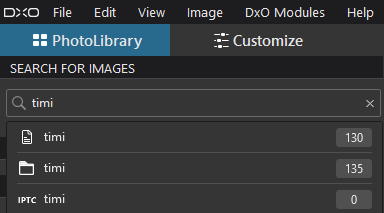
Show 130 photo where the photo file name include ‘timi’ (across multiple folders), and 135 photos, where the folders name included ‘timi’ (multiple folder). Its search in database, so what’s in there, search find it.
Indeed - and its functionality seems somewhat strange to me.
The manual is no great help either.
- Duplicated a folder, opened PL and the duplicate showed
- Quit PL
- Removed the duplicate, opened PL and the duplicate shows an outlined icon
- Clicked on “show missing folders” and the duplicate disappeared from the sidebar - but the images it contained are still in PL’s database.
PL still gobbles up info on any image file it sees and keeps it in the database until the physical file is deleted, by the user, in PL. The database is therefore like an old time “oubliette”, a dungeon into which people were thrown never to emerge again. In PL, they do emerge though, as the dreaded previews showing a question mark. And these cannot be deleted in the UI, because the file does not exist. Resorting to a DB browser is possible, but far from user friendly.
Long story short: PL is not a competent manager imo.
That’s not enough. To remove the missing folders and their content from the database on PC, you have to enable “Show missing folders” and then click in the missing folder context menu “Remove” or “Remove All Missing Folders” (“Delete missing folder” or “Delete Missing volume” on Mac). It’s described in the manual – “Managing & searching images” chapter , “Removing Missing Folders and Volumes” section. It works, but may take a lot of time, depending on your database size – checked on PC.
I think, PL not far from a fair/good enough DAM.
I full agree what you tell: ‘However, the architecture of the DPL database is easy to understand. Very simplistic. The names of the tables are almost self-explanatory.’ - actual Database tables, fields is pretty straightforward.
I think, a GUI (UX) part of searching / filtering part need to develop for more useable.
More ‘clickable’.
Actually i like the current search, its just cute, simple, flexible. However, its too simple.
To add some data table, relations to the Database, seems not a big deal.
Thanks for the pointer into the user guide. Things seem to work as advertised, mostly: even though the context menu says " delete all missing folders", missing folders aren’t deleted if they are below a shown folder. It’ a welcome start though.
Does anyone know if the databases on Windows and macOS finally have the same structure?
Last time I checked with someone in the forum, the databases of PL for Win / Mac were different.
As a fileviewer with a broad support of metedata like EXIF, IPTC and XMP and also with a nice map support of position data it is fantastic that XnView is “free”. Some call it a light weight PhotoMechanic. It is possible to maintain the metadata with it too. I use it since many years as a complement to my DAM-software when i need a fast overview of “all” metadata on the files. Something the othwer software can´t really offer.
I like PhotoMechanic and still have it installed but have left it of several reasons. Even if it has very powerful template and batch update tools it lacks the powerful AI-Autotagger function iMatch has. PM´s productivity can´t match iMatch at all when it comes to maintaining Descriptions and Keywords in an efficient way. PhotoMechanic is fine until it comes to maintainng Descriptions and Keywords. Then every productivity gains drops like a stone because that is mostly totally manual. Very few softwares are able to day to AI-generate Descriptions automaticallyu lioke iMatch is.
I thought Photomechanic´s keyword support was pretty clumsy and inefficient and it can´t handle “controlled vocabularies” the way iMatch can even with AI-generated keywords - both flat and hierachic ones.
Photomechanic also has a very unmodern nineties looking interface and it hasn´t developed all that much in the last five years and compared to iMatch it is twice as expensive as a perpetual option. The price of PM doubled in five years - without any development could be seen. In the meantime iMatch has develpoped a lot together with´all the AI-sources it supports - especially the last two years. Even the map functions are a lot better and much more flexible in iMatch. In iMatch you are free to use several map-sources and reverse look up functions. There is no such flexibility in PhotoMechanic.
Immich and Memora have both had a lot of mentions lately.
You could take a look at LAP which is an Open Source photo management app:
Andy Hutchison gave LAP a very good review just a few days ago: Lap: This Cross Platform Open Source Asset Manager is So Nearly Perfect
I run Immich on my intel-based nas. Works well and in the background, no load on my laptop
Nobody mentioned Ente Photos. Does anyone know how it compares to Immich?
Hi Roger,
despite the steep learning curve, I would like to recommend “digikam”. It’s an opensource/foss and very capable DAM-system which runs on Windows as well as on Mac and Linux. Before I made the switch I’ve been a very happy user of “IMatch” which is probably one of the most advanced commercial DAM-products on the market. But it is limited to Windows and - at least for me - just too complex.
I’m very fine with “digikam” now.
By the way: Because I’m not too happy with DxO’s (PL 9 & 10) and MS’s (Win 11) AI-strategy, I’m testing alternative opensource/foss solutions besides “digikam” for an independent and free photographic workflow, for example “RawTherapee” and “Darktable”. And what can I say: It’s quite promising. What it lacks so far is efficiency: Using DxO to do my postprocessing I’m much quicker getting the job done. But maybe its just a question of practising.
Darktable is very good raw developer and image editor. I am more and more using it instead of commercial software. The learniing curve is a bit steep though but the manual is very good.
Thanks, I still have to try the various suggestions. I have been busy lately..
This is a quite huge database. Did you ever tried to reindex it totally in one shot? As per my observations, there is a memory leak in the indexing function and you probably will not reach the end (unless you have massive DDR >> 32 GB). I raised a ticket for the issue, but I’m about two month waiting already for a solution from DXO team.
I just wonder how complex I match must be when you say Digikam is simple to use. Digikam has one of the most convoluted, and confusing user interface I have ever experienced, and I have used a lot of different software!
Have a look at LightCraft which is a clone of Lightroom. I have not looked at it much but I did use Lightroom for many years and it was a decent DAM, so suspect LightCraft will be good considering it’s functionality currently in Alpha.
No. I’m trying to cleanup old directories and to go down below 50,000 raws. It doesn’t make sense to me to keep more. Just managed to delete 90% in a directory with 4,000 raws, using PL.