Because I’ll never get a Fuji Camera and I never will get a X-Trans chip, this button is waisting space in my work frames.
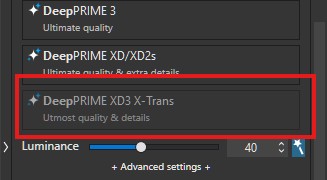
My request is to provide an option in preferences to hide this button and to release the work space.
Because I’ll never get a Fuji Camera and I never will get a X-Trans chip, this button is waisting space in my work frames.
My request is to provide an option in preferences to hide this button and to release the work space.
There should be a dropdown menu to save valuable space, especially when PL is running on a single screen.
Permanently displaying all the noise reduction models is pointless – except for “marketing purposes”.
I’m running on a single screen. Click on the headline will collaps the Denoising area. Drop down to deselect whole Geometry Palette is something I do not want. In general I’m 100 % okay with DeepPrime 'til XD2. Just want to hide the X-Trans stuff.
A drop-down would absolutely make sense for this part of the application, it’s something I will always set to the same thing and forget, and I will never need any Fuji-related tools so being able to hide those is useful to me (and I imagine anyone else not using Fuji).
I, too, vote for a dropdown method to select the denoise algorithm.
Fully support that idea.
Other tools have gone tapeworm too, but let’s stick to denoising.
I support this proposal too …
There has long been a clear message from users that it’s preferred for individual “correction panels” to be concise and economically designed so that as many panels as possible remain visible in the vertical list beneath each Tab.
The new UI for Noise Reduction is now more than twice the height of the PLv8 version !!
OK…If it reads the EXIF data in the file and is smart enough to “gray out” the “DeepPRIME XD3 X-Trans” for non-Fujifilm files, why can’t it be smart enough to just not display that particular box? Or is that too much code?
Sorry to disagree, but I doubt that DxO will ever be willing to hide this feature. This is a major feature for x-trans shooters. I assume that DxO purposely don’t want to hide it so that everyone is aware that it is available, if not for their own current requirements than for their potential future needs or for others. Many people have multiple cameras or have friends or loved ones that have x-trans cameras even if they don’t. Even those users who are not currently x-trans users may acquire a Fuji camera at some point. DxO wants everyone to know of its availability and will likely want to keep it visible.
If I owned DxO I certainly would not hide this major feature just because some users want to recover a 1/2 inch x 3 inches of vertical interface space in one of the palettes. I am also not currently a Fuji shooter, but in my opinion a lot of energy is being spent on what is a very minor issue. I can think of a hundred more important things that DxO could be spending their time on.
Mark
A grayed-out button is never a good sign. Usually, something is missing to activate this button. In this case, it’s the x-Trans sensor. I think DxO knows better marketing methods to promote this feature
If you have an image that was taken with a camera/lens/sensor (Bayer) combination, modules are usually available to develop the image. If this is not the case, a pop-up window will notify you and you can download the module if it is available. What is different with a camera/lens/sensor (X-Trans) combination? On the contrary, DxO would be consistent in its structure by hiding unwanted or unnecessary functions. Now they have a break. 
It’s certainly not the most pressing issue, but it’s a small and hopefully easy quality-of-life change. For those who don’t shoot X-Trans, it’s quite useless.
I’d be curious how many people use different noise removal tools often at all. I know I tend to stick to just one, which means 3/4 of the selection options aren’t relevant for me. A concise drop-down or option to hide what isn’t use would streamline this section nicely.
If DxO wants to advertise it to people then they can do that on their website and other mediums. They don’t need to do it on my local desktop PC, that only I ever see.
100% agree. Very good valid arguments.
I do. I regularly choose between DeepPRIME 3 and XD2/s.
I can see both sides of the argument. The amount of space the panel takes up is significant. Simply hiding XD3 seems of little benefit, but making it a dropdown like so many other controls seems sensible.
But as has already been said… there are way more pressing issues to work on. Some of those are low hanging fruit, too.
Either way, this part of the user interface is simply strangely designed. Why, for example, does the noise reduction option for X-Trans sensors not appear when we simply open a photo from such a sensor? Besides, in my opinion, noise reduction selection fields simply take up too much space. We now even have AI in PhotoLab, and such a simple thing couldn’t be done well?  I understand that excellent noise reduction is an advantage and a hallmark of PhotoLab, but there is really no need to emphasise this to users who already know it anyway.
And yet… the trial (and initial paid) version advertises FilmPack 8.
There’s what you/we/some want, and there’s what DxO are just gonna do.
There’s what you/we/some want, and there’s what DxO are just gonna do.
That certainly sums up the problem. I’m not saying my way is the very best way but… if they’re not getting user feedback from us, here, then where are they getting it from?
Or do they not look at what users say, want, or need?
Use the support form. In my experience, they will always reply. In the past I have suggested something should be different and have had the response that they’ve put it on a list to consider.
Good point. Ticket ID is #596171
Except the Support site seems to be out of action 
Yes, it is saying “Maintenance”. Means it will come back. Hopefully!