While the Nik Collection 8 installed flawlessly to my Microsoft Surface Laptop Pro, I cannot get the new version 9 to finish installation. I get the dreaded 0xc000005 error after it nears the final installation. I contacted DXO and they responded with a set of steps to take, all of which I did with no success. Anyone else experiencing this issue with version 9?
1 Like
I have a similar issue - only no error message.
I am trying to install the a trial to test it out. It starts the process then hits a point (4th little dot in process at top of installer) where it sits at “50%” indefinitely. I have tried disabling anti-virus temporarily - didn’t help. Cancelling it, removing it and restarting the download - same result.
Nothing in the Windows System Application log to hint at what’s going wrong.
I have PureRaw 6 installed - no issues there. Would love to know what is causing the install to hang.
System compatibility requirements are all met.
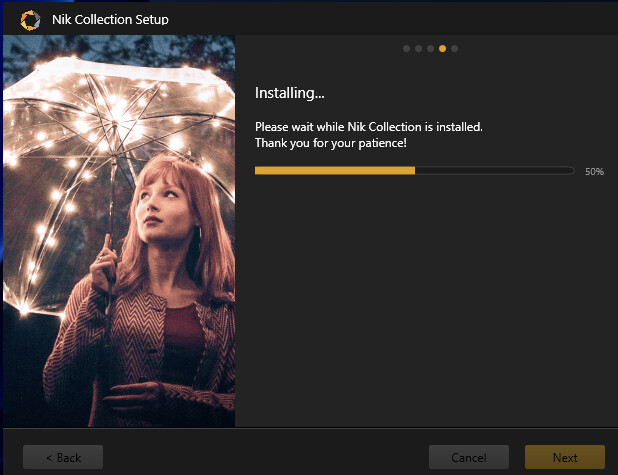
1 Like
Geoff…I’ve contact DXO about this and I”ll be sure to let you know if they can resolve it. Works fine on my desktop, but not my surface laptop pro. Frustrating!
2 Likes
I’m experiencing the same issue on a Lenovo ThinkPad. The installation gets stuck at 50% after the progress bar cycles through a few times. I’m still waiting for a response from second-level support.
Probably networking or antivirus issue.
Nik9 installer downloads several gigabytes of AI models and PNG’s to some temporary location. IIRC, in my case downloading took about 15 minutes, but got no problems otherwise.
Yes, that was my first thought too. However, the installation just freezes without any network or hard drive activity.
Maybe you have the same issue as I had with my Internet provider some 2-3 years ago. Every few months I couldn’t download anything over about 100MB for several days, with Internet slow and TCP connections timing out. For example, one of Windows update couldn’t get installed. Probably there was some false limits problem. In my case it was fixed by the provider. But maybe your case is different…
Yes, the internet connection doesn’t matter here, since the installation process doesn’t download any additional packages. This behavior can be reproduced on different days and at different times, and it always stops at the same step.
Not an internet issue or antivirus software in my case. Easily loaded the software on my desktop version…same internet with my laptop and I turned off all anitvirus while I was loading and installing. I’m thinking it is definitely a software issue. Waiting to hear back from DXO and I do hope they are reading these comments on the forum. Enjoy the PL and Nik Collection for years…it’s my go to these days.
1 Like
There is some Windows-specific problem that I am seeing for several years already:
- downloads from Chrome browser always work fine, no stalling
- downloads from applications are regularly stalled after some point and there is no networking activity visible
- if I enable VPN (I use ExpressVPN) all applications download fine, no stalling!
As a result, every time when I expect an application to download significant amount of data, I enable VPN and have 100% success
Searching in Google I have the following answer from AI:
This issue is common in Windows 11 and usually indicates that while your internet connection is stable, the specialized services managing background app downloads (like the Microsoft Store, Windows Update, or Game services) are being throttled, blocked, or are experiencing cache corruption.
This is definitely Windows-related, not Internet-provider. My PC is dual boot (Win11 and Linux) and e.g. steam (gaming platform) downloads work very fast on Linux but are severely throttled on Win11 (once again turning on VPN makes download fast)
Installation routines from PureRAW or other vendors (including those that download large amounts of data during installation) haven’t caused me any problems so far. I’ve asked DxO to provide an offline installer that could resolve this issue.
I tried this and it does the same error message. YPN was not effective; and I had no problem downloading and installing it on my desktop via Chrome. Was hopeful, but alas…. Maybe the suggestion from mikey about an offline onstaller will help? DXO has responded back from my request. Hoping it gets resolved soon.
mikey,
Did DXO respond to your request for an offline installer? If so, did it work?
No, so far the error behavior has been analyzed by second-level support. I’ll be happy to provide feedback once the installation is working.
Mikey…I just disabled my firewall and antivirus and the Nik 9 loaded up succesfully. HOpe this helps your situation. I think the firewall was the issue stopping the installation
Still no luck on my end.
I have tried disabling antivirus. Allowing the installer through the firewall with a dedicated rule, disabling the Windows firewall, disabling DNS filtering and using a VPN set to various countries.
Just hits that 50% mark on one of the steps and stops - no action at all.
Each time I need to force cancel and then uninstall manually to clean up.
Disappointing.
Geoff…did you disable your firewall? That is what did it for me.
Thanks Jim - worth a shot but did not work for me.
Baffled, as I just downloaded and installed a trial of a competitors application without issue.
Ah well - not to be.
Glad to hear you have been able to get it running 
Sorry to hear that … was hoping it would work for ya. Not sure this is the forum to ask what competitor application you are trying. But would be interested. However, I do love my Nik and DXO! I’ve been forunate with their customer service as they have always been very responsive to me. Can’t answer for anyone else. Stay well and here’s wishing you the best in your photographic endeavors . PS: again, DXO emailed me to say they were going to update the Nik 9 to address some issues; hope this is one of them.
1 Like
DxO has since sent me an updated installation routine, which allowed me to successfully install the NIK Collection. I suspect this will be rolled out to the general public shortly. 