@Joanna , @herman - thanks a lot! I will start using saving saved searches in Finder, and have a look at the ExifTool. I am using Apple Photos / iCloud for storage (appr. 35000 photos), as a DAM it works good enough for me. As the Apple Photos editor isn’t good enough and DXO Photolab cannot be used as extension to Apple Photos I need another DAM for images in a separate processing pipeline (hence this post). Is there any way around importing / exporting between Apple Photos and Photolab, i.e. a more integrated solution?
Or use NeoFinder………..
So, why would I pay for an app that duplicates what Finder and Spotlight can already do?
There is no need for another indexing function since the Spotlight engine and database is constantly being updated as soon as the computer is switched on.
Are you seriously suggesting to use ExifTools as a general metadata maintenance tool?? That is pretty odd and deadly inefficient isn´t it?
There is no iMatch for Mac
I tried some research on if there is some solutions for Mac that even can generate Descriptions and Keywords for Mac. Not even Lightroom can do this today as is BUT maybe together with som plug-ins.
This was the answer I got:
No — Lightroom (both Lightroom and Lightroom Classic) does not currently have a built-in “AI image understanding” feature that automatically generates a finished Description/Caption (and keywords) just by importing photos. Adobe’s own help docs describe adding/editing titles and captions as metadata you enter (or copy/sync), not something Lightroom generates from visual analysis.
However: Lightroom Classic can absolutely do this via plugins — and then the answer becomes “yes, if you mean inside Lightroom using a plugin.” Examples of plugins/add-ons that explicitly generate captions/extended descriptions + keywords from image content and write them into IPTC fields in the catalog:
-
Any Vision (plugin): can generate captions/extended descriptions and keywords, plus OCR, based on prompts/analysis.
-
MetaMagic (plugin): markets batch creation of “IPTC keywords, titles and captions.”
-
AI Image Tagger (Adobe Exchange): claims captions/descriptions/keywords and support for services like Google Gemini and OpenAI models (and even local Ollama).
-
PhotoTag.ai / PhotoKeyworder.ai (plugin/tooling): generates Title/Description/Keywords and fills those fields in Lightroom Classic.
Practical consequence for your PhotoLab 9 workflow
If you use Lightroom Classic + a plugin: make sure you write metadata out to XMP sidecar files (or embed it when possible), so DxO PhotoLab 9 can pick it up via its XMP synchronization.
So the architecture is basically:
-
Lightroom itself: a metadata editor (manual/sync/copy).
-
A plugin in Lightroom Classic: AI image understanding → writes caption/keywords → you save/export to XMP.
(Maybe it is a better solution then to use Lightroom than Photolab is the solution is to use both Lightroom and Photolab)
There is also something called Visionary AI Tagging in Neo Finder but I´,m not really sure it is using XMP-metadata. From what I saw it looks like this is a more proprietary solution that stores the AI-tagged data in a proprietary file of some sort.
I´m a little sursprised there is so little on the market for Mac OS but I guess that mirrors the limited market share.
I suppose simplicity of use including key wording. Also Nitro is very clear and efficient as a DAM. But then one has to buy it.
FYI - another option discussed a few years ago that does have a Mac version.
You can also walk from London to Glasgow, but no-one would attempt it except to prove something.
One of the things I say about LrC is that is it efficient for entry of keywords. Photos is the absolute opposite. It’s actually worse than just not providing the feature.
Also, it doesn’t really add them to files. It adds them to photos within its database.
I have been using PSU for several years now in combination with DPL. The combo works very well, no issues at all.
Certainly not for everything but, just for adding keywords, it really is quite simple.
I don’t know about “generating” but my app certainly allows inputting of keywords, star ratings, colour and text tags and descriptions. It then uses the underlying Spotlight mechanism to allow for the creation of saved searches, which are essentially a live updating folder that is updated whenever a file uses one of the criteria for that folder.
And to the raw file isn’t it?
George
You can target either the RAW file or an XMP sidecar, depending on the parameters.
Imagin you are a professional working with pictures and metadata (doesn´t even need to be a photographer) say a museum photo antiquarian and the museum buys a DAM like iMatch for say 150U$. Than this antiquarian working with metadata might be able to (at a low calc example) double the throughput that day. Than you might have “paid” that 150$ expense for that software in one single day.
You don´t even need to be emplyed or work for money at all - it just might be your hobby as a photo enthasiast - like me and many others for example. We just might become very much more productive and might save a lot of time we can do all sorts of other things instead of hanging over a computer all the time because we were stuck in unesscessarily inefficient processes.
People who value their time might even rather take a walk in the Brittish countryside between London and Glasgow istead of having to sit there chanied to their computers that sunny day in the countryside. 
I haved always wonderad why some people are so reluctant to pay for a software that really might change it all together for them. What is 150 U$? A small silent fart in the space? I can say I would not have had any problems to pay three times more . which by the way is the Camerabit-company´s new pricelevel for a PhotoMechanic perpetual licence. Don´t tell Mario Westphal at Photools I wrote that because he might take me on my words.
There are few things that can fundamentally revolutionize the workflows and productivity of everything from global corporations to smaller companies and individuals like a really good DAM. If you choose an XMP-based DAM wisely, it can also scale all the way up from a one-man company to a global corporation and one like that can handle not only images and video but just about any other digital files and assets you need to keep track of in an efficient way.
I have a harder time understanding how people can afford NOT to get an effective and versatile DAM.
@Joanna, Do you remember all the problems we have got for so many years with Keywords - especially with hierarchical keywords in Photolab. It was so bad that you even decided to make your own Keyword-maintenance application and maintaining hierarchical keywords is still a total f_ _ _ _ _ _g disaster in both Photolab and PhotoMechanic, so most people using them goes for a standard vocabulary (that no one dare or have the strength to maintain). It has also often been a pain exporting pictures with hierarchical keywords from Photolab to other applications. I had a hell with PhotoMechanic and Photolab until I decided to use a flat keyword-structure instead.
The one and only software I have seen so far that have solved these problems are iMatch. I haven´t seen a efficient and properly working hierarchical keywords mantenance any where else.
So this is how we can do it in iMatch:
It came with a hierarchical keywords Thesaurus from the beginning but I cleared that and imported all my pictures first into the database. After that it was just to klick a button and import all the keywords already used on my pictures into the Theasarus.
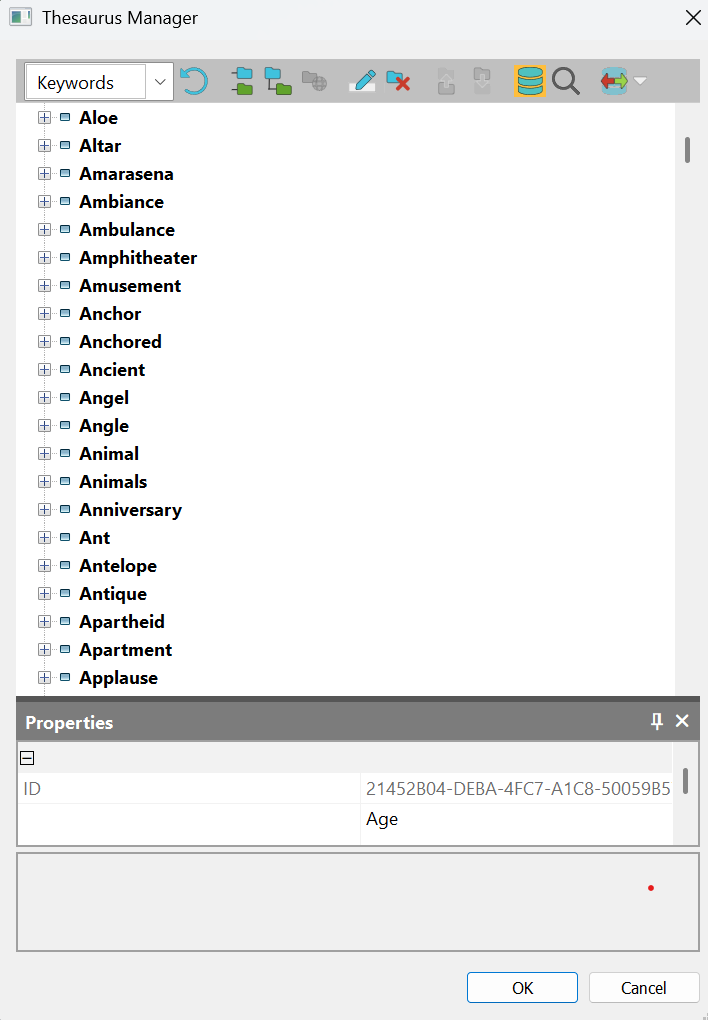
Since iMatch has an AI-tool called Autotagger that analyzes the pictures and automatically creates Descriptions and Keywords to your liking with help of dedicated prompting both for Descriptions and Keywords it can automatically build and maintain even hierarchical keywords - yes it is nothing wrong with your eyes - it fixes that - conditioanlly.
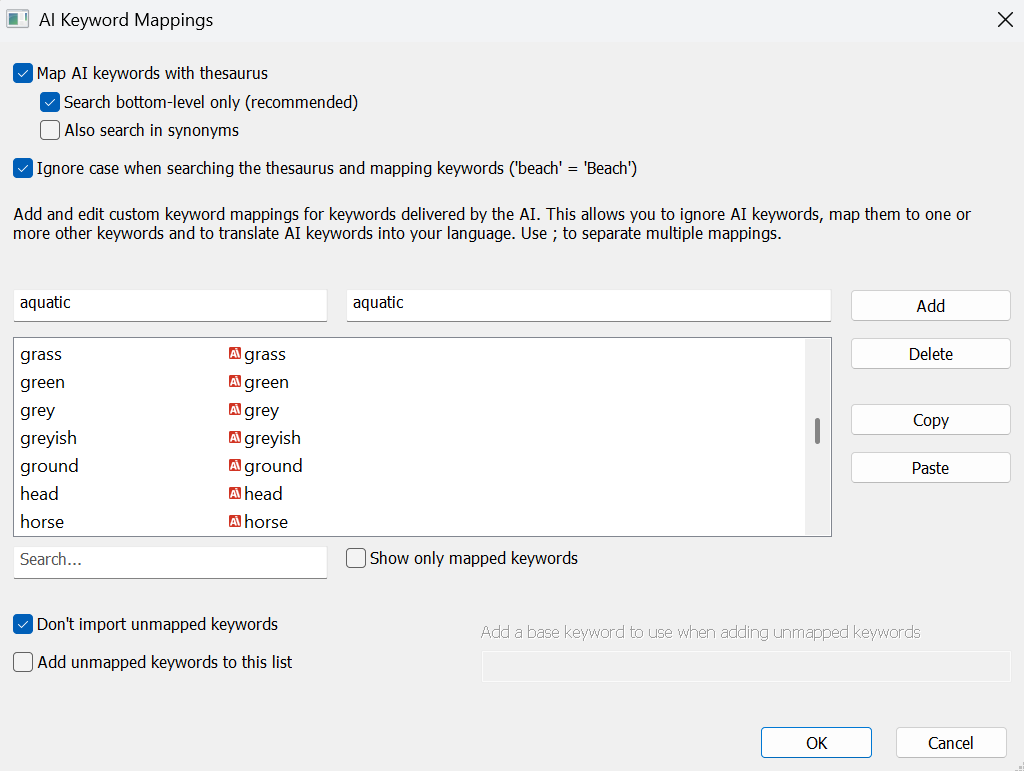
In order not to flood the whole Thesaurus with AI-generated keywords - flat or hierarchical - it also allows us to configure so only the AI-generated keywords matching word already in the Thesaurus gets written to the pictures - and finally it can limit the number of Keywords written to the pictures automatically. The control is total and matching the Controlled Vocabulary - if you want one in the Thesaurus.
It also supports sorting and all sorts of different formatting of the keywords - some only want low case and others want The first character in Capital size e.t.c.
It is also possible to match the AI-generated words to words in other languages.
Compared to the sophisticated support for Keyword maintenance I have in iMatch today, all the Keyword maintenance solutions I’ve seen in my RAW converters and also in PhotoMechanic and other DAMs I’ve worked with is just inefficient rudimentary toys mostly very painful and cumbersome to use. In Photolab there isn´t even a keyword list for filtering which at least is present in the others.
Can you all imagine how much time and maintenance pain just these AI-driven Keyword-features are saving me and other iMatch-users?? I think in the light of that 150 U$ is a steal. Do you see now what a poor and time costly metadata maintenance recommendation using ExifTools is?
On top of this I think iMatch is indespensable when it comes to bypassing the problems handling the latency opening big picture folders in Photolab. Both iMatch and PhotoMechanic and even XnView integrates wonderfully with just Photolab.
I… uhhh… use ExifTool to sort that out. Yes, I am a programmer, but @Joanna isn’t wrong when she says it’s easy. You can use some other AI tooling to give you the commands if you like. Or just do what I did and Google for the solution. I used a (GUI-based) automation tool to make it all happen automatically for me:
- I export JPEGs to my required specifications from PhotoLab.
- I export small JPEGs from my metadata manager of choice (LrC) using a preset.
- Hazel (automation tool) sees LrC’s files and uses a simple ExifTool command to copy the keywords across to the PL JPEGs, then deletes the LrC ones.
Simple. To quick export actions and I have my keyword hierarchy sorted.
I counter that no AI is going to give me my complex keyword requirements, but LrC lets me add them super efficiently. I’m in full control and the biggest chore is the one I make for myself in identifying the aircraft in every frame that contains one (the registration, not just the type). That part can take WAY longer than creating (if not already existing) than adding them to the photos. I currently have just shy of 2,700 keywords in my aircraft hierarchy.
If you are happy maintaining your metadata with ExifTools - than you are happy to maintain your metadata with ExifTools.
I just tell the ones that are not that there are other far more efficient and professional ways to both add Keywords and Descriptions if you have a lot of metadata to manage - if you run Windows. Seems to be more complicated as Mac-users.
Thank you for your comment. I read your posts on the iMatch forum regarding your tests, which were very helpful in reviewing the options at the start of my project.

Yes, I agree. I said 300,000 because Mario himself said it could range from 300,000 to 1 million (limited, no doubt, by the machine’s performance). I prefer to be conservative! I’m working only on the original RAW for the recognition by a LLM. But, the first usage is your and thanks for your update.
Hi
Photo Supreme or Photo Mechanics. Photo Supreme is really perfect with PhotoLab.
BR
Yvan