New to Photolab - questions about DAM

Hi,

I am new to Photolab, migrating from Capture One. Trying to set up the PL9 database on my Mac I ran into a couple of issues / questions, hopefully someone here can shed some light on these. I have a appr. 6000 images to take care of and I want to use keywords for organization, with several keywords exceeding 1000 images. Apart from a weird blackout where PL9 ran wild and created literally hundreds of virtual copies of random images I found the following limitations:

  • Folders should be kept small, maybe around 1000 images (this means that I have to find a folder structure for my images, even though I don’t use it, I want to use keywords instead)
  • Keyword filtering is not supported, I need to use the search tool instead
  • The search tool searches the whole drive unless explicitly being told to search within a certain folder (why can it not just search the active folder?)
  • The search tool is limited to 1000 hits (why on earth …)
  • Smart collections / folders are not supported
  • does the database back up?

What I would have liked:

  • a folder structure free from limitations
  • smart collections / folders based on keywords / search
  • keyword filtering
  • a smarter search tool without limitations (1000 hits)

If I have misunderstood or missed something please tell me. Also - with my situation, what would be the easiest and most robust setup using PL9 only? I am not willing to pay extra for a separate DAM, are there free alternatives that work well? I am on a Mac, is there any way to use Spotlight to create a structure (i.e. “saved searches”)?

Regards //Ekkehard
I feel your pains; yes, the DAM is very limited and it’s my only sore point of the application. I would ditch everything else in a heartbeat if I could simply have a few points addressed with the DAM part of PL.

It searches what has been priorly indexed, not the entire drive. So any folder you have previously navigated to, or any folder you have explicitly told PL9 to index (by right clicking the folder in PL9’s file browser and clicking “Index a folder.”

Not of its own accord.

You have to go to File → Project Database > Create a Backup


Unfortunately I don’t have any great suggestions for you as far as a separate DAM. I have tried, tried and tried again to find something worthwhile but the closest I can think of is to just purchase a one-off Capture One and use that to browse my images and then open them in PL9, or similar with Lightroom (which actually you can just cancel your subscription and continue using the DAM part of Lightroom, so I might just go that route…)

2 Likes

Digikam is an open source DAM.

2 Likes

I too have migrated to Photolab9/Filmpack/Viewpoint after many years on Capture One. I use EXCIRE as a dam which can share the same file structure that Photolab9 works with.

1 Like

PhotoLab is not alone in having issues with large numbers of files. For this reason, many, many years ago, I adopted a simple year/month folder structure.

It’s not critical to me that this structure is used. Its primary purpose is simply to keep folders manageable. But even so, I do find it useful as I know, for example, that my trip to Singapore in 2019 was in April. No need for keywords to find those photos.

I also use the folder structure as a bridge between Lightroom Classic and PhotoLab. I agree PhotoLab’s keyword handling is limited. Far too limited for me, which is why I use LrC to manage my photos. If I want to find photos by keyword, I search in Lightroom. I can then use the plugin to automatically create a project in PhotoLab with the results, but usually I am only looking for a handful and I will simply note which year/month they are in and go to PhotoLab to manually locate them.

A fair number of people here use alternate software to manage their photos, which should tell you what the answer is.

3 Likes

Coming from Lightroom, I initially had similar concerns about PL DAM. I looked at using other products for DAM, including continuing to use LR just for that, and also using Adobe Bridge (which I found horrible). But for me I just didn’t like using 2 products. In the end I made a few changes to the way I work, and now I’m quite happy with PL.

A couple of things:

  • Smart collections / folders are not supported

You can use projects to group images from multiple different folders. Not quite the same, but you may find it useful. One image can belong to many projects.

  • Folders should be kept small, maybe around 1000 images (this means that I have to find a folder structure for my images, even though I don’t use it, I want to use keywords instead)

Searching may not be as much of a problem as you think. I have 52,000 images and a search by keyword is almost instantaneous. You can have large folders, I think the only drawback is that a huge folder is slower to load.

The DAM in PL is certainly limited, but if you are willing to organise your images into a physical folder structure, you may find it is enough.

I hope you find an acceptable solution.

4 Likes

This happened to me with v5 or 6. The secret to removing them is the ‘sort’ button in your image-selection window. Sort by virtual copy, select, delete.

Not a DAM guy so no anwers there, but I thought you might be wondering how to do that (I was stumped until someone here on the forum told me how)

1 Like

ESCH - Suggestion by IanS is good, and it is free

1 Like

I’ve been meaning to install / try digiKam (again). The last time I tried it (on windows) the only way to run it was in a container, hadn’t realized they were so far along in a Win64 port.

My first question is whether it can start PL pointing at a single raw file or if it has to open an entire folder (my primary issue with Bridge - but the limitation might be in PL itself). It (unsurprisingly) could not when in a container

1 Like

I am now moving fairly freely between PL8 and Capture One and both have different but similar limitations. On my MacBook I have been using XNViewMP which is free, fast, frequently updated and very flexible in how it can handle filtering and searches. Then, once you have performed your search, and found images scattered on your disk, you can right-click and Open With PL. XNViewMP creates its own database but it can also be set to write to xmp files (though it sophistication means that not all XN filtering can be written to xmp files). With the power of computers these days, running two open apps and moving between them with a Command+Tab is just a learnt work process/procedure and not an inconvenience.

Clive

1 Like

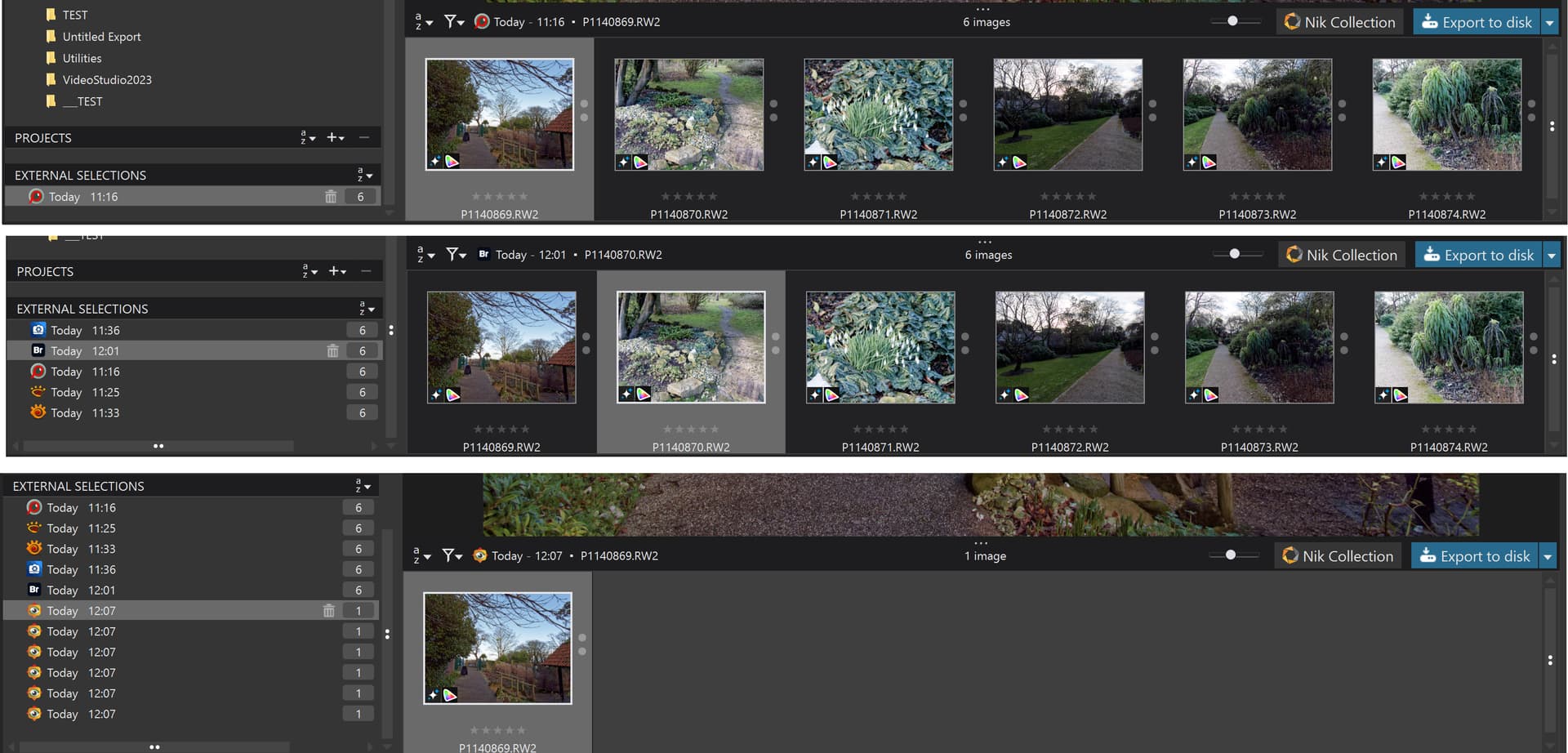
@bobkoure Most Photo viewers/editors will pass one or more images to another program and PL will open just what has been passed in a form of a ‘Project’ known as an ‘External Selection’.

Points to note:-

  1. An ‘External Selection’ cannot be Named/renamed in the same way that a PL ‘Project’ can but is actually stored in the same database structure ‘Projects’.
  2. The number of images that can be passed in one operation is limited by the Operating System buffer area. For my G9 images (20MB) that is between 350 - 500 images at any one time.
  3. The various programs pass images in different ways and the results can be
    a. Only one image arrives at PL e.g. older versions of Faststone Image Viewer
    b. All images arrive but are treated as many separate ‘External Selections’ e.g. FastStone Image Viewer and possibly DigiKam
    c. All images arrive as one ‘External selection’ but limited by the OS Buffer e.g. FastRaw Viewer, XnView, XnViewMP, ACDSee Photo Studio, Adobe Bridge
    d. The whole directory is opened in PL BreezeeBrowser,

@bobkoure Not my experience in the tests I conducted above!? I cleared the database, which meant I lost the previous ‘External Selections’ and repeated the Bridge test and got

and in the database only the 6 entries I selected in Bridge and submitted to PL9, i.e. not the entire directory

1 Like

Hiya…

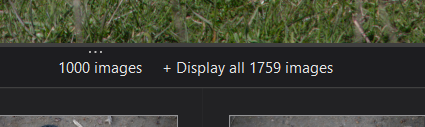
Have just noticed, I think this may be a new PL9 feature, but although search defaults to a max of 1000 images, you can now go beyond that. Eg I did a search just now, it returned 1000, but to the right of where it said 1000 it said ‘display all 1777’. I clicked that, and it went off and returned the remaining 777 images as well (very quickly).

It may be an earlier feature, I don’t know because I rarely do such a wide ranging search, if it is likely to return a lot of hits I usually enter multiple criteria (eg camera model and colour tag).

Hope this helps

Cheers

2 Likes

I gave up using PL database and now use Adobe Bridge. Try watching ‘The Ultimate Guide to Adobe Bridge’ by Rick Burress on YouTube, it has been a revelation for me. Use it for up loading from the camera, sorting, metadata, key wording before editing in PL.

1 Like

Hello,

You can also consider iMatch (I’m going to do a little advertising for this product, which I really like), which is a DAM specifically designed to manage RAW files and images.

The great strength of iMatch is that it is developed by an independent developer (Mario) who is open to new technologies as long as they offer real benefits to users.
As a result, iMatch is now compatible with the AI world, allowing you to add the engine and LLM of your choice ( to do what you want, such as auto-tagging. An important point is that iMatch works without cloud computing; everything is local, including LLM processing.
The single developer, Mario, is very attentive to his users. iMatch is very powerful and reliable, designed to manage large asset libraries (here approx. 180,000, but Mario says it can support 300,000).
iMatch reads side xmp files, including dop, to import metadata.
The future:
Here, in the testing and development phase, I have included Olama Vision, which allows (in theory…) the analysis of RAWs (from the file’s integrated Jpeg). The idea is that iMatch then creates an automatic description of the image.
This is very promising (in theory, at least), even if it is very demanding in terms of local resources (GPU >= 24 GB).
The downside of iMatch is that it only works on Windows, and I would like DXO to offer direct integration into DXO (I’m dreaming…).

To manage RAW and also Jpeg/Tiff from RAWs, iMatch offers a lot of features (maybe too much?) and it is very pleasant.

The future ( my own test is on going):

Here, in the testing and development phase, I have included Ollama (so locally) with Gemma 3 12b (as a test), which (in theory) allows RAW files to be analyzed (based on the file’s embedded JPEG). The idea is that iMatch then creates an automatic description of the image.
This is very promising (in theory, at least), even if it is very demanding in terms of local resources (GPU >= 24 GB in my PC but Mario’s test talks about a minimum of 16 GB.).
IMatch is also compatible online services LLM suchs Mistral or GPT.

The downside of iMatch is that it only works on Windows, and I would like DXO to offer direct integration into DXO (I’m dreaming…).

I have often heard about another Windows/Mac DAM Photo Supreme that could be compared to it, but I am not familiar with it.

2 Likes

Nice advert, but the OP said specifically that he wasn’t willing to pay for a separate DAM, and iMatch is $135. From the review I read sounds very thorough though!

1 Like

Are you on Windows or macOS?

Perhaps what you speak of is Windows-only, because I do not get the same option:

1 Like

Yeah I’m not the salesman! :wink:

I don’t know if there is a truly free and reliable DAM system out there… Because developing this type of product is a huge undertaking.

Yes, it’s very interesting, but to be honest, integration with an LLM is far from user-friendly.
It requires a lot of testing (and time) with rigorous methods.
Clearly, I’m not sure it’s totally ready for a ‘wide audience’. It’s worth the 130 bucks to encourage Mario (that’s my point) and to prepare for the future.
But the analysis requires suitable and expensive hardware resources. What’s more, I can’t seem to get below 5% waste, even on ‘sorted’ series.
The average analysis time is 1 minute per RAW (Nikon Z8), but I’m looking for accuracy first and foremost, before performance.

Cheers!

@unchdxoly This came up recently here Trigger creation of XMP sidecar files - #17 by BHAYT and @platypus responded that the feature was not available on the Mac version of PhotoLab and the 1,000 limit remained with no option to access the rest of the search results which is possible with Windows PL.

While I thought it was a new feature, when I researched older releases it has certainly been present since PL7.6 and possibly earlier!?

Edit:- Just did a test and the feature is available in PL6.18.0 and PL5.16.0, which is strange because I always thought I had hit the 1,000 limit before and it didn’t provide any option to display the rest!?

I am currently testing out iMatch by Photools.com It is a paid DAM but so far its a pretty good dam. Plan to use it with PL9. Also it handles videos and other file types too like MS Office documents and PDFs. Not limited to stills. Flexible and fast. I think it even as face recognition and can classify photos by the people in it.

3 Likes

Hiya

Here is what I get

but yes am on windows 11 and PL9.4