Hello, I noticed significant slowdown when using “Magnifying Glass” tool after I did an update to 8.11.0 build 695. Will it be fixed in next update?
Windows 10.
Hello, I noticed significant slowdown when using “Magnifying Glass” tool after I did an update to 8.11.0 build 695. Will it be fixed in next update?
Windows 10.
The next “update” is PL9, which now is capable of rendering the whole image denoised and corrected, not just the loupe portion. How reactive it is will depend on the spec of your machine.
Dear Joanna, I already read so many posts telling about plethora of problems with 9.x line, that the only thing I can say as the answer is “no, thank you!”.
Do you mean there won’t be any other update to 8.x line and I should revert to former version — which, fortunately, I kept on my HDD (I mean the installer file) — because 8.11.0 isn’t going to be fixed?
OK, so now it’s clear what is the cause. I did an update a few days ago, and only a few minutes ago I did another “export” of a photo — which took 7-8 times longer than usual. So it seems GPU support for my “AMD Radeon RX 580 Series" (ChipID = 0x67df)” has been removed.
Could you bring it back, DxO team?
This is a user forum. You need to contact DxO support.
Think you’ll find that PL9 won’t work with that GPU, although anecdotal reports on here suggest that it might wort whilst those that are supported won’t. Who knows?
I am keeping my PL7 but I don’t think I’ll be using PL9. It seems no-one wants to buy it off me. So I’ll disable it and see if it ever get’s sorted out.
You can select manually in the preferences (and not select ‘Auto’). I have RX550 (4GB).
Indeed, already found out yesterday (just was unable to post it, due to restrictions here), that it seems DxO 8.11.0 now prefers “CPU only” as the way to render using “PrimeX” (I mean that HQ denoising module, the third one from the top). After I manually switched it to “GPU” (in “Preferences”, the tab “Performance”) it now works as before. Well, almost like before — because before it selected the detected GPU on automatic, which made more sense than present behaviour.
BTW: and there’s another flaw: Ctrl-Shift-C key combination doesn’t work. Only from menu one can “copy development settings”.
May good idea if you ‘change’ this to ‘Solved’, like write this to the title end or something.
Hi - I too am having problems with PL 8.10 and 8.11 with Loupe magnifier.
Works fine with PL 8.9, but with introduction of PL 8.10 onwards, PL crashes to black screen an requires re-opening everytime I access the Loupe magnifier
This exact crash also occurred with the trial version of PL 9 leading me to wonder if some coding from PL9 has been introduced to PL 8.10 and PL 8.10? ( also see posts about sharpening not being applied with PL 8.10 and 8.11)
I have a support ticket with this with DxO with nothing reported back to me to date.
I too found that selecting CPU only with both PL V8.10- and 8.11 did not reproduce this failure , bit both time taken for loupe to focus and to export a deep prime image is so greatly increased that it really isn’t a “FIX” as suggested by Andreas.cscore !! - especially when PL 8.9 continues to perform effortlessly on my machine and PL 8.10 and PL 8.11 don’t really give any further benefits to me.
Question for Zbig and Andreas,cscore ?? “Now works as before” are you saying here that PL9.11 now works when “auto selection” used on performance tab or is that merely confirmation that selecting “CPU only” remains the only way found to allow Loupe magnifier to work as it should? It’s a bit ambiguous.
I may be incorrect but my understanding is that selecting “Auto” uses CPU for applying settings and then switches to GPU for convertion and export, resulting in the very slow export times when “CPU only” is selected??
I will continue to use PL 8.9 until and if I get a satisfactory solution from DxO and if ido, I will report back to this Forum
Speaking for myself: I’m using 8.11.0 since the few days I did (automatically suggested) update and I experienced no crashes so far. The former version crashed on rather regular basis, unfortunately, and I admit I had no idea it might be related to loupe tool.
8.11.0 has (IMHO) broken “auto selection” option in preferences/performance — there’s really no reason to favor “CPU only” rendering, when GPU has been detected — and it has deactivated Ctrl-Shift-C key combination, that’s why I don’t mark this thread with “solved”. No, I detected two mentioned bugs in 8.11.0.
latest update
I downloaded the latest version of PL8 via my user account at DxO - Pl V8.11.0 build 695, rather than using the upgrade route when opening PL 8.9.
When using PL 8.11 I now find that under “preferences” the only setting that is now available to me is “CPU only”. - “auto selection” & “Intel ARC 140T(16GB)” appear on the dropdown menu for “DeepPRIME Acceleration” but after re-opening the programme after selecting either of these as default as required, the default always re-sets to “CPU Only”
The programme runs without crashing when accessing the Loupe settings with this new “CPU Only” default setting on V 8.11 Build 695
With “CPU only” now set as default Loupe takes an age to focus and raw to Jpeg Deep Prime XD/XD2s export now takes one 1minute 39 seconds which isn’t really acceptable - (With PL v 8.9 loupe focuses within 2 seconds and exports within 15 seconds)
With this latest upgrade, (V8.11 build 695) it looks to me that DxO have decided that my integrated Graphics card Intel ARC 140 (16GB) is no longer supported for some reason, despite this card being listed as acceptable in the minimum system requirements both for PL 8.11 and PL 9.3 and confirms my suspicions that code from PL9 has been introduced to PL8 from v 8.10 onwards.
I have contacted DXO asking for an explanation from DxO as to why I am now limited to using CPU only from PL V8.11 onwards when PL V8.9 allows this and runs perfectly please along with a request that when I can expect this to be rectified by DxO allowing me to use the full power of my machine as indicted should be the case by DxO?
I suspect that this apparent GPU issue is the reason why I experienced similar problems when running the trial version of PL9 on the same machine.
Z.BIG, - I suspect that you will find that just as I have found, despite selecting your GPU from the dropdown menu the software willl default to CPU onlyIn the meantime, I will continue to use PL V 8.9 that works perfectly for me
Well, at the moment it works using my GPU. My Radeon 580 isn’t the fastest video adaptor under the Sun, but it meets my requirements — I don’t need a faster GPU — and I hope DxO PL will continue supporting this GPU, not requiring the users to buy “latest-greatest” (and the most expensive) ones.
yep exactly as I found using the new default setting of “CPU Only”, it works, but very slowly when compared to performance with PL v8.9.
Do you have a copy of V8.9 that you could revert to and use your GPU?
There’s nothing in the two uodated versions (V8.19 & 8.11) that are of any use at all to myself
Sounds like the loupe has ben “improved” to the new PL9 loupe. Remember the good old days of the magnifier that worked, quickly, didn’t crash everything…………………….
I collected quite a few subsequent version files — like eight of them, or so — but no, as long the version I’m using works for me (well, except Ctrl-Shift-C at the moment) I’m not going to mess with my installation. May it work not being annoyed.
Exactly my thoughts - didn’t work for me on PL9 trial and now doesn’t work on PL8.9 upwards!
What is the difference between loupe magnifier in PL 8.9 and the “new” loupe in PL9?
I cant find anything apart from it may be linked to full scale previews? I couldn’t get that to work on trial either!
DxO seem to have a problem with Intel ARC GPU’s as well as the problems reported with Manufacturers - it would be nice if they just admitted that !!
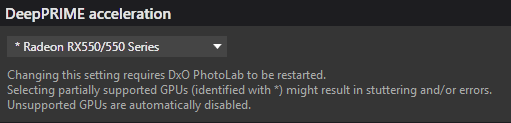
Seems DxO do now (or back for a bit while) for ‘Auto’ do some changes in PL8 and also for PL9 what is based on my observations (may from PL 9.2?): If GPU VRAM amount <6GB the ‘Auto’ change to ‘CPU only’, and its seems may also true for some integrated (shared memory i guess) GPU. The GPU itself has a small ‘*’ (asterix) for ‘Partial support’
See mine:
Also for: @Zbig
TLDR is near to the end.
I think this Loupe thing related with Export in PL8 (In the case of PL9 Export AND/OR with AI masks).
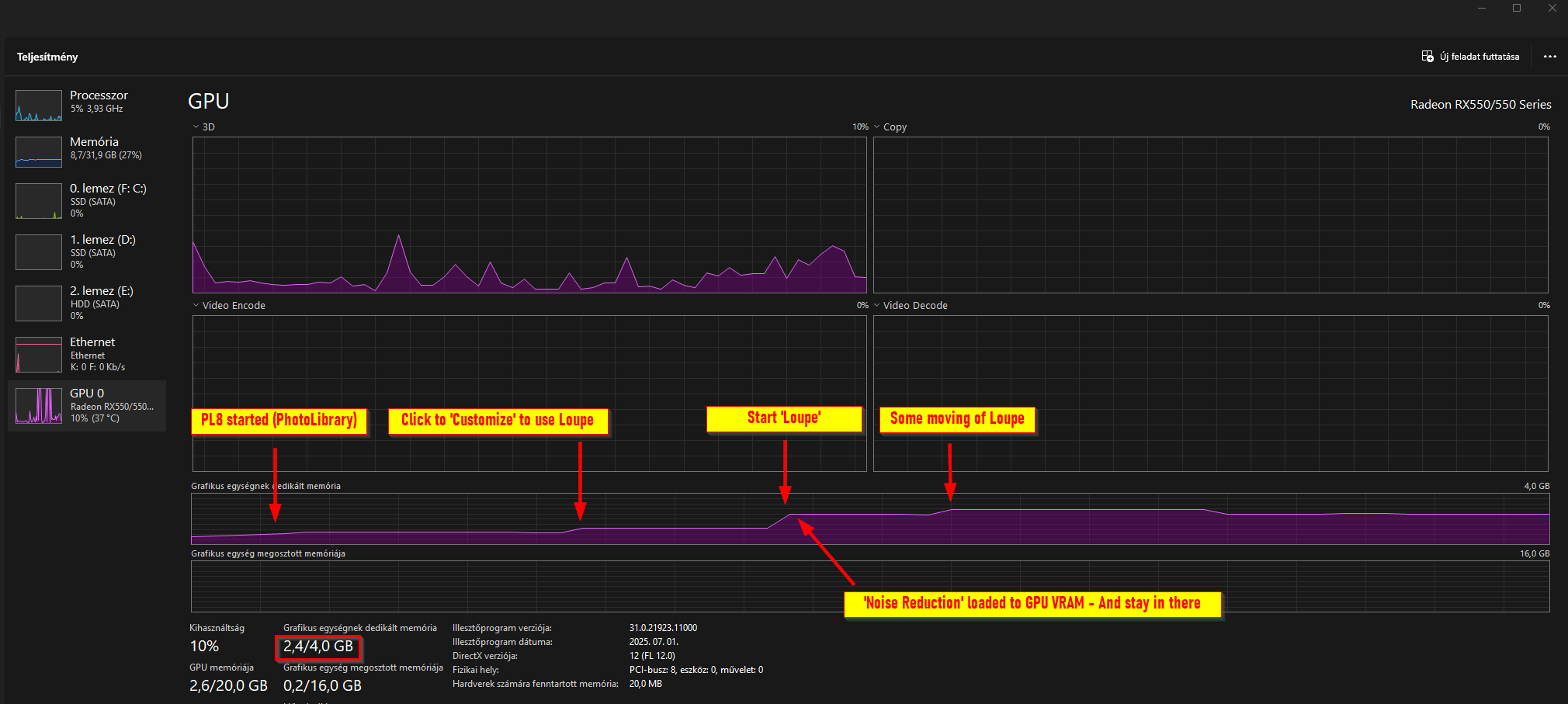
Please see GPU VRAM usage. I have 4GB GPU VRAM. This demo with DP3 NR. PL 8.11
As PL8 started → Its tart ot use some GPU VRAM amount (in this demo its start in PhotoLibrary mode) → Click to Editing (customize) is use a bit more VRAM → Use Loupe → Its load the NR to GPU VRAM → Some movement on Loupe start to use a bit more VRAM. → NR stay loaded to VRAM.
Okay, i quit from PL8. Start PL again.
So, the issue is the following at general:
IF you has only 4GB GPU VRAM (or some integrated GPU with ‘shared VRAM’?) AND use Loupe → NR loaded to VRAM and stay there → AND after try Export → Export may fail because Export also want to load NR to GPU VRAM → As not enough VRAM available. However Loupe mode can use → As its loaded ‘1st’ to VRAM.
IF you has only 4GB GPU VRAM (or some integrated GPU with ‘shared VRAM’?) AND Export ‘first’ (and not use Loupe) → NR loaded to VRAM for Export and stay there → AND after try Loupe → PL may crash because Loupe also want to load NR to GPU VRAM → As not enough VRAM available.
TLDR: Based on my observations: IF you has GPU with 4GB VRAM (or may some integrated (shared memory i guess) GPU, and with NR: DP3 (i not test other NR’s):
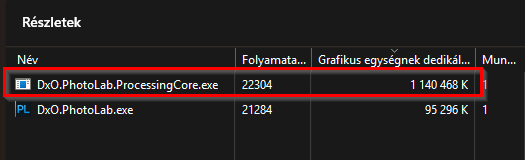
Note: For Export process you can kill the DopCor → But its not really help in the Loupe operations, as you cant ‘kill’ the Loupe.
Note: ‘Sleep trick’ may works for most, but may not all cases. For me its works, and i read the forum similars ‘its works’.
‘CPU only’ is what its the name. At general in ‘CPU only’ you can do everything (at least with 32GB, i measure usages like 13-24GB of System Memory). But of course with CPU as-it-is performance.
I think may PL8.11 use this Loupe + NR from PL9. I think the NR thing / handling change.
I think all is because of GPU VRAM amount, and not about ‘we not support exactly the Radeon RX580’ of whatever. I think for DxO the GPU type not important - i think for DxO its ‘transparent’ → the GPU VRAM ‘amount’ is the important.
I hope its helps, any question, please comment.
Fortunately my GPU has 8 GB VRAM — hoping it’ll mean ‘enough’ for long, since I’m not going to replace that GPU by any other; it works for me. In case of troubles with any next version of DxO PL — to me solution is simple: I stay with the former version.
Hi Andeas - a lot of information there!!