Did I miss this, or has it only just appeared today / at the same time PL9 has been released?
https://licenses.dxo.com/en/login
6 Likes
@stuck Just been announced by the look of it but they don’t appear to know how to spell.
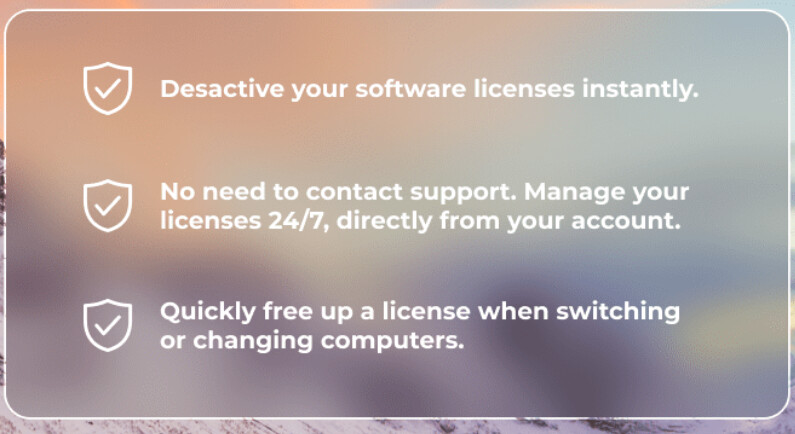
What is “Descative”, should it be “De-activate” @DxO_Support-Team.
You misspelt it. They wrote “Desactive”, which is Désactivez (French) for Deactivate (English) without the accent.
3 Likes
@joanna Sorry, but why have we got “Desactive” on the screen which was my point, with or without the accent it should be “De-activate” and long overdue.
@DxO team
Thank you!!!
1 Like
I’m leaning out of the window.
- de-authorised the installations of PL7 and -8
→ the dashboard updated the entries as expected
→ PL7 started anyways, but I got the “oops” message
→ force-quit PL7 and started it again
→ PL7 presented the window for trial and activation with trial greyed out
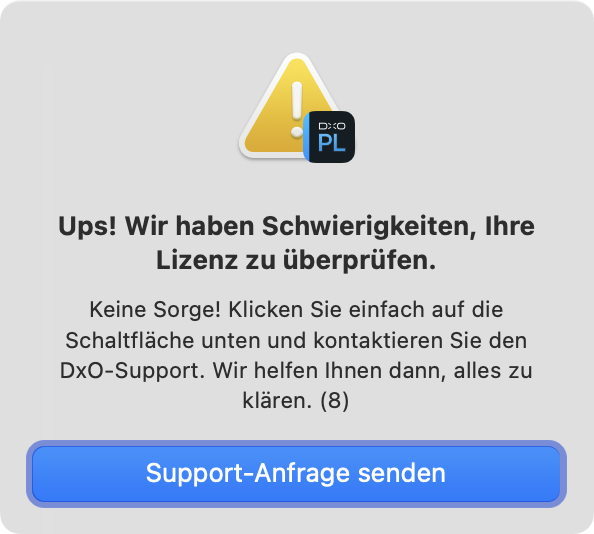
All things considered, the license management seems to work. It feels a bit rough around the edges, but the logic is okay and has some potential:
- Show the activation window directly - and ditch the oops popup which will add support requests that could be prevented.
Another test shows that I can deauthorise an installation and as long as the app is not restarted, the license counter is reset, an installation is shown, but status is “deauthorized”.
Wonder whether the display would be corrected when a second installation were activated.
Oops, I just tried this (logged on)… I get 500 Server error… looks like its not quite ready.
Richard
That just means that the server is temporarily not working, nothing else. Happens at CaptureOne too.
That’s fantastic! Before we need to contact the support. Sometimes support was even suspicious on reacitavtion requesty. That was really annoying. It’s OK that we can now manage that by ourselves.
I don´t care about the misspelling acksident (delibrete mistake) ! So glad you finally fixed and even give an overview this and I think it looks good. Hope it works too when it is time to use it 
BUT I got an error now logging in to the licensing service:

Now it has died for good it seems. I have restarted to and this message is displayed everytime I try to access the function, so the misspelling seems to be the smaller problem to worry about. A few days ago it worked fine.
Still dead, as others have reported…
Could be just not going to get fixed until Monday, or…
Richard
I get the 500 error today too. It worked just fine a few days ago when I first posted. 
It is a new feature. It may have some initial glitches that need to be addressed.
Mark
I think the server is just down in the weekends.
George
Could be. As said it worked very well before today.
License Management didn’t work for me yesterday (first time try) but it works today (Monday). BTW, Win11 24H2 update didn’t “eat” any of my DxO licenses, which I was worried about, reading some license problems reported recently.
Strangely enough I had activated 2 instances of both version 7 and 8 and the same for Filmpack 7 and ViewPoint 5 the last time it worked for three days ago. They are gone now. I don´t care really but I did not dream this up so it still is a little bit strange. No problem. I just have to reactivate again.
In my case it works as expected (PL7,PL8,VP4,VP5,FP7,Nik7,Nik8), except perhaps for PL9 trial license not shown.
Did PL7/8 ask you to re-enter the keys upon startup?
Never experienced that…
No they did not. Three days ago they were to be seen and before I could not see them among my software in my pages in Photolab. It looked almost as the mess in Capture One where the whole licensing history is kept. In fact, I prefer to have it as it is now. I can understand that they want to clean up the history. The likelihood of me using Photolab 7 again isn´t all that high today is it and if I should want to activate version 7 again I guess therer is no problem doing so.
1 Like
They did on my Mac … I deauthorised a computer while PL was running and then, PL did not quit automatically, but asked for a code after I had quit and relaunched PL. I haven’t tested the behaviour with multiple Macs though.
1 Like