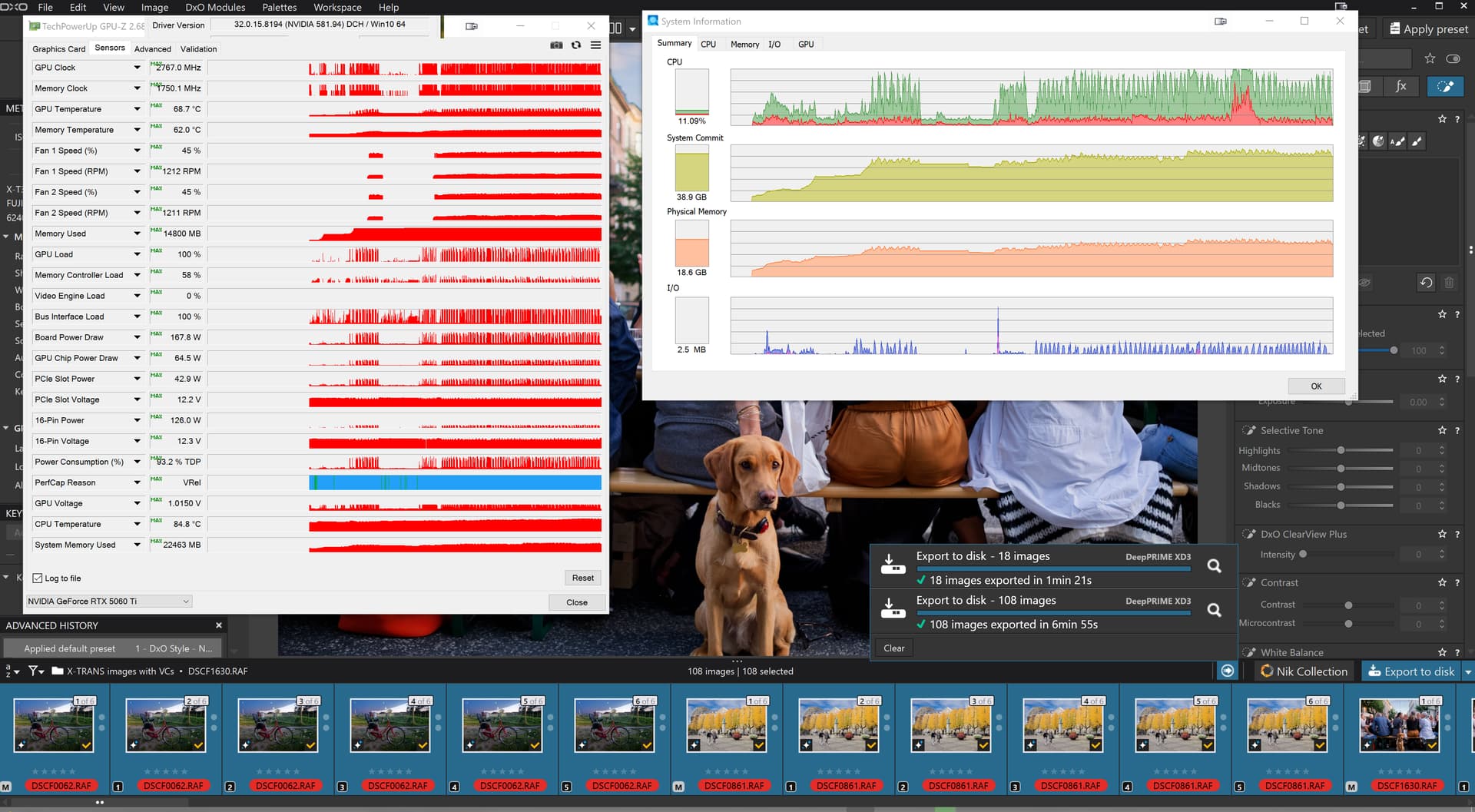
Important notice – NVIDIA RTX / WinML performance and stability improvements with DxO PhotoLab 9.7
Some Windows users experienced performance and stability issues when using AI Masks in DxO PhotoLab.
After several months of close collaboration with NVIDIA and Microsoft, along with extensive testing and benchmarking, DxO PhotoLab 9.7 brings significant improvements to these issues, combining and extending the optimizations introduced in previous updates.
Performance and stability improvements
On NVIDIA RTX 30xx to 50xx GPUs, DeepPRIME processing is now 14% to 25% faster
On NVIDIA RTX 20xx
Memory management has been improved for systems with less than 16 GB of VRAM
Stability has been significantly improved on Intel GPU configurations
Extended AI acceleration with Windows ML
PhotoLab 9.7 expands Windows Machine Learning (WinML) support to improve performance and compatibility across a wider range of systems:
Broader OS support:
Windows 11 23H2 or later
Windows 10 22H2
Expanded hardware support:
NVIDIA RTX 20xx, 30xx, 40xx and 50xx series GPUs
Automatic activation:
This AI processing mode is enabled by default and can be adjusted in the Preferences
These improvements provide faster AI-based processing and improved stability on supported configurations.
Known limitations
Windows ML is not supported on:
AMD GPUs
NVIDIA GTX series GPUs (including 10xx)
These configurations will continue to use the standard processing pipeline.
Stenis
(Sten-Åke Sändh (Sony, Win 11, PL 6, CO 16, PM Plus 6, XnView))
3
I wonder what users with 4060- or 5060-cards says about a recommendation to turn off their GPU-cards when using Photolab 9. Avoiding to use “AI Mask Keywords” in the drop down menu is a far better recommendation. I wonder how big drop there will be in the user base of Photolab after a recommendation like the first one. I guess some users will go elsewhere.
Glad I upgraded to a RTX 5070 Ti and upgraded to the 581.80 driver. So far no problems.
I wouldn’t be surprised at this point. Hobbyists might be in a position to wait (what has it been now, months?) for fixes to these AI issues, but professionals need solutions they can rely on.
Maybe it’ll be less than 7 years before the next post from DxO staff, though?
Weird. I have a 4060 and I haven’t had any problems with AI masks since that round of updates a couple of weeks back.
1 Like
Stenis
(Sten-Åke Sändh (Sony, Win 11, PL 6, CO 16, PM Plus 6, XnView))
6
Yes it is and there is a lot of selfharming going on when they are painting so broad. They ought to be far more specific and careful with what they write. All this will cause DXO a lot of bad will and they have lost the momentum they had for a moment in getting dissatisfied Adobe users to migrate.
Just lucky I expect, however the CPU is running hot so my left leg and feet are nice and warm!!
Now back to my current project, providing a robust File copy/rename utility driven by a CSV file to handle 1,000s of pdf files for a submission to a client from the Architectural practice my son works for, way more “fun” than trying to break PhotoLab.
They did not say that you should turn of AI and not use your GPU but say you should not use Keyword AI with the 60 series cards.
Anyway, I just did that, used both Keyword AI and area AI mask with DeepPrime XD on my 5060 TI 16GB and it worked just fine.
1 Like
mwsilvers
(Mark - New Jersey, USA, Win10, RTX 4060, PL9, FP8, VP5, Nikon Zf )
10
Using AI mask keywords works with my RTX 4060 on my old Windows 10 machine, but it is much faster to select the things I want masked manually. Additionally, when I use keywords for AI masking, exports with both DeepPRIME and AI masks very often takes around twice as long to complete compared to when I create the same AI masks manually.
I’ve obviously missed something. What is this mystery of which you speak?
mwsilvers
(Mark - New Jersey, USA, Win10, RTX 4060, PL9, FP8, VP5, Nikon Zf )
12
I am not certain what you think you are missing, AI masking keywords have been problematic on the Windows platform since PL 9 was released. Although AI masking in general has improved after the release of updated Nvidia drivers as well as DxO’s recent updates to PhotoLab, issues still remain when using the AI masking keywords.
But what are they? I would expect to type in a word. All I can find is a drop-down
Stenis
(Sten-Åke Sändh (Sony, Win 11, PL 6, CO 16, PM Plus 6, XnView))
14
They did write: “we recommend to Use CPU processing”.
It is exactly this I mean. Why generalize when thew picture is soo much more complex. In that case it would be better not saying anything at all I guess ot just writing :”temporarily avoid AI Mask keywords”. Why generalize and urge people to disable their graphics cards? We know what is working or not by now don´t we.
Stenis
(Sten-Åke Sändh (Sony, Win 11, PL 6, CO 16, PM Plus 6, XnView))
15
This is just semantics. They mean the words used in that drop down list. At least in the Windows-environment they are the ones causing the problems since they use a much more demanding AI-model then the one used with the “freehand selection method”. The last method has worked for most people since day one and that was what DXO should have recommended and nothing else really.
Stenis
(Sten-Åke Sändh (Sony, Win 11, PL 6, CO 16, PM Plus 6, XnView))
17
@Joanna, you are faster than a cobra even at this time of the night
mwsilvers
(Mark - New Jersey, USA, Win10, RTX 4060, PL9, FP8, VP5, Nikon Zf )
18
Ah! Now I understand what you meant. Yes, that drop down list is what many posters have referred to as keywords. Like you, I don’t agree with that usage. I only used it myself for consistency since so many posts on the subject of DxO’s AI masks use that term to describe the drop down menu.
The choice of “keyword” confused me too - I’d imagine that to be an AI-assisted metadata tagger that labels your shots with something relevant to their contents for easier finding later, but PL isn’t a DAM (and that’s ok!).
“AI prefab mask” or something similar might be better.
mwsilvers
(Mark - New Jersey, USA, Win10, RTX 4060, PL9, FP8, VP5, Nikon Zf )
20
I just think of it as drop down menu with automated masking selection options.
 Performance and stability improvements
 Extended AI acceleration with Windows ML
 Known limitations