At this stage I got it running and when balanced against the amount of usage I use the thing for I am not going to invest one more second of my life restoring to the previous good version. I will wait until the real, proven fix comes out then make some decisions.
I’m guessing the QA was non existent prior to this update being released. With all of us experiencing the same behavior, can’t imagine they did any real testing
I had the same issue. I created a support ticket and got a link in their e-mail on 8/15 to upload the “DxODiagnosticsData-*.zip” file generated from their Diagnostics tool .
So far today, I got 2 e-mails from Customer Support that it’s been routed to developers, who are looking into what I sent over. Luckily, I had a previous working version in my Downloads and that I could continue the work after the failed upgrade.
I am on Windows 11 with Intel Ultra 9 285K and RTX 5060 8 GB
Can you make version 6.4.1.7 available for download? I don’t have the old install files but lesson learned, I’ll keep them around from now on.
I also had the problem that PureRaw stopped working after the update. I then uninstalled PureRaw via Windows “Settings - Apps” and reinstalled the previous version of PureRaw, which was still in the Downloads folder. Fortunately, that worked without any problems.
After sending the “DxODiagnosticsData-*.zip” file, I have received the following as I’m sure most folk have
Aug 18, 2026, 1:36 AM GMT+2
Hello,
We sincerely apologize for the inconvenience that this has caused. This is a known issue with the latest update and our team is working on a fix that should be done early this week. We would humbly ask your understanding to wait until then, what we can do on our end is we will send you an email with an updated installer you can use once they figure out a fix. Thank you for your understanding.
Kind regards,
James - DxO Labs Support Team
Hi all,
I also had the problem that PureRaw stopped working after the update 
DxODiagnosticsData send…
CPU AMD 9950X3D / 32GO DDR / RTX 4070 TI SUPER / WIN 11 LATEST VERSION
EDIT : I have an older version installed on my laptop. I can share the DXO folder located in “Program Files” compressed as a zip file to help you out until the next update.
After sending the “DxODiagnosticsData-*.zip” file, on Sunday pm, this is their last reply :
Aug 17, 2026, 7:02 PM UTC+2
Hello,
In order to move your request forward in the best condition, we have now forwarded it to one of our developers, a product specialist, for an in-depth analysis. The review is still ongoing on our side. We will get back to you as soon as we are able to provide you with an update. Please do not respond to this ticket, as it will then be removed from the expert’s processing queue. We thank you for your understanding.
Sincerely,
Riley - DxO Labs Support Team
PS : for those who want to keep on working with the version 6.4…I suggest to strongly ask DXO to make the previous version available on their site. File is too big for sending and I’ve no simple solution now to this version available for download. I think DXO can provide this temporarly workaround…
Regards,
I sent in the requested diagnostics and a video also requested of the splash screen opening and closing. I couldn’t add it to an email because the files produced by their diagnostic app were too large so I sent them via “WeTransfer” then I sent them an email download link separately. Way over a day later they have not bothered to download that folder so I guess I wasted a lot of my time doing that. Later I sent them a short email to say I had uninstalled the app and reinstalled version 4.7 which happily worked. I did this to show that my machine was fine but I received a replay that said it was wonderful that everything was fine on my end and not to reply to this email. My original request obviously dropped. DxO’s customer service has a really bad attitude problem. This is the second time an update has stopped the app from working and I am NOT a happy customer.
Did you read DXO’s mail? They give you a link to upload files on Support-Server with your case ID if files are too big to send via mail.
Just received an email to say that this issue is now fixed with the latest 6.5.1 update available to download.
Can confirm, working again for me.
 Important notice - DxO PureRAW 6.5.1 Hotfix Now Available
We sincerely apologize for the inconvenience caused by an issue introduced with the DxO PureRAW update released on Thursday, August 13.
A fix is now available today, Wednesday, August 19, in the latest version of DxO PureRAW 6.5.1 for Windows.
You can install the update directly from the application or download the latest version from your customer account.
If the update resolves the issue, no further action is required. If the problem persists after updating, please contact our support team and include the results from the DxO PureRAW diagnostic tool.
Thank you for your patience and understanding.
1 Like
I dug into this today and I think I’ve found what’s actually going wrong. Posting
everything in case it helps — and there’s a one-line workaround at the bottom that’s
simpler than the compatibility-mode dance.
My symptoms match this thread exactly: splash screen, gone in about 2 seconds, exit
code 0xC0000005 (access violation), no window ever. PureRAW 5.13 on the same PC is
rock solid.
Where it actually dies
%LOCALAPPDATA%\DxO_Labs\DxO PureRAW 6\Logs\PureRAWv6.txt ends at the same place on
every single launch:
CE: Creating Session with WinMLv2
CE: Started EnsureProvidersReadyAsync
CE: Execution provider WebGpuExecutionProvider is ready
[WinML] EP download progress: 100
crashreporter: Crash occurred
6.5 runs its AI models through Windows ML, which pulls in Microsoft’s WebGPU execution
provider — the package Microsoft.WinML.ONNX.WebGPU.EP.2, currently 0.2.1.0, which
Microsoft still labels experimental. It crashes the instant that provider is loaded.
I checked the crash minidump: the WebGPU EP DLL from C:\Program Files\WindowsApps is
NOT in the loaded-module list yet, while Microsoft.Windows.AI.MachineLearning.dll and
DirectML.dll are. So it dies during that load, not after it.
The “building the GPU cache” popup some of you see flash by is that provider’s
download dialog.
That would explain why this hits Intel Arc, AMD and NVIDIA users alike. It isn’t a
particular GPU — it’s the new Windows ML path that 6.5 introduced. Which also matches
the reports here that 6.3 and 6.4 were fine.
A second, separate bug (NVIDIA only)
On my RTX 5060 Ti the log additionally says:
CE: NVIDIA GPU does not support raytracing, skipping CUDA execution provider registration
@5ifty7even reported the same line earlier in another thread. It’s wrong. I queried
D3D12 directly (D3D12CreateDevice + CheckFeatureSupport(D3D12_FEATURE_D3D12_OPTIONS5)):
RTX 5060 Ti → RaytracingTier = 12 (TIER_1_2)
Microsoft Basic Render Driver → RaytracingTier = 11 (TIER_1_1)
The enum is NOT_SUPPORTED = 0, TIER_1_0 = 10, TIER_1_1 = 11, TIER_1_2 = 12. My card
reports the newest tier and PureRAW doesn’t recognise it — it looks like the check
matches against a fixed set rather than using >=. The effect is that the CUDA provider
is never registered, so NVIDIA machines lose the one path that might have avoided the
broken WebGPU one.
So I think there are two bugs stacked: WebGPU EP crashes for everyone, and the
raytracing check removes NVIDIA’s escape route.
Things that do NOT fix it — all tested here
- NVIDIA driver update. Reproduced on 591.86 and on Studio 610.88.
- Disabling the Intel NPU (AI Boost) in Device Manager. Verified it was actually
disabled (CM_PROB_DISABLED), no change. - Turning off antivirus.
- Deleting the WebGPU EP package. Windows ML simply re-downloads the same 0.2.1.0 at
the next launch (about an 11 second delay) and crashes identically — so it is not a
corrupted package. - Full uninstall and clean reinstall, with the MSI registration and install folder
verified gone beforehand. - Windows per-app GPU preference set to High performance.
The workaround, simplified
@stefan1’s compatibility-mode trick works — I can confirm it. But all those steps do
is get one registry string written, so you can skip straight to it. That matters,
because “open the app and change a setting” is a chicken-and-egg problem when the app
won’t open at all.
Close PureRAW, then run this in PowerShell (no admin needed):
New-ItemProperty -Path “HKCU:\Software\DxO\DxO PureRAW 6” -Name “selectedDeviceId” -Value “Use CPU Only” -PropertyType String -Force
Then launch PureRAW 6 normally. Mine now starts every time, and the log shows:
CEDevice::getDefaultDevice: Saved device ID: Use CPU Only
CE: Using adapter CPU
One warning if you do use the compatibility-mode route instead: don’t leave Windows 8
compatibility mode switched on afterwards. The app then believes it’s running on
Windows 8 and silently disables DeepPRIME XD3 — you’ll see “Current version of OS does
not support DeepPRIME XD3 functionality” in the log.
Either way this is CPU processing, so it’s slow. It’s a way to reach your app and your
settings, not a fix. I’m staying on PureRAW 5 for actual work.
For DxO, if anyone from the team is reading
Two things would sort this out:
- Use >= for the raytracing tier test (tier >= D3D12_RAYTRACING_TIER_1_0). As it
stands this will affect every RTX 50-series machine on a current driver. - Don’t hard-depend on the WebGPU execution provider. Fall back to the bundled ONNX
Runtime / DirectML engine when it fails to load, instead of taking the process down.
DxOCorrectionEngine.dll already contains a config key called
WindowsMLEnableVendorExecutionProviders — exposing that via PR6.lua or
DXO_INTERNAL_ENGINE_CONFIG would give affected users a supported way out today.
(DXO_INTERNAL_ENGINE_CONFIG currently only overrides the three modelCache* keys.)
System
PureRAW 6.5.0.10 (build 09e1b6941)
Windows 11 Home build 26200
Intel Core Ultra 7 265F, 32 GB
NVIDIA GeForce RTX 5060 Ti 16 GB, Studio driver 610.88
Microsoft.WinML.ONNX.WebGPU.EP.2 0.2.1.0
If anyone wants to check whether they’re hitting the same thing, search your
PureRAWv6.txt for “WebGpuExecutionProvider” and see whether the crash line comes right
after it.
HIRO1122 - Excellent work, albeit a little late since apparently DxO released a hotfix v.6.5.1, which I have not tried yet as I am at work. One user above says that it resolves the issue.
To DxO - preventative measure going forward - keep the previous known stable version available for download, in this case NOT v.6.5 but v.6.4.1. It is that simple. Having a MS AI code piece upset the apple-cart is forgivable if users are not facing complete loss of functionality without having to resort to workarounds like compatibility mode or registry editing.
Until and unless that change in strategy is implemented, I cannot be satisfied with the CS received, although I do thank DxO for at least being aware enough to jump on it and provide this hotfix within 5 days. 
I just downloaded the 6.5.1 release for Windows from their site and I can also confirm it’s working correctly…so far.
La actualización 6.5.1. me funciona perfectamente
My experience has been the same. Interesting though it installed a brand new version that I needed my key to unlock. It’s all good so far but I had to re-input my saved settings. That seemed to be the only casualty.
V6.5.1 appears to work fine
So I uninstalled the v.6.5 that I had the workaround applied to. Downloaded a fresh version off the website, installed it (it confirmed it was v.6.5.1 Build 1), fired it up and got this:
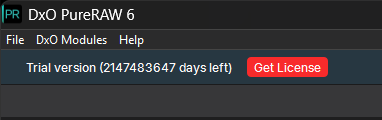
Clicked the red button expecting the popup to put in my VALID activation key and instead it opens the DxO web page showing me my activation key. I copy that to clipboard.
Now what? … I can’t get the popup window prompting the input of the Activation key!! I clicked Help > Manage My Licenses … same web page, no popup. I deactivated the only license I have and shut down the software and opened it up again and it still says trial version with no popup and no way to Activate from the software or the website.
There is ALWAYS something with this software!!! 
I then rebooted the computer and when the desktop came back up, a small DxO popup says that I am out of trial activations … never mind I had previously deactivated a valid license. I had not even clicked the DxO PR icon to fire it up when I was presumptuously told that I was out of trial activations. WTF?!
So I dismissed that, and then clicked on the DxO PR icon and then it presented the activation popup, and I was able to activate the software. I re-cicked Manage My Licenses from within PR6 and the web page says that it is activated once again.
I am SO not amused by this software!!! If it were not for the good job it does denoising I would call it a total piece of  .
Now off to save this v.6.5.1 in a couple different places.