Someone in that thread (jokermanex) reported that for 6.2 and 6.1, DxO had said that they “… identified an issue affecting PureRAW 6.1 and 6.2 specifically on systems with Intel integrated GPUs (iGPU) and Intel Arc GPUs — on these configurations, processing falls back to the CPU instead of using GPU acceleration, causing significantly slower export times.“
and that,
“In short: it’s a GPU-acceleration regression specific to Intel hardware (integrated graphics and Arc GPUs). The 6.1/6.2 update broke the GPU detection/dispatch logic for those chips, so the app silently falls back to slow CPU-only processing even though it looks like GPU/Auto is selected.“
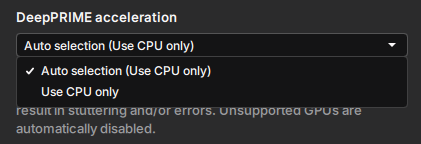
Clearly this problem is back since I cannot see a selection like this:
With 6.3 the Z6III NEF that is taking me over 5 minutes now was taking 33 seconds!
They fixed the crash-on-load issue and broke the Intel Arc graphics functionality.
Apparently many people do not manage their software very well. I have learned to always keep a previous known good older version stored. Wise up folks, you can do better.
I did uninstall previous versions - many times. For v.6.5.1, I did that as well. Clearly stated in plain language. Read my post again, if interested.
This is not a simple issue of a faulty installation. This software has issues that should not be occurring if there is a robust QA process.
I am fully aware of how software works and what is expected to be delivered to the paying end user. This is not freeware or shareware (assuming you know what that meant).
Not the remaining issue is the apparent lack of Intel Arc support in the working installation. A ticket was raised for that.
So… there is currently no way to trial the software as app crashes on startup and hotfix through customer account is for already paying customers only?
Hmmmm … never thought of that. I guess if anyone downloads the “current” version they will get the v.6.5 and will likely not come back …? Sad.
Meanwhile I have a ticket open for them to re-enable the Intel Arc GPU selection in “Preferences”. They sent me the link to the diagnostics program which I ran (twice, with PR running and not). Hopefully they can see what needs to be done and issue the full fix.
I have not seen any MAC users speaking up about any issues with v.6.5 so I have no idea.
My advice is - if you have no issues with your 6.4.1 then do not update to 6.5.1 (and certainly NOT 6.5). Wait until all the bugs have been removed. v.6.5.1 is still not up to snuff since there could be slow performance issues tied to the non-use of Intel ARC GPU (if that is the GPU on your machine).
Here is a synopsis of the current situation as seen by Gemini AI: Google Search
I’m sorry you’re still having serious trouble, Grumpy Goat, and hope they get a fix for you and other ARC users soon. But I will confirm for anyone checking if it’s okay to update from PureRaw 6.4.1 to 6.5.1 on Windows 11 with an nVidia GPU that I too did this and am having no issues.