Heard back from support - “To ensure that your request receives the most appropriate attention, we have now escalated it to one of our developers, who is a product specialist, for an in-depth review. The analysis is still ongoing on our side. We will reach out again as soon as we are in a position to provide you with an update. “
You have to wonder how long it will take to get a fix.
OK, Thanks to Vincent Fisher’s input I was able to run a clean installation in Compatibility mode and it did not completely fail.
What version of Windows I do not know since I ran the troubleshooter which was prompting Windows 8, and I was hoping that the Windows 11 troubleshooter would try the last version of Windows prior to the present.
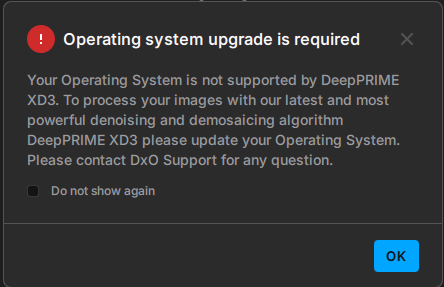
After the troubleshooter was finished and when it asked whether that solved the problem I ran the freshly installed PR 6.5 and it loaded and stayed waiting for input. It presented the activation options and I got my code and activated it and it went to the main screen waiting for a file. It also presented this screen which is probably understandable:
There is nothing wrong with that file which opens in any other program I use. I do note from the release notes for v.6.5 that there was support for DJI Osmo Pocket 4P which came out after the Luna Ultra, but I was initially too hasty to read all the release notes to see whether the Luna Ultra was also now supported. After my DNG file failed to load, I have no idea whether it is not supported or whether it is not loading because of the current “issue” with v.6.5.
I then got my Nikon Z6III, took a RAW image with that, dropped it onto PR v.6.5 and it loaded it into the Lightbox. Normal (?) popups appeared as I believe is expected after a fresh install. Then I clicked “Process with Preview” and it would not preview the image - the split screen was blank. It futzed around some more including shutting down the program and restarting / reloading the NEF file. I then clicked “Process” and accepted the defaults and let it run. At first it said that it was processing but the process circle did not come up. Another shutdown and reload, this time the processing started. It was slower than the previous version but nowhere as slow as the previous issue in my other thread about slow as molasses …
It finished and made a DNG file which actually opened in other software, and seemed to be noise reduced. I shut down the PR 6.5.
Then for sh!ts and grins I opened the PR 6.5 again and dropped the same NEF file on it and attempted a preview and this time it worked.
I do hope their “developer” manages to fix this promptly and we get back to our “normal” workflow.
Why do you keep saying this? Multiple people have done this. DxO apparently knows about the problem. If new participants in the thread are not reading ahead enough, telling them to add a ticket will not improve the situation.
DXO PureRAW 6.5 has a problem. I am an IT professional, and I checked all possible solutions to the problem. But the problem is with the update and not my Asus Z13 128GB laptop. I pulled down the update and reinstalled the older version, and everything works perfectly. It proves that the problem isn’t my hardware but the DXO PurRAW 6.5 update.
I’m in the same boat. It does not load, the splash screen pops up for a second then disappears after I upgrading to 6.5.0 / 10 yesterday. The older version worked fine before I updated, Now I cannot open PureRaw 6 at all, and I cannot revert to the previous version. What a pain
It sound that I’m not alone…. and this is a very global issue of this version.
Same problem since Friday : I’ve opened a ticket early on Friday and waiting for a reply, I’ve upgraded the Pilote GEForce Game Ready version 6 10.88 - published Jul 28,2026, un-install PR 6.5.0 and re-installed it. PR still do not start. The support send me a diagnostic tool to run I’ve send them the result and waiting…
I’ still have the old version which was running before the upgrade 6.4.1.7 and without progress during the day, I’ll re-install it.
Same here. Also raised a ticket. Been using since Pureraw 2. Very disappointing and affecting my workflow. I know heaps of professionals, including wedding photographers, who rely on this for their business workflow. Not good enough.
Seems to be an issue with using/identifying a GPU for DeepPrime acceleration.
Running the app in compatibility mode prevents GPU acceleration (or detection) but you get that annoying popup about an old version of Windows as shown in an reply above.
Launching the app in compatibility mode and then explicitly selecting CPU acceleration in PR preferences will allow you to start the app perfectly fine without compatibility mode or warnings about old versions of Windows. Just note that image processing is slower than using a GPU for acceleration.…but at least it works.
On my machine, I only have the CPU acceleration option and I do not get any warnings about old versions. That only happened once.
In this mode, mine appears to be running as before (i.e. no warning messages or unusual behaviour) but maybe 3x (or more) slower compared to 6.4.1 on the same machine with only has a built-in GPU.
I’m experiencing the same issue; nothing works after the update. In response to my support ticket, I received a diagnostic file that I’m supposed to run and send the results to DxO. The file is 260 MB – how am I supposed to send that, and what information does it even contain? Nowhere in my purchase information did it state that I would have to disclose my entire system configuration for PureRaw to function. What particularly frustrates me is the complete lack of explanation or information from DxO. I’m currently on a three-month trip through the Baltic states, writing a photo report about Poland, Lithuania, Latvia, and Estonia, which is updated almost daily online. It’s especially annoying when you want to present readers with high-quality photos, and the program you purchased suddenly stops working without any notification or alternative. At least an older version would be offered as a temporary measure, but no, apparently even that’s beyond DxO’s capabilities. Such ignorance really makes me angry.
I successfully got version 6.5 running. Upon the first launch, I selected the CPU option and then exited; I then relaunched the program and switched the setting to the GPU. I’m not sure if this is the crucial step, but I re-ran the version 6.5 installer after updating the Windows App Runtime—make sure you have the latest version of the Windows App Runtime.
Successfully running version 6.5 and using a discrete graphics card for processing.
I could not agree more. Their Customer Support response - even if they are working on it - gets a zero stars from me. When you release crippleware you have to treat the customers differently than if there is a small bug. First step is damage controle - get in front of the people and show that you know what it is and am working on a solution. Silence in this case is damaging to the business. Ignorance indeed.



 and this is a very global issue of this version.