May its helps. Its under Windows database, but i think Mac similar.
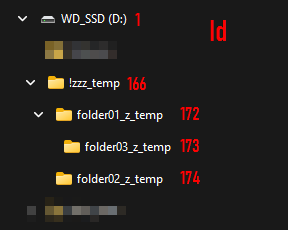
I have the following folder structure (i add with RED the Drive/Folder Id in the PL database. Its only for better overview, editing need to be done on data table.
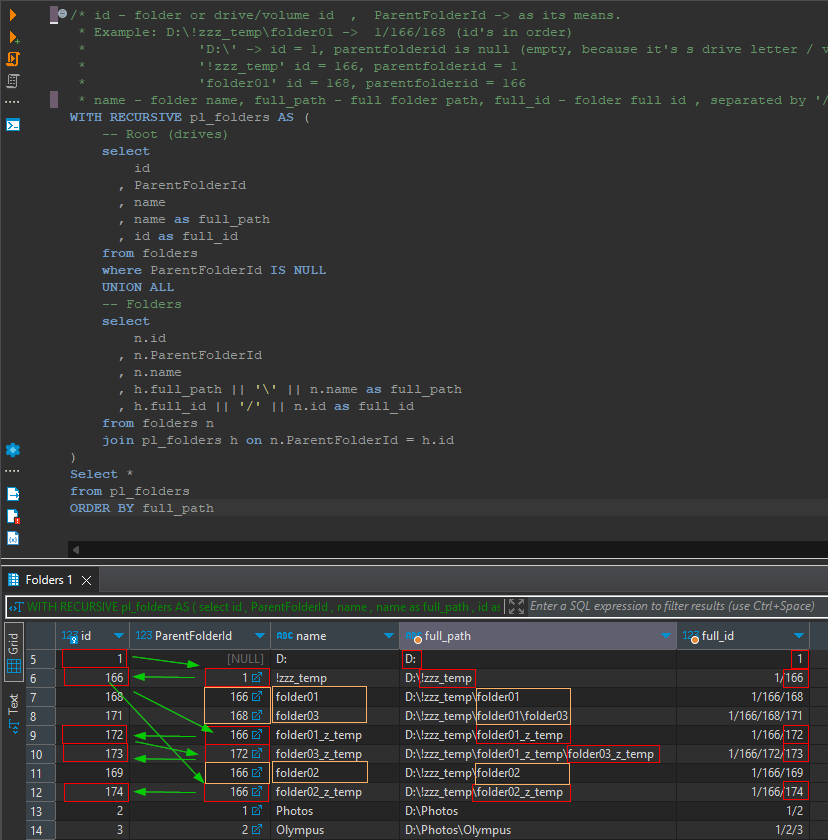
I made a small SQL query for better overview / understanding the logic:
/* id - folder or drive/volume id  ,  ParentFolderId -> as its means.
 * Example: D:\!zzz_temp\folder01 ->  1/166/168 (id's in order)
 * 				'D:\' -> id = 1, parentfolderid is null (empty, because it's s drive letter / volume, has no parent)
 *          	'!zzz_temp' id = 166, parentfolderid = 1
 * 				'folder01' id = 168, parentfolderid = 166
 * name - folder name, full_path - full folder path, full_id - folder full id , separated by '/' */
WITH RECURSIVE pl_folders AS (
    -- Root (drives)
    select
        id
      , ParentFolderId
      , name
      , name as full_path
      , id as full_id
    from folders
    where ParentFolderId IS NULL
    UNION ALL
    -- Folders
    select
        n.id
      , n.ParentFolderId
      , n.name
      , h.full_path || '\' || n.name as full_path
      , h.full_id || '/' || n.id as full_id
    from folders n
    join pl_folders h on n.ParentFolderId = h.id
)
Select *
from pl_folders
ORDER BY full_path
You can change to Mac data table and field names.
I think the ‘Folders’ data table is → ‘zdopfolder’, ‘id’ field is ‘z_pk’, ‘ParentfolderId’ → ‘zparent’, ‘name’ → ‘zname’
I try my best to modify for Mac, may works fine
WITH RECURSIVE pl_folders AS (
    -- Root (drives)
    select
        z_pk --id
      , zparent --ParentFolderId
      , zname --name
      , zname as full_path --name as full_path
      , z_pk as full_id  --, id as full_id
    from zdopfolder --folders
    where zparent IS NULL  --where ParentFolderId IS NULL
    UNION ALL
    -- Folders
    select
        n.z_pk    --n.id
      , n.zparent --n.ParentFolderId
      , n.zname   --n.name
      , h.full_path || '\' || n.zname as full_path      --h.full_path || '\' || n.name as full_path
      , h.full_id || '/' || n.z_pk as full_id
    from zdopfolder n --folders n
    join pl_folders h on n.zparent  = h.z_pk  --n.ParentFolderId = h.id
)
Select *
from pl_folders
ORDER BY full_path
And here the results for overview of Id’s (inder Windows, but under Mac the logic is the same.
The drive / volume dont have ParentFolderId - as its the drive/volume, and it doesn’t has parent.
All folder below ParentFolderId is filled > as its the parent of the folder. Parnet alos can be not folder, but drive / volume
I highlight with red the linking logic.
So, its depend on the case, you can change the parentfolderId to the correct one (all of its subfolders need to check, just the ‘main folder’) can works. You can also add a new data row, fill the values (Id generated automatically)
For example: i highlight with orange color 3 folder, what was previously known by PL , but not under ‘D:!zzz_temp’, but somewhere totally different place. I quit from PL. Open database. Find the folder name: ‘folder01’, whatever was the parentfolderid, i change manually to ‘166’ ( ‘D:!zzz_temp’). Also for the ‘folder02’ do the ‘166’.
But what about ‘folder03’ what is below ‘folder01’ → nothing, as its parentfolderId already point to ‘folder01’! So, generally if you link manually some folder, the sub-folders not need to change the parentfolderid.
I suggest to first try it with some test folders. Example:
- Create a ‘test_folder01’, create some ‘test_folder02’ under that. PL is running → Click on that folders. Copy some photo to this folders, create collection ‘test_collection01’ from photos from both (01, 02) folder. In last step we check via the Collection to database manipulation is fine or not). Also, some keyword can be added (to check in the end)
- Quit from PL.
- Move manually this folders to some other place (where you not click on that in PL!)
- Create manually folder like ‘test_folder_final’. Leave empty (not copy back the test_folder01, 02)
- Start PL.
-
- IF PL not start for some reason, then do database manipulation manually → create the new data row in the table, fill datas.
- Click in PL to the ‘test_folder_final’ → PL now register this folder in the database.
- Open collection ‘test_collection01’ → you see, all item is Question marked (as folders not exist in the database known position)
- Quit PL.
- Open database.
- Go the the ‘folder’ data table (whatever is the tabel name in Mac: ZDOPFOLDER )
- Find the folder in the data table (zname): ‘test_folder_final’. Copy its Id (mac: z_pk)(and NOT parentFolderId, mac: zparent) to the clipboard.
- Find in the data table the ‘test_folder01’ → and whatever the ParentFolderId (zparent) in there: paste the previously copied Id (‘z_pk’) to that field.
- Start PL.
- Check Collection you create previously. Its need to be okay.
Huhh, it was long. But i think, may the idea can be catched. It may takes some time to change the parentfolderid (Mac: zparent). But may you change a few places, and all okay (and you done in 1 minute)