The DB of PL for Windows is different from the one for Mac. Here’s what to do on Mac:
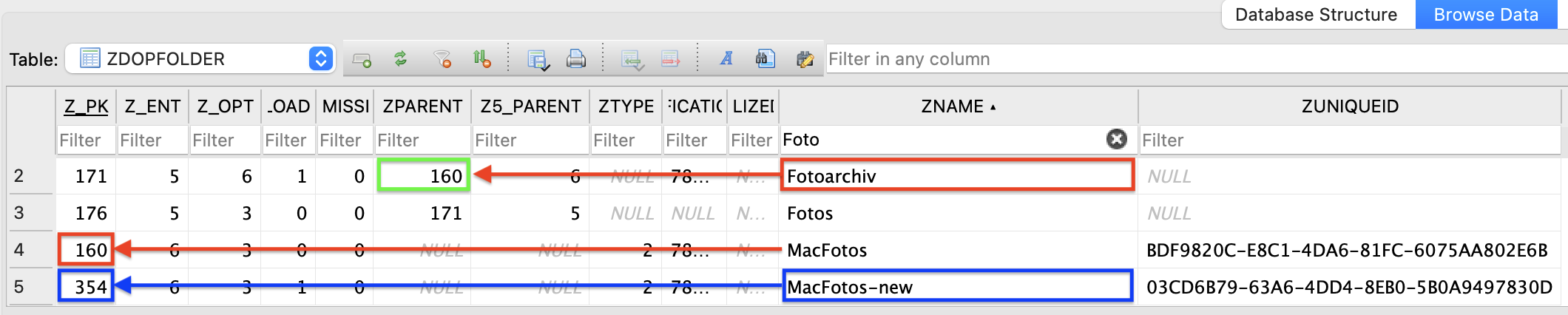
Steps - DO NOT SKIP ANY OF THEM!
- in PL, make a database backup (with the command nested in the file menu)
- quit PL, then delete it’s cache files or folders (they are recreated by PL later)
- with Finder, copy the old Foto Archive to the new drive
- open a DB Browser for SQLite and open PL’s database (not the backup)
- select the Browse Data tab and the ZDOPFOLDER table
- breathe, look, wait (thin ice starts now)
- find the name of your Foto Archive (I called it “Fotoarchiv”)
- find the number of the parent in column ZPARENT (here, it’s 160 @ green box)
- find the number of the new drive in Z_PK (here, it’s 354)
- replace the number you found in step 8 by the one you found in step 9
- save the database and close it
- open PL, select the new drive and check if the settings are present
I’ve tried the procedure with PL8 as a proof of concept and it worked as far as I’ve tested it. Nevertheless, I DO NOT guarantee that the procedure is spotless. If there are other relations that need to be adjusted, the modified database will crash PL sooner or later. In that case, restore the database backup.
Notes:
- Have not tested yet with PL9. Some of the steps might need to be written with more detail or precision. Haven’t checked the influence of the background tasks either. I think I had them disabled when I tested with PL8.
- Als check out the other post(s) I have added in this matter.
- An item under ZNAME is for a volume, if there is a UUID. Without UUID, it’s a folder. Folders have parents (either a folder or a volume) and the parent’s primary key is found in column ZPARENT. Volumes have no parents.
- I set my Mac to have several volumes. My “Fotoarchiv” folder is on a volume called “MacFotos”. After the modification of the database, PL expects “Fotoarchiv” to be on the volume “MacFotos-new”.
If you’re not sure about such a mod, test with copies of a folder with a few subfolders only…or live with what DxO can do. Never ever do such a mod without a backup.