How to efficient cull, sort and tag day's of burst pictures of one subject like a carrace

Yep burst is for losers and insecure people :clown_face: ( just kidding)

I use burst in modest way, mostly so i don’t have to wait for the memory clearing between shots and relock of AF.
I have often a burst of 2 or 3 files.
Like the marines 3 taps not half your stack.
I use panning alot and use different Focus modes.
MF and a certain point then aim in front when the hips are nearly straight i start fireing until i am over the straight part.
This give a slidly front image a dead centre side image and a slidly rear image of the car. Using a certain minimum shutter speed setting and a Aperture leafs ISO to meander.

For birds and 300mm (600mm efl) i use often AE/AF backbutton focuslock.
Again burst modes for always possible capture. If your finger is steady you can even shoot 1 image in that modus.
Mosly its tacktack 2 images. ( which can result in almost right and just right pose of the bird.

One thing i am very very very bad in is the focus lock on the move kind of aiming. Must be the camera capability’s in locking on the bird in flight… :innocent:

An other type of 4k and 8K preburst video kind of modes i never found use for. Probably for people who shoot stunts or jumping cars ,motors ,dogs.
It keeps only 1 sec of images after Release of the shuttertrigger. Al the others it deletes. So you can start shooting burst/ aka filming and say “action” wait for the subject relaese button after passing… easypeasy. No timingskills needed.

My present “problem” is camera usage memory.( remember the (pre)settings for a certain job to get the best result. Ive tryed to setup the G9 like my G80 is set up in FN buttons but i have more physical buttons and stil my touchscreen of/on is missing in my G9.
The G80 had a centre button perfect for it. The G9 is that centre button a physical lock for the psam.(So i have lcdscreen default facing backwards and use the top lcd as quick look and EVF for playback.)
What slowing my adjustments on screen down , open adjust close swiffellcd, but no unatended “noseadjustments”.

Back to culling, it is probably a phase ,after a wile shooting moving cars on a circuit you have it all. ( i mean more of the same start to be boring.)
After a wile you have all the racers captured and in your archive.
Its more the experience then the pictures.( we don’t have to sell them)
What i try to say is the camera is a part of the activity to share. Shooting cars, flowers, mushrooms, musea, animals all is sub priority in the day. It’s creating a memory of the day and let us show others of the family what we did.

Next thing to be playing with could be slowmotion. Timelaps, plain video.
Macro, etc. If my daughter or son likes it i set it up and see how we can acomplisch the goal. :slight_smile:

1 Like

Write what you mean then, Wolfgang. Using unclear acronyms doesn’t advance communication at all. Why should I have to puzzle over your acronyms? Yes, I too use FRV (FastRawViewer) or FP (FilmPack) sometimes but only for subsequent mentions.

But we basically agree. It doesn’t matter if one uses Xfview, FastPictureViewer, FastRawViewer or PhotoMechanic (the latter is very expensive for a culling tool and a little bit clunky), the point is to use a fast image viewer which suits one to rate and cull one’s photos and to only bring files into PhotoLab on which one will work.

Added value: one can throw away the dross, saving between 1/3 and 3/4 of drive space for each session, which multiplied across two backups is a lot of space and money.

@uncoy – see (and read)

Once the images have been renamed, I use FastPictureViewer to go through the folder (multiple times) and …

@Wolfgang , Hmm, wrong link?
I go back to my netflix post.

@OXiDant

that post/link was for @uncoy to help him out

(grrr … just checked again and changed it to …like-a-carrace/52351/10)

1 Like

There are MANY ways you can cut the time you spend in your workflow. It all comes down to the simple formula of “time versus money”. Spend more money and you can cut back the time.

AI can leverage what you are looking for. I have not used the product yet so I can not talk to its value. However On1 has a product called Lightpanel that works as a plugin to Lightroom Classic that appears to be able to do do most of what you are looking for.
Has anyone used the product yes? It looks like it can tag/delete out of focus , identify like faces and objects,

Another thing that won’t cost any money might be to put the lense cover on and do a five or six shot burst. That way, it will be obvious when you start your culling where the bursts are.

AI keywording has come a long way and could also cut time and is not expensive at all…

Just some random thoughts.

Depending heavily on what you expect from such a tool. Can they pull detail from the photo yet? Or are they still just broadly categorising objects in the photo?

I’d be impressed if a photo of a race car could yield the team, race number, or make of car. Or is it just “car” or “race car”?

Morning,

I rarely post, although I’ve been using Photolab since version 7 and now version 9 is my default editor.

I take a lot of wildlife shots often at high burst rates, it’s not uncommon to come back from a trip or a workshop with 1000’s of images. As you’ve all mentioned culling takes time and is not the most exciting task.

So myself and a small team have been working on a new culling app, based on the ML models I’ve been developing for a few years. At the moment it is solely being developed for Mac (because we’re all experience Mac developers and engineers) but if there’s enough interest there is the option to offer cross platform.

Allows the user to select manual process culling or the preferred ML route; you have control.

We’re a couple of months into development, here’s small a snapshot of what the app can do very well already:

Genre-aware photo competition grade scoring - Has a very good grasp what the photo is about. Works across portrait, wildlife, landscape, macro, sports, street, fashion and automotive styles, understands aesthetics, leading lines etc- The app suggests your keepers, workable, for review and obvious duplicates.

Automatic burst/duplicate detection - Groups similar shots and suggests the best one. Saves me hours of comparing nearly-identical frames.

Really fast imports - Processes thousands of photos with full analysis in minutes. I can start culling very quickly.

Professional overlays - Focus peaking, subject detection, composition, clipping warnings, accurate histogram. The stuff we actually use.

Face crop previews - For portraits, sports and wildlife it automatically shows face crops so you can quickly assess sharpness where it matters.

Simple tier system - Colour-coded, one click to filter.
Smart blur detection - Knows the difference between camera shake and intentional bokeh/motion blur.

Face quality analysis - For portraits and wildlife it checks if eyes are sharp and the capture quality is decent. The models understand poses and expressions then factors that into scoring.

Whilst very powerful software, the UI is very easy to understand and use.

Other essentials
The app knows it is not perfect, thus allows you to tweak the scoring and suggestions (locally and privately).

Does NOT use your images for training, we have our own models based on licensed photos and data.

Is completely non destructive.

Whilst the app can suggest edits/improvements - It does NOT edit your photos; there’s Photolab for this.

Still very much in development, but it’s at the point where myself and a few photographer friends are using it and saving time.

If anyone is interested, I’ll be happy to post a few screenshots and there will be a need for beta testers in a few months.

4 Likes

sounds great this non editingsoftware related piece of software.
(i don’t like software key tasks bound to a certain group.
Adobe’s your in for all at a subsicption base per month and if you leave your fuu… and need to find for everything new software isn’t what i would prefere.

DxOPL’s noise reduction and lens modules where initially why i switched from Silkypix’s very fine editor for Panasonic M43 body’s.
i am here from plv1.2.
it is come a long way up in it’s editing toolset til v8 for me and v9 looks promissing in his AI upgrade.
(ok some other things as there total absence from the forum as a information and sparring partner is gone downhill. (i suspect that they have a reason to retreat /pull back from there initially active engangement in this forum towards nearly no engagement.)

So back you your software, if it is like Fast Raw Viewer: stand alone from big photosoftwarecompagnies , high quality, simple to use and not too expensive.
i am in.
this stand alone tools are like tools you open only when you need it or when it is practical and better then the equal equivalents inside say PL.
(why i use bridge from adobe for DAM instead of PL’s version, somehow i feel not comfortable inside PL’s organisor. ( could be much better now but in it’s starting moments it could ruin your carefully build XMP-files)

Your post looks like a safe for more people who wants to have speed up certain tasks without deliver there images to a cloud blackhole of image sucking company. ( fill in the names)

If you can combine this with IPTC/Metadata entering on a XMP-file, it could be grown in to a powerfull DAM.

i am on windows so can’t help you in Beta until you cross platform it.

if you have a homepage/website you can always PM that towards people who likes to see more.
:slight_smile:

1 Like

Hi Peter,

There will be a website up when we have something a little more fully fledged. In the meantime I’ll get a few screenshots up.

We’ve all been bled dry by large companies over the years and we’ve worked for them in the past. As a small team we personally don’t need to bleed anyone; we’ve all done very well from our careers.

Yes it would be standalone and independent, I’ve personally used Fast Raw Viewer; really good software and nicely written and we would be offering a more manual workflow like FRV as well as the automated ML version.

We do plan to have the necessary metadata, xmp and ratings ready for editing software; that’s pretty straightforward.

At the moment that app would be first base where you drop your files in > cull > export into editing software. We don’t delete anything, just organise the best shots ready for editing.

With reference to software analysing a users photos/work in the cloud. For us this isn’t an efficient use of resources; there’s already libraries of licensed photos that can be analysed and iterated over to generate ML models in the fastest way possible.

1 Like

This is sounding really interesting. I remain to be convinced of the AI stuff, but of course I have never seen this running.

Does it have a robust keywording capability? For the longest time, I have been using Lightroom Classic as my library. The reason I’ve never switched to anything else is the powerful keyword system, which I use most of.

I have very large hierarchies with synonyms and non-exporting keywords and I really value the ease with which this is maintained and, even more so, the ease with which I can apply them.

PhotoLab has hierarchical keywords but they are fiddly and inefficient compared to LrC.

1 Like

That could certainly be added, it’s not a feature I currently use personally. But if we are guided and given ideas it would be implementable.

The key thing with AI/ML is to use it as an aid to save time for the user, not to completely replace the user.

Whilst I trust the software to select my best shots, on a personal level I like to check when I feel I need to.

When I returned from Spain recently, I came back with 25,000+ shots (lot’s of wildlife bursts). That would normally take me weeks to get through with home life and career demands. This was reduced to less than 25 minutes and that was with full analysis of subjects, poses, eye sharpness etc.

Would I ever fully trust a machine to do everything? No, I don’t think we should either; I like being relevant.

1 Like

So you’ve to check the selected images and the rejected images again. :smiley:
Just to be sure.

George

@onelife69 too.

FRV does have the possibility to have a reject folder and select folder. So you always can go back easy to change your mind.
That its why i use FVR to do the final cull decisions. If i am doubt a decision later i just drag one out of the “bin” of reject.
Or do a quick select of certainly keepers and proces the non selected later in time.

If AI is doing the fist culling ( delete all just bad) and the second (select all good and very good) you would like a easy second gues possibility.
( i read non images is deleted only moved/marked so thats good)

1 Like

Imatch is what i use for culling. Highly recommended. Tried photomechanic and bridge in the past.

Integrates well with my processing software photolab 8, affinity, nik 8.

Photo Mechanic can be pricey, from $10-$60 per month. I believe that iMatch offers a one-time license, at $55 for the Home version or $129 for the iCloud version.

If you could get AI/ML to do what I do with keywords, I’d pay you handsomely. I think my money is safe.

I am a long way from “car, dog, house” keywording!

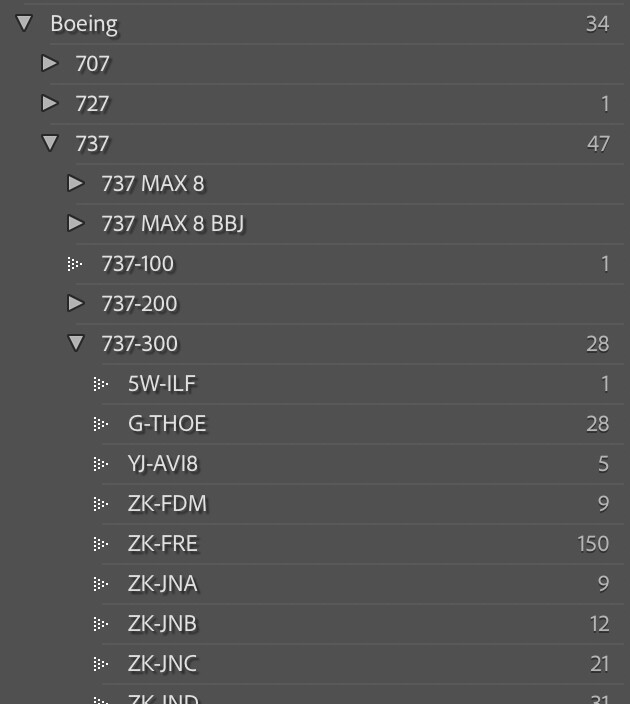
This is a very small peek inside my “aircraft” hierarchy.

But a lot of the power LrC gives me is in using the keywords. If I take a new photo of the aircraft registered ZK-JNC (impossible, but an example from this snippet) then I type “ZK-JN” and pick from a shortish list, or simply complete it with the “C”. The power is that I then automatically get “737-300, 737, Boeing, aircraft” for free. There may also be synonyms on some of those that get me extra keywords, too.

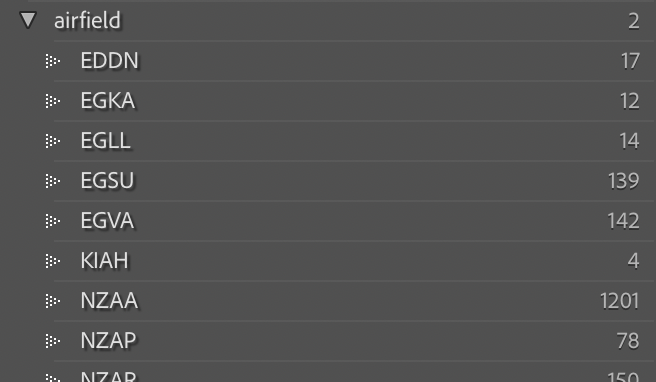
Then I use this hierarchy.

If I type EGLL, I get that and it’s synonyms “LHR, London Heathrow Airport”.

For non-aviation I have wildlife hierarchies where I type the common name (or part thereof) and also get the binomial name plus “bird” or “insect” or some such. I try to do the same with plants.

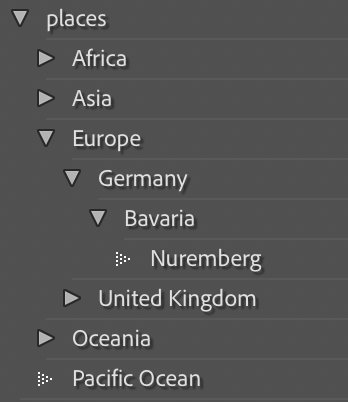
Finally, I have a “places” hierarchy where I have this sort of thing. Again, if I type “Nuremberg” I will also get “Nürnberg” (a synonym) as well as the parents. This is in addition to GPS (which not all photos have, nor can have).

So far nothing I have tried on the Mac has measured up to the speed and power of both maintaining these hierarchies and also using them (which is where efficiency really counts). If I come home with 100 photos from an airport, I will spend 20-30 minutes identifying and tagging every single aircraft that features, as well as the airport (easy if it’s all from one) and, in cases where known, the operator (e.g. airline, aero club, etc) _before I do anything else.

I use the results to find stuff in my own library (published or not, I don’t delete anything) and also to add information for when I publish on Flickr.

See example results of actual photos here:

  1. K3255206 | zkarj | Flickr
  2. K3255163 | zkarj | Flickr

Scroll down for the tags.

So, I doubt you can offer that automatically, but after I have all my keywords added, my next step is to pick which shots I’m going to ‘pretty up’ in PhotoLab for publishing. Also, as I have mentioned elsewhere, I will go back over old photos often, so being able to historically examine images is a must.

1 Like

It’s always something I would do, no point complaining later

Yes that’s pretty much what our system is currently doing, although it doesn’t delete; simply moves files into relevant folders.

It’s easy to recover, promote or demote

1 Like

That is very interesting; and thorough. I’ll take a look and see what can be implemented.

Fully agree on looking back at historically photos. We’re currently building full session structures.

1 Like