I have no idea which, if any, of the new or upgraded features will be available in PhotoLab 9. That is a very important consideration for me since I don’t use the stand-alone version,
Mark
I have no idea which, if any, of the new or upgraded features will be available in PhotoLab 9. That is a very important consideration for me since I don’t use the stand-alone version,
Mark
FilmPack and ViewPoint are present in PhotoLab and often enough, updates come in pairs like FP/PL or VP/PL.
Anyways, I recommend to download PL installers forand keep them for fallback (if necessary), Windows installers seem to come as setups that download things from DxO’s servers. Whether those setups define the version, I can neither say nor test.
Looks like the focus is mainly around film effects this time - no new mask tools etc. (ala Luminosity masks in FilmPack 7).
I’m glad. Film effects aren’t something my style often needs so this is an easy ‘pass’.
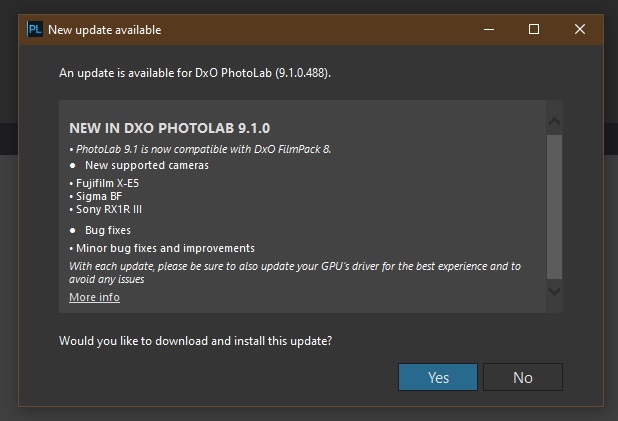
Edit: Incidentally, I just booted up PhotoLab 9.0.2 (trial) and have this update available, stating immediate compatibility with FilmPack 8:
Not to sidetrack but: grabbing it now and testing the AI masking (again)…
Everyone interested might check → https://download-center.dxo.com/Support/docs/FilmPack_v8/release-notes/FP8_release-note_win_EN.pdf
Ah… what the hell?
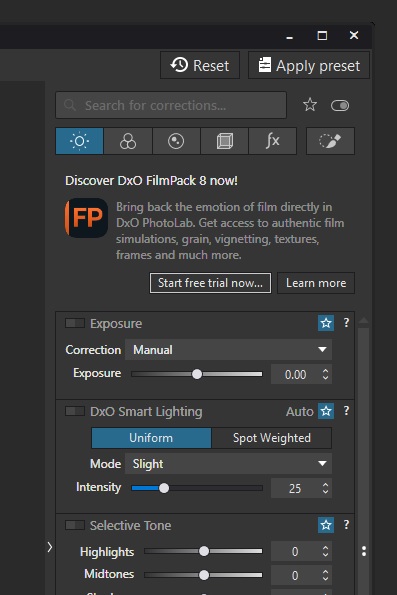
I’ve just upgraded to PL9.1.0 Build 488 and am presented with adverts in the working tool bar.
Checking the options briefly I see no way to remove this. Clicking “Learn More” opens the sales page, “Starting the free trial” opens a dialogue box to start a trial or buy FilmPack 8.
However there’s no obvious way besides either of these things to remove this advert.
Edit: Also, AI subject masking still doesn’t work for me in this release (Internal Error: Correction failed on the Execute Stage).
what’s the upgrade price for v7 owners?
Update pricing depends on where one lives.
Best check your DxO Shop Account.
Its clear the only way they get FP sold is embedding ransomware for PL in it. There is absolutely nothing in this update I could ever see any use for. After many forced upgrades over the year’s
I dont know if this is a new lets not fo random ware or that they thought afte V9 it was not worth adding to the customer anger
I’d hesitate to call it ransomware in the purist sense but that doesn’t mean I’m in any way in favour of how they’re behaving.
It’s clear they’re not confident enough to amalgamate FilmPack, ViewPoint and PhotoLab together into one larger product and charge a premium for the offering.
I’d be quite happy to not get FilmPack. In terms of its core functionality it’s not a toolkit I need and that’s OK. If others find use for it then that’s great too - I’m not questioning its overall value to everyone.
But…
Tacitly making it essential by putting core functionality (e.g. Luma Masking) in it is awful business practice.
Putting un-removable adverts for it in your latest product (I’m not sure if the advert is only forced “on” in the PL9 trial or if it’s forced “on” across in the paid version too. It’s very irritating in the first (trial) and would be absolutely dreadful in the second (paid).
Coupled with the less-than-entirely-successful launch of PL9 and the usual high upgrade price, and I’m not exactly impressed with the business right now. They’re fortunate the core PhotoLab product is still an attractive thing.
For example, PL9.1.0/Win installer downloads FilmPack Resources (put into Dependencies directory), 781MB total, mostly new high-resolution textures.
Probably downloading new AI models also will be done during installation time, like it was for PL8.8. Install time downloads are there to make the installation file smaller by not including things that will rarely change.
On the other hand it makes downgrading a bit risky (?)…
This is my upgrade cost from V7 to V8.
Yours might be different depending on taxes.
Buy upgrade €79.99
My upgrade cost from FP7 is $89.99 US. PL9 is $119.99. Looking for bundle pricing - I’m not seeing any when I check my store account, except for PureRAW 5 + Nik Collection 8. Looking at shop.dxo.com, it appears that the only bundle offers lower the full price of the products, not the upgrade price. That’s disappointing and sets my expectations very low for Black Friday. I’m not sure that what’s new vs. FP7 is enough incentive for me to upgrade now vs. waiting two or more years - I’ll only know for sure when I get around to running a trial of PL9 + FP8.
About the same here. Offered on my shop account:
120 euro for PL8 → PL9 upgrade.
80 euro for FP7 → FP8 upgrade.
No offer for PL8+FP7 → PL9+FP8 upgrade.
No offer for PR5+Nik8 bundle.
In PL9, fine-contrast adjustments were not added to Local Adjustments, they still require FP5 or later license, while Creative Vignetting needs at least FP3 expert, as in previous version. No visible changes in those tools. And no oval masks – use Nik 
From my personal perspective, FP8 has fixed an issue with repetitive Grain pattern and provided some new renderings, so it’s a minor update for me. There were some other changes, perhaps interesting for others, e.g. PhotoShop users. I didn’t look yet at FP8 UI, but I’ve never used it for work. I may treat the FP upgrade as a 3.33 euro/month subscription (assuming 2-year cycle), just to keep the product alive.
Note that PL8 and FP8 are not compatible. As expected, FP8 version does not work with older PL.
One interesting new feature looks interesting for me as a I still digitize (mainly color slide positive pictures. If I understand it correctly Filmpack 8 now supports even color negatives?
Better for scanned film
If you scan negatives/slides at home, the new optimization tools in FP8 will save you time and improve results, especially inversion and tone-curve presets to correct scans. FP7 doesn’t have this built-in.
I quickly went through the online user guide and noticed a longish description with screenshots. Maybe you like to have a look.
@Stenis Yes FP8 has something called ‘Film scan optimizer’ and ‘color shift neutralizer presets’, plus a dedicated tone curve to facilitate digitization of negative and positive films.
I have a lot of unscanned negative color film. I have tested to handle it in Vuescan but maybe it is easier to do it with the Filmpack functions. Might in fact be interesting.
Thanks for your tips!
So if I have PL9 and FP7 and I want to trial “FP8 in PL9” — how can I do that? Is it possible?
The negative inversion features are intriguing to me and could allow me to ditch my Lightroom subscription again. At the moment I use NegativeLab Pro which is bound to Lightroom.
I just use trial PL9 and FP8 versions, having also downloaded and installed FP8 standalone version. Got FP8 trial license by mail.
As far as I can see, ‘negative inversion’ wasn’t implemented in PL9 and it’s available only in FP8 GUI (?). Looks like FP8 “diverged” from PhotoLab a bit, but maybe I’m wrong.
Yes that I am not seeing that feature in PhotoLab 9 even though I have activated FP 8 in it.
Mark