I think the new image stacking feature in PL9 is a good thing. Unfortunately, it hinders my individual workflow. It’s annoying to have to turn off stacking in every folder after every change. Is there an option, perhaps in the preferences, to turn off stacking altogether?
Not sure if I should create a ticket in dxo support with 7 pro’s only. 
I would certainly support that initiative 
I don’t get it. Stacking neither defaults to on or off, but all virtual copies are automatically marked as stacked but the stack is not automatically collapsed.
Completely disabling stacking and work like when PL had no stacking at all? YES!
Stacking is often in the way of how I work, e.g. with virtual copies…and having to disable the stack every time feels like an unnecessary bore. (LrC is as bad as PL in this respect)
Ticket #620366 created.
Please excuse my wondering but, since I have never found stacking to “get in the way”, what is it that annoys you? After all, unless you actively collapse stacks, the only difference I see is a different colour background. What am I missing?
@Joanna , the stack is blocking the sorting function, e.g. for virtual copy number.
When openening a folder, by default I have this
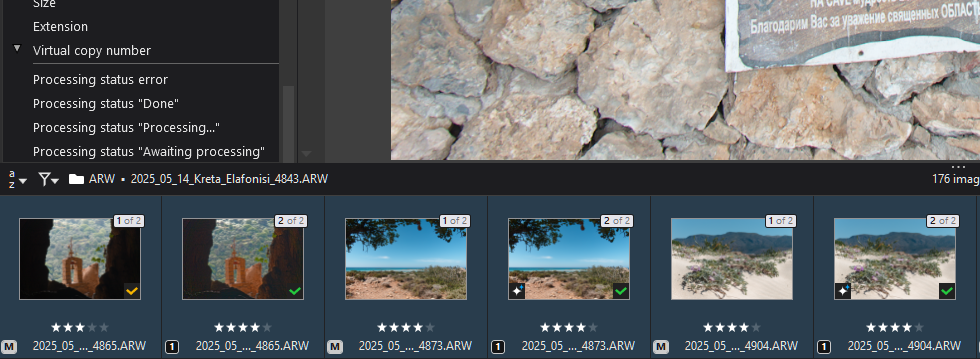
unsorted  .
.
As a workaroung I need to disable stacking for the images in this folder. The I get this:
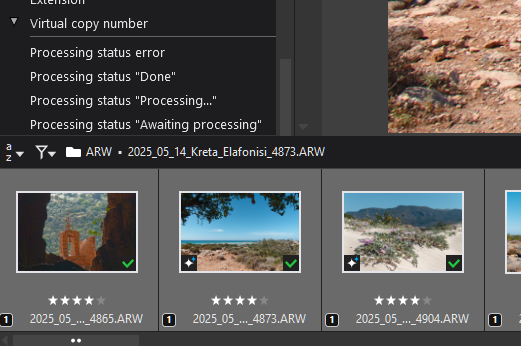
So, the idea is to provide an option in preferences telling PL I don’t want to use stacking. This would be as it was in the past without having this function in place.
And the good thing is, if I want to use stacking, it would be quite easy to enable it.
Best HG
Yes.
Give each VC a different star rating and sort by rating. The sequence of images will usually be unchanged as long as there is a stack.
Example: Take a series of images and treat them with increasing levels of something, giving each level a series of VCs and a rating.
- Create VC, add a star
- Create another VC and add two stars
- …
- Create a fifth VC and add 5 stars
- Apply feature with level 1 to all 1-star images
- Apply feature with level 2 to all 2-star images
- …
This will get you an array showing how a feature applies to different images. Useful for testing and learning.
Yes, that’s exactly/precisely the basis of my gripe … Auto-stacking of VC members achieves absolutely nothing - except creating annoying clutter and UI distractions !
Let me explain;
- When VC(s) are created they are automatically assigned to a stack
- BUT, they the stack is not collapsed (Thank goodness; that would be MUCH worse)
- So, until they are collapsed there’s no point to VCs being members of a stack - including because they’re already marked as VCs
Meanwhile, look at the resulting mess in the Image Browser
- Conflicting numbering of VC members ; M = 1 of n, VC1 = 2 of n, VC2 = 3 of n, etc
- There’s confusing thumbnail-background highlighting (as variations of similar blue-colour on PL-Win version) … which makes it more difficult to discern the currently selected image(s).
All to what end ? - - To save a few mouse-clicks for those users who welcome the ability to stack VCs (and I’m not disparaging that cohort - it’s just that I’m in it) - - BUT, to the detriment those who abhor the consequences.
Including, of course, the negative implications pointed out, above, by @HGF & @platypus
Just give us ability to activate this feature, or not … then we’d all be happy.
They did the same thing with the automatic zoom-to-fit when using the Crop tool (in PL7 I think it was), which is probably the feature of PL I loathe the most. You can no longer just crop at the zoom level you’ve chosen.
Starting to read xmp in PL5 with no way to disable it caused other kinds of breakage for me. Removing PRIME in PL9 as well.
It’s what they do. Instead of adding new possibilities for users who want them, they just change things and make a new group of people unhappy.
Perhaps diligent beta-testers pointed out to the PLv9 dev. team the issues and implications of auto-stacking VC members, but;
-
perhaps there was so little opportunity for meaningful interaction between beta-testers and their handlers that the downsides of this decision was not properly appreciated by the dev. team;
-
and/or perhaps the PLv9 design team chose to proceed regardless.
Who knows ?!
Whatever it is, it happens too often IMO.
Arrrrrhhhhh - Case in point;
I have just now deleted a wanted image (using Shift-Del) because I thought, from UI visual feedback, that I had a bunch of VCs selected … but it was just the new, annoying background applied to VC members that have been auto-marked as stack members 
PS. Yes, I do have a backup … Still, not happy …
Response from dxo support for '#620366
“I don’t think this is possible at present, so I have sent the idea to the developers.”
I’ve linked the URL of this thread to the ticket, to provide the devs a better understanding of what the request is. In my opinion there are a lot of powerful, meaningful explanations in this thread.
I’ll keep this thread updated.
HGF
I personally like the automatic stacking – to keep things together, especially when manually grouped .
But an option to enable / disable stacking is indeed helpfull !!
PL 8 Win
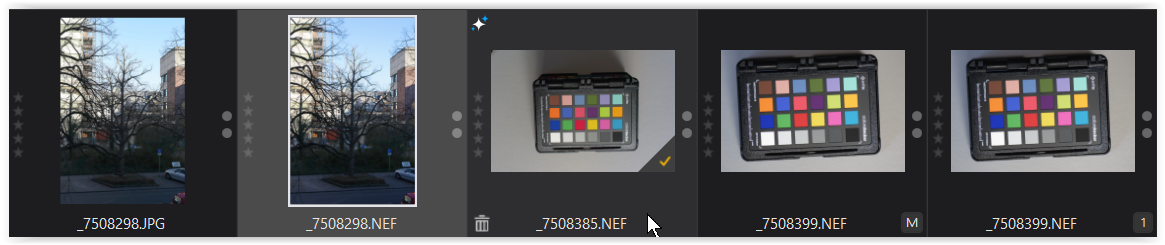
- very dark = unselected
- mid grey = selected
- dark grey = mouse over
- very dark = unselected
PL 9 Win
What I don’t like so much is the inconsistency of the background colour.
#1
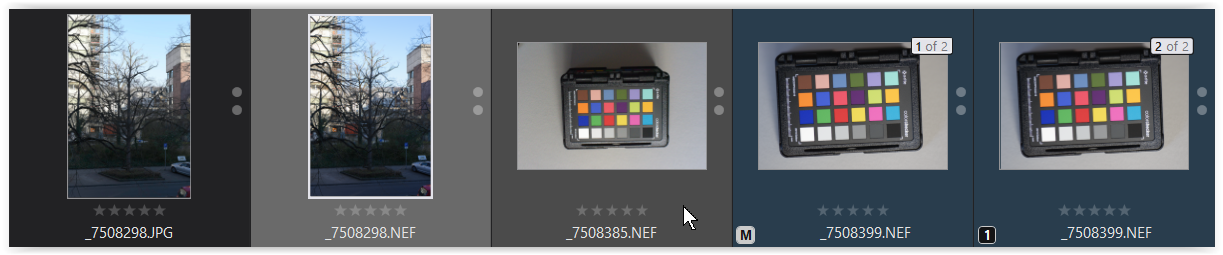
- very dark = unselected
- mid grey = selected
- darker grey = mouse over
- very dark blue = unselected, stacked, not grouped
#2
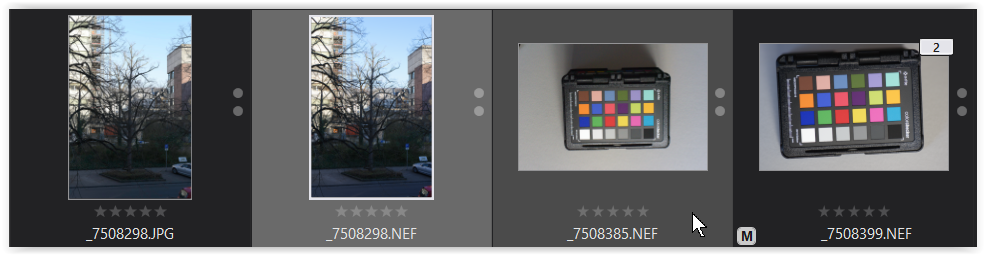
- very dark = unselected
- mid grey = selected
- darker grey = mouse over
- very dark = unselected, stacked + grouped
#3
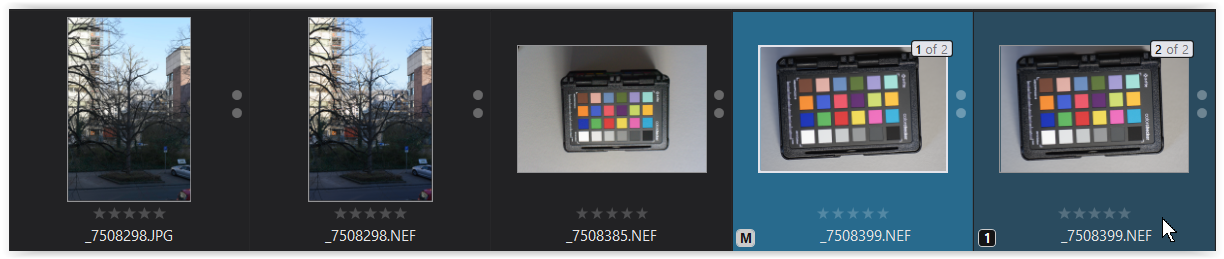
- very dark = unselected
- vibrant blue = selected, stacked, not grouped
- darker blue = mouse over, stacked, not grouped
#4
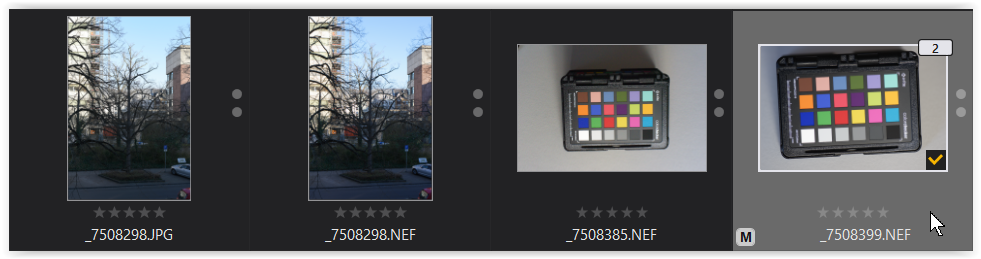
- very dark = unselected
- mid grey = selected, stacked + grouped
And what if, instead of (partially) colouring the background of the image stack in shades of blue, the background of the selected image(s) appeared in a vibrant blue, just as for the settings in “Customize” … uniform GUI ?
Furthermore, this can (visually) reduce the problem of accidentally selecting multiple/all images.
YES - - That would be an excellent enhancement (as well as making auto-stacking of VCs an optional preference setting).
I’ve added your background color topic to the ticket.
I agree, we should be able to turn it off. But I would also like to see it stack automatically when turned on: when I export to another application, say Affinity, and I make edits there and save it, the .tiff or .dng file should be saved. and automatically stack when stacking is turned on. Just like in Lightroom. It would make my workflow a lot better.