I haven’t noticed this. Export times have remained similar for me (6-10 seconds per Z6 image with an RTX 3070 8 GB).
Hmm, interesting! Maybe it’s something that’ll just “go away” for me… or some minor bug, IDK.
For contrast here’s how my system is doing right now with a large DeepPRIME XD3 export using PL9.11:
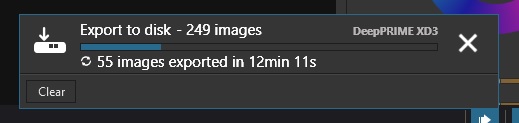
If PL10 keeps my XD3 export time at about 2.5 minutes, that’s going to be roughly 2 hours to export just this many photos. The full 249 images would take something like 10 hours (!)
I could stick with DeepPrime 3 which is nearly as good, but if I do need XD3 then that kind of export time is a deal breaker.
2 Likes
If you like me has the exe version of Affinity, it’s not really a problem. I believe this button is for the msix version.
Just select Export to Application, Press the Browse button, find Affinity and select it. The next time it’s there as default.
@Fineus , I have made a test with a batch of XD3 images, to check if it was an issue with batch conversion being slower than single images:

No, still no issue on my PC. Less than 5 seconds per image…
1 Like
Appreciate it thank you - FWIW I found PL10 horribly slow (2.5+ minutes per image) with a single XD3 export.
I wonder if I can get those greyed out options to show, or if it’s a weird glitch that’ll go away.
Anyway, I’ll stop spamming as this thread is more a general “PL10 launch” one.
I wonder how many users may assume/fear that the Auto-Brush has been removed from PLv10’s Local Adjustments tool-kit (?)
-
PLv9:
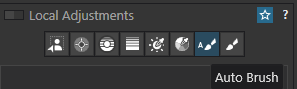
-
PLv10:
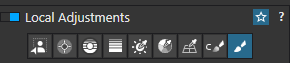
It’s still there … but now an option associated with the standard Brush.
I think they did that because the new Control Brush pretty much does what the auto brush was doing but much better because you can tune and feather it using the luma and chrome sliders. but as you way it is still there if one really want to revert to the old brush
25 sekonds per image with version 9 seems pretty slow. Depending on what has ben done I never gets more than 7-8 seconds and often just around 3.. What kind of gear do you have?

Maybe something to try with your exportproblems
I tested now with some pictures and got an average of 4 seconds. So I can´t see yet that my computer is slower than with version 9. But I guess we can keep an eye on it for a while.
Fat lot of good this software provides when it will not install and DXO has ZERO customer support.
If the control brush is “better” is left to be seen. They are different tools.
-
The Autobrush “collects” color and brightness while painting, and when used with some care (of course depending on the suject) you can have an almost finished mask. To Erase (refine) press & hold the ALT key (Windows), which selects the Eraser (negative brush) … done.
-
The Control brush’s selector/picker starts where you start painting and goes over everything you cover. Then maybe you have to move the selector around. With chroma and luma settings you refine your mask. Pressing / holding the ALT key activates a negative Control brush, which might not erase what you just painted over. Instead you change the tool and select the manual eraser … … … … done.
.
What comes to my mind … You have tried to select the sky with the AI sky mask, but that failed in between the trees and branches. While before you could have tried to solve the problem by using a Control line instead of, now just use the Control brush (as submask) to fill the AI sky mask’s gaps.
Or … you paint over an area that is too bright in places, then adjust the chroma and luma to target that overly bright region / spot – allowing you to reduce the exposure or whites for that specific area (the opacity slider could help with “invisible” masking) …
2 Likes
Interesting, because it’s offering me a PL8 Elite to PL10 Elite upgrade for $130.
Regarding a button to invoke Affinity … The following is quote from a DxO email;

4 Likes
Wish I saw this before wrestling with support and taking screenshots. Thx.
It’s frustrating that they would show a feature off in the press release and in their instructional videos, yet make no mention that it won’t be part of the initial release.
Oh well, what else to expect from DxO?
1 Like
Does any new functionality in version 10 require FilmPack?
So far a new version of FilmPack has not been released so nothing has changed with regard to the features available in PhotoLab requiring a FilmPack license.
“Major Bugs”? What are they? I’ve never had anything but perfect performance from PL 9. I keep reading about all these shortcomings, but I’m very happy with PL 9 and so far, PL 10.
5 Likes
New in DxO PhotoLab 10.0.1 for Windows
Bug fixes:
• A workaround restores full compatibility with NVIDIA driver 616.56, with no impact on image quality or processing
performance.
• AI-based tools now work as expected on computers equipped with more than one NVIDIA or AMD graphics card.
• AI Dust Removal now works as expected on computers using an Intel Arc graphics card.
• Fixed a random crash occurring while using multi-display configurations.
• Minor bug fixes and improvements
4 Likes
Are we getting an English announcement or just the French one ?
Am I the only one who feels that the most urgent upgrade right now wouldn’t be depth masks, but rather the ability to creatively remove artifacts from the frame? I was recently shooting from a raft, and an unfortunate backpack ruined my shots. There really wasn’t anywhere to stash it during the river trip—no good spot for that pack (with my photo gear inside). A removal feature would have been a lifesaver for me. But perhaps I’m biased, and there are other priorities?