I had a back and forth with Riley (DxO tech support) regarding DxO’s license activation system as ViewPoint v4 isn’t compatible with that system (and I stupidly got mixed up on the version I was trying to activate).
She mentioned that in general once you upgrade an app to a new version the old version disappears in the ‘manage activations’ window. I was not aware of this, thought I’d be good with old versions so long as I didn’t have more than 3 concurrent activations of that particular product. But this new info has me rethinking upgrades in general, particularly around being able to continue to use laptops with lower specs than my desktop with v7 or v8.
Personally, if I’d upgraded PL from 5 to 6 to 7 to 7, I would have expected it to be fine for me to activate any of those - so long as I stayed at/under 3 activations total - but it’s sounding like it doesn’t work that way.
You can check this yourself → Your account → License management, which (if I’m not mistaken) works for those versions that call ‘home’ (this 30+ day period…).
I have PhotoLab 7,8,9 licenses and their activations are shown correctly in my license management page – just checked on https://licenses.dxo.com/en/dashboard. Same for ViewPoint 5, NikCollection 7,8, FilmPack 7. I can run all three versions of PhotoLab without licensing problems, but never had to actually manage them. Looks like some misunderstanding.
The license manager site shows my PhotoLab licenses for versions 7, 8 and 9.
Earlier versions don’t show due to a line that DxO chose to draw (that’s imo).
The thing is, that I upgraded to PL9 from PL8 and PL8 is still shown. This makes Riley’s info look, hmm, wrong.
The feature is usable for all apps that DxO currently updates and an update is needed to switch licensing to be handled with the license management site and services. While FilmPack 7 is included, ViewPoint 4 and Nik 6 are not. I suppose that the non-manageable apps keep their limited one way licensing policy.
Corrected my original response – in my case VP4 license is NOT shown (but VP5 is). It seems that starting point for current license management was PL7, VP5, FP7, NC7. I don’t have any PR license to check, but probably it was PR4. Btw, trial PL9 and FP8 licenses weren’t shown there while they were active.
I’ve paid for Photolab versions 1, 2, 3, 4, 6, 7, 8 - and can manage activations for 8 only. An issue if I change PCs more than once as I always used two activations (desktop and laptop) excepting the time I got a new laptop. I hadn’t a clue I could deactivate PL on the old laptop - and that only brought me to three anyway.
As it is, Viewpoint 4 ‘isn’t compatible’ with the current activation system so I’m waiting for her to deactivate one of my activations. I’ve no visibility into which PCs have activations. When I first opened the ‘‘manage activations’ panel it showed two PL activations for my new PC
The LicMan feature was introduced around mid-PL7. Early PL7 licenses can’t be managed, later licenses can. Check PL7 for updates. the latest version I have on Mac is 7.19 build 80.
I’ve bougth PL7 license in Dec 2023 and activated it with PL7.1/Win installations on two devices. They are shown correctly on the DxO license management page, so your statement is in contradiction with what I actually see.
It probably(?) started from the time that different versions of the same app were able to be installed concurrently - rather than completely replacing the previous version.
@Wlodek my statement is sloppily phrased. This is what I got on my Macs:
Early PL7 had its clear text license file in a subfolder of the Mac’s Library folder.
An update of PL7 copied the license silently to an encrypted file below the user Library folder. I wrote about this in this post about PL 7.7 in May 2024.
In this post, @stuck opened a thread about license management - in September 2025.
Moreover, the 3x day callback for license verification was introduced in May 2024.
Did a short test:
Moved the license files away from where they are and installed PL7.0.
Activated PL with a license key that I had not used before
Checked the license manager. Result: The license I just used was not listed.
On the whole, we’re splitting hairs here, but some users of older PL7 versions might be unable to manage their licenses. Updating to a newer version should supposedly fix this.
Out of interest I have had a look at my licences and all that’s shown is PL9 and Filmpack 8 nothing for Viewpoint or that I have PL 8 running along with Filmpack 7 with them. Basicly it’s, as usual, a mess some have multiple versions of diffrent programs listed others like me have paid for them and don’t even have all the current versions listed let alone older ones.
list all apps you’ve bought a license for, but the ones you have upgraded disappear and the new product will show up instead. I’ve upgraded PL8 to PL9 and therefore, PL8 is not shown any more
show the licenses you have for newer products. For PL, it’s versions 7, 8 and 9.
For other products, it’s probably covering the last 3 years worth of products.
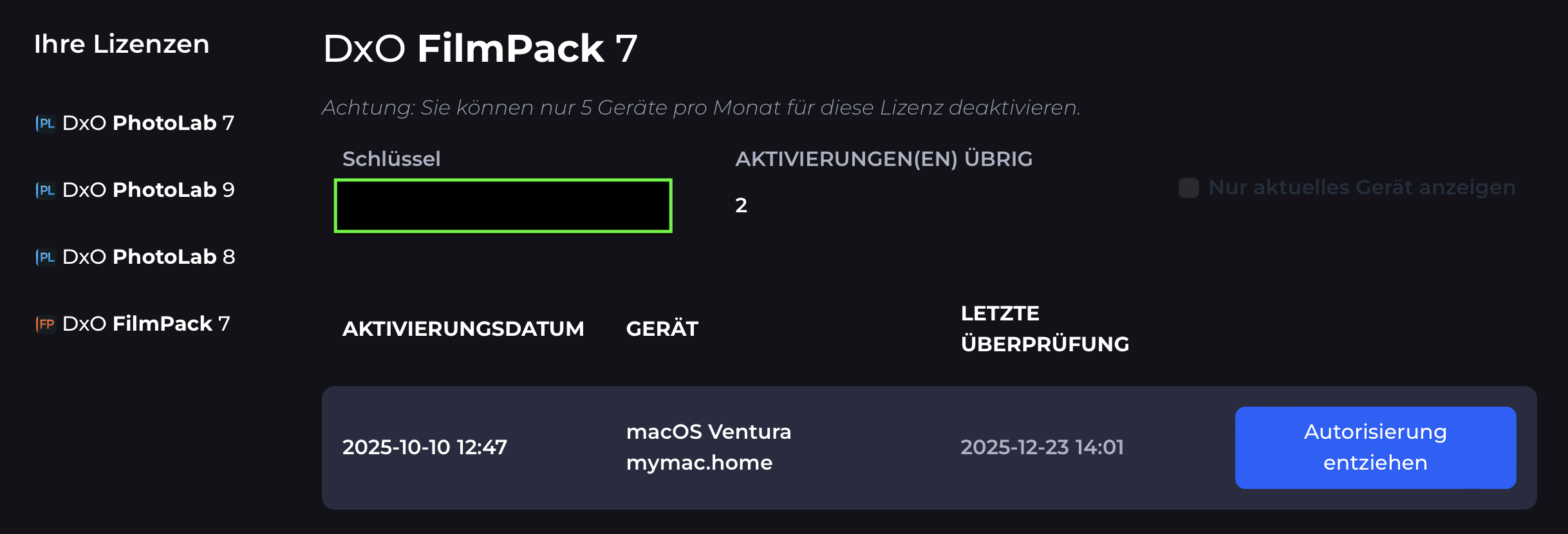
If you activated all your products on your current machine(s), the license manager should show those activations. On my Mac, I see this:
Your license code should show in the area I marked with the green box…
and the device name is something that DxO builds from whatever data they have or get with the funny fact that my Mac is NOT running with macOS Ventura.
Sorted it on my phone under My active Licenses it displays two programs an these are displayed in full below. But you can scroll this initial list through other programs which then are displayed, when selected, below. Unlike the language option there is no indication that this is a changeable option.