I have 3070 with 8GB of VRAM and 32GB of RAM.
Found that sometimes export will fail - well known problem.
However I found a set of steps that seems to give me good results, maybe other will find it useful:
AI masks use a lot of VRAM, export will likely fail if not careful:
start task manager and observe GPU VRAM
close ALL other apps
select some image that has no AI masks and then RESTART DXO
when DXO restarts it will generate preview for this image - using very little VRAM (as no AI masks)
As soon as you select any image with AI masks, preview will be generated eating a lot of VRAM - so keep selection on “simple” image.
right click on images to export (with simple image in preview) and select export
export should work
So generating preview (when AI mask is present) in my case takes VRAM usage above the “red line”.
** I wish DXO could disable preview for duration of export. **
You nail it! See it a bit later below what i think.
As soon as you select any image with masks, preview will be generated eating a lot of VRAM - so keep selection on “simple” image.
I guess you talk about Ai mask (i guess ‘Manual’ AI mask). GPU VRAM usage happen in this case as ‘AI model’ loaded (and stay there) to GPU VRAM.
I wish DXO could disable preview for duration of export.
I think not exactly ‘Preview’ happen during the export but a i kind of it. It’s need to load the ‘AI model’ for AI masks during Export (if photo has AI mask), DP NR, etc.
Frankly, i think its can ‘save a lot of us’!.
I guess the ‘trick’ is the following: what is the ‘loading order’ (allocation order) to the GPU VRAM.
In the case of export: If the order is: AI mask (photo you clicked already has AI mask on) than ‘AI Model’ loaded to GPU VRAM - 1st. And you export after with DP3 → DP Export and DP ‘loaded’ later - 2nd.
So VRAM usage (allocation) 1st: AI Model 2nd. DP Export. But if the ‘first’ selected photo don’t has any AI mask, but the second photo has, during the Export process the VRAM load/allocation order: 1st: Export 2nd: AI mask. And if not the AI mask is the first loaded/allocated, than seems may ‘AI model’ load to VRAM more ‘fill to max, but not runs out’.
A failed export potentially leaves the export worker in a corrupted state. Terminating it will clear that issue and the worker will be restarted by PL9 immediately.
Here’s my issue with all this. My NVIDIA 4070 with 8 gig VRAM has no trouble at all CREATING masks with AI “keywords”, no matter how complex. It has trouble EXPORTING a photo with AI “keyword” masks. The problem it seems to me is in PL9’s export and has nothing to do with the NVIDIA card.
Well, yes, it’s a serious problem and DxO needs to fix it. But at least there’s a viable workaround in the meantime. Fantastic find, @irekz ! You, too, Bryan!
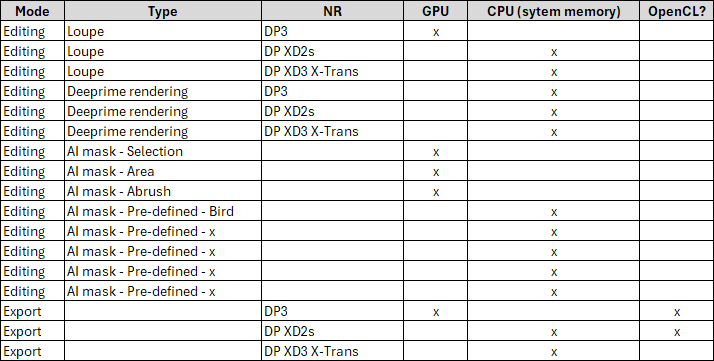
Yes, because seems 8GB GPU VRAM may not enough for 1.) hold in GPU VRAM the ‘Pre-defined’ (keyword) AI Mask model + detection for editing AND over that the ‘same’ for Export. (or something similar). And Loupe, Deeprime rendering, DP XD2s (vs DP3) also not helps.
This makes no sense. Masks created using the box tool which are identical to the AI keyword masks export just fine. The error DCO is making is recreating the mask during the export process… the mask exists in the “Customize” view. Once it is created the information is identical no matter how the mask was created. So why have a different export process for different masks in the first place. Define the Mask no matter how it was created then have ONE export process for all masks.
I don’t think Box (Area) is the same AI prompt and training data than ‘Sky’. Also, Pre-defined (keyword) check te whole image for ‘animal’, for each different photo. ‘Box’ not ‘find’ Birds, just a ‘box’
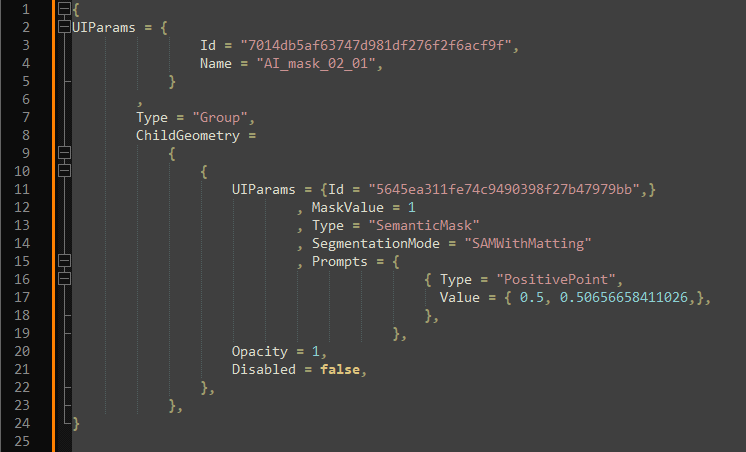
Multiple causes. First: DxO save to the .dop file the mask descriptions, like: position, transparency, AI prompt, etc. Example for some manual AI mask:
Second: because you can do editing during export. So, if your export has AI mask, than Export need to use some AI Model. But if you also edit in PL in the meantime (with AI mask), you need a ‘second’ (‘double/twice)’ ‘AI model loaded’ - the second for the editing.
So why have a different export process for different masks in the first place.
Export process is more-or less is ‘one process’. But for AI masks its need to use (and load) ‘AI Model’ (in GPU VRAM) to calculate pixel level masks / final export. Each type of AI mask (selection, area, abrush, keyword, etc) - use different AI prompts, etc. AI pre-defined (keyword) masks also use AI model, but with different prompts (optimized like for ‘Animals’), works for the whole image, etc.
A single image should not eat up 4GB of RAM, I’m not a Windows user but it sounds as if the core problem is that storage is not being released once each image has been exported.
I think it has more to do with Nvidia than Windows. During the 30-day trial I processed a group of 160 images, all with more than one AI mask, a mix of keyword, graduated density, and chosen area, and they exported just fine. It took 40 minutes, but no crashes or lockups. This was with an Arc GPU with 10G V RAM.
This is my exact suspicion. Either DxO are not handling video ram properly or NVIDIA drivers are not releasing the ram when requested. I suspect it is DxO not managing resources properly.
I’d second this, as performance (for me) tanks even before an export has taken place.
It happens while placing masks (and by “masks” I mean 2 or 3 masks, not dozens).
It happens while navigating from one unedited image to another, while making no changes.
It also happens while exporting. Especially in the latest release (which took my export time to 2 minutes 30 seconds or more, from a previously stable 30-35 seconds).
Easy to ‘eat up’ GPU VRAM at general. If you has AI mask on the photo → ‘AI mask model’ need to load to GPU VRAM and run it. If you use DP NR → Same. IF you use Loupe/Deeprime rendering (with DP NR) → Same. Seems DP3 use less than DP XD2s, and so on. Each use some amount of GPU VRAM. But once loaded, this stay and ‘re-used’ for the ‘next photo’. At general i think something same can be valid under Mac.
In the early days of 9.x release (like 9.0) i think some similar than you (‘release’). But now (after many-many observations / measurements and colleagues forum post/comments, as more experience gained) may ‘we’ see a bit more about how PL behave. I think ‘release of GPU VRAM’ may not helps in the end of the day. As its need to ‘load to GPU VRAM’ anyhow, i not see any advantage to ‘release’.
Of course kill the DopCor (the export process) may helps, also the ‘put to Sleep trick’ (under windows) may helps.
Of course, may GPU driver quality vary - seems mostly in the case of nVidia stuffs.
Note: in ‘CPU only’ mode everything expected to work (at least with 32GB of system memory)
I think DxO should implement (optional?) export mode for low VRAM GPUs.
When user selects export, it will ask if to close editor view (exit this process to avoid any VRAM usage) and leave on a screen a simple export progress bar. That would avoid any double AI model loading,
Yep, booth of you has good ideas. May its can works out. May less works out IF DxO don’t have a good ability to ‘remove’ from GPU VRAM the once loaded (to GPU VRAM) things.
And may in the end of the day some ‘freak’ table come up.
What may seems very-very diffusing for the users. May its raise more problem in forums/users like: ‘PL is so fucking complex, i don’t want ot use it’. For PowerUseres its can be nice.
And seems very-very problematic from development point of view, if near not impossible. Not just developing is an issue, but may ‘switching’ between them can be issue. Like: release all and load the combinations again, etc. Just think about one photo in the filmstrip/export has DP3, next one is DP XD2s, third is XD3 Fuji. And you Editing and Export in the same time.
Note: i see some hint like DxO may ‘prepare’ for DeeprimeRendering the ‘CPU only’ mode.
To me this sounds like poor VRAM management, or possibly a complete lack of garbage collection (the act of removing things from RAM or VRAM that no longer need to be there).
I have a Ryzen 9 9950X3D, 64GB RAM with an RTX5080 (16GB VRAM), without doubt an absolute beast of a PC, yet DxO exports are extremely slow (but never failed to be fair).
I would edit my photos and when I’m done I’d export them and it would take forever. I noticed that my VRAM was 100% used up by DxO, so I decided to close the app and open it again, then the export was very fast in comparison.
I tested it twice by exporting the exact same 46 images straight after editing them, then again after restarting the app. The difference is quite significant: 22:26 on the first import, then 1:12 after an app restart. That’s a whopping 18.7 times faster, just by restarting the app!
There’s something very wrong with RAM/VRAM management. A photo editor shouldn’t use this much VRAM when doing simple colour/tone/denoise edits and even if it did, it should free up the VRAM when it no longer needs something.