Thanks again for this!
I looked at upgrading the GPU on my current built-for-silence Win PC, realized I’d have to upgrade both motherboard (for PCIE version and channel requirements) and power supply (GPU power requirements), figured I was in for building an entire new PC. As a side note, I tried to remember when I built this PC - and couldn’t, but I’m pretty sure it’s at least 10 years old (with a 5- or 6-year-old GPU).
Sharing my thinking in case anyone else is in the same boat with me (needing silence). The new AMD ‘zen 5’ Ryzens offer a lot of performance for not much wattage (important when you consider that that wattage turns to heat which has to be removed somehow). The Ryzen 7 9700X seems to be the ‘sweet spot’ (decent performance for a 65W TDP)
I went with ‘Be Quiet’ case, liquid cooler, and power supply as even their lower-cost items seem to be built for quiet (and sticking with the same mfgr for case and liquid cooler raises the chances of things fitting properly). Add a PCI SSD (way faster than SATA) and 32G of DDR5 and I’m up to $1150 before I add a GPU.
I’m still trying to figure out if the RX 9070 is worth $200 more than the RX 9060 for what I do. Anyone have thoughts on that? I’m not a gamer, upgrading solely for v9 (and possibly a Fujifilm GSX100sII - 100MPX has been out of the question with my current PC, wishing they’d come out with a GSX50sIII - 50MPX with PD AF). But that’s off-topic here.
I’ve already warned my wife that there’s going to be swearing coming out of the basement over the next few days. 
I’m going through this now as my current box hasn’t got the ‘lanes’ needed for current GPUs.
About USD1600, 1850 if you’re picking parts for best performance per dB noise generated (water cooling, low noise GPUs).
I’m not counting my time to figure out what’s needed and then to assemble everything. I’ve built literally dozens of PCs over the years, first one in '88 or '89, quite a number for friends since then.
[update 12/21/2025]
I’ve (finally!) got my new system up and running. Using PhotoLab v8, exporting 24MP photos using Deep Prime X2/X2DS, it takes approximately 2.1 seconds per export when done in batches of more than ten. I expect that to be longer when I get a higher resolution body (probably a D850 so 48MP)
Machine is a Ryzen 7 9700X (X870 chipset), 32GB DDR5, PCIE4 NVME SSD - and the Radeon RX 9070 16GB on the charts here. no overclocking. Cost including new case was about US$1700 and I spent about $200 extra to make sure the thing was quiet. Not sure I needed to do that. And an extra $100 for a motherboard with features I wanted.
[/update]
If you imagine that overclocking is designed to accelerate games that could be running for hours on end. It makes logical sense to use overclocking for photo editing. Because that is the specific reason for it.
I have upgraded and bought a GPU from a local gamer (who was upgrading) and I can run PL9 with all the AI masks etc etc etc, but that wasn’t the reason. The launch of PL9 has taught me a very valuable lesson - never think as a customer, you are of any value. Most customers will accept their software manufacturer dumping on them from a great height and still come back and buy more. Wolves and sheep - symbiotic.
Going through building a new PC after a 12-13 year hiatus was something of a revelation. Overclocking is semi-automatic now. Also NVME SSDs. About the fastest hard drive I had did well under 250 MB/sec. A SATA SSD doubled that (500ish). Now a PCIE4 NVME SSD gets me 7,400, and a PCIE5 a bit over 10,000 (and I bought a cheap one of those).
No argument on software providers not focusing on people like us.
I guess I was just very lucky because I placed an order of my new Noname tailormade PC with 32 GB RAM DDR5, the 31th of October. A little before my son bought the same amount for 1200 SEK (108 U$) - I had to pay 1511 SEK (1336 U$). Today (24 dec) exactly the same memory costs 4999 SEK (450 U$). I have never seen anything like it in my entire life.
My PC has an MSI Geforce 5070 Ti 16 GB too that costed me 7592 SEK (683 U$) and today the price has risen to 9890 SEK (890 U$). Even that is felt by the ones buying these systems now but still it is far from as bad as the RAM has developed.
My machine has a 4 TB SSD too that costed 2799 SEK (252 U$) and the price for that today is raised to 3499 (314 U$), which is quite modest compared to the development of the RAM prices.
So it seems that RAM priced development is the real rocket here and one can just speculate in what impact this might have in the future. If this price level on RAM will be sustained it might force users to buy machines with less memory than before the RAM prices sky rocketed and that doesn’t play all that well with the rising demands softwares like Photolab is puttingh on our system resources of our computers.
So what happens now is almost system threathening because the AI-business demands is now pricing out the average users from the RAM-market - the users that are supposted to be able to use their products even locally even in the future. There is now a distinct before and after. and the real losers are the ones that waited too long to upgrade. For many the upgrade windows has just closed and we don´t know when it will open again.
Another thought too: Will this force the users that can’t upgrade now right into the arms of the big AI-providers like Google and Open AI. It is far less system resource demanding to use for example my DAM-software Photools iMatch (Autotagger) with The Open AI API over the net than running a local Google Gemma 3 12b with Ollama or LM Studio (demands 16 GB VRAM).
Sad to say but you are not alone to base your ever unchanging opinions over time on Windows, neglecting in this case the last 20 years of Windows development. That is not serious Joanna.
I have no problem with your view on the Mac-world and it is fine even to pay some more for a some what limited platform you trust and have no problem with and as long as you don’t need outside those limitations. BUT the case these days is that it is as stable to use Windows systems as anything else and we have read even here about quite a few Mac-ownwers with similar problems to Windows users using old GPU-cards. Not very much of a difference there was it?
BUT there are lots of users who likes to build their own systems too or prefer to order them built after their instructions and usually they get more bang for their money that way. Thy that with a Mac.
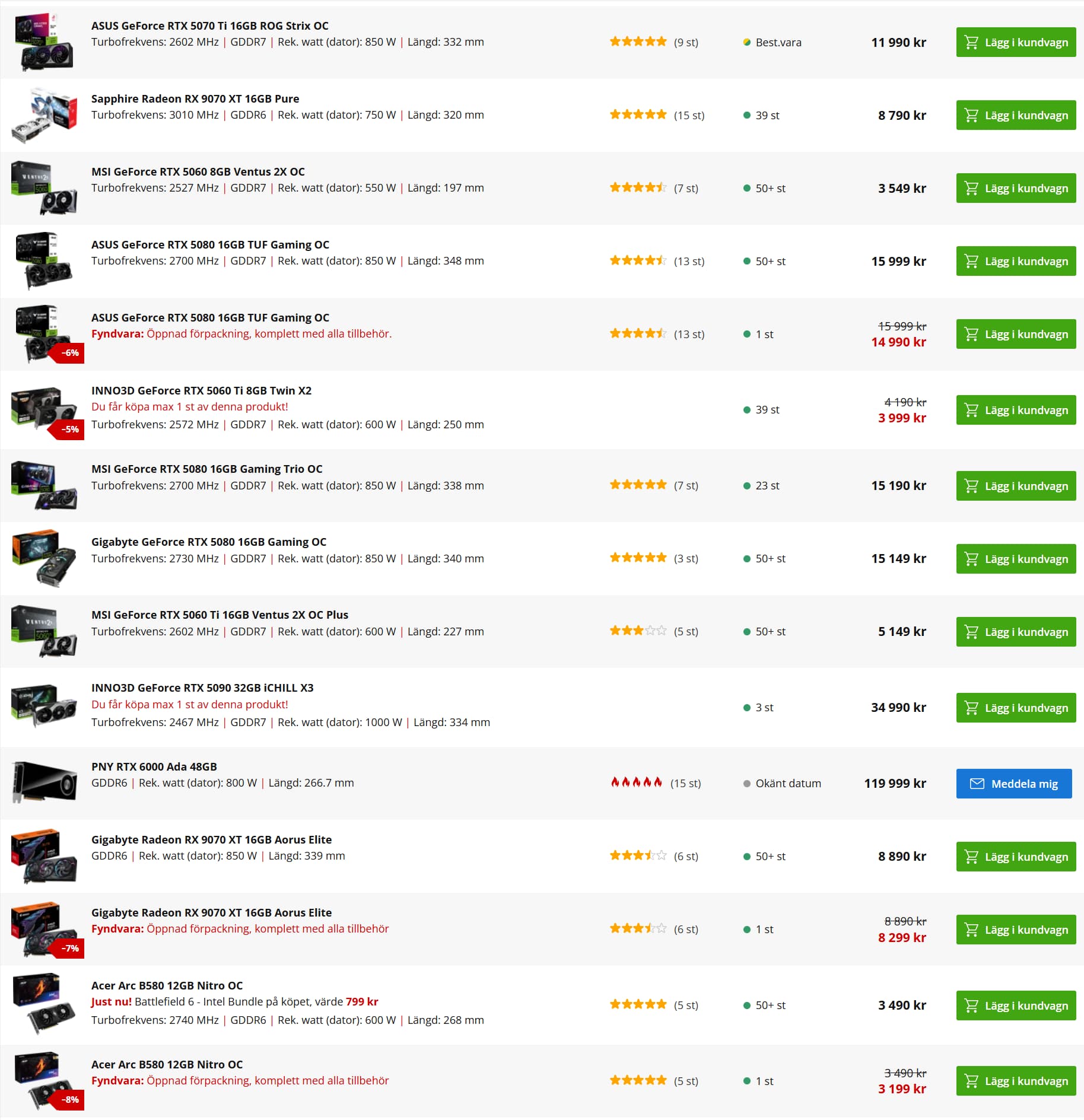
Below you can see part of a list of GPU-cards available for order at one of the biggest PC-builders in Stockholm:
Here is 330 different GPU-cards from 12 different vendors between 2700 SEK (243 U$) to 119 000 SEK (10 710 U$).
.. and 453 RAM products for under 1000 SEK to 50 000 SEK (4500 U$)
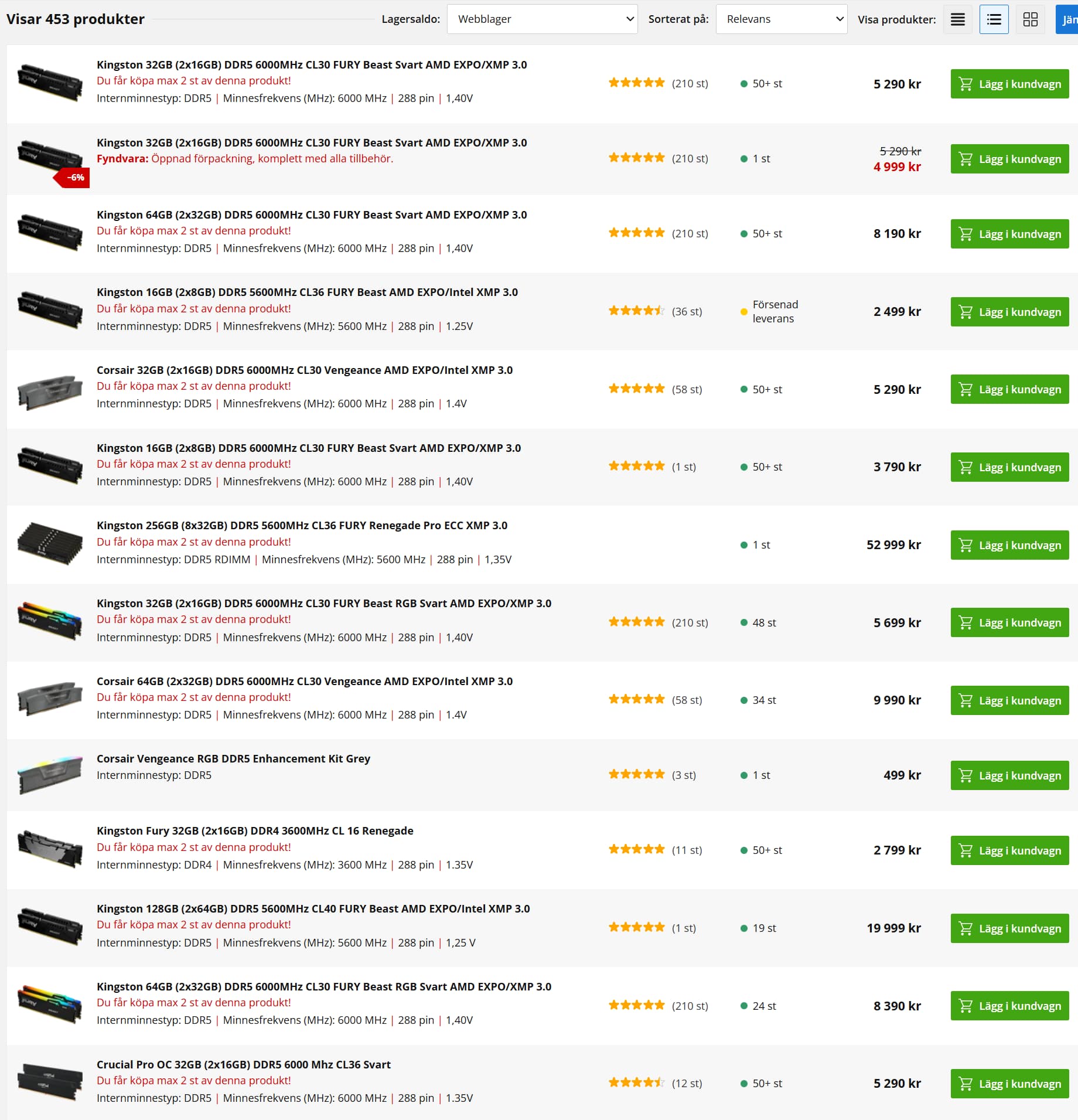
The choice is yours! You can practically get what ever you are prepared to pay for if you just are prepared to wait a week or two. There is a reason why industry guys looks on Macs like they do. Compared to this the Mac-world is really limited and in some bransches, so is the software awailable too. That is the fate of NOT being an industry standard platform.
There is a reason why Windows PC’s still is the industry standard.
Many PC-users also can upgrade a slow older GPU-card today if their power supply allows it. They don’t necessarily need to throw their old computer away and buy a new one as often will be the case with a Mac. They really have that option and flexibility many times. Mac users have not. Only the laptop users in the PC-world are as limited as Mac-users today.
Quite a few years ago even laptops had at least one or maybe two card slots but I don’t think machines like that are made any more.
Since PLB9 we should consider AI powered by GPU. From my first test, some LLM with image capabilities required at least 16 GB but 24 GB seems to be correct.
Furthermore, I think, we should need also the CPU capabilities in term of NPU.
This is not only for PLB but more to be ready with the global IT technologies evolution.
Therefore, I believe that the integration of AI solutions must require appropriate hardware integration, not only GPU but both GPU + CPU.
We’ll see. Many users that solely use and rely on online AI-services will be fine with quite modest computers. Then the processing takes place in the providers datacenters and not locally. Increasingly more expensive GPU-cards and RAM might even accelerate a migration from beefy personal computers to thinner ones when not needing to cater for the demands of locally run AI-models. Some software gives the users a choice (like Photools Imatch DAM) while others like Photolab 9 doesn´t and it is just that fact that causes a lot of the Photolab users with older GPU-cards with too little VRAM, a lot of problems.
This is probably a problem that will be solved naturely as people will adapt either by buying beefier computers or by chosing softwares that handle local AI-models mlore efficient than Photolab and both Capture One and Lightroom does that already. I don´t see why DXO Photolab shall not be able to live within 8GB VRAM as both C1 and Lightroom does.
The main difference between LR and PLB is the different business model.
LR is subscription-based, so Adobe can switch between cloud computing and local computing.
This means that LR can more easily be multi-platform.
DXO is 100% offline, which means that the user must provide the hardware required to ensure compatibility with the software. It is also up to the user to choose the hardware based on the required performance level.
With AI features that require performance, this changes things somewhat.
Personally, I prefer the DXO model, but I must admit that I am a geek, so I have no problem selecting the correct hardware for the correct use.
This is not the case for everyone.
No the big difference for most users of coomercial RAW converters is that som is fine with a GPU card like my old one 3060 Ti with 8 GB of VRAM and some are NOT read Photolab 9.
For Capture One and Lightroom 8 GB i VRAM s fine but that is NOT the case fot Photolab 9.
You’re suggesting that everyone should have to run out and ‘select’ new hardware for the correct use because DxO released a new version? What if someone runs two or three programs and each one performs best with different hardware? You don’t see an issue with this line of thinking? It’s up to the software developer to ensure their program works with the vast majority of users or they risk being passed up for a competitor’s offerings. While it’s true AI requires a lot more resources, DxO knows this and should have a very prominent caveat posted on the site, even a pop-up to warn people that the money they’re spending may be at risk if their system is inadequate.
Its not just RAM that is being hit with rocketing prices.
Large standard HDDs, SSDs, NVME etc are all rapidly rising, as it isn’t just RAM that in demand. They also need large fast drives for storing all the data slurping that AI is doing.
Likely to be very lean times for system builders and higher prices for off the shelf PCs.
Estimates suggested this will carry on for 2 years, but that is a guess based upon the asssumption that any ramping of production will be done. We should also assume that prices won’t fall that much (do they ever?).
DxO should start to take a long hard look at how itutilises RAM, Graphics etc, otherwise its customer base could dminish if users literally cannot run the next version, or it runs like treacle.
Storage, solar panels, EV batteries etc. are the reason why the price of physical silver is exploding. Costs are going to skyrocket over the next couple of years.
It was to be expected, really. No system is yet suitable for the efficient use of AI. Everything has to be scaled up enormously, and a huge amount of GPUs, RAM and system resources are used to keep the AI usable. It’s like a big whirlpool – everything is sucked in, swallowed up and, if more powerful resources become available, discarded somewhere after a short period of use. Everything will be subordinated to this.
Yes, even 16 GB might be to small if you have decided to go for the bigger local AI-models. My son just bought a 5090 card with 64 GB as some sort of future proof option.
He doesn´t want to be dependent on cloud services at all. I guess I´m a bit more pragmatic. I don´t have any problems with using cloud-services like the Open AI API if that is giving me the best texting quality in my iMatch DAM.
@tilltheendofeternity I guess you are right about that reflection but you haved my recent figures in my example from a PC-builder in Stockholm.
In October the figures in my example was for:
RAM from 1200 SEK to 4990 for 32 GB and that is a rise of 415% in two months.
GPU Geforce 5070 Ti with 16 GB VRAM from 7592 SEK to 9890 with is a rise of 30,2%
SSD of 4 TB 2799 SEK to 3499 wich is a rise of 25%.
So I guess it is safe to say for now that it is the RAM that is the real bottle neck on the market right now.
Mechanical harddrives are still used but not that hot anymore. Many think they are to slow to use in high end desktops as a main storage but I use them as an internal slower mirror or backup still in my new machine too. The prices also have dropped significantly the last years on harddrives so that are still pretty cheap.
No I don´t care about what others do with the need AI has created BUT the demands many modern softwares local AI-implemantations put on the local computers has shown that either the users will have to upgrade to meet those demands or the manufacturers of these softwares has to offer interfaces to cloud-services that can make those local demands turn to a cloud source instead for upgrading hardware. Photools iMatch offers these possibilities with a wide variety of AI-source options both local and cloud-services. Even Topaz is performing some of its tasks on-line. as an example. DXO though has not - yet.
I can absolutely see a close future where the current paradigm with fat beefy computers for precessing graphic material like pictures and video with a lot of AI will die. Most private users will be priced out of the market when the big players vaccuums the component market for components to build AI-datacenters and as a result of that most people will not even use computers soon. Instead many will have to rely on the big players cloud-services and when that transition is done it will be the end of free rides on Chat GPT, Google’s AI services or Coopilot. Everybody will get sucked into subscriptions. I don´t think that this is a part of a big tech masterplan but it is a side effect that is manifesting itselt right now before our very eyes.
It is like that already. I see for myself that I really need a Plus subscription on Open AI beside the use of their API-services for iMatch DAM. I like to speed up my dialog with using voice to text dialog and using Deep Search for researche of different kind more extensively and that is not for free and I want my grandchildren to be able to use “Study and Learn” which is a very helpful feature.
So in the short run my choice isn´t between upgrading hardware or relying on AI cloud-services because I really need both and most people will in a short while have to make up their minds too or find other ways that might suit them better but as a reaction to American protectionism I might leave American alternatives all together and support European cloud.services like the French Mirage that seems promising instead. I will start to make some serious tests after New Years Eve.
Here is a link to some statistics from Photools community over how the use of different AI-sources are distributed in the use of iMatch DAM Autotragger
https://www.photools.com/community/index.php?action=dlattach;attach=38604;image
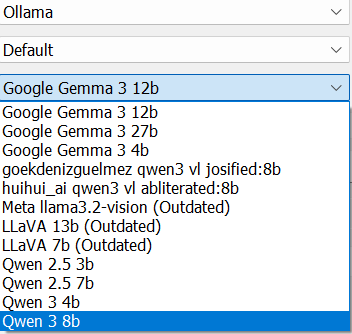
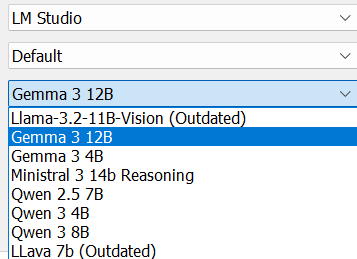
Ollama and LM Studio are handlers or frameworks that handles a lot of local AI-models.
Ollama handles the following local AI-models in iMatch version 2025.7 
And LM Studio handles the following
Beside the free Ollama and LM Studio models there also are interfaces to commercial AI cloud models
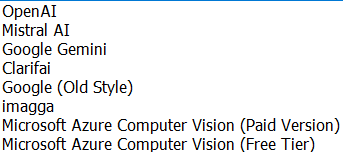
For me these AI-interfaces in iMatch is a symbol of free choice Photools offers. Mario Westphal’s philosophy at Photools is to give the users as much freedom of choice they can manage to maintain, always trying to provide the best commercial and free AI alternatives both for image analyzing and and texting and map-data and reverse geolocation.
I guess a lot of other companies selling RAW-converters etc has a lot to learn here when it comes to openess and providing a great variety of choices for the users.
For the vast majority of users, many of these “benefits” will be barely used if at all. A benefit is only that if it benefits. As we are seeing, MS is coming under pressure with Win11 and not before time.
Linux is slowly evolving and their market share is growing. Imagine being able to run an office suite and browse online with a Pentium 64 and 4gb of RAM. Intel and AMD will have to focus on GPUs and data mining.
Linux have 4.1% of the global desktop market, 5.03% in the US. 72.7-85% of the mobile market (calculations differ) - yes Android is Linux dressed up. 77% of web servers. The top 500 super-computers are all Linux based. 92% of VMs on the cloud are……. you guessed it, Linux.
And when people suggest that Linux and open source are a bunch of amateurs, Linux have 25,000 developers actively contributing to the Linux kernel.
AI is far more about big-tech getting access to your data than anything else.
Photools may be great for professional photographers - in the US, 1 in 2000 claim to be professional photographers. Let’s pretend that they are all earning a decent living doing that. Then that is where Photools are aiming. The rest of us…………………………. not so much.
I got 32GB of Micron DDR5 RAM for about $200 on ‘black Friday’ (the day after US Thanksgiving). It had been around $125 a few weeks before, but it’s getting near $400 these days. It’s not like I waited for BF pricing while watching the prices go up but decided around that time that I needed to build a new PC to run PhotoLab. I hadn’t built any PCs since 2011 or 12 and only started re-educating myself on current tech about a week before that, had no clue on prices. And for my last PC I’d spent a bit over $200 for 32GB of high spec (low CAS) overclock-able DDDR3 (note 3 not 4) so it didn’t seem outrageous; only found out about ‘RAMageddon’ when I hade a comment about what I’d paid in a thread about RAM prices spiking - and was told that that was double the ‘normal’ price.
That said, prices on DDR4 RAM have not spiked, and higher spec DDR4 is about the same as typical DDR5, so builders are starting to use that more. The downside is that it limits their motherboard choices to earlier chipsets and PCIE4. No idea how much that might affect PhotoLab usability. It’s unlikely to be an improvement over DDR5 / newer chipsets, but most mid level GPU cards these days are PCIE4 and that might be the important bit.