If you can stretch to it, I gather the 5070 XT is a formidable option when going the AMD path. The nVidia equivalent is the 5070Ti which is more expensive of course, has some added RTX/DLSS bits for gaming, but is apparently better for graphical computation as well.
Unfortunately most of the benchmarks focus on the gaming, so YMMV.
The 5050/5060/5070 GPUs on these sub-U$2000 laptops have 8Gb of vram. The 5060/5070 GPUs are as much as 40% ‘better’ than a 5050 on AI tasks. The Ti versions of the 5060/5070 GPUs are another 40% more capable (and will have 12Gb of vram) but are currently limited to Asus and MSI priced at more than U$2500.
I spent my adult work life writing code and troubleshooting on Windows and Unix machines. For the latter part of my career, I switched to using a Mac at home. (Yes, three operating systems at the same time.) Once I retired, I happily walked away from Microsoft Windows on PCs, and have never looked back.
After the most recent photolab update and downgrading my RTX 4070 Super Ti to The studio driver 566.36 I am no longer having error messages or crashes with photolab.
I do not edit hundreds of photos at a time.
My windows laptop is ancient. Exports that render in 20 seconds on my PC take about an hour on the laptop. I am seriously considering a move to APPLE as the Macbook pro seems to be very efficient and speedy.
My son, a self employed mac software writer loves his macs, but will use windows for games. He does not do imaging or videos. My daughter loves macs while my youngest is a windows fan.
The new mac chips are so interesting that even Intel is getting into the arena with their new proposed silicon.
My firstborn works for a Google team in London. She uses a company supplied Macbook.
We routinely belong to both churches when we get together.
I worked as a consultant and developer on a Windows app for a client for about seven years. After the first year, my Dell laptop (brick) started to play up and a friend suggested replacing it with a Mac. At that time, the 17" MacBook Pro was a lot cheaper than an equivalent Windows machine.
When I said I had to continue working on Windows for the project, his reply was to point me to Parallels. Sure enough, I ended up with a Windows VM that I could use just for my programming but, also, switch back to Mac sanity by simply closing the VM.
This came in useful one day when Visual Studio did something weird to the Windows environment, rendering it unusable. All I had to do was restore a backup copy of the VM. In the meantime, I had a fully functioning Mac.
This is one Mac user who is not easily confused. All I want to do is use the computer, without having to know how it was put together.
My 2 cents only, as a non-programmer, but reasonably advanced user, who has used PCs since the IBM-XT, but recently bought a Mac.
We live in our RV much of the year so space is a premium. Trying to find a MS-based laptop with a high-res, color-managed screen, decent CPU, GPU, and memory to run PL and other GPU-intensive apps is not cheap. Yes, the gaming machines have lots of power but generally the screen colors suck and the fan noise requires earplugs. Been there, done that. Spent even more on a laptop that had a good screen too. But the machine still ran hot, loud, and seemed fragile. Keeping the drivers updated required frequent attention.
This spring, I spilled a drink on the keyboard and bricked the device. When looking for a replacement, Macs seem to cost about 10% more for the closest match in specs for a laptop with “color-calibrated” display, fast GPU and lots of memory. Despite my long-standing aversion to a Mac, I gave it a try. This is before the PL9 release “issues”.
The Mac does the job very well without running hot or noisy. The OS-based keystrokes are different, so it’s frustrating to stumble while learning new muscle-memory based routines.
Absolutely nothing wrong with that. When it come to technology, some people need more of a crutch then others and Macs are there to fill that need.
However, among other reasons for not using Macs (or iPhones for that matter), I configure the layout of my Windows computers, and Android phones, very significantly to meet my specific habits and use preferences, Macs and iPhones are pretty much one size fits all and are considerably less configurable. While this makes them simpler to use for many people who prefer avoiding a learning curve, it assumes everyone will be happy with Apple’s design and feature decisions. I am not one of them.
Finally, I also use a lot of software that does not have Mac versions, some of it my own.
I keep a low-tech PC around for the few programs that are Windows only.
While it is different, I worried that I couldn’t customize the Mac for my needs, but found the opposite was true. It is definitely not a “crutch”.
Yes, the sticker shock is tough, but I find myself doing more “productive” tasks rather than constantly updating and tweaking the OS. YMMV
I’ve only ever been a Windows user so I couldn’t say how things really are “on the other side” with Mac.
But I’ve been pleased to get Windows 10 mostly set up how I want it and now I (mostly) just leave it alone. I wouldn’t consider myself a power user in terms of demands, and while I’m happy to get my hands a bit dirty with RegEdit or PowerShell, so long as there’s a tutorial, I don’t need to tinker too much.
Caring what other people use seems a bit of a waste of energy, so long as it doesn’t impact what I’m doing, go for it!
I don’t regret the move from win11 to Mac mini m4 pro. Didn’t experienced problems with pl9 trial version. I’ll wait a bit before switching from pl8 to pl9.
I can’t speak to your experience or why you had a constant need to update and tweak your Windows machine. I assume it was hyperbole. I spend very little time updating and tweaking Windows, and have had virtually no issues in years. Practically all updates are completely automated and my machine is as tweaked as its going to be. Other than taking an hour or two to test Nvidia drivers in response to the recent AI masking issues, the last time I had to tweak anything was when I upgraded my graphics card to the RTX 4060 and added a 2TB WD Black SSD to improve performance. That was 16 months ago.
Perhaps most of it was how I had the PC system locked down, so needed to allow/manage updates more frequently. Nvidia was the worse as it seems there were updates once or twice a month. Windows had more frequent updates than Mac. So it was the time to update, re-boot, validate, etc. The vast majority of times these updates were benign, but having been burned before, I checked. Perhaps naiveté, but this seems a minor issue for Mac.
Speaking of which, I recently discovered something called NVCleanInstall:
This seems to be a way to cut out a lot of the bloat that nVidia packages with their drivers. I’ve been using it for about a month now and it’s worked very effectively to pick-and-choose what bits of nVidia drivers I really need, rather than just grabbing everything.
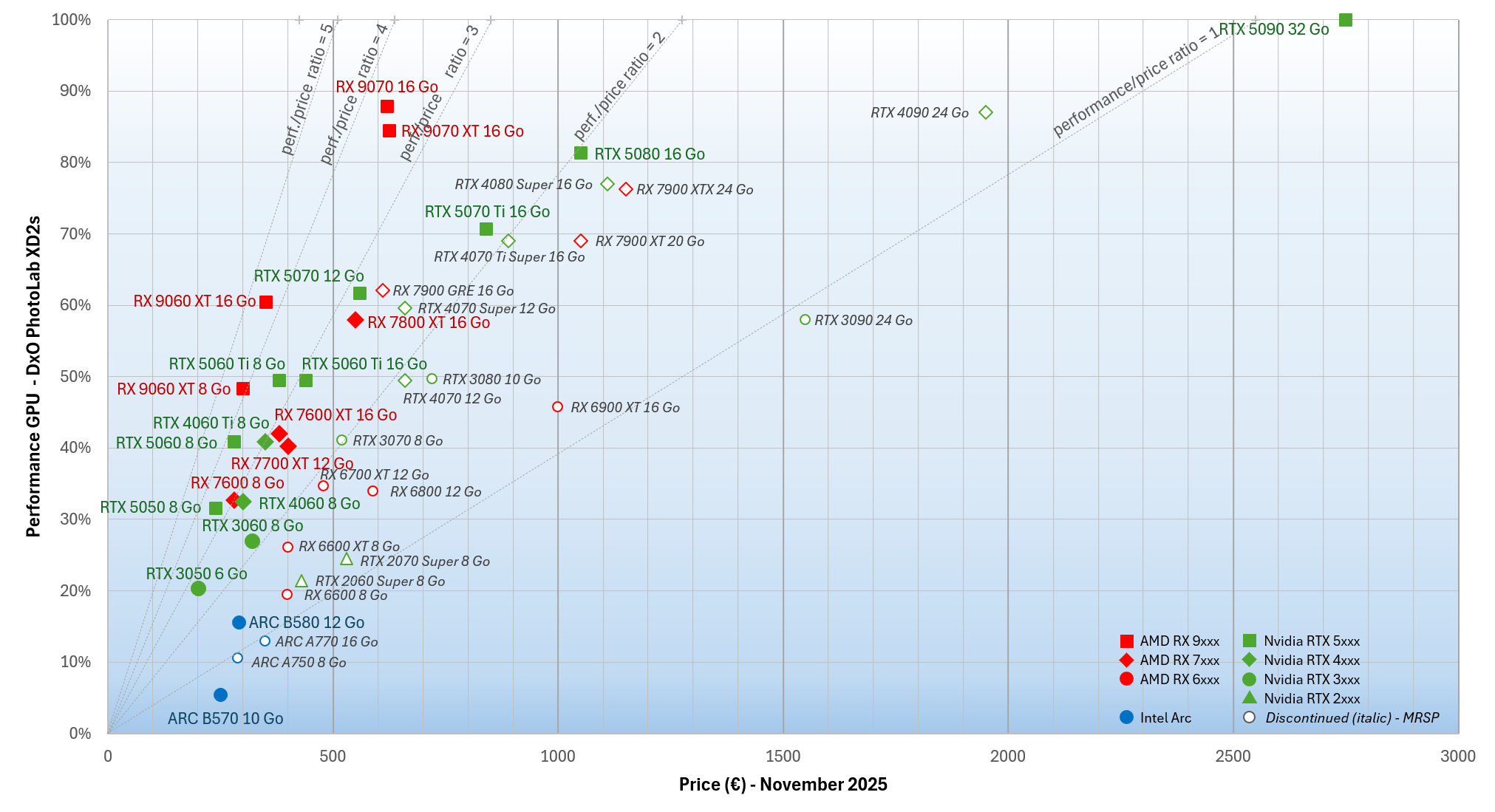
Black Friday is the time to find good deals. So here is the updated GPUs comparison chart with DxO Photolab.
There has been a slight drop in prices at the low and mid-range, but prices have also skyrocketed for the most powerful GPUs, when they are available.
But above all, Photolab 9 has arrived with its AI masking, which is a game changer.
To date, there are still major issues with Nvidia drivers, and Photolab 9 reacts very poorly to a lack of video memory. More than ever, opt for a GPU with 16 GB of VRAM and do not go below 8 GB of VRAM.
In this regard, the AMD RX 9060 XT 16 GB GPU remains the undisputed champion in terms of performance/price ratio, especially when it can be found for around €350.
Finally, the speculative bubble surrounding AI is causing a shortage of memory chips, and the price of RAM is skyrocketing like never before. It has already doubled in less than a month.
If you want to upgrade your graphics card, do so quickly before manufacturers pass on the increase in RAM prices to their cards: it’s only a matter of weeks at most. It’s already too late to get DDR5 RAM or buy high-capacity hard drives at a good price.