If I sort out pictures I often jump back-forth-back-forth etc to compare which one of my shots I would like to keep and which can be deleted.
Because it’s often just minor differences, so helpful that you can quickly jump between several pictures.
But PL always has a huge delay until the image is shown. So difficult to see the small differences because you have a dela with black screen in between.
Adding a cache (at least for the pictures that are currently worked on) or whatever would be great.
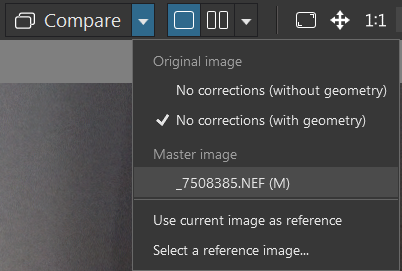
mark the reference image in the filmstrip (using “R”), return to your image, and click “Compare” (Ctrl + D) … to compare all the fine details.
→ Any image can serve as the reference image, even one from a different folder.
That’s a good tip.
But of course works just for two; not browsing through a whole series of pictures - which you sometimes have when shooting action etc.
But thank you for the tip. At least a good workaround. I was not aware of that.
Well, the comparison mode in question is intended for the phase where you are working on an image (editing it). And thanks to the cache (which you asked about), PL allows you to compare things “instantly” and down to the finest detail – whether it’s the overall image at high magnification or a side-by-side comparison.
If the goal is to browse through a series of images – for instance, to get a quick impression, check for sharpness or details (such as closed eyes), or make an initial selection (culling) – PL is not the right tool. In such cases, PL’s full image rendering is unnecessary.
Since RAW files contain an embedded JPEG, you can simply use a viewer of your choice. For Windows, there are programs such as IrfanView, FastStone Image Viewer, FastRawViewer, or XNView/MP. Most of these also offer a filmstrip view (similar to PL), though you should check whether the thumbnail previews are displayed with color correction.
.
Personally, I remain a fan of FastPictureViewer; the program displays images at full size – or, with a left-click, at 100% magnification and, with a right-click, at 300% (among many other options). Furthermore, I can quickly browse back and forth and delete unwanted images directly (moving them to the Windows Recycle Bin) while I don’t need tags or color labels.
.
Anyway, you need to find out yourself what works best for you.
The software I use is Picture Information Extractor (PIE) because
a) you can show and customize the EXIF data incl. manufacture specific parameters
b) you can use it to copy the JPG&RAW files from the camera to the PC, autom. rename it (e.g. yymmdd-hhmmss) and put the corresponding RAW files in a subfolder.
If you then browse through the jpg’s and delete images, it automatically deletes the corresponding RAW file in the RAW-subbfolder as well.
Actually that’s great and fast. But if PL would be fast enough to do it all here it would be even better.
Thank you for providing the information around PIE, which looks interesting (!).
Personally, I use Total Commander for file operations as well image management, and FastPictureViewer for image selection / culling. For more check here … , here … , here …
I’ve been using Photo Mechanic for a while now and it’s excellent for fast manual culling of images (set up a couple of hot-keys to toggle colour tags against an image and you can quickly filter out what you want to discard, or even import those colour tags into PL by syncing the metadata in PL after tagging in PM.
It is pricey though, and there are other fast raw viewers available that are good for quickly skimming back and forth between images.
PhotoLab is not good for this, IMO. It applies rendering to images as soon as they’re loaded for viewing which means it renders every image before you can see it. Other viewers simply display what’s currently there and don’t apply any changes, so they’re faster - in some cases instant.
I am using different tools for culling and tagging/preparing for editting. Somehow i don’t use PL. ( don’t get used to the UI.)
Adobe Bridge 2026 is my DAM in a way of first culling and organising/tagging/iptc. Side by side check i use faststone image viewer ( max 4x sbs.
Checking quality of use of a rawfile Fastrawviewer for exposure, pixel percentage out of dynamicrange, edge detection, etc.
For searching pl is folder index pretty good. But thats after you did all the prep work i. Keywording and such.
Biggest problem is remembering al the posibility’s and in which application you have you get the result you like to have.
Renaming, like cameraname, you can’t edit the name it’s dmc-G9 and ypu can’t let it be just G9 or if you have 2 G9_1 and G9_2 in dxopl. Every time i need something to rename, redo, sort out, i am looking in all my applications to look which can do the task i have in mind the best. ( because i forget in which i did it before )

 )
)